
- Forums
- Product Forums
- General Purpose MicrocontrollersGeneral Purpose Microcontrollers
- i.MX Forumsi.MX Forums
- QorIQ Processing PlatformsQorIQ Processing Platforms
- Identification and SecurityIdentification and Security
- Power ManagementPower Management
- Wireless ConnectivityWireless Connectivity
- RFID / NFCRFID / NFC
- Advanced AnalogAdvanced Analog
- MCX Microcontrollers
- S32G
- S32K
- S32V
- MPC5xxx
- Other NXP Products
- S12 / MagniV Microcontrollers
- Powertrain and Electrification Analog Drivers
- Sensors
- Vybrid Processors
- Digital Signal Controllers
- 8-bit Microcontrollers
- ColdFire/68K Microcontrollers and Processors
- PowerQUICC Processors
- OSBDM and TBDML
- S32M
- S32Z/E
-
- Solution Forums
- Software Forums
- MCUXpresso Software and ToolsMCUXpresso Software and Tools
- CodeWarriorCodeWarrior
- MQX Software SolutionsMQX Software Solutions
- Model-Based Design Toolbox (MBDT)Model-Based Design Toolbox (MBDT)
- FreeMASTER
- eIQ Machine Learning Software
- Embedded Software and Tools Clinic
- S32 SDK
- S32 Design Studio
- GUI Guider
- Zephyr Project
- Voice Technology
- Application Software Packs
- Secure Provisioning SDK (SPSDK)
- Processor Expert Software
- Generative AI & LLMs
-
- Topics
- Mobile Robotics - Drones and RoversMobile Robotics - Drones and Rovers
- NXP Training ContentNXP Training Content
- University ProgramsUniversity Programs
- Rapid IoT
- NXP Designs
- SafeAssure-Community
- OSS Security & Maintenance
- Using Our Community
-
- Cloud Lab Forums
-
- Knowledge Bases
- ARM Microcontrollers
- i.MX Processors
- Identification and Security
- Model-Based Design Toolbox (MBDT)
- QorIQ Processing Platforms
- S32 Automotive Processing Platform
- Wireless Connectivity
- CodeWarrior
- MCUXpresso Suite of Software and Tools
- MQX Software Solutions
- RFID / NFC
- Advanced Analog
-
- NXP Tech Blogs
- Home
- :
- MCUXpresso软件和工具
- :
- Kinetis Design Studio
- :
- Re: Having trouble connecting to the board through KDS
Having trouble connecting to the board through KDS

Hi all,
I was wondering if anyone happened to have any issues with connecting with the board itself. I am using a FRDM-KL25Z board and the most recent version of KDS. In addition I have already done all the software updates through the IDE. I am using a Windows 10 PC if that matters. All I have attempted to do so far is run a sample "Hello World" project that was included in the SDK package that I downloaded from the website. In order to run this project I followed the steps laid out in http://cache.nxp.com/files/soft_dev_tools/doc/support_info/KSDK13GSUG.pdf?fsrch=1&sr=1&pageNum=1. This is the "Getting Started with Kinetis SDK (KSDK) v.1.3 document. After following all of the steps very carefully, I get the following issues when trying to run the debugger.
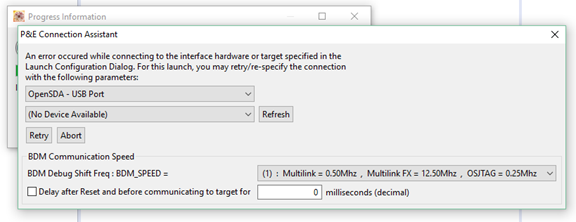
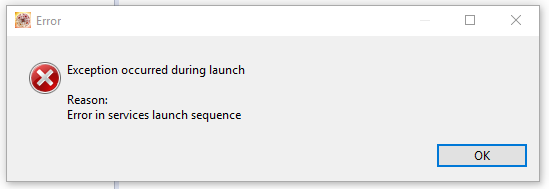
I have read that this may be an issue with out-dated firmware? I am not sure. Here is the information regarding what is currently on my board.
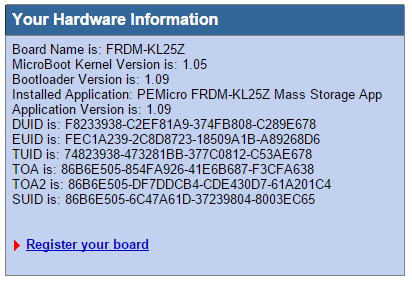
In addition, the power indicator LED flashes when it is plugged in rather than a solid color. Any help anyone could send my way to fix this issue would be greatly appreciated.
E.J.
已解决! 转到解答。

 Jorge_Gonzalez
Hello Edward Franskevicz:
As shown in your information picture your board only has an MSD bootloader firmware (Mass Storage App):
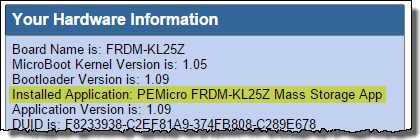
What you need is either a Debug firmware or the combined MSD + Debug firmware.
Please carefully read all the next tutorial by colleague Erich Styger:
And about Windows 10, it indeed matters. You may need a Windows 7 machine to update the bootloader from version 1.09 to 1.11.
Best Regards!
Jorge Gonzalez
-----------------------------------------------------------------------------------------------------------------------
Note: If this post answers your question, please click the Correct Answer button. Thank you!
-----------------------------------------------------------------------------------------------------------------------
Jorge_Gonzalez
Hello Edward Franskevicz:
As shown in your information picture your board only has an MSD bootloader firmware (Mass Storage App):
What you need is either a Debug firmware or the combined MSD + Debug firmware.
Please carefully read all the next tutorial by colleague Erich Styger:
And about Windows 10, it indeed matters. You may need a Windows 7 machine to update the bootloader from version 1.09 to 1.11.
Best Regards!
Jorge Gonzalez
-----------------------------------------------------------------------------------------------------------------------
Note: If this post answers your question, please click the Correct Answer button. Thank you!
-----------------------------------------------------------------------------------------------------------------------
 BlackNight
If usinig a Windows 8/10 machine, the following article might be helpful:
The problem is that Windows tries to write files to FRDM board which screws the board firmware.
Diasabling this in the Windows settings should help (I have not tried that myself, but others indicate that this helps).
In the worst case, you need a Windows 7 machine somewhere to make the bootloader update.
I hope this helps,
Erich
