
- Forums
- Product Forums
- General Purpose MicrocontrollersGeneral Purpose Microcontrollers
- i.MX Forumsi.MX Forums
- QorIQ Processing PlatformsQorIQ Processing Platforms
- Identification and SecurityIdentification and Security
- Power ManagementPower Management
- Wireless ConnectivityWireless Connectivity
- RFID / NFCRFID / NFC
- Advanced AnalogAdvanced Analog
- Neural Processing UnitsNeural Processing Units
- MCX Microcontrollers
- S32G
- S32K
- S32V
- MPC5xxx
- Other NXP Products
- S12 / MagniV Microcontrollers
- Powertrain and Electrification Analog Drivers
- Sensors
- Vybrid Processors
- Digital Signal Controllers
- 8-bit Microcontrollers
- ColdFire/68K Microcontrollers and Processors
- PowerQUICC Processors
- OSBDM and TBDML
- S32M
- S32Z/E
-
- Solution Forums
- Software Forums
- MCUXpresso Software and ToolsMCUXpresso Software and Tools
- CodeWarriorCodeWarrior
- MQX Software SolutionsMQX Software Solutions
- Model-Based Design Toolbox (MBDT)Model-Based Design Toolbox (MBDT)
- FreeMASTER
- eIQ Machine Learning Software
- Embedded Software and Tools Clinic
- S32 SDK
- S32 Design Studio
- GUI Guider
- Zephyr Project
- Voice Technology
- Application Software Packs
- Secure Provisioning SDK (SPSDK)
- Processor Expert Software
- Generative AI & LLMs
-
- Topics
- Mobile Robotics - Drones and RoversMobile Robotics - Drones and Rovers
- NXP Training ContentNXP Training Content
- University ProgramsUniversity Programs
- Rapid IoT
- NXP Designs
- SafeAssure-Community
- OSS Security & Maintenance
- Using Our Community
-
- Cloud Lab Forums
-
- Knowledge Bases
- ARM Microcontrollers
- i.MX Processors
- Identification and Security
- Model-Based Design Toolbox (MBDT)
- QorIQ Processing Platforms
- S32 Automotive Processing Platform
- Wireless Connectivity
- CodeWarrior
- MCUXpresso Suite of Software and Tools
- MQX Software Solutions
- RFID / NFC
- Advanced Analog
- Neural Processing Units
-
- NXP Tech Blogs
- Home
- :
- MCUXpressoソフトウェアとツール
- :
- Kinetis デザインスタジオ・ナレッジベース
- :
- Flash from File: Downloading a file without the sources
Flash from File: Downloading a file without the sources
- RSS フィードを購読する
- 新着としてマーク
- 既読としてマーク
- ブックマーク
- 購読
- 印刷用ページ
- 不適切なコンテンツを報告
Flash from File: Downloading a file without the sources
Flash from File: Downloading a file without the sources
Sometimes I only want to download a binary (.s19, .hex, .elf) without the need for the project and sources of it.
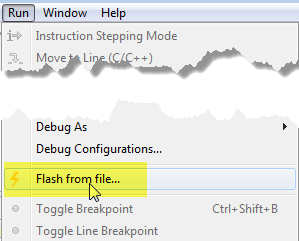
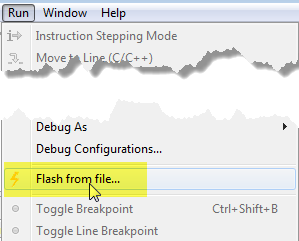
With the command line version of GDB you can do this, but there is as well a way in KDS to do this more interactively: Flash to File...
From the Run menu, select 'Flash from file...':
Then configure your connection (see KDS Debug Configurations (OpenOCD, P&E, Segger)).
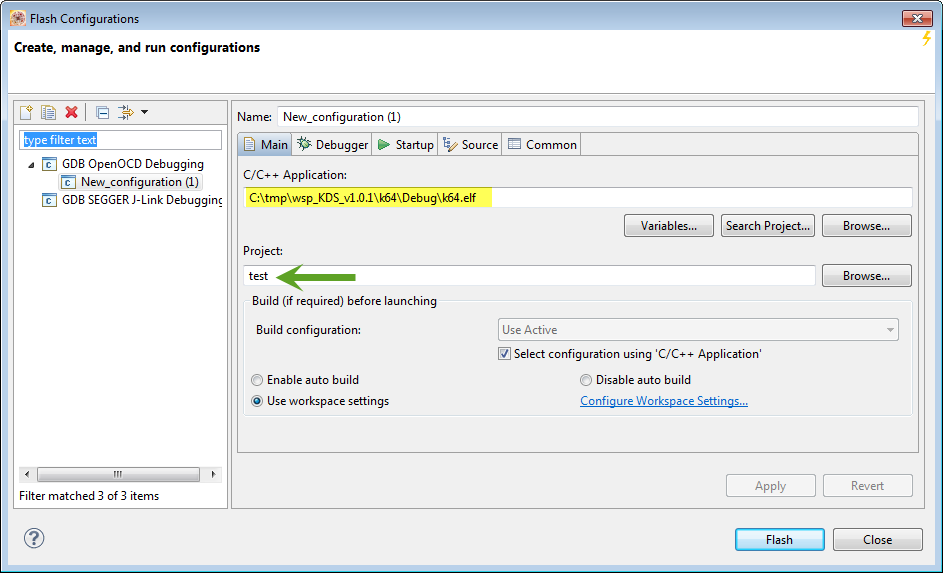
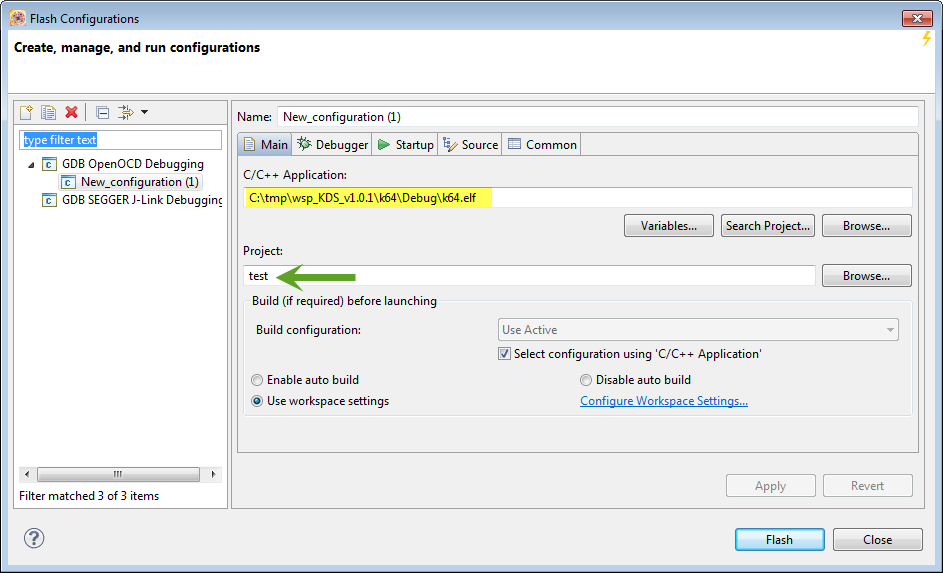
Beside of the settings in the Debugger Tab (which depends on the used debug interface (P&E, Segger, OpenOCD, see note1 below), you need to specify in the 'Main' tab two things:
- The name of the binary (e.g. elf file)
- A project name (see note2 below)
Note1:
there is a current issue in KDS v1.0.1beta that P&E is not listed as Debugging Connection. This is expected to be fixed in KDS V1.1 (GA).
Note2:
While the project is not really necessary, there is the issue in KDS v1.0.1beta that without a project name, you will get an error. So if you start with a new/empty workspace, you need to create a 'dummy' project first and to provide this as a project name.
Happy Flashing :-)

- 既読としてマーク
- 新着としてマーク
- ブックマーク
- ハイライト
- 印刷
- 不適切なコンテンツを報告
How do I generate a .s19 file like in Codewarrior?
In Codewarrior I go into "ARM Linker" and "Output" and selct "Generate S-Record file". I don't see this option in KDS.

- 既読としてマーク
- 新着としてマーク
- ブックマーク
- ハイライト
- 印刷
- 不適切なコンテンツを報告
It's in the 'Toolchain' tab, see Binary (and S19) Files for the mbed Bootloader with Eclipse and GNU ARM Eclipse Plugins | MCU on Ecl...
