
- Forums
- Product Forums
- General Purpose MicrocontrollersGeneral Purpose Microcontrollers
- i.MX Forumsi.MX Forums
- QorIQ Processing PlatformsQorIQ Processing Platforms
- Identification and SecurityIdentification and Security
- Power ManagementPower Management
- Wireless ConnectivityWireless Connectivity
- RFID / NFCRFID / NFC
- Advanced AnalogAdvanced Analog
- Neural Processing UnitsNeural Processing Units
- MCX Microcontrollers
- S32G
- S32K
- S32V
- MPC5xxx
- Other NXP Products
- S12 / MagniV Microcontrollers
- Powertrain and Electrification Analog Drivers
- Sensors
- Vybrid Processors
- Digital Signal Controllers
- 8-bit Microcontrollers
- ColdFire/68K Microcontrollers and Processors
- PowerQUICC Processors
- OSBDM and TBDML
- S32M
- S32Z/E
-
- Solution Forums
- Software Forums
- MCUXpresso Software and ToolsMCUXpresso Software and Tools
- CodeWarriorCodeWarrior
- MQX Software SolutionsMQX Software Solutions
- Model-Based Design Toolbox (MBDT)Model-Based Design Toolbox (MBDT)
- FreeMASTER
- eIQ Machine Learning Software
- Embedded Software and Tools Clinic
- S32 SDK
- S32 Design Studio
- GUI Guider
- Zephyr Project
- Voice Technology
- Application Software Packs
- Secure Provisioning SDK (SPSDK)
- Processor Expert Software
- Generative AI & LLMs
-
- Topics
- Mobile Robotics - Drones and RoversMobile Robotics - Drones and Rovers
- NXP Training ContentNXP Training Content
- University ProgramsUniversity Programs
- Rapid IoT
- NXP Designs
- SafeAssure-Community
- OSS Security & Maintenance
- Using Our Community
-
- Cloud Lab Forums
-
- Knowledge Bases
- ARM Microcontrollers
- i.MX Processors
- Identification and Security
- Model-Based Design Toolbox (MBDT)
- QorIQ Processing Platforms
- S32 Automotive Processing Platform
- Wireless Connectivity
- CodeWarrior
- MCUXpresso Suite of Software and Tools
- MQX Software Solutions
- RFID / NFC
- Advanced Analog
- Neural Processing Units
-
- NXP Tech Blogs
- Home
- :
- 软件论坛
- :
- FreeMASTER
- :
- Re: Install Freemaster 3.1.3 issue for Win10 Enterprise LTSC
Install Freemaster 3.1.3 issue for Win10 Enterprise LTSC


Hello Fred,
let's try one more experiment, if this does not help, please contact me directly at [email protected] and I will work with you to diagnose the problem directly on your computer.
- Log-out/log-in to make sure the FreeMASTER process is terminated.
- Run the registry editor (regedit.exe) and browse to Computer\HKEY_CURRENT_USER\Software\Freescale
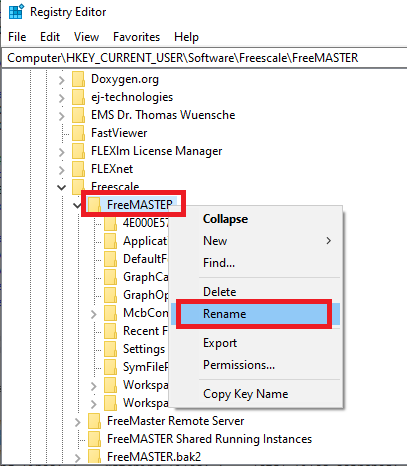
- Locate the FreeMASTER key and use menu to rename it as displayed in the picture below. You can also press the F2 key. Rename it e.g. to FreeMASTER_bak
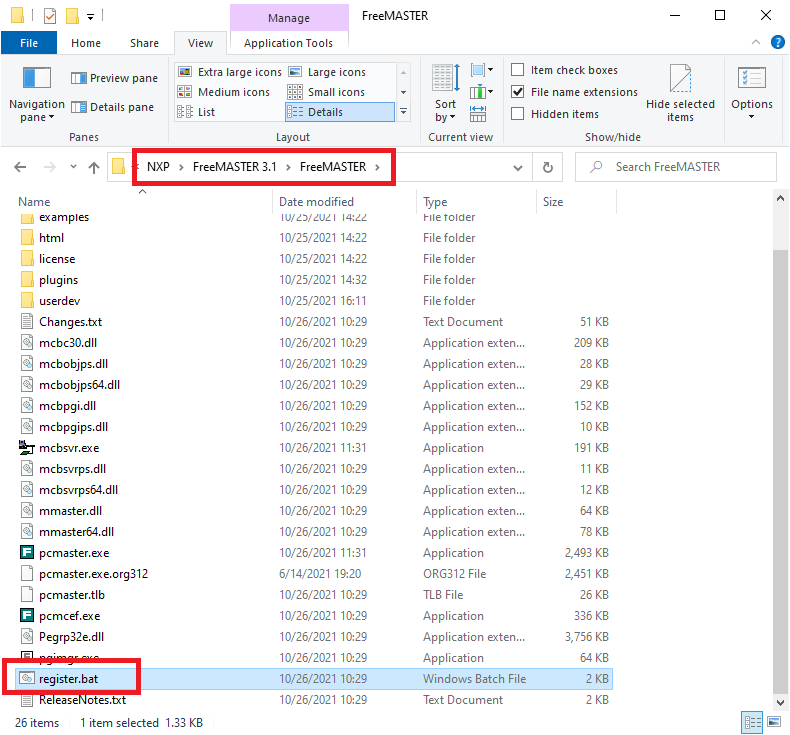
- Run the Windows Explorer and navigate to C:\NXP\FreeMASTER 3.1\FreeMASTER
- Locate the register.bat file and click it with right mouse button
- Select "Run as Administrator" - you should see a black command line window with some progress messages (no failures should occur).
- In Windows Explorer, double click the pcmaster.exe to run it directly (not from the Start menu)
If it works, please write to this forum. If it crashes, please contact me by email and I will try to help you directly.
Thanks,
Michal

This particular problem is with Microsoft windows OS installation. Not with PCS7 91 build.
According to the Microsoft community, it's not a new problem that quite a lot of Windows users have encountered with CMD keeps popping up the error. However, most Windows users are still not quite clear about what they shall do when such a problem comes out. So what can you do when such a problem occurs to your in Windows 10/8/7?
Below method will you how to clean boot Windows also got for Survey 10 as an example for you to follow and clean boot your PC.
Steps:
1. Click "Start" and search: msconfig select "System Configuration";
2. Click "Services" on System Configuration click and select "Hide all Microsoft services" click "Disable all";
3. Click "Startup" on System Configuration click "Open Task Manager
4. Select each startup item on Startup and click Disable close Task Manager
5. Click "OK" on Startup tab of System Configuration Restart PC.
By doing so, your computer will be able to work normally again, and you'll see that no CMD window pops up anymore.
Hope it helps
Dear Fred,
yes FreeMASTER application uses a font component internally which requires any printer to be installed in system. Can you install any printer (even a PDF virtual printer) in system, set it as default and try again?
Thank you,
Michal
Hi Michal
One good news and one bad news. After I install a virtual printer called "PDFCreator" as default printer, Freemaster no longer show this error message but just a moment it will close and restart automatically :(.
I tried several times and get the same result. Any suggestion?
Thanks for your quick reply
Fred
Hello Fred,
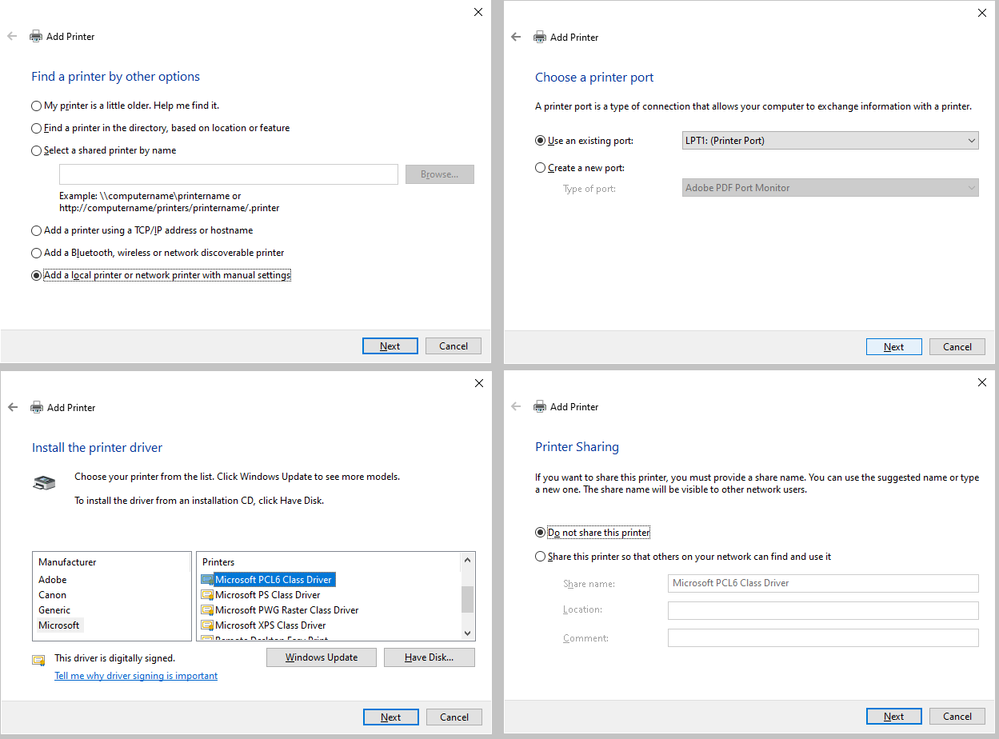
It seems the printer still causes the issues. I'm sorry for the issues. Can you try to install some "real" printer driver, eg. Microsoft PCL6 printer and set it as default?
Thank you,
Michal
Hello Michal
Thanks for your quickest reply. I follow all the steps you mention but Freemaster 3.x is still crash and restart only if you click "Variable Watch" window. Please see the Win10 Event viewer as attached file.
I even tried to install Freemaster 2.5 to verify it, amazingly the result is the same.
I use a lot of Freemaster application from 1.X to 3.X and think I am a experience user but it's the first time to use Win10 Enterprise LTSC. Is it an issue for the Advantech EPC??
BTW: I just got this brand new EPC-U2117 a week ago
Thanks a lot & any suggestions are welcome
Fred
Dear All
Finally Michal provide a solution to this Freemaster crash issue when I clicked "Variable Watch" window.
Just unclick View->“View Formatting Toolbar”. Freemaster is back to normal.
Summary solution to this issue
1. Install a printer driver like "Microsoft PC6 class driver"
2. Un-click View->“View Formatting Toolbar”
Dear Fred,
thanks for confirming the issue appears in the Formatting toolbar. I would not call this problem solved yet. Hiding the toolbar is just a quick and dirty workaround. WIthout the toolbar, you will not be able to set the font and sizes of the watch grid cells, so the functionality is degraded.
Also, I'm afraid that making the bar visible again will cause the application to crash again. (can you confirm?).
Anyway, this symptom really points to a problem inside the font drop-down list. In the past we have rarely seen a similar issue, but it was always solved by having at least some printer installed in the system. From some reason, it does not help in your case. I wonder if you could try to install another printer (some real printer if possible) and try again.
Thank you for your cooperation,
Michal
Hello Fred,
let's try one more experiment, if this does not help, please contact me directly at [email protected] and I will work with you to diagnose the problem directly on your computer.
- Log-out/log-in to make sure the FreeMASTER process is terminated.
- Run the registry editor (regedit.exe) and browse to Computer\HKEY_CURRENT_USER\Software\Freescale
- Locate the FreeMASTER key and use menu to rename it as displayed in the picture below. You can also press the F2 key. Rename it e.g. to FreeMASTER_bak
- Run the Windows Explorer and navigate to C:\NXP\FreeMASTER 3.1\FreeMASTER
- Locate the register.bat file and click it with right mouse button
- Select "Run as Administrator" - you should see a black command line window with some progress messages (no failures should occur).
- In Windows Explorer, double click the pcmaster.exe to run it directly (not from the Start menu)
If it works, please write to this forum. If it crashes, please contact me by email and I will try to help you directly.
Thanks,
Michal
