
- Forums
- Product Forums
- General Purpose MicrocontrollersGeneral Purpose Microcontrollers
- i.MX Forumsi.MX Forums
- QorIQ Processing PlatformsQorIQ Processing Platforms
- Identification and SecurityIdentification and Security
- Power ManagementPower Management
- Wireless ConnectivityWireless Connectivity
- RFID / NFCRFID / NFC
- Advanced AnalogAdvanced Analog
- Neural Processing UnitsNeural Processing Units
- MCX Microcontrollers
- S32G
- S32K
- S32V
- MPC5xxx
- Other NXP Products
- S12 / MagniV Microcontrollers
- Powertrain and Electrification Analog Drivers
- Sensors
- Vybrid Processors
- Digital Signal Controllers
- 8-bit Microcontrollers
- ColdFire/68K Microcontrollers and Processors
- PowerQUICC Processors
- OSBDM and TBDML
- S32M
- S32Z/E
-
- Solution Forums
- Software Forums
- MCUXpresso Software and ToolsMCUXpresso Software and Tools
- CodeWarriorCodeWarrior
- MQX Software SolutionsMQX Software Solutions
- Model-Based Design Toolbox (MBDT)Model-Based Design Toolbox (MBDT)
- FreeMASTER
- eIQ Machine Learning Software
- Embedded Software and Tools Clinic
- S32 SDK
- S32 Design Studio
- GUI Guider
- Zephyr Project
- Voice Technology
- Application Software Packs
- Secure Provisioning SDK (SPSDK)
- Processor Expert Software
- Generative AI & LLMs
-
- Topics
- Mobile Robotics - Drones and RoversMobile Robotics - Drones and Rovers
- NXP Training ContentNXP Training Content
- University ProgramsUniversity Programs
- Rapid IoT
- NXP Designs
- SafeAssure-Community
- OSS Security & Maintenance
- Using Our Community
-
- Cloud Lab Forums
-
- Knowledge Bases
- ARM Microcontrollers
- i.MX Processors
- Identification and Security
- Model-Based Design Toolbox (MBDT)
- QorIQ Processing Platforms
- S32 Automotive Processing Platform
- Wireless Connectivity
- CodeWarrior
- MCUXpresso Suite of Software and Tools
- MQX Software Solutions
- RFID / NFC
- Advanced Analog
- Neural Processing Units
-
- NXP Tech Blogs
- Home
- :
- 製品フォーラム
- :
- デジタルシグナルコントローラ
- :
- MC56F8037 ISSUE WHILE INTEGRATING INTERNAL FLASH CODE TO EXISTING CODE
MC56F8037 ISSUE WHILE INTEGRATING INTERNAL FLASH CODE TO EXISTING CODE
- RSS フィードを購読する
- トピックを新着としてマーク
- トピックを既読としてマーク
- このトピックを現在のユーザーにフロートします
- ブックマーク
- 購読
- ミュート
- 印刷用ページ
MC56F8037 ISSUE WHILE INTEGRATING INTERNAL FLASH CODE TO EXISTING CODE

- 新着としてマーク
- ブックマーク
- 購読
- ミュート
- RSS フィードを購読する
- ハイライト
- 印刷
- 不適切なコンテンツを報告
HI TEAM,
we have been using MC56F8037 for one of projects, that receives a PWM signal based on interrupt and performs some calculation function and produces an output.
- we had a requirement to store few parameters into the internal flash of the controller.
- we tested successfully the basic flash read-write code separately.
- while adding this flash code files (IFsh1.c, IFsh1.h) into our original code and adding its components to linker file (.cmd) the original code stops to work.
( if (IFsh1.c, IFsh1.h) is not added and only changes are made in linker file original code works fine.)
(original and edited linker file (.CMD) files attached)
I request you to guide me for following:
- what might be the reason for this kind of behavior of the code.
- How to take some code fragment from memory and copy and execute it inside RAM
- How to place a code in a specific memory location inside the controller ( which can be seen in MAP file.)
i want to place (code segments available in IFsh1.c ) at a specific location ( say 0x5000).
kindly help.

 xiangjun_rong
- 新着としてマーク
- ブックマーク
- 購読
- ミュート
- RSS フィードを購読する
- ハイライト
- 印刷
- 不適切なコンテンツを報告
Hi, Amit,
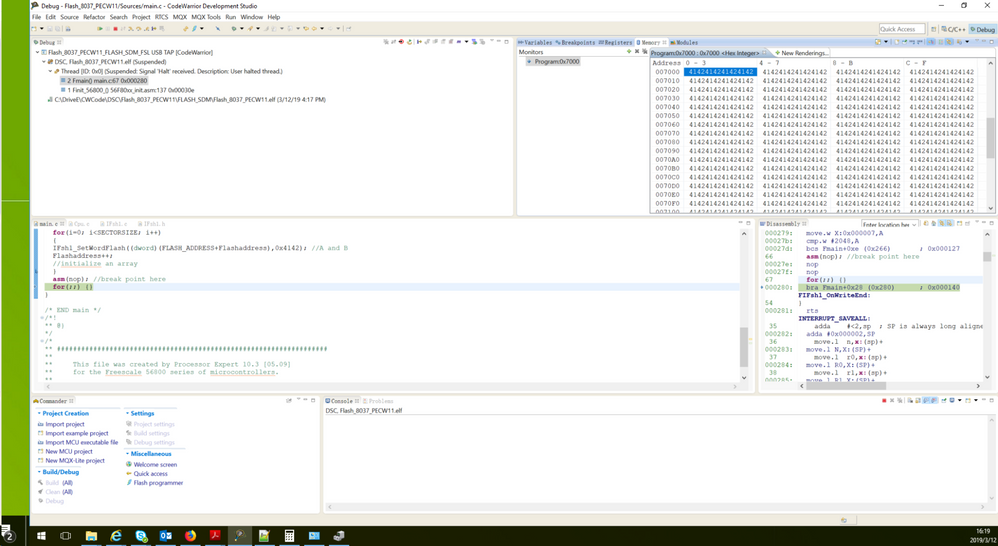
I have developed an example which can write one program flash sector, it works fine on my MC56F8037EVM and CW for mcu ver11 tools as the screenshot.
I attach the example, the program flash sector address from P:0x7000 to 0x77FF, the sector size is 0x800(2K 16 bitsword). Do not try to write last sector from P:0x7800 to 0x0x7FFF, the last sector includes the configuration field, whci copy to security register automatically after Reset.
 xiangjun_rong
- 新着としてマーク
- ブックマーク
- 購読
- ミュート
- RSS フィードを購読する
- ハイライト
- 印刷
- 不適切なコンテンツを報告
xiangjun_rong
- 新着としてマーク
- ブックマーク
- 購読
- ミュート
- RSS フィードを購読する
- ハイライト
- 印刷
- 不適切なコンテンツを報告
Hi, Amit,
If you have constant data which will not be changed in your application, you can just define it as following:
const unsigned int array[5]={1,2,3,4,5};
The array[] will be saved in program flash when the code is downloaded.
If you want to save data to program flash in application, it is a bit complicated.
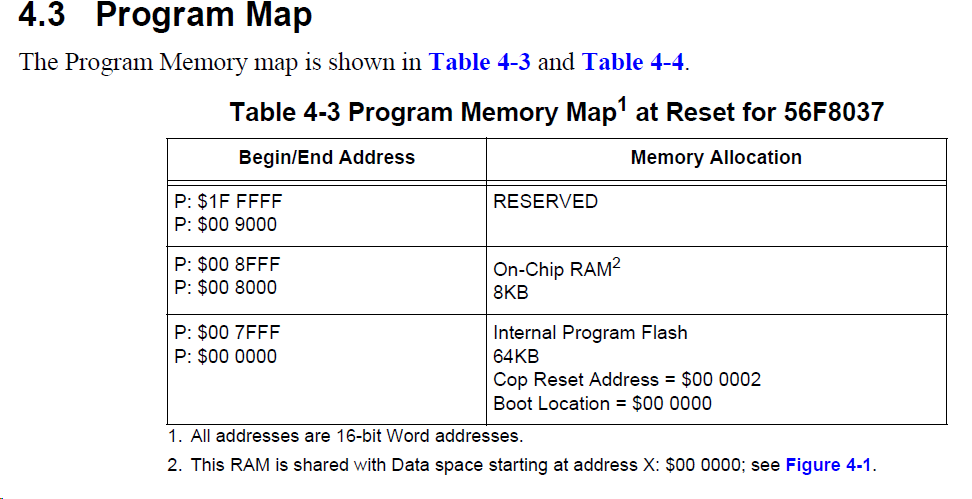
As you know that MC56F8037 has only program flash and program/data RAM, so you have to save data into program flash. Because the data and program RAM share the same RAM cell, and the global variables, stack, heap all occupy the same RAM, and you have to execute the programming flash code in the RAM, so you have to allocate the RAM carefully in case they overwrite.
Regarding your *.cmd file,
.x_Data (RW) : ORIGIN = 0x00000001, LENGTH = 0x00000FFF
# p_flash_ROM_data mirrors x_Data, mapping to origin and length
# the "X" flag in "RX" tells the debugger flash p-memory.
# the p-memory flash is directed to the address determined by AT
# in the data_in_p_flash_ROM section definition
.p_flash_ROM_data (RX) : ORIGIN = 0x00000001, LENGTH = 0x00000FFF
#Other memory segments
.p_internal_RAM (RWX) : ORIGIN = 0x00008000, LENGTH = 0x1000
.ApplicationCodeInRAM :
{
__PRG_RAM_START=.;
.=__PRG_RAM_START + __DATA_END;
__pRAM_WIR_start = .;
# insert RAM routine (this is for proper move of memory pointer and it is equal to the row above)
* (.RAW_RAM)
# You can add your sections here.
} > .p_internal_RAM
The X space from X:0x0000 to X:0x0FFF, P:0x8000 to P:0x8FFF are the same RAM cell, but you define them separately so they are overwritten.
I suggest you develop the code to write an array in application by esasing a program flash sector and program it. When you success, you can add your application code.
Hope it can help you
BR
XiangJun Rong
 xiangjun_rong
- 新着としてマーク
- ブックマーク
- 購読
- ミュート
- RSS フィードを購読する
- ハイライト
- 印刷
- 不適切なコンテンツを報告
Hi,
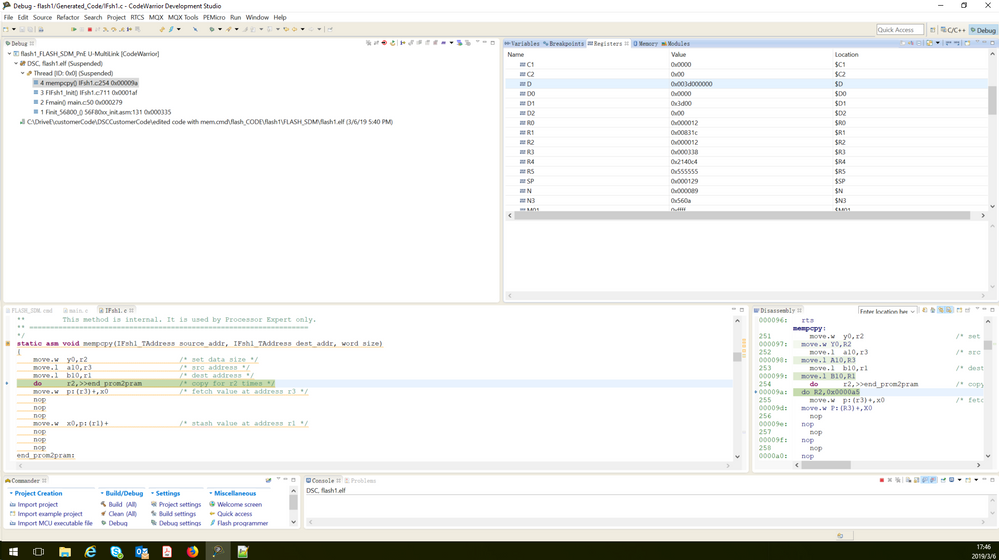
I have modified the CMD file, from the memory copy, you can see that the dest/source address are correct, the source address is in P flash range, the dest address is in the range of Program RAM address.
I attach the cmd file.
But I do not find the code to initialize Flash register for example configuring the flash clock frequency.
BR
XiangJun Rong
 xiangjun_rong
- 新着としてマーク
- ブックマーク
- 購読
- ミュート
- RSS フィードを購読する
- ハイライト
- 印刷
- 不適切なコンテンツを報告
Hi,
I attach the CMD file, you have to call the IFsh1_Init(); in the main.
BR
XiangJun Rong
void main(void)
{ int er =0;
word *rd=0;
word addr = 0x7E00;
/* Write your local variable definition here */
/*** Processor Expert internal initialization. DON'T REMOVE THIS CODE!!! ***/
PE_low_level_init();
/*** End of Processor Expert internal initialization. ***/
IFsh1_Init();
- 新着としてマーク
- ブックマーク
- 購読
- ミュート
- RSS フィードを購読する
- ハイライト
- 印刷
- 不適切なコンテンツを報告
Dear Team,
i have tested this linker file in the standalone code for flash( read and write) and the code function is halted at erase sector option, and does not work further.
kindly help in this.
