
- Forums
- Product Forums
- General Purpose MicrocontrollersGeneral Purpose Microcontrollers
- i.MX Forumsi.MX Forums
- QorIQ Processing PlatformsQorIQ Processing Platforms
- Identification and SecurityIdentification and Security
- Power ManagementPower Management
- Wireless ConnectivityWireless Connectivity
- RFID / NFCRFID / NFC
- Advanced AnalogAdvanced Analog
- Neural Processing UnitsNeural Processing Units
- MCX Microcontrollers
- S32G
- S32K
- S32V
- MPC5xxx
- Other NXP Products
- S12 / MagniV Microcontrollers
- Powertrain and Electrification Analog Drivers
- Sensors
- Vybrid Processors
- Digital Signal Controllers
- 8-bit Microcontrollers
- ColdFire/68K Microcontrollers and Processors
- PowerQUICC Processors
- OSBDM and TBDML
- S32M
- S32Z/E
-
- Solution Forums
- Software Forums
- MCUXpresso Software and ToolsMCUXpresso Software and Tools
- CodeWarriorCodeWarrior
- MQX Software SolutionsMQX Software Solutions
- Model-Based Design Toolbox (MBDT)Model-Based Design Toolbox (MBDT)
- FreeMASTER
- eIQ Machine Learning Software
- Embedded Software and Tools Clinic
- S32 SDK
- S32 Design Studio
- GUI Guider
- Zephyr Project
- Voice Technology
- Application Software Packs
- Secure Provisioning SDK (SPSDK)
- Processor Expert Software
- Generative AI & LLMs
-
- Topics
- Mobile Robotics - Drones and RoversMobile Robotics - Drones and Rovers
- NXP Training ContentNXP Training Content
- University ProgramsUniversity Programs
- Rapid IoT
- NXP Designs
- SafeAssure-Community
- OSS Security & Maintenance
- Using Our Community
-
- Cloud Lab Forums
-
- Knowledge Bases
- ARM Microcontrollers
- i.MX Processors
- Identification and Security
- Model-Based Design Toolbox (MBDT)
- QorIQ Processing Platforms
- S32 Automotive Processing Platform
- Wireless Connectivity
- CodeWarrior
- MCUXpresso Suite of Software and Tools
- MQX Software Solutions
- RFID / NFC
- Advanced Analog
- Neural Processing Units
-
- NXP Tech Blogs
- Home
- :
- CodeWarrior
- :
- QorIQ用CodeWarrior
- :
- Re: DDRV for board bring up
DDRV for board bring up
- RSS フィードを購読する
- トピックを新着としてマーク
- トピックを既読としてマーク
- このトピックを現在のユーザーにフロートします
- ブックマーク
- 購読
- ミュート
- 印刷用ページ
DDRV for board bring up

- 新着としてマーク
- ブックマーク
- 購読
- ミュート
- RSS フィードを購読する
- ハイライト
- 印刷
- 不適切なコンテンツを報告
Hi Experts,
We would like to use DDRv on custom board but we want to know everthing required. I'm asking information here since our NXP representative is not reponding for the moment. Our board has the same Jtag pin as LS1043ARDB.
What would be required?
CWTAP + DDRV Licence
How may we get a quick quotation.
Best Regard,

 yipingwang
- 新着としてマーク
- ブックマーク
- 購読
- ミュート
- RSS フィードを購読する
- ハイライト
- 印刷
- 不適切なコンテンツを報告
Hello j_wallace,
In order to use DDRv tool, the customer needs to purchase the specialist level license, please refer to CodeWarrior Dev Tools for Networked Apps|NXP.
QCVS DDRv tool is installed on the top of CodeWarrior for ARMv8, please login www.nxp.com, click "CodeWarrior Networked Suite - Specialist Level" to download "CodeWarrior Networked Applications" from the link "CodeWarrior for QorIQ LS Series ARMv8", please install CodeWarrior for ARMv8, the QCVS(DDRv) tool should be installed automatically.
You need to create a DDR QCVS project, if there is SPD on the target, please use read from SPD option, otherwise you need to configure DDR related configuration parameters according to the DDR data sheet after create the default QCVS DDR project, then generate DDR controller initial configuration parameters and use DDRv tool to do further optimization and validation.
Please refer to DDRv user manual https://www.nxp.com/docs/en/user-guide/QCVS_DDR_User_Guide.pdf .
Please refer to DDR Controller Configuration on LS2085/LS2080 Bringing up for the custom board bringing up.
Have a great day,
TIC
-----------------------------------------------------------------------------------------------------------------------
Note: If this post answers your question, please click the Correct Answer button. Thank you!
-----------------------------------------------------------------------------------------------------------------------
- 新着としてマーク
- ブックマーク
- 購読
- ミュート
- RSS フィードを購読する
- ハイライト
- 印刷
- 不適切なコンテンツを報告
Hello,
Thanks for your reply.
So far, I'm already using QCVS(free) generated code (uboot_ddr1.c) with our SDRAM Datasheet informations but u-boot hangs after relocation.
SDRAM dump shows poor initialization pattern. So My question is: May DDRV+CWTAP make on-target testing to validate settings before I set parameters up in u-boot.
Best regards.
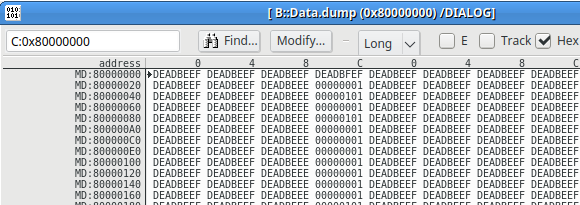
yipingwang
- 新着としてマーク
- ブックマーク
- 購読
- ミュート
- RSS フィードを購読する
- ハイライト
- 印刷
- 不適切なコンテンツを報告
Hello j_wallace,
Please create bareboard project in CodeWarrior, then modify CodeWarrior initialization file with your DDR controller configuration parmaters, and check whether the sample CodeWarrior project can run successfully in DDR.
Please create the project from File->New->ARMv8 Stationery, build this project, and configure target launch connection from Run->Debug Configurations->GDB Hardware Debugging-><project>->Debugger->Configure target connection, duplicate LS1043A_RDB target configuration and modify the DDR controller configuration section in Target Init File.
Have a great day,
TIC
-----------------------------------------------------------------------------------------------------------------------
Note: If this post answers your question, please click the Correct Answer button. Thank you!
-----------------------------------------------------------------------------------------------------------------------
- 新着としてマーク
- ブックマーク
- 購読
- ミュート
- RSS フィードを購読する
- ハイライト
- 印刷
- 不適切なコンテンツを報告
Hello Yiping,
The target configuration file (python script) works with CWTAP. I'am still waiting for a quotation from our NXP representative.
It looks like our flash device (S25FS128S) is not supported by CWTAP Am I wrong?
For now I have a Lauterbach Power Debug probe. To do this test I need to convert the python script to Lauterbach pseudo language.
Thanks.
