
- Forums
- Product Forums
- General Purpose MicrocontrollersGeneral Purpose Microcontrollers
- i.MX Forumsi.MX Forums
- QorIQ Processing PlatformsQorIQ Processing Platforms
- Identification and SecurityIdentification and Security
- Power ManagementPower Management
- Wireless ConnectivityWireless Connectivity
- RFID / NFCRFID / NFC
- Advanced AnalogAdvanced Analog
- Neural Processing UnitsNeural Processing Units
- MCX Microcontrollers
- S32G
- S32K
- S32V
- MPC5xxx
- Other NXP Products
- S12 / MagniV Microcontrollers
- Powertrain and Electrification Analog Drivers
- Sensors
- Vybrid Processors
- Digital Signal Controllers
- 8-bit Microcontrollers
- ColdFire/68K Microcontrollers and Processors
- PowerQUICC Processors
- OSBDM and TBDML
- S32M
- S32Z/E
-
- Solution Forums
- Software Forums
- MCUXpresso Software and ToolsMCUXpresso Software and Tools
- CodeWarriorCodeWarrior
- MQX Software SolutionsMQX Software Solutions
- Model-Based Design Toolbox (MBDT)Model-Based Design Toolbox (MBDT)
- FreeMASTER
- eIQ Machine Learning Software
- Embedded Software and Tools Clinic
- S32 SDK
- S32 Design Studio
- GUI Guider
- Zephyr Project
- Voice Technology
- Application Software Packs
- Secure Provisioning SDK (SPSDK)
- Processor Expert Software
- Generative AI & LLMs
-
- Topics
- Mobile Robotics - Drones and RoversMobile Robotics - Drones and Rovers
- NXP Training ContentNXP Training Content
- University ProgramsUniversity Programs
- Rapid IoT
- NXP Designs
- SafeAssure-Community
- OSS Security & Maintenance
- Using Our Community
-
- Cloud Lab Forums
-
- Knowledge Bases
- ARM Microcontrollers
- i.MX Processors
- Identification and Security
- Model-Based Design Toolbox (MBDT)
- QorIQ Processing Platforms
- S32 Automotive Processing Platform
- Wireless Connectivity
- CodeWarrior
- MCUXpresso Suite of Software and Tools
- MQX Software Solutions
- RFID / NFC
- Advanced Analog
- Neural Processing Units
-
- NXP Tech Blogs
- Home
- :
- CodeWarrior
- :
- Classic/Legacy CodeWarrior
- :
- Re: CodeWarrior(TM) Development Studio V8.8 Connection Issue on New PC
CodeWarrior(TM) Development Studio V8.8 Connection Issue on New PC
- Subscribe to RSS Feed
- Mark Topic as New
- Mark Topic as Read
- Float this Topic for Current User
- Bookmark
- Subscribe
- Mute
- Printer Friendly Page

- Mark as New
- Bookmark
- Subscribe
- Mute
- Subscribe to RSS Feed
- Permalink
- Report Inappropriate Content
Dear [Support/Team],
I am using the MPC8358E chip for my project. The software code for this project was originally developed in early 2016 on a Windows XP PC (let’s call it the reference PC). I was not the original developer.
Now, I need to make some modifications to the code for my new design. I have moved to a Windows 11 (64-bit, 8 GB RAM) PC (let’s call it the new PC).
I downloaded and installed CodeWarrior™ Development Studio for Power Architecture™ Processors V8.8 from the NXP website. Using this tool, I can run hardware diagnostics to check the hardware connection. However, when I connect using my new PC, I am getting an error indicating that the hardware is not connected.
Below i am share the screenshot for your reference
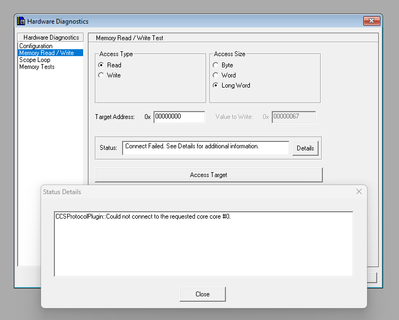
When I connect the same hardware setup to the reference PC, it connects successfully. This confirms that both the hardware and the JTAG interface are working correctly.
I have copied and verified the IDE preferences and target settings (for both Debug and ROM versions) from the reference PC to the new PC. Everything seems correct, but I still face this connection problem.
Please help me resolve this issue, as I need to complete the project by the end of this month.
Best regards,
NKJ
Solved! Go to Solution.

 Oswalag
- Mark as New
- Bookmark
- Subscribe
- Mute
- Subscribe to RSS Feed
- Permalink
- Report Inappropriate Content
Hello,
Please refer to the link below:
Oswalag
- Mark as New
- Bookmark
- Subscribe
- Mute
- Subscribe to RSS Feed
- Permalink
- Report Inappropriate Content
Hello,
Please refer to the link below:
- Mark as New
- Bookmark
- Subscribe
- Mute
- Subscribe to RSS Feed
- Permalink
- Report Inappropriate Content
NXP Tec support,
The link is not opening. If you meant that link have 8.8.6 Patch file, I’ve already installed everything as suggested, but I’m still experiencing the same issue.
