
- Forums
- Product Forums
- General Purpose MicrocontrollersGeneral Purpose Microcontrollers
- i.MX Forumsi.MX Forums
- QorIQ Processing PlatformsQorIQ Processing Platforms
- Identification and SecurityIdentification and Security
- Power ManagementPower Management
- Wireless ConnectivityWireless Connectivity
- RFID / NFCRFID / NFC
- Advanced AnalogAdvanced Analog
- Neural Processing UnitsNeural Processing Units
- MCX Microcontrollers
- S32G
- S32K
- S32V
- MPC5xxx
- Other NXP Products
- S12 / MagniV Microcontrollers
- Powertrain and Electrification Analog Drivers
- Sensors
- Vybrid Processors
- Digital Signal Controllers
- 8-bit Microcontrollers
- ColdFire/68K Microcontrollers and Processors
- PowerQUICC Processors
- OSBDM and TBDML
- S32M
- S32Z/E
-
- Solution Forums
- Software Forums
- MCUXpresso Software and ToolsMCUXpresso Software and Tools
- CodeWarriorCodeWarrior
- MQX Software SolutionsMQX Software Solutions
- Model-Based Design Toolbox (MBDT)Model-Based Design Toolbox (MBDT)
- FreeMASTER
- eIQ Machine Learning Software
- Embedded Software and Tools Clinic
- S32 SDK
- S32 Design Studio
- GUI Guider
- Zephyr Project
- Voice Technology
- Application Software Packs
- Secure Provisioning SDK (SPSDK)
- Processor Expert Software
- Generative AI & LLMs
-
- Topics
- Mobile Robotics - Drones and RoversMobile Robotics - Drones and Rovers
- NXP Training ContentNXP Training Content
- University ProgramsUniversity Programs
- Rapid IoT
- NXP Designs
- SafeAssure-Community
- OSS Security & Maintenance
- Using Our Community
-
- Cloud Lab Forums
-
- Knowledge Bases
- ARM Microcontrollers
- i.MX Processors
- Identification and Security
- Model-Based Design Toolbox (MBDT)
- QorIQ Processing Platforms
- S32 Automotive Processing Platform
- Wireless Connectivity
- CodeWarrior
- MCUXpresso Suite of Software and Tools
- MQX Software Solutions
- RFID / NFC
- Advanced Analog
- Neural Processing Units
-
- NXP Tech Blogs
- Home
- :
- CodeWarrior
- :
- クラシック/レガシー CodeWarrior
- :
- Re: CodeWarrior® Development Studio for MPC55xx/MPC56xx (Classic IDE) v2.10 is supported in windows 10?
CodeWarrior® Development Studio for MPC55xx/MPC56xx (Classic IDE) v2.10 is supported in windows 10?
- RSS フィードを購読する
- トピックを新着としてマーク
- トピックを既読としてマーク
- このトピックを現在のユーザーにフロートします
- ブックマーク
- 購読
- ミュート
- 印刷用ページ
CodeWarrior® Development Studio for MPC55xx/MPC56xx (Classic IDE) v2.10 is supported in windows 10?

- 新着としてマーク
- ブックマーク
- 購読
- ミュート
- RSS フィードを購読する
- ハイライト
- 印刷
- 不適切なコンテンツを報告
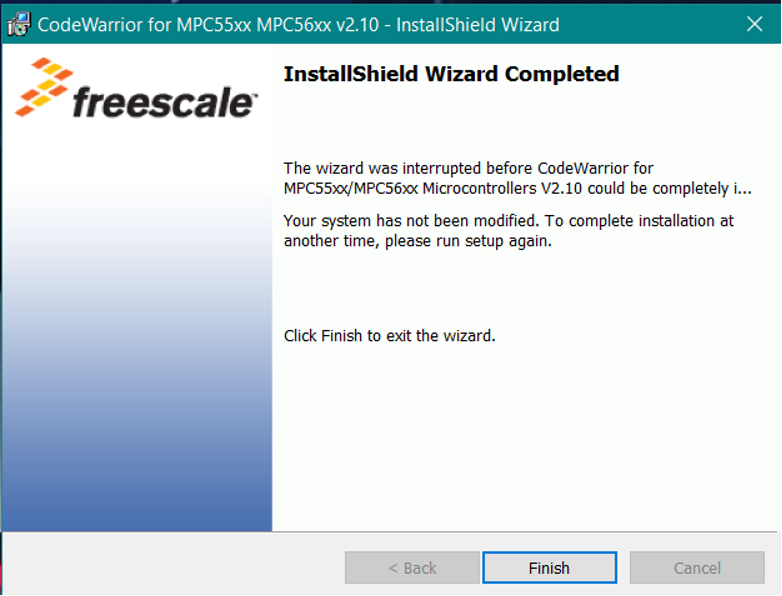
I was using CW v2.10 in windows 7. But when i am trying to install setup file in windows 10, It is not working.Error scrrenshot is as shown.
- 新着としてマーク
- ブックマーク
- 購読
- ミュート
- RSS フィードを購読する
- ハイライト
- 印刷
- 不適切なコンテンツを報告
I use MacBook Air M1 (OS: Sonoma 14.7.5 (23H527)) with Wine v10.6 to running CodeWarrior 2.10 for coding. It works super fast. Of course debugging is impossible because luck of PEMicro Apple silicon drivers/support. But on this step I don't need it.
- 新着としてマーク
- ブックマーク
- 購読
- ミュート
- RSS フィードを購読する
- ハイライト
- 印刷
- 不適切なコンテンツを報告
Hi Jun,
Unfortunately we don't have an option to use windows 7 in our organization.
Do you suggest any alternatives to use CW2.1 for windows 10 ?
Regards,
Sukruth

 ZhangJennie
- 新着としてマーク
- ブックマーク
- 購読
- ミュート
- RSS フィードを購読する
- ハイライト
- 印刷
- 不適切なコンテンツを報告
Sukruth
Please use this eclipse version, which can support MPC56xx on win10
CodeWarrior® for Microcontrollers-Eclipse IDE 11.1 | NXP
Have a great day,
Jun Zhang
-------------------------------------------------------------------------------
Note:
- If this post answers your question, please click the "Mark Correct" button. Thank you!
- We are following threads for 7 weeks after the last post, later replies are ignored
Please open a new thread and refer to the closed one, if you have a related question at a later point in time.
-------------------------------------------------------------------------------
- 新着としてマーク
- ブックマーク
- 購読
- ミュート
- RSS フィードを購読する
- ハイライト
- 印刷
- 不適切なコンテンツを報告
ZhangJennie
- 新着としてマーク
- ブックマーク
- 購読
- ミュート
- RSS フィードを購読する
- ハイライト
- 印刷
- 不適切なコンテンツを報告
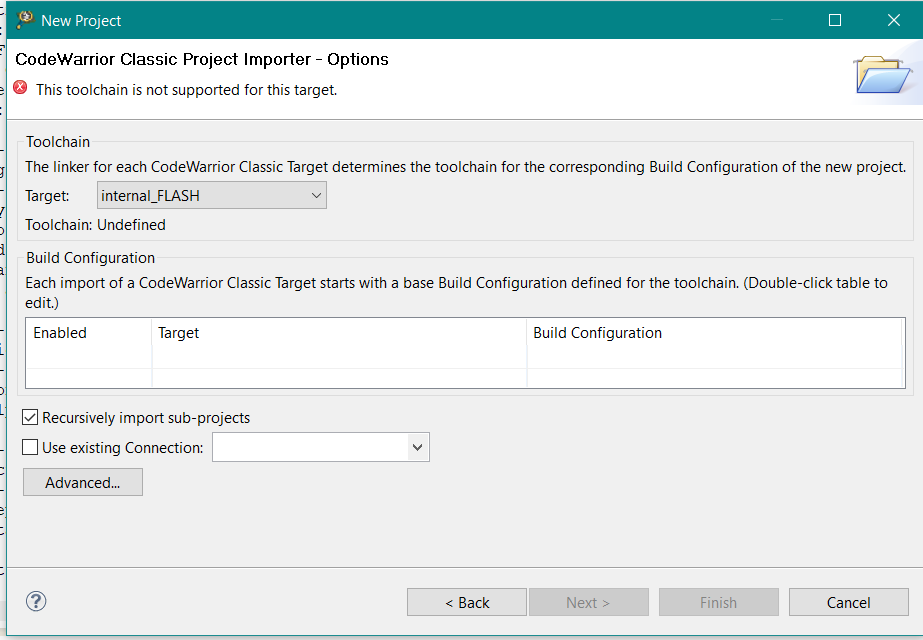
yes, when you create a new project with CodeWarrior11, you will see MPC5668G here


- 新着としてマーク
- ブックマーク
- 購読
- ミュート
- RSS フィードを購読する
- ハイライト
- 印刷
- 不適切なコンテンツを報告

 stanish
- 新着としてマーク
- ブックマーク
- 購読
- ミュート
- RSS フィードを購読する
- ハイライト
- 印刷
- 不適切なコンテンツを報告
Hi Sukruth,
Unfortunately project importer does not support MPC5xxx projects (it is dedicated to DSCs only) in CodeWarrior for MCUs 10.x
Anyway, there are essentially two options:
1) stay with CodeWarrior for MPC55xx/56xx v2.10
Althought Windows 10 is officially not supported I've verified it is possible to use it with Windows 10 64bit
(IDE + build tools + debugger)
I'd suggest you to try:
* to run the installer as an administrator.
* enter installation path outside of "Program Files" folder (use e.g. "C:\NXP\CW for MPC55xx and MPC56xx 2.10")
* run the installer with compatibility mode set to Windows 7 if the suggestions above do not work.
* If you install it correctly please download the latest Pemicro Drivers (PEmicro | Experts in Embedded tools for Flash Programming and Development )
2) migrate your project into CodeWarrior for MCUs v11.0
You will have to create a new project, add your source files and cofigure the project manually.
See attached document AN4094 to migrate the build tools settings - CW v2.10 vs. CodeWarrior for MCUs (Eclipse)
The advantage of option #2 is you will get the latest compiler version with many issues addressed.
If you experience any issues while migrating project we can assist you (in such a case please submit a support ticket for a private support channel: How to submit a new question for NXP Support
Hope it helps.
Stan
- 新着としてマーク
- ブックマーク
- 購読
- ミュート
- RSS フィードを購読する
- ハイライト
- 印刷
- 不適切なコンテンツを報告
1) stay with CodeWarrior for MPC55xx/56xx v2.10
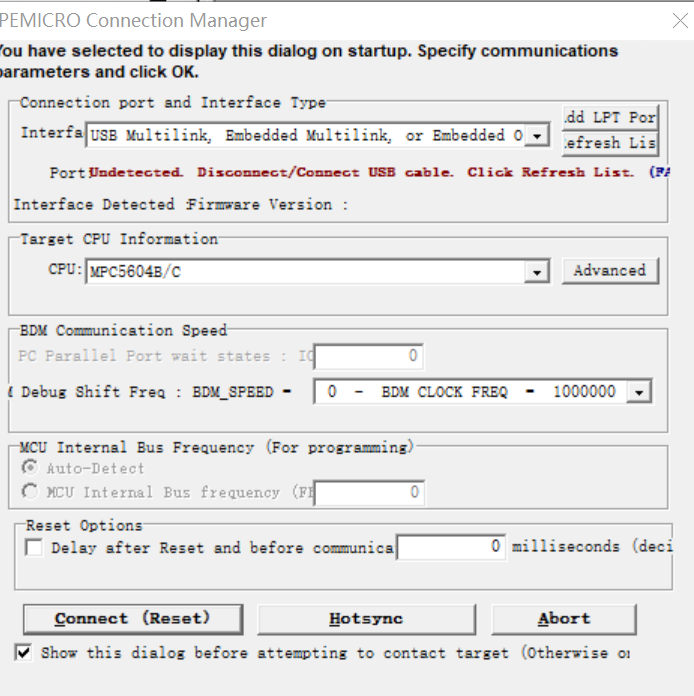
I can't use cw 2.10 in Windows 10, and the debug window keeps popping up an undetected disconnected/connected USB cable. I used it https://www.pemicro.com/faqs/faq_view.cfm?ID=29 The method of webpage cannot solve the problem. In Firmware update, the firmware can be recognized and upgraded normally, and the latest version of the driver has been installed. The driver can also be found in Device Manager. I just can't debug.
- 新着としてマーク
- ブックマーク
- 購読
- ミュート
- RSS フィードを購読する
- ハイライト
- 印刷
- 不適切なコンテンツを報告
Hi Stan,
Thank you for your response.
I followed the steps mentioned in option 1. But it is not working for me.
I also tried option 2. However, getting many errors in the code warrior IDE. (compiler errors)
Any document describing the steps to migrate from old project in CW v2.1 to new project in CW v11.1 ?
Is there any sample project for MPC5668G with CW v11.1 ?
Regards,
Sukruth
 ZhangJennie
- 新着としてマーク
- ブックマーク
- 購読
- ミュート
- RSS フィードを購読する
- ハイライト
- 印刷
- 不適切なコンテンツを報告
There are Qorivva sample under CW install:
C:\Freescale\CW MCU v11.0\MCU\CodeWarrior_Examples\Qorivva_Examples
If you need more assistance, please submit a ticket as Stan suggested.
- 新着としてマーク
- ブックマーク
- 購読
- ミュート
- RSS フィードを購読する
- ハイライト
- 印刷
- 不適切なコンテンツを報告
Hi Jun,
Thank you for your reply.
I am using MPC5668g (POWERPC controller).
Please suggest me the suitable CW version for this target.
Regards,
Sukruth
ZhangJennie
- 新着としてマーク
- ブックマーク
- 購読
- ミュート
- RSS フィードを購読する
- ハイライト
- 印刷
- 不適切なコンテンツを報告
Sukruth
I checked MPC5668g. Unfortunately, for this chip, we only have CW2.1. no other newer version.
Please use CW2.1 on our recommended windows platform.
Sorry for the inconvenience.
Have a great day,
Jun Zhang
-------------------------------------------------------------------------------
Note:
- If this post answers your question, please click the "Mark Correct" button. Thank you!
- We are following threads for 7 weeks after the last post, later replies are ignored
Please open a new thread and refer to the closed one, if you have a related question at a later point in time.
-------------------------------------------------------------------------------
ZhangJennie
- 新着としてマーク
- ブックマーク
- 購読
- ミュート
- RSS フィードを購読する
- ハイライト
- 印刷
- 不適切なコンテンツを報告
CodeWarrior® Development Studio for MPC55xx/MPC56xx (Classic IDE) v2.10 can support below windows platform.
Microsoft® Windows® XP
Windows Vista™, 32-bit or 64-bit edition
Windows 7, 32-bit or 64-bit edition
CW2.1 was released before win10 launching time, so win10 is not on CW2.1 supporting list.
What's your chip part number? I can help you check if there is related CW eclipse version that can support your target.
Have a great day,
Jun Zhang
-------------------------------------------------------------------------------
Note:
- If this post answers your question, please click the "Mark Correct" button. Thank you!
- We are following threads for 7 weeks after the last post, later replies are ignored
Please open a new thread and refer to the closed one, if you have a related question at a later point in time.
-------------------------------------------------------------------------------
