
- Forums
- Product Forums
- General Purpose MicrocontrollersGeneral Purpose Microcontrollers
- i.MX Forumsi.MX Forums
- QorIQ Processing PlatformsQorIQ Processing Platforms
- Identification and SecurityIdentification and Security
- Power ManagementPower Management
- Wireless ConnectivityWireless Connectivity
- RFID / NFCRFID / NFC
- Advanced AnalogAdvanced Analog
- MCX Microcontrollers
- S32G
- S32K
- S32V
- MPC5xxx
- Other NXP Products
- S12 / MagniV Microcontrollers
- Powertrain and Electrification Analog Drivers
- Sensors
- Vybrid Processors
- Digital Signal Controllers
- 8-bit Microcontrollers
- ColdFire/68K Microcontrollers and Processors
- PowerQUICC Processors
- OSBDM and TBDML
- S32M
- S32Z/E
-
- Solution Forums
- Software Forums
- MCUXpresso Software and ToolsMCUXpresso Software and Tools
- CodeWarriorCodeWarrior
- MQX Software SolutionsMQX Software Solutions
- Model-Based Design Toolbox (MBDT)Model-Based Design Toolbox (MBDT)
- FreeMASTER
- eIQ Machine Learning Software
- Embedded Software and Tools Clinic
- S32 SDK
- S32 Design Studio
- GUI Guider
- Zephyr Project
- Voice Technology
- Application Software Packs
- Secure Provisioning SDK (SPSDK)
- Processor Expert Software
- Generative AI & LLMs
-
- Topics
- Mobile Robotics - Drones and RoversMobile Robotics - Drones and Rovers
- NXP Training ContentNXP Training Content
- University ProgramsUniversity Programs
- Rapid IoT
- NXP Designs
- SafeAssure-Community
- OSS Security & Maintenance
- Using Our Community
-
- Cloud Lab Forums
-
- Knowledge Bases
- ARM Microcontrollers
- i.MX Processors
- Identification and Security
- Model-Based Design Toolbox (MBDT)
- QorIQ Processing Platforms
- S32 Automotive Processing Platform
- Wireless Connectivity
- CodeWarrior
- MCUXpresso Suite of Software and Tools
- MQX Software Solutions
- RFID / NFC
- Advanced Analog
-
- NXP Tech Blogs
iMX8M Mini Serial Port (UART 3)

Hi Sir,
I have iMX8M mini EVK and I am able to connect my iMX8M mini to my laptop via USB Micro B debug port of iMX8 Mini. and i am bale to see the console output in putty / minicom.
from the documents i came to know that
The iMX8M has four independent UART Ports (UART1 – UART4).
But On the EVK board, only UART3 is available and the UART2 is used for Cortex-A53 core, and UART4 is used for Cortex-M4 core.
The Pin details for UART 3 is -
TXD - Pin 8
RXD - Pin 10
Now i want to test UART3 of iMX8M Mini.
I mean to say -
1. I want to connect iMX8M mini USB Micro B debug port to my laptop and see the console.
2. Then I want to connect iMX8M mini UART3 to my laptop via some USB to serial convertor
3. Now I want to send some data say "Hello" to UART3 from my laptop and want to see this string in console / putty.
so basically i want to test UART3 TX and RX.
Please suggest me how can i do this or test UART3 .
Thanks & Regards,
Maneesh Singh

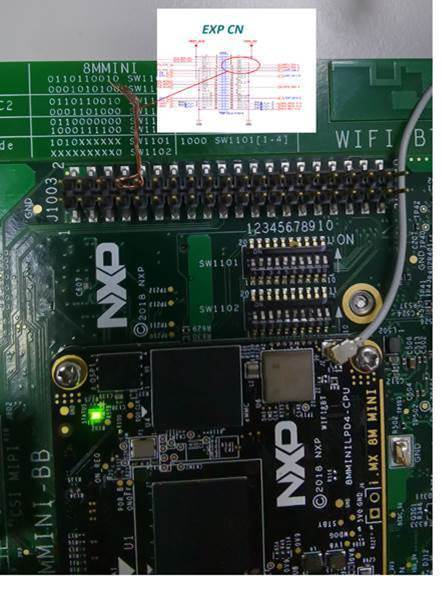
It is very easy to test uart3 on i.MX8MM evk. Just short the pin 8 and pin 10 on J1003
You can do the loop back test.
[ 34.579352] type=1400 audit(1554575978.284:3643): avc: denied { dac_read_search } for pid=3875 comm="main" capability=2 scontext=u:r:zygote:s0 tcontext=u:r:zygote:s0 tclass=capability permissive=0
[ 34.601700] type=1400 audit(1554575984.088:3655): avc: denied { dac_read_search } for pid=3946 comm="main" capability=2 scontext=u:r:zygote:s0 tcontext=u:r:zygote:s0 tclass=capability permissive=0
[ 34.603662] audit: audit_lost=3544 audit_rate_limit=5 audit_backlog_limit=64
[ 34.620139] type=1400 audit(1554575984.092:3658): avc: denied { dac_read_search } for pid=3946 comm="main" capability=2 scontext=u:r:zygote:s0 tcontext=u:r:zygote:s0 tclass=capability permissive=0 duplicate messages suppressed
[ 34.627334] audit: rate limit exceeded
[ 34.647937] type=1400 audit(1554575984.112:3659): avc: denied { dac_read_search } for pid=3962 comm="main" capability=2 scontext=u:r:zygote:s0 tcontext=u:r:zygote:s0 tclass=capability permissive=0
evk_8mm:/ $ su
evk_8mm:/ # stty -F /dev/ttymxc2 -echo
evk_8mm:/ # cat /dev/ttymxc2 &
[1] 4151
evk_8mm:/ # echo abcdef > /dev/ttymxc2
evk_8mm:/ # abcdef
evk_8mm:/ # ec[ 75.021722] healthd: battery l=85 v=3 t=35.0 h=2 st=2 c=400 fc=4000000 cc=32 chg=a
ho[ 76.603789] healthd: battery l=85 v=3 t=35.0 h=2 st=2 c=400 fc=4000000 cc=32 chg=a
fadsfasf13123432 > /et dev/ttym
ttymxc0 ttymxc1 ttymxc2
evk_8mm:/ # echo fadsfasf13123432 > /dev/ttymxc 2
evk_8mm:/ # fadsfasf13123432
evk_8mm:/ #

Hi ,
I'm also dealing with the same problem and I am using iMX8M Mini board on IAR Embedded IDE.
I am modifying the examples program path:SDK_EVK-MIMX8MM\boards\driver_examples.
I want to know how can I change UART4 to UART3.
Is there any suggestion?
Many thanks!
Robert Tseng.
Hi,
Is there anyone or any NXP person who can reply to my above questions ?
I am using iMX8M Mini EVK with Android 9.0 running on it.
Thanks
Maneesh

 CarlosCasillas
Hi Maneesh,
As you already mentioned, on i.MX8M Mini, UART2 is used for A53 debug and UART4 for M4 debug, while UART1 is connected to the Wi-Fi/Bluetooth, so, only UART3 is available, and it is physically accessible on header J4 (pins 2, 4, 6 and 10).
So, if you want to test it, if using Linux, you could try with an echo, or with a terminal application (like Python miniterm), like the implementation of accessing to ttyMCC on the following Community document:
Controlling a robotic arm over Wi-Fi with UDOO NEO
For connection of the UART3 to the computer or other devices, you could use the access on header J4 using for example an external USB to UART converter, like the usage of a EVBUSB2SER board on the following Community document:
https://community.nxp.com/docs/DOC-104269
Hope this will be useful for you.
Best regards!
/Carlos
-------------------------------------------------------------------------------
Note:
- If this post answers your question, please click the "Mark Correct" button. Thank you!
-------------------------------------------------------------------------------
Hi CarlosCasillas,
Thanks for your reply and suggestions.
I am using iMX8M Mini board on which Android 9.0 (pre-build image from NXP) is running.
1. I connected UART of iMX8M Board to my PC using USB to serial connector.
and open it in Putty terminal software
2. But when i do echo on ttymxc i get permission denied error.
echo "testing" > /dev/ttymxc2
NOTE : I tested for all the ttymxc and with su and sudo also. But nothing works
3. In this below link to Add the required permission to UART it is suggested to do changes in Android app's manifest file
https://developer.android.com/things/sdk/pio/uart
But it's for Android APP and i don't want to use any android app.
I want to test echo and cat from Android console like how we do in linux.
So please suggest me how can add permission to iMX8M Mini UART and how can we test it using echo and cat.
Thanks,
Maneesh
CarlosCasillas
Hi Maneesh,
If using Android, you may see permission issues when accessing to the regular serial terminal. As a glance, you could try enabling the serial terminal from ADB, and launching the commands with root access from the ADB serial terminal.
Hope this will be useful for you.
Best regards!
/Carlos
-------------------------------------------------------------------------------
Note:
- If this post answers your question, please click the "Mark Correct" button. Thank you!
-------------------------------------------------------------------------------
