
- Forums
- Product Forums
- General Purpose MicrocontrollersGeneral Purpose Microcontrollers
- i.MX Forumsi.MX Forums
- QorIQ Processing PlatformsQorIQ Processing Platforms
- Identification and SecurityIdentification and Security
- Power ManagementPower Management
- Wireless ConnectivityWireless Connectivity
- RFID / NFCRFID / NFC
- Advanced AnalogAdvanced Analog
- Neural Processing UnitsNeural Processing Units
- MCX Microcontrollers
- S32G
- S32K
- S32V
- MPC5xxx
- Other NXP Products
- S12 / MagniV Microcontrollers
- Powertrain and Electrification Analog Drivers
- Sensors
- Vybrid Processors
- Digital Signal Controllers
- 8-bit Microcontrollers
- ColdFire/68K Microcontrollers and Processors
- PowerQUICC Processors
- OSBDM and TBDML
- S32M
- S32Z/E
-
- Solution Forums
- Software Forums
- MCUXpresso Software and ToolsMCUXpresso Software and Tools
- CodeWarriorCodeWarrior
- MQX Software SolutionsMQX Software Solutions
- Model-Based Design Toolbox (MBDT)Model-Based Design Toolbox (MBDT)
- FreeMASTER
- eIQ Machine Learning Software
- Embedded Software and Tools Clinic
- S32 SDK
- S32 Design Studio
- GUI Guider
- Zephyr Project
- Voice Technology
- Application Software Packs
- Secure Provisioning SDK (SPSDK)
- Processor Expert Software
- Generative AI & LLMs
-
- Topics
- Mobile Robotics - Drones and RoversMobile Robotics - Drones and Rovers
- NXP Training ContentNXP Training Content
- University ProgramsUniversity Programs
- Rapid IoT
- NXP Designs
- SafeAssure-Community
- OSS Security & Maintenance
- Using Our Community
-
- Cloud Lab Forums
-
- Knowledge Bases
- ARM Microcontrollers
- i.MX Processors
- Identification and Security
- Model-Based Design Toolbox (MBDT)
- QorIQ Processing Platforms
- S32 Automotive Processing Platform
- Wireless Connectivity
- CodeWarrior
- MCUXpresso Suite of Software and Tools
- MQX Software Solutions
- RFID / NFC
- Advanced Analog
- Neural Processing Units
-
- NXP Tech Blogs
- Home
- :
- General Purpose Microcontrollers
- :
- Kinetis Microcontrollers
- :
- TWR-K70 SDHC SD Card
TWR-K70 SDHC SD Card
- Subscribe to RSS Feed
- Mark Topic as New
- Mark Topic as Read
- Float this Topic for Current User
- Bookmark
- Subscribe
- Mute
- Printer Friendly Page

- Mark as New
- Bookmark
- Subscribe
- Mute
- Subscribe to RSS Feed
- Permalink
- Report Inappropriate Content
Hello, I am attempting to access an SD Card on my TWR-K70. I am using CodeWarriors Component manager to setup the SDHC at 400KHz and 4 bit data mode. I have confirmed the correct PTE pins are selected for the clock/cmd and data lines per the TWR manual. When the card is inserted I am not seeing an OnCardInserted event occur. I've attempted to call DetectCards function but it exits during the VoltageValidation call, presumably failing to see the card. Could anyone provides pointers what to try next? I only need to transfer data blocks from the card, nothing too fancy.
Solved! Go to Solution.
- Mark as New
- Bookmark
- Subscribe
- Mute
- Subscribe to RSS Feed
- Permalink
- Report Inappropriate Content
I found a solution getting the basic SD card functionality working. Just import the SD project from CodeWarrior File->Import->CodeWarrior->Example Project. This has a nice example of using the SDHC module and how it should be configured for the K70. Specifically I believe I was missing setting up the GPIO SD Card detect pin in my own implementation.
Thanks again for those who took the time to help, especially Mark. I was interested looking into your uTasker project.
- Mark as New
- Bookmark
- Subscribe
- Mute
- Subscribe to RSS Feed
- Permalink
- Report Inappropriate Content
I found a solution getting the basic SD card functionality working. Just import the SD project from CodeWarrior File->Import->CodeWarrior->Example Project. This has a nice example of using the SDHC module and how it should be configured for the K70. Specifically I believe I was missing setting up the GPIO SD Card detect pin in my own implementation.
Thanks again for those who took the time to help, especially Mark. I was interested looking into your uTasker project.
- Mark as New
- Bookmark
- Subscribe
- Mute
- Subscribe to RSS Feed
- Permalink
- Report Inappropriate Content
The SDHC_LDD components init routines sends the command SDHC_PDD_CMD0_GO_IDLE_STATE to put the SD Card into idle state. But the card is never responding or being placed in idle state. If anyone has had luck using the SDHC_LDD or init_SDHC component with the TWR-K70 please post here.

- Mark as New
- Bookmark
- Subscribe
- Mute
- Subscribe to RSS Feed
- Permalink
- Report Inappropriate Content
Peter
You can load a binary to your board from here which allows it to use the SD card (for FTP or web server, USB-MSD or shell interface) https://community.freescale.com/message/462303#462303
It will verify that there is no HW problem.
I will be working on adding the RGB support in the next days in case you need a complete solution later.
Note that the uTasker SD card interface allows it to be fully simulated using VisualStudio so you can also develop and test low level SD card interfaces using it in case you want to work without a file system.
regards
Mark
- Mark as New
- Bookmark
- Subscribe
- Mute
- Subscribe to RSS Feed
- Permalink
- Report Inappropriate Content
Peter
For infomation I have just (finally) built a TWR-RGB-LCD onto my tower with TWR-K70F120M. I found that this didn't disturb the SDHC operation.
The TWR-RGB-LCD can together with a secondary elevator attached, which I replaced for the dummy elevator that was origionally there. Are you sure that you attached your correctly?
Regards
Mark
- Mark as New
- Bookmark
- Subscribe
- Mute
- Subscribe to RSS Feed
- Permalink
- Report Inappropriate Content
Thanks for checking Mark. I do have it setup correctly as I've been able to get the LCD module working. I have also tried without the TWR-RGB-LCD module connected as well with no luck. I'll explain how I have the SHDC_LDD component setup.
Interface:
4-bit data mode
Bus Clock:
375kHz (I believe this is from the SYSTEM_OSC)
Interrupt service/event:
enabled
Pins:
CLK: PTE2
CMD: PTE3
DAT0: PTE1
DAT1: PTE0
DAT2: PTE5
DAT3: PTE4
Enable device:
yes
Auto Initilization:
yes
As I mentioned above the card never comes out of LDD_SDHC_RESET state at the end of the SHDC init routine. I've tried multiple cards.
- Mark as New
- Bookmark
- Subscribe
- Mute
- Subscribe to RSS Feed
- Permalink
- Report Inappropriate Content
Hi Peter
I finally got around to configuring the TWR-RGB-LCD on the TWR-K70F120M and have attached a binary that you can load to your board to veriy that you have no HW problems.
If there is no SD card inserted (or no "pics" directory available on it) the LCD will show some graphics (images, animation, text).
If you insert a FAT32 formatted SD card with a directory called "pics" you can put in a quantity of 24 bit colour bit maps (480 x 272 in size or smaller) and these will be displayed as a slide show (when the K70 detects the SD card and the directory after a reset).
The tower is also contactable on the IP address 192.168.0.3 and has an FTP server which can be used to copy the files to the SD card if you want to copy them during operation.
Furthermore, the SD card shows up as a hard disk if you connect the TWR-SER's USB connector to the PC and so the images can also be copied from there.
The slide show doesn't use a second window and swap so that the updates are instantaneous but simply redraws the screen. This allows the actual SD card read/LCD write speed to be visible.
The binary can be copied to the board using CodeWarrior's "Flash File to Target" Utility.
Essentially it shows that the SD card operates well together with the TWR-RGB-LCD module; I had no problems with HW or any port conflicts etc.
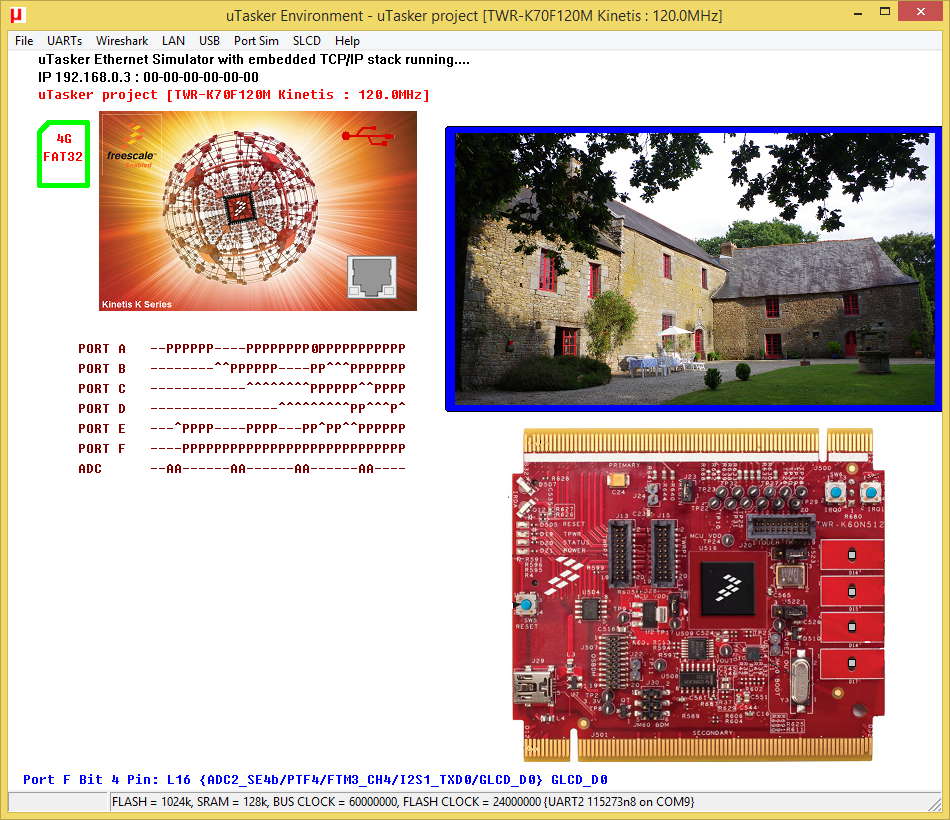
For configuration and testig I used the uTasker Kinetis simulator - a screen shot is shown below testing the SD card and TWR-RGB-LCD operation.
Regards
Mark
- Mark as New
- Bookmark
- Subscribe
- Mute
- Subscribe to RSS Feed
- Permalink
- Report Inappropriate Content
Mark, thanks much for the effort! I loaded the .bin file you provided and everything worked as advertised. I'm curious how to you implemented the SD card interface with uTasker? Are you using SPI mode or the SDHC data/cmd/clk lanes? I'm assuming you aren't using CodeWarriors component configurator to generate the SDHC code. This at least tells me my SD card and the reader on the K70 does work.
- Mark as New
- Bookmark
- Subscribe
- Mute
- Subscribe to RSS Feed
- Permalink
- Report Inappropriate Content
Hi Peter
I am pleased that it could be established that the HW is OK.
On the K70 tower board the SDHC interface is used but it is also possible to use SPI (I can configure the uTasker project to use any available ones).
No CW component generators are used because if find them a huge risk in serious projects as seen when scanning through the forums; many posts are because of difficulties resulting from relying on such case tools - which sometimes work and sometimes don't, or work under some circumstances and others not, or by chance. When things go wrong users with a reliance on them miss much basic knowledge and understanding of what is being used and involved to be able to quickly and efficiently resolve the issue - unless they get lucky and find someone friendly to help out they then find themselves here: http://static.fjcdn.com/pictures/Shit_b71e35_345157.jpg

Because I program seriously and need to be able to account for every line of code used in industrial projects in many countries around the world, and also support such cases whenever there is an issue (or suspected issue) I need to do it right - I have no excuses that I can push back to a case tool which spits out code that was essentially plugged in by an unknown person (it could have been a senior programmer and validated by extensive code coverage tests but it could have been given to a student to do who was pleased to achieve a blinking LED and didn't care that it actually only worked as long as everyone holds their breath).
The case tools are useful to obtain something to start with, as are reference projects, but often they are unsuitable for productive work (the particular modules weren't necessary designed to interact with others in complex situations).
The uTasker project can be configured for just about any Kinetis processor and board as a project framework with just about all resources (USB, Ethernet, file systems, drivers) in a matter of munutes so I can also produce fully operating projects faster that the case tools can do it as well...
Regards
Mark
- Mark as New
- Bookmark
- Subscribe
- Mute
- Subscribe to RSS Feed
- Permalink
- Report Inappropriate Content
I disconnected the TWR-RGB-LCD from my setup and I am now getting a "Card Insertion" IRQ in the SDHC_IRQSTAT register. Is anyone aware of a conflict between the RGB-LCD and the SDHC?
- Mark as New
- Bookmark
- Subscribe
- Mute
- Subscribe to RSS Feed
- Permalink
- Report Inappropriate Content
With the stock SDHC_LDD component I am still unable to access or receive a response from the SD Card. Durring SDHC_init routine the final steps are to send 80 cycles to the card and then the GO_IDLE_STATE command is issued. The card never responds to this but the SDHC_init function assumes everything worked fine and moves on. The SD Card structure still shows the default value of LDD_SDHC_RESET. I'm curios if anyone has had success using the SDHC_LDD component on a TWR-K70, I am running out of ideas and need to find some way to load images into RAM.
- Mark as New
- Bookmark
- Subscribe
- Mute
- Subscribe to RSS Feed
- Permalink
- Report Inappropriate Content
Hi Peter
It is best not to assume that every connection is possible since there can be various conflicts between hardware circuitry:
- http://www.utasker.com/forum/index.php?topic=1737.msg6228#msg6228
- the TWR-K60 board has an IR transmitter connected to one of the LCD bus signals, which needs to be removed for it to be able to work
- various other modification requirements have been found
These are however flexible development boards and some such problems are introduced with new board revisions, or corrected with new board revisions, or others may apear with new peripheral cards. It is virtually impossible to foresee all conflict potentials that exist or may exist in the future so you need to check things carefully and don't make any assumptions.
Regards
Mark
- Mark as New
- Bookmark
- Subscribe
- Mute
- Subscribe to RSS Feed
- Permalink
- Report Inappropriate Content
Mark, thanks for the heads up.
I checked the schematics for all 3 boards attached. The TWR-K70/TWR-SER/TWR-RGB-LCD, none of them seem to be conflicting with the PTE0-5 pins which the SDHC uses for it's data/cmd/clk lanes.
PTE2= SDHC CLK Pin
PTE3= SDHC CMD Pin
PTE1= SDHC DAT0 Pin
PTE0= SDHC DAT1 Pin
PTE5 = SDHC Dat2 Pin
PTE4 = SDHC Dat3 Pin

 Rick_Li
- Mark as New
- Bookmark
- Subscribe
- Mute
- Subscribe to RSS Feed
- Permalink
- Report Inappropriate Content
Hi Peter
the problem seem weird.
I also reviewed the schematic of these three boards and there is no conflicts.
As mentioned by the quick guide, the TWR-LCD-REG should be attached to the SECOND TWR-ELVE board, not the primary board.
please also note the PRIMARY side of TWR-K70 should be attached to the PRIMARY board of TWR-ELVE.
Could you please check?
- Mark as New
- Bookmark
- Subscribe
- Mute
- Subscribe to RSS Feed
- Permalink
- Report Inappropriate Content
To update, I found that with the TWR-LCD-RGB connected I do get an Card Insertion IRQ on boot. It requires using the init_SDHC component instead of the SDHC_LDD component. I then have to select the "DAT3 as Card Detection Pin" for it to trigger. It's getting stuck in my ISR though, so I may not be correctly clearing the IRQ.
- Mark as New
- Bookmark
- Subscribe
- Mute
- Subscribe to RSS Feed
- Permalink
- Report Inappropriate Content
I double checked that the TWR-RGB-LCD board is on the secondary side of both the TWR-SER and TWR-K70 boards. I currently have graphics running on the LCD as well.
To clarify, I am attempting to load RGB images into my framebuffer in DDR2 on the K70 from an outside source. If I can do this from SD Card that would be great, else if there is perhaps another path anyone has tried I would be grateful for any tips.
- Mark as New
- Bookmark
- Subscribe
- Mute
- Subscribe to RSS Feed
- Permalink
- Report Inappropriate Content
- Mark as New
- Bookmark
- Subscribe
- Mute
- Subscribe to RSS Feed
- Permalink
- Report Inappropriate Content
Mark,
Yes something similar to that. I am currently am not running any OS on my board, I would like to avoid this if at all possible. If I could setup DMA from the SD Card to DDR2 to load images that would be ideal. I have the rest of the hardware configured how I would like it but the last step with the SD Card is causing trouble.
The TWR-LCD-RGB I am using.
Graphical LCD Tower System Module with RGB In|Freescale
- Mark as New
- Bookmark
- Subscribe
- Mute
- Subscribe to RSS Feed
- Permalink
- Report Inappropriate Content
Peter
Normally one uses a file system on the SD card otherwise it is not easy to copy the images to the card. When a file system is used the clusters will jump around according to the FAT storage and DMA is not very helpful.
I have worked with the "picture frame" application on a number of processors and boards including some with DDR and LCD controller and others (like Coldfire and Kinetis) via FlexBus or simple bit-banging or SPI (without LCD controller in the processor). I do have the tower board with RGB interface but haven't tried with it just yet.
Regards
Mark
P.S. I have such a device on line at http://demo.uTasker.com where the image presently in the TFT can be seen on a web page and images can be posted to it.
If there is an SD card plugged in one can FTP to it and load images to the card so that these are then shown on the LCD as slide show. Like that I can upload photos when travelling so that people back at home can see them.
