
- Forums
- Product Forums
- General Purpose MicrocontrollersGeneral Purpose Microcontrollers
- i.MX Forumsi.MX Forums
- QorIQ Processing PlatformsQorIQ Processing Platforms
- Identification and SecurityIdentification and Security
- Power ManagementPower Management
- Wireless ConnectivityWireless Connectivity
- RFID / NFCRFID / NFC
- Advanced AnalogAdvanced Analog
- MCX Microcontrollers
- S32G
- S32K
- S32V
- MPC5xxx
- Other NXP Products
- S12 / MagniV Microcontrollers
- Powertrain and Electrification Analog Drivers
- Sensors
- Vybrid Processors
- Digital Signal Controllers
- 8-bit Microcontrollers
- ColdFire/68K Microcontrollers and Processors
- PowerQUICC Processors
- OSBDM and TBDML
- S32M
- S32Z/E
-
- Solution Forums
- Software Forums
- MCUXpresso Software and ToolsMCUXpresso Software and Tools
- CodeWarriorCodeWarrior
- MQX Software SolutionsMQX Software Solutions
- Model-Based Design Toolbox (MBDT)Model-Based Design Toolbox (MBDT)
- FreeMASTER
- eIQ Machine Learning Software
- Embedded Software and Tools Clinic
- S32 SDK
- S32 Design Studio
- GUI Guider
- Zephyr Project
- Voice Technology
- Application Software Packs
- Secure Provisioning SDK (SPSDK)
- Processor Expert Software
- Generative AI & LLMs
-
- Topics
- Mobile Robotics - Drones and RoversMobile Robotics - Drones and Rovers
- NXP Training ContentNXP Training Content
- University ProgramsUniversity Programs
- Rapid IoT
- NXP Designs
- SafeAssure-Community
- OSS Security & Maintenance
- Using Our Community
-
- Cloud Lab Forums
-
- Knowledge Bases
- ARM Microcontrollers
- i.MX Processors
- Identification and Security
- Model-Based Design Toolbox (MBDT)
- QorIQ Processing Platforms
- S32 Automotive Processing Platform
- Wireless Connectivity
- CodeWarrior
- MCUXpresso Suite of Software and Tools
- MQX Software Solutions
- RFID / NFC
- Advanced Analog
-
- NXP Tech Blogs
- Home
- :
- MCUXpresso Software and Tools
- :
- MCUXpresso IDE
- :
- Zoom not working in MCUXpresso IDE v11.1.0?
Zoom not working in MCUXpresso IDE v11.1.0?
- Subscribe to RSS Feed
- Mark Topic as New
- Mark Topic as Read
- Float this Topic for Current User
- Bookmark
- Subscribe
- Mute
- Printer Friendly Page
Zoom not working in MCUXpresso IDE v11.1.0?

- Mark as New
- Bookmark
- Subscribe
- Mute
- Subscribe to RSS Feed
- Permalink
- Report Inappropriate Content
Hello community,
am I the only one having problems with text zoom on MCUXpresso IDE v11.1.0?
The commands "Window -> Editor -> Zoom In" and "Window -> Editor -> Zoom Out" used to work fine in v11.0.0, but not on v11.1.0 (clean install). They will change the settings (found in "Preferences -> General -> Appearance -> Colors and Fonts"), but not the appearance - i.e., text size on screen doesn't change, but settings are affected. Also, manually changing the text size from "Preferences -> General -> Appearance -> Colors and Fonts" has no effect until the IDE is restarted. Of course the shortucts "Ctrl + +" and "Ctrl + -" don't work as well.
This is a neat feature that possibly got broken - looking forward to get it back! :-)
Stefano

- Mark as New
- Bookmark
- Subscribe
- Mute
- Subscribe to RSS Feed
- Permalink
- Report Inappropriate Content
Dear support,
Is this fixed meanwhile?
Last comment is from January? Current release still seems to be IDE v11.1.0 [Build 3209] [2019-12-12]
By the way, the "Toggle Block Selection Mode" seems to bring the font back to something usable in the editor window.

- Mark as New
- Bookmark
- Subscribe
- Mute
- Subscribe to RSS Feed
- Permalink
- Report Inappropriate Content
Current release is 11.1.1 b3241 (2020-03-02) and it has zoom fixed.
- Mark as New
- Bookmark
- Subscribe
- Mute
- Subscribe to RSS Feed
- Permalink
- Report Inappropriate Content
Hi Erich,
Thanks for the tip. The reason I missed that is that "Check for updates" inside the MCUXpresso IDE did not report that new version but gave an error exactly while checking for possible updates.
I could install the new version though by directly going to the downloads section of the MCUXpresso website.
- Mark as New
- Bookmark
- Subscribe
- Mute
- Subscribe to RSS Feed
- Permalink
- Report Inappropriate Content
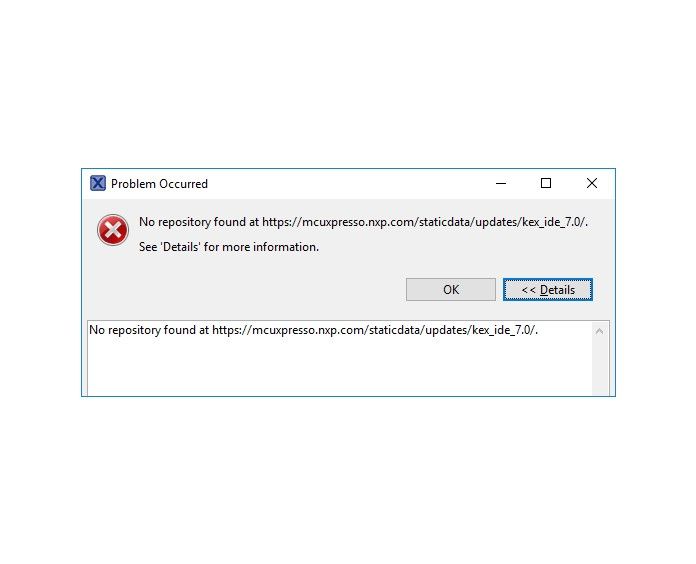
That problem still exists in the latest version by the way. (11.1.1)

 liborukropec
- Mark as New
- Bookmark
- Subscribe
- Mute
- Subscribe to RSS Feed
- Permalink
- Report Inappropriate Content
Hello,
not needed to provide details how to reproduce the "No repository ..." error. The update site for Config Tools 7.0 in IDE has been corrupted and has to be uploaded again. It will be fixed during hour or two, it is in progress.
Sorry for any inconvenience,
Libor
- Mark as New
- Bookmark
- Subscribe
- Mute
- Subscribe to RSS Feed
- Permalink
- Report Inappropriate Content
I think this is not related to this thread (zooming), right?
I suggest you start a new thread. And would be good if you could provide details how to reproduce this dialog.
 lpcxpresso_supp
- Mark as New
- Bookmark
- Subscribe
- Mute
- Subscribe to RSS Feed
- Permalink
- Report Inappropriate Content
Thank you for the report - we will investigate.
Regards,
MCUXpresso IDE Support
 jingpan
- Mark as New
- Bookmark
- Subscribe
- Mute
- Subscribe to RSS Feed
- Permalink
- Report Inappropriate Content
Hi Stefano,
Thanks you for reminding. I'll report this bug. Hope we can get rid of this bug at next version.
Regards,
Jing
- Mark as New
- Bookmark
- Subscribe
- Mute
- Subscribe to RSS Feed
- Permalink
- Report Inappropriate Content
Hi Stefano,
enountered this yesterday too, so I can confirm what you see in 11.1.0. It works in 11.0.1, and this is my current workaround. If I find one for 11.1.0, I'll post it.
Erich
- Mark as New
- Bookmark
- Subscribe
- Mute
- Subscribe to RSS Feed
- Permalink
- Report Inappropriate Content
Hi @Stefano Voulaz,
I did a bit more of digging, and I have found out that the zoom-in/zoom-out gets applied when I restart the IDE.
So I can zoom, but I have to do a restart to get it applied as a workaround.
I hope this helps,
Erich
