
- Forums
- Product Forums
- General Purpose MicrocontrollersGeneral Purpose Microcontrollers
- i.MX Forumsi.MX Forums
- QorIQ Processing PlatformsQorIQ Processing Platforms
- Identification and SecurityIdentification and Security
- Power ManagementPower Management
- Wireless ConnectivityWireless Connectivity
- RFID / NFCRFID / NFC
- Advanced AnalogAdvanced Analog
- Neural Processing UnitsNeural Processing Units
- MCX Microcontrollers
- S32G
- S32K
- S32V
- MPC5xxx
- Other NXP Products
- S12 / MagniV Microcontrollers
- Powertrain and Electrification Analog Drivers
- Sensors
- Vybrid Processors
- Digital Signal Controllers
- 8-bit Microcontrollers
- ColdFire/68K Microcontrollers and Processors
- PowerQUICC Processors
- OSBDM and TBDML
- S32M
- S32Z/E
-
- Solution Forums
- Software Forums
- MCUXpresso Software and ToolsMCUXpresso Software and Tools
- CodeWarriorCodeWarrior
- MQX Software SolutionsMQX Software Solutions
- Model-Based Design Toolbox (MBDT)Model-Based Design Toolbox (MBDT)
- FreeMASTER
- eIQ Machine Learning Software
- Embedded Software and Tools Clinic
- S32 SDK
- S32 Design Studio
- GUI Guider
- Zephyr Project
- Voice Technology
- Application Software Packs
- Secure Provisioning SDK (SPSDK)
- Processor Expert Software
- Generative AI & LLMs
-
- Topics
- Mobile Robotics - Drones and RoversMobile Robotics - Drones and Rovers
- NXP Training ContentNXP Training Content
- University ProgramsUniversity Programs
- Rapid IoT
- NXP Designs
- SafeAssure-Community
- OSS Security & Maintenance
- Using Our Community
-
- Cloud Lab Forums
-
- Knowledge Bases
- ARM Microcontrollers
- i.MX Processors
- Identification and Security
- Model-Based Design Toolbox (MBDT)
- QorIQ Processing Platforms
- S32 Automotive Processing Platform
- Wireless Connectivity
- CodeWarrior
- MCUXpresso Suite of Software and Tools
- MQX Software Solutions
- RFID / NFC
- Advanced Analog
- Neural Processing Units
-
- NXP Tech Blogs
- Home
- :
- Software Forums
- :
- S32 SDK
- :
- MPC5744P DEVKIT Using S32 SDK 0.9.0 BETA
MPC5744P DEVKIT Using S32 SDK 0.9.0 BETA
- Subscribe to RSS Feed
- Mark Topic as New
- Mark Topic as Read
- Float this Topic for Current User
- Bookmark
- Subscribe
- Mute
- Printer Friendly Page

- Mark as New
- Bookmark
- Subscribe
- Mute
- Subscribe to RSS Feed
- Permalink
- Report Inappropriate Content
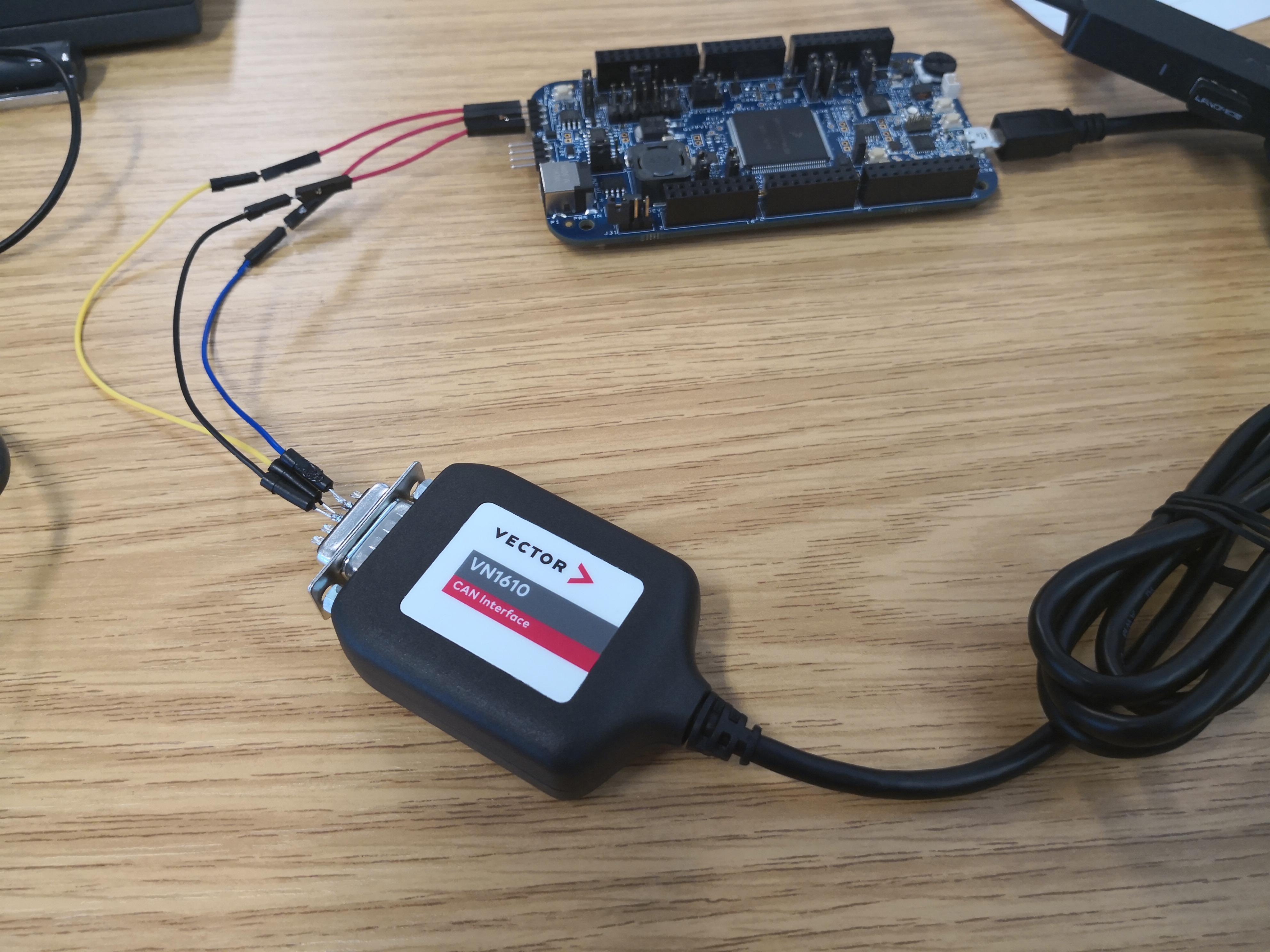
I am trying to test the FlexCAN module using the S32 SDK 0.9.0 BETA for the MPC5744P. I have tried loading the example code, which on reception of a CAN message toggles the DEVKIT LEDs and also sends CAN messages when the switches are pressed. I am using a Vector VN1610 CAN-to-USB to communicate with the board when running, however, I seem to not be able to receive or send data to the board this way. On debug, I see that the program is stuck in the loop
while (FLEXCAN_DRV_GetTransferStatus(INST_CANCOM1, RX_MAILBOX) == STATUS_BUSY) { }
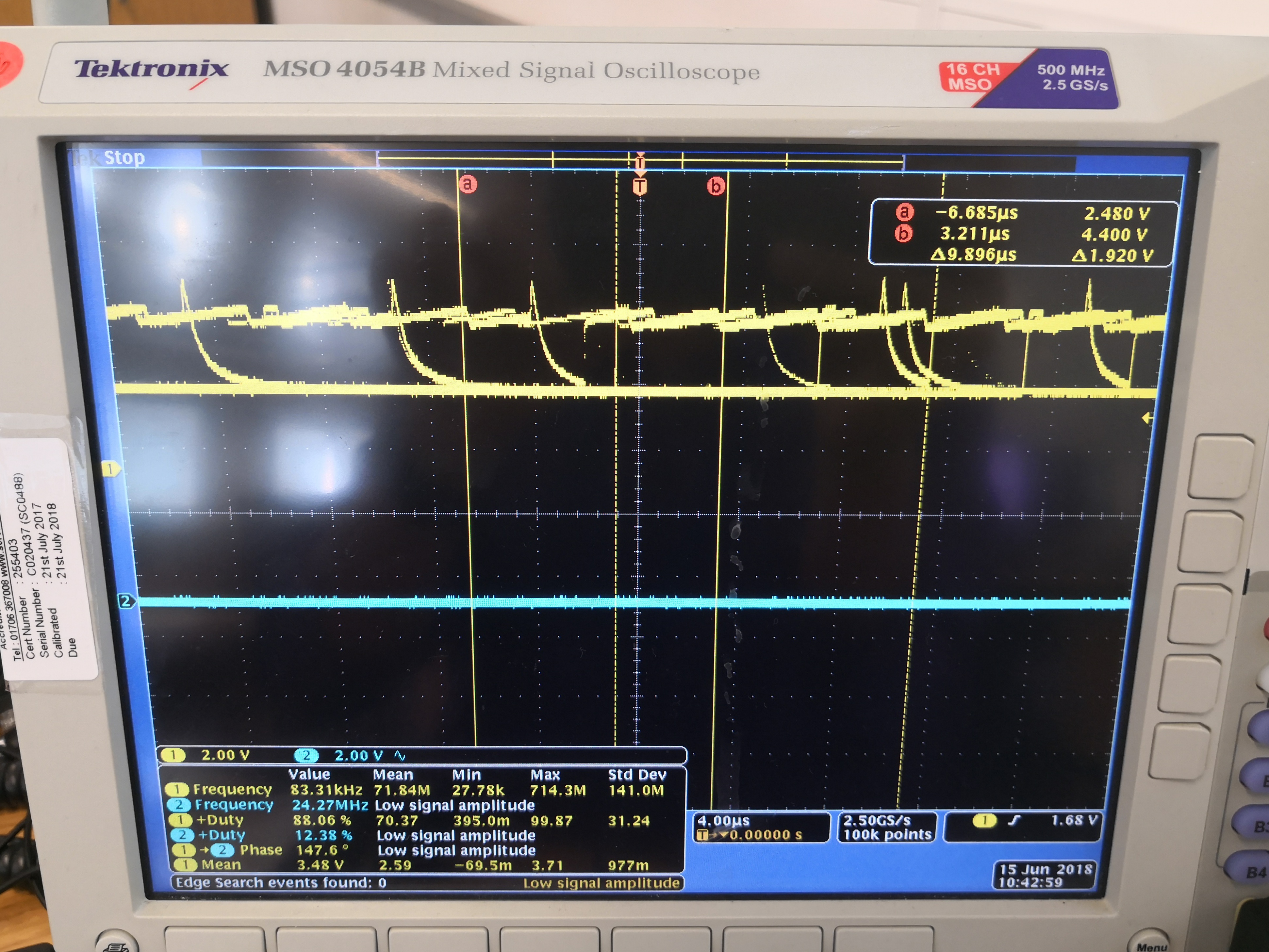
I have also monitored the signals from the CAN ports on the DEVKIT as well as the Vector VN1610 and I can read signals on the scope so I am unsure why the the transfer status cannot 'finish' i.e. the loop is infinite.
i have attached my set-up as well as the tests I have made on the oscilloscope.
Solved! Go to Solution.

 stanish
- Mark as New
- Bookmark
- Subscribe
- Mute
- Subscribe to RSS Feed
- Permalink
- Report Inappropriate Content
Hi,
I'd recommend to add terminating resistor 120 ohm between CAN_H and CAN_L terminals or populate SMD resistor 120 Ohm - R38 pads
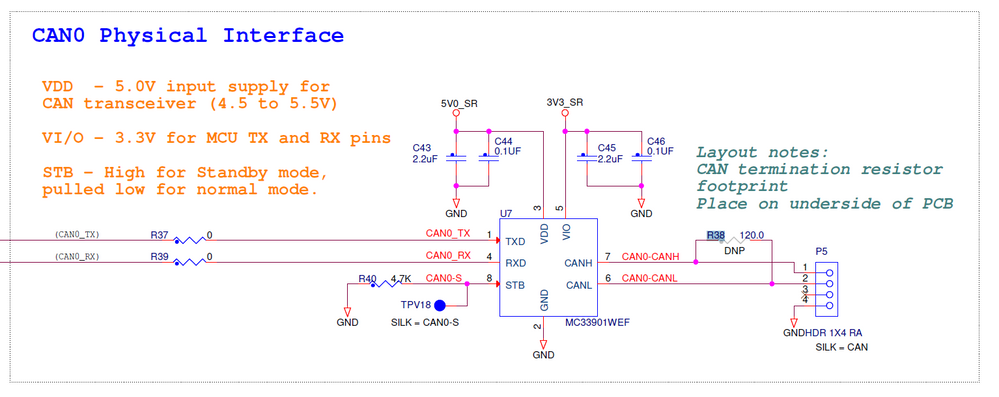
500kbps, 85% sampling point
Hope it helps.
Stan
- Mark as New
- Bookmark
- Subscribe
- Mute
- Subscribe to RSS Feed
- Permalink
- Report Inappropriate Content
Hi Chulue Zhong, Could you please share the example code which you used with the DEVKIT to transmit and receive CAN signals on the CAN0 port?
The example included with the S32 Design studio for MPC5744P DEVKIT sends CAN messages on CAN2 and I'm not sure how to monitor these using a Vector CAN case HW and Vector CANoe.
Thanks in advance.
- Mark as New
- Bookmark
- Subscribe
- Mute
- Subscribe to RSS Feed
- Permalink
- Report Inappropriate Content
The way I set up CAN was to use Processor Expert with the S32 SDK, which is an addon you can get from the S32 download page I believe. Then you can choose which FlexCAN module to use in a graphical interface and then add functionality by dragging and dropping code. Hence the final code set-up (FlexCAN only) for me was
in "main()":
// FlexCAN message struct for sending
flexcan_msgbuff_t send_buff;
send_buff.data[0] = 0;
send_buff.data[1] = 0xFF;
send_buff.data[2] = 0;
send_buff.data[3] = 0xFF;
send_buff.data[4] = 0;
send_buff.data[5] = 0xFF;
send_buff.data[6] = 0;
send_buff.data[7] = 0xFF;
send_buff.dataLen = 8; // data length
send_buff.msgId = 1; // Message ID
// FlexCAN Data Info
flexcan_data_info_t txInfo = {
.data_length = 8,
.is_remote = 0,
.msg_id_type = FLEXCAN_MSG_ID_STD,
};
// Initialize FlexCAN module
FLEXCAN_DRV_Init(INST_CANCOM1, &canCom1_State, &canCom1_InitConfig0);
// Configure Tx Message Buffer 0 to send CAN message
FLEXCAN_DRV_ConfigTxMb(INST_CANCOM1, 0, &txInfo, send_buff.msgId);
// Send the message
FLEXCAN_DRV_Send(INST_CANCOM1, 0, &txInfo, send_buff.msgId, &(send_buff.data));
while(1)
{
// Wait for transfer to complete
while (FLEXCAN_DRV_GetTransferStatus(INST_CANCOM1, 0) == STATUS_BUSY) {
//FLEXCAN_DRV_Send(INST_CANCOM1, 0, &txInfo, send_buff.msgId, &(send_buff.data));
counter++;
}
}
If you don't use the S32 SDK I think you can just replace CAN2 with CAN0 in the example code you saw, but you probably need to pay attention to the peripheral clocking for CAN0. On the DEVKIT, only CAN0 is connected to a proper CAN transceiver (MC33901WEF, see above) so with minimal set-up you would just need a 120-ohm resistor and some wires to connect to the Vector CAN peripherals.
stanish
- Mark as New
- Bookmark
- Subscribe
- Mute
- Subscribe to RSS Feed
- Permalink
- Report Inappropriate Content
Hi,
I'd recommend to add terminating resistor 120 ohm between CAN_H and CAN_L terminals or populate SMD resistor 120 Ohm - R38 pads
500kbps, 85% sampling point
Hope it helps.
Stan
- Mark as New
- Bookmark
- Subscribe
- Mute
- Subscribe to RSS Feed
- Permalink
- Report Inappropriate Content
I do have an additional follow-up question, however. Are the values 500kbps and 85% sampling point dependent on the CAN transceiver (MC33901WEF) in the case of the DEVKIT? Also, the default sampling point was 87.5% actually, which worked.
- Mark as New
- Bookmark
- Subscribe
- Mute
- Subscribe to RSS Feed
- Permalink
- Report Inappropriate Content
Thanks very much, I now have the example code working. I thought initially that this resistor was already on the board.
