
- Forums
- Product Forums
- General Purpose MicrocontrollersGeneral Purpose Microcontrollers
- i.MX Forumsi.MX Forums
- QorIQ Processing PlatformsQorIQ Processing Platforms
- Identification and SecurityIdentification and Security
- Power ManagementPower Management
- Wireless ConnectivityWireless Connectivity
- RFID / NFCRFID / NFC
- Advanced AnalogAdvanced Analog
- Neural Processing UnitsNeural Processing Units
- MCX Microcontrollers
- S32G
- S32K
- S32V
- MPC5xxx
- Other NXP Products
- S12 / MagniV Microcontrollers
- Powertrain and Electrification Analog Drivers
- Sensors
- Vybrid Processors
- Digital Signal Controllers
- 8-bit Microcontrollers
- ColdFire/68K Microcontrollers and Processors
- PowerQUICC Processors
- OSBDM and TBDML
- S32M
- S32Z/E
-
- Solution Forums
- Software Forums
- MCUXpresso Software and ToolsMCUXpresso Software and Tools
- CodeWarriorCodeWarrior
- MQX Software SolutionsMQX Software Solutions
- Model-Based Design Toolbox (MBDT)Model-Based Design Toolbox (MBDT)
- FreeMASTER
- eIQ Machine Learning Software
- Embedded Software and Tools Clinic
- S32 SDK
- S32 Design Studio
- GUI Guider
- Zephyr Project
- Voice Technology
- Application Software Packs
- Secure Provisioning SDK (SPSDK)
- Processor Expert Software
- Generative AI & LLMs
-
- Topics
- Mobile Robotics - Drones and RoversMobile Robotics - Drones and Rovers
- NXP Training ContentNXP Training Content
- University ProgramsUniversity Programs
- Rapid IoT
- NXP Designs
- SafeAssure-Community
- OSS Security & Maintenance
- Using Our Community
-
- Cloud Lab Forums
-
- Knowledge Bases
- ARM Microcontrollers
- i.MX Processors
- Identification and Security
- Model-Based Design Toolbox (MBDT)
- QorIQ Processing Platforms
- S32 Automotive Processing Platform
- Wireless Connectivity
- CodeWarrior
- MCUXpresso Suite of Software and Tools
- MQX Software Solutions
- RFID / NFC
- Advanced Analog
- Neural Processing Units
-
- NXP Tech Blogs
- Home
- :
- MCUXpresso Software and Tools
- :
- MCUXpresso General
- :
- Create K20 USB CDC Device
Create K20 USB CDC Device
- Subscribe to RSS Feed
- Mark Topic as New
- Mark Topic as Read
- Float this Topic for Current User
- Bookmark
- Subscribe
- Mute
- Printer Friendly Page

- Mark as New
- Bookmark
- Subscribe
- Mute
- Subscribe to RSS Feed
- Permalink
- Report Inappropriate Content
As I try to port my K20 product code from MQX to FreeRTOS I've hit a bit of a snag - I want to add the USB CDC interface, but that doesn't seem to be possible with the latest version (2.2) of the SDK available from NXP.
When I compare the options available to the K20 to something like the K22 or K64, there isn't the same range of options and no "middleware" where the USB drivers can be selected.
I've done a few hours of trying to port the code from one of the FRDM-K22F demo projects, but this feels like a rabbit hole where I will spend a lot of time without a lot of success.
Anybody have any suggestions as to how I can do this port reasonably easily/successfully?
Thanx!
Solved! Go to Solution.
- Mark as New
- Bookmark
- Subscribe
- Mute
- Subscribe to RSS Feed
- Permalink
- Report Inappropriate Content
Hi Alexis,
Okay, after the last two days of pulling my hair out with boards loaded with the processor that I want to use, I have a USB CDC Device app working and I can recreate it on my test set up so I think the question is answered.
The solution was to look at the TWR-K21M120 - I was trying the FRDM-K22F and FRDM-K64F previously, both of which have a 2.7.0 SDK, (when I was reading through other people's suggestions, this seemed to be the right approach). The TWR-K21M120 is actually be Freedom/Tower board that is closest to the MK22FN1M0AVLL12 that I'm testing with and the MK22FN1M0AVMD12 that I want to use in the final product AND has the same SDK.
The TWR_k21M120 SDK is 2.3.1 (which is the same level as the SDK for MK22FN1M0Axxx12 parts that I am using) and the "twrk32f120m_dev_cdc_vcom_freertos" can be loaded directly into the MK22FN1M0AVLL12 and run that on the board I'm using for test (I didn't think that loading the binary file for an MK21 was possible on an MK22 due to the ID bits in the processors, but I'm definitely NOT complaining). After seeing the MK21 code run on my test board I tried the FRDM-K22F and FRDM-K64F apps and while they can be downloaded into the MK22FN1M0AVLL12 but don't seem to run; I know that the clocking & SRAM differences for the FRDM-K64F would not allow it to run but I don't know what the issue is wth the FRDM-K22F although it may be clocking there as well.
The secret seems to be to not look at the Freedom/Tower board that seem to best match the processor you want to use, but the ones that have the same SDK that is available for the processor you want to use.
A couple of points that I would appreciate you answering:
1. The "twrk32f120m_dev_cdc_vcom_freertos" create "osa" and "usb" folders that need to be copied into the final application and these options aren't available in the "New Project" dialog (even though they are in ths SDK .zip file) - why is that? Shouldn't all the options that I select when making the SDK before downloading it be available when I'm making a project?
2. I cannot figure out any way to generate the same "board" clock_config.c/.h files usign the clock tool in MCUXpresso IDE (which is why I copy them in directly - fortunately I'm using a 8MHz Crystal while the Tower board uses a ceramic resonator. Is there a document that explains how to do this?
So, based on five days plus of experimenting and trying to figure out what's happening for somebody looking to do what I did with a Kinetis part (I won't say that it is an easy process or would work with any other device), I've put down the steps I've come up with for getting my device to run the USB CDC Device application and using MCUXpresso IDE and I'm going to mark the question answered so that they don't skip over when they have the same question that I had.
Again, thanx for replying and suggesting fixes.
myke
This is based on the "twrk21f120m_dev_cdc_vcom_freertos" example project.
- Load in the SDK 2.3.1 for TWR-K21F120M
1. Create Project:
- MK22FN1M0Axxx12
Name: MK22_FreeRTOS_USB_#TWRK21
Device Packages: MK22FN1M0AVLL12
Operating Systems: FreeRTOS
Drivers: clock
- common
- flash
- gpio
- port
- sim
- smc
- sysmpu
- uart
CMSIS Drviers:
Utilities: assert
- debug_console
Middleware:
2. Setup USB and IO Pins
- Pin 10: USB0_DP USB_DP
- Pin 11: USB0_DM USB_DM
NOTE: No Clock Specification
3. Build and test.
4. Delete "FreeRTOSConfig.h" in "source" folder
5. Create "source folders" for:
- osa
- usb
And copy in the contents from the respective folders in "twrk21f120m_dev_cdc_vcom_freertos"
6. Replace in the "board" folder with the values from "twrk21f120m_dev_cdc_vcom_freertos" for:
- clock_config.c
- clock_config.h
NOTE: Have to figure out if I need to change the capacitor values for the clocks
7. Open "Properties"=>"C/C++ Build"=>"Settings"=>"Preprocessor" and match the following terms:
__REDLIB__
CPU_MK22FN1M0AVMC12_cm4
CPU_MK22FN1M0AVMC12
_DEBUG=1
USB_STACK_FREERTOS
USB_STACK_FREERTOS_HEAP_SIZE=32768
FSL_RTOS_FREE_RTOS
SDK_DEBUGCONSOLE=0
CR_INTEGER_PRINTF
PRINTF_FLOAT_ENABLE=0
__MCUXPRESSO
__USE_CMSIS
DEBUG
8. Open "Properties"=>"C/C++ Build"=>"Settings"=>"Includes" and match the following includes:
"${workspace_loc:/${ProjName}/board}"
"${workspace_loc:/${ProjName}/source}"
"${workspace_loc:/${ProjName}/}"
"${workspace_loc:/${ProjName}/usb/device/source/khci}"
"${workspace_loc:/${ProjName}/usb/include}"
"${workspace_loc:/${ProjName}/osa}"
"${workspace_loc:/${ProjName}/drivers}"
"${workspace_loc:/${ProjName}/CMSIS}"
"${workspace_loc:/${ProjName}/freertos/include}"
"${workspace_loc:/${ProjName}/freertos/portable}"
"${workspace_loc:/${ProjName}/utilities}"
"${workspace_loc:/${ProjName}/startup}"
"${workspace_loc:/${ProjName}/usb/device/class/cdc}"
"${workspace_loc:/${ProjName}/usb/device/class}"
"${workspace_loc:/${ProjName}/usb/device/source}"
"${workspace_loc:/${ProjName}/usb/device/include}"
9. Copy following files from "sources" of "twrk21f120m_dev_cdc_vcom_freertos" in to "source" of the new project
- configFreeRTOS.h
- usb_device_config.h
- usb_device_descriptor.c
- usb_device_descriptor.h
- virtual_com.c
- virtual_com.h
NOTE: "twrk21f120m_dev_cdc_vcom_freertos" has a "source" folder with the "semihost_hardfault.c" file, ignore
10. Modify "MK22_FreeRTOS_USB_#TWRK21.c" by "#ifdef" out the "main" method
11. Build and test
- Mark as New
- Bookmark
- Subscribe
- Mute
- Subscribe to RSS Feed
- Permalink
- Report Inappropriate Content
I just wanted to make a comment for anybody using the Freedom/Tower USB example code - if you ever change your pins, remember to recopy in the "clock_config.c" and "clock_config.h" files from the example code before rebuilding the project.
I found out the very hard way that the Linux implementation of MCUXpresso IDE does not indicate that the clock_config files are updated when you click on "Update Code" in the pin view. I discovered the issue when I tried building the project under Windows.
It's an easy thing to forget and very frustrating when your code doesn't seem to work any more due to the change that you just made.

 Alexis_A
- Mark as New
- Bookmark
- Subscribe
- Mute
- Subscribe to RSS Feed
- Permalink
- Report Inappropriate Content
Hello Myke,
I think it will be better to start from the USB_CDC example than start from an empty project, I will suggest to import the example project usb_device_cdc_vcom_freertos and try to add your code there.
I hope this helps you.
Best Regards,
Alexis Andalon
- Mark as New
- Bookmark
- Subscribe
- Mute
- Subscribe to RSS Feed
- Permalink
- Report Inappropriate Content
Hey Alexis,
Thank you for replying. I've been trying to do just that with little luck.
My target processor is going to be an MK22FN1M0AVHD12, so I thought I'd start with the FRDM_K22F and I tried to copy in everything as is. But, as I was doing that, I ended up with a problem with missing the "fsl_sysmpu.c/.h" files. I copied those in from the FRDM_K64F (which I just have and saw that it has a MK64FN1M0VLL12 which does have the sysmpu capability. Everything builds okay but I get the message when I connect my board to a Windows/10 machine:
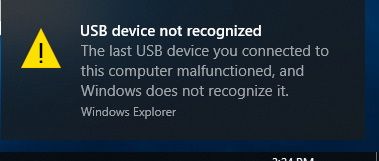
I then repeated the process with using the FRDM-K64 example with the same result.
The process I'm using to create the app on my board is at the end of this reply. (I don't seem to be able to append files to a reply).
Any ideas what's wrong? I'm trying to figure out what I'm not doing right. Next step is to kDiff through the projects and see where the differences are and if they would affect the operation of the USB and packet headers.
Thanx,
myke
2020.02.02 [MAP] - Original list of instructions deleted as the ones at the end of the thread are correct.
Alexis_A
- Mark as New
- Bookmark
- Subscribe
- Mute
- Subscribe to RSS Feed
- Permalink
- Report Inappropriate Content
Hello Myke,
Are you modifying the descriptor or adding another endpoint? I have tried the example standalone and works fine so I think something in the porting is interfering with the device enumeration.
If you're going to use the K22 it wil be better to start from the vcom_freertos examples and add the need it middlewares to this, this is done if you right click in the project ->SDK Management -> Manage SDK components
Best Regards,
Alexis Andalon
- Mark as New
- Bookmark
- Subscribe
- Mute
- Subscribe to RSS Feed
- Permalink
- Report Inappropriate Content
Hi Alexis,
Okay, after the last two days of pulling my hair out with boards loaded with the processor that I want to use, I have a USB CDC Device app working and I can recreate it on my test set up so I think the question is answered.
The solution was to look at the TWR-K21M120 - I was trying the FRDM-K22F and FRDM-K64F previously, both of which have a 2.7.0 SDK, (when I was reading through other people's suggestions, this seemed to be the right approach). The TWR-K21M120 is actually be Freedom/Tower board that is closest to the MK22FN1M0AVLL12 that I'm testing with and the MK22FN1M0AVMD12 that I want to use in the final product AND has the same SDK.
The TWR_k21M120 SDK is 2.3.1 (which is the same level as the SDK for MK22FN1M0Axxx12 parts that I am using) and the "twrk32f120m_dev_cdc_vcom_freertos" can be loaded directly into the MK22FN1M0AVLL12 and run that on the board I'm using for test (I didn't think that loading the binary file for an MK21 was possible on an MK22 due to the ID bits in the processors, but I'm definitely NOT complaining). After seeing the MK21 code run on my test board I tried the FRDM-K22F and FRDM-K64F apps and while they can be downloaded into the MK22FN1M0AVLL12 but don't seem to run; I know that the clocking & SRAM differences for the FRDM-K64F would not allow it to run but I don't know what the issue is wth the FRDM-K22F although it may be clocking there as well.
The secret seems to be to not look at the Freedom/Tower board that seem to best match the processor you want to use, but the ones that have the same SDK that is available for the processor you want to use.
A couple of points that I would appreciate you answering:
1. The "twrk32f120m_dev_cdc_vcom_freertos" create "osa" and "usb" folders that need to be copied into the final application and these options aren't available in the "New Project" dialog (even though they are in ths SDK .zip file) - why is that? Shouldn't all the options that I select when making the SDK before downloading it be available when I'm making a project?
2. I cannot figure out any way to generate the same "board" clock_config.c/.h files usign the clock tool in MCUXpresso IDE (which is why I copy them in directly - fortunately I'm using a 8MHz Crystal while the Tower board uses a ceramic resonator. Is there a document that explains how to do this?
So, based on five days plus of experimenting and trying to figure out what's happening for somebody looking to do what I did with a Kinetis part (I won't say that it is an easy process or would work with any other device), I've put down the steps I've come up with for getting my device to run the USB CDC Device application and using MCUXpresso IDE and I'm going to mark the question answered so that they don't skip over when they have the same question that I had.
Again, thanx for replying and suggesting fixes.
myke
This is based on the "twrk21f120m_dev_cdc_vcom_freertos" example project.
- Load in the SDK 2.3.1 for TWR-K21F120M
1. Create Project:
- MK22FN1M0Axxx12
Name: MK22_FreeRTOS_USB_#TWRK21
Device Packages: MK22FN1M0AVLL12
Operating Systems: FreeRTOS
Drivers: clock
- common
- flash
- gpio
- port
- sim
- smc
- sysmpu
- uart
CMSIS Drviers:
Utilities: assert
- debug_console
Middleware:
2. Setup USB and IO Pins
- Pin 10: USB0_DP USB_DP
- Pin 11: USB0_DM USB_DM
NOTE: No Clock Specification
3. Build and test.
4. Delete "FreeRTOSConfig.h" in "source" folder
5. Create "source folders" for:
- osa
- usb
And copy in the contents from the respective folders in "twrk21f120m_dev_cdc_vcom_freertos"
6. Replace in the "board" folder with the values from "twrk21f120m_dev_cdc_vcom_freertos" for:
- clock_config.c
- clock_config.h
NOTE: Have to figure out if I need to change the capacitor values for the clocks
7. Open "Properties"=>"C/C++ Build"=>"Settings"=>"Preprocessor" and match the following terms:
__REDLIB__
CPU_MK22FN1M0AVMC12_cm4
CPU_MK22FN1M0AVMC12
_DEBUG=1
USB_STACK_FREERTOS
USB_STACK_FREERTOS_HEAP_SIZE=32768
FSL_RTOS_FREE_RTOS
SDK_DEBUGCONSOLE=0
CR_INTEGER_PRINTF
PRINTF_FLOAT_ENABLE=0
__MCUXPRESSO
__USE_CMSIS
DEBUG
8. Open "Properties"=>"C/C++ Build"=>"Settings"=>"Includes" and match the following includes:
"${workspace_loc:/${ProjName}/board}"
"${workspace_loc:/${ProjName}/source}"
"${workspace_loc:/${ProjName}/}"
"${workspace_loc:/${ProjName}/usb/device/source/khci}"
"${workspace_loc:/${ProjName}/usb/include}"
"${workspace_loc:/${ProjName}/osa}"
"${workspace_loc:/${ProjName}/drivers}"
"${workspace_loc:/${ProjName}/CMSIS}"
"${workspace_loc:/${ProjName}/freertos/include}"
"${workspace_loc:/${ProjName}/freertos/portable}"
"${workspace_loc:/${ProjName}/utilities}"
"${workspace_loc:/${ProjName}/startup}"
"${workspace_loc:/${ProjName}/usb/device/class/cdc}"
"${workspace_loc:/${ProjName}/usb/device/class}"
"${workspace_loc:/${ProjName}/usb/device/source}"
"${workspace_loc:/${ProjName}/usb/device/include}"
9. Copy following files from "sources" of "twrk21f120m_dev_cdc_vcom_freertos" in to "source" of the new project
- configFreeRTOS.h
- usb_device_config.h
- usb_device_descriptor.c
- usb_device_descriptor.h
- virtual_com.c
- virtual_com.h
NOTE: "twrk21f120m_dev_cdc_vcom_freertos" has a "source" folder with the "semihost_hardfault.c" file, ignore
10. Modify "MK22_FreeRTOS_USB_#TWRK21.c" by "#ifdef" out the "main" method
11. Build and test
