
- Forums
- Product Forums
- General Purpose MicrocontrollersGeneral Purpose Microcontrollers
- i.MX Forumsi.MX Forums
- QorIQ Processing PlatformsQorIQ Processing Platforms
- Identification and SecurityIdentification and Security
- Power ManagementPower Management
- Wireless ConnectivityWireless Connectivity
- RFID / NFCRFID / NFC
- Advanced AnalogAdvanced Analog
- Neural Processing UnitsNeural Processing Units
- MCX Microcontrollers
- S32G
- S32K
- S32V
- MPC5xxx
- Other NXP Products
- S12 / MagniV Microcontrollers
- Powertrain and Electrification Analog Drivers
- Sensors
- Vybrid Processors
- Digital Signal Controllers
- 8-bit Microcontrollers
- ColdFire/68K Microcontrollers and Processors
- PowerQUICC Processors
- OSBDM and TBDML
- S32M
- S32Z/E
-
- Solution Forums
- Software Forums
- MCUXpresso Software and ToolsMCUXpresso Software and Tools
- CodeWarriorCodeWarrior
- MQX Software SolutionsMQX Software Solutions
- Model-Based Design Toolbox (MBDT)Model-Based Design Toolbox (MBDT)
- FreeMASTER
- eIQ Machine Learning Software
- Embedded Software and Tools Clinic
- S32 SDK
- S32 Design Studio
- GUI Guider
- Zephyr Project
- Voice Technology
- Application Software Packs
- Secure Provisioning SDK (SPSDK)
- Processor Expert Software
- Generative AI & LLMs
-
- Topics
- Mobile Robotics - Drones and RoversMobile Robotics - Drones and Rovers
- NXP Training ContentNXP Training Content
- University ProgramsUniversity Programs
- Rapid IoT
- NXP Designs
- SafeAssure-Community
- OSS Security & Maintenance
- Using Our Community
-
- Cloud Lab Forums
-
- Knowledge Bases
- ARM Microcontrollers
- i.MX Processors
- Identification and Security
- Model-Based Design Toolbox (MBDT)
- QorIQ Processing Platforms
- S32 Automotive Processing Platform
- Wireless Connectivity
- CodeWarrior
- MCUXpresso Suite of Software and Tools
- MQX Software Solutions
- RFID / NFC
- Advanced Analog
- Neural Processing Units
-
- NXP Tech Blogs
- Home
- :
- QorIQ Processing Platforms
- :
- QorIQ
- :
- JTAG load and execute u-boot on LS1043a and CodeWarrior with custom RCW/DRAM init
JTAG load and execute u-boot on LS1043a and CodeWarrior with custom RCW/DRAM init
- Subscribe to RSS Feed
- Mark Topic as New
- Mark Topic as Read
- Float this Topic for Current User
- Bookmark
- Subscribe
- Mute
- Printer Friendly Page
JTAG load and execute u-boot on LS1043a and CodeWarrior with custom RCW/DRAM init

- Mark as New
- Bookmark
- Subscribe
- Mute
- Subscribe to RSS Feed
- Permalink
- Report Inappropriate Content
Hi,
We have a LS1043a based custom board and we are adapting LSDK1909 to our customizations.
We currently have a working bl2.pbl (RCW+PBI+ATF_BL2) with our DRAM initialisation in QSPI. We cannot however pass the BL31 stage for an unknown reason.
We have read and tested the procedure described in AN12270 Bringing up Layerscape devices using CCS script and DRAM boot. But since we want to debug why our modifications doesn’t work on our custom board, we would like to use our own RCW+DRAM init code and not rely on Hard coded RCW. Also, our DRAM is different then LS1043ardb/aqds.
Once the ls1043a has booted (RCW+PBI and BL2: bl2_qspi.pbl) and we have manually loaded u-boot in DRAM (address 0x8200 0000); how can we execute code at 0x8200 0000 using CCS or python scripts ? (Setting ProgramCounter and execute ??)
We use CW4NET 2018.01 ARMv8 ISA and app notes we have found (such as AN4956 u-boot debug using CW) don't look compatible; LSDK1909 uses ATF as bootloader.)
Thanks.

 yipingwang
- Mark as New
- Bookmark
- Subscribe
- Mute
- Subscribe to RSS Feed
- Permalink
- Report Inappropriate Content
Hello frank_o,
Please create a bareboard project in CodeWarrior referring to section "3.2 Working with bareboard application" in C:\Freescale\CW4NET_v2018.01\CW_ARMv8\ARMv8\Help\Getting_Started_for_CW_ARMv8.pdf.
Please open "Target Initialization File" panel from Target Connections->LS1043A_RDB(1), modify "DDR Initialization" according to your custom board. The check whether the bare board project can run successfully in DDR memory on the target board.
Thanks,
Yiping
- Mark as New
- Bookmark
- Subscribe
- Mute
- Subscribe to RSS Feed
- Permalink
- Report Inappropriate Content
Hi,
Sorry to say but this was really not my question. I have read Getting_Started_for_CW_ARMv8.pdf and CWARMv8TM many times.
I didn't want CW to override my DDR settings. As I mentioned, "since we want to debug why our modifications doesn’t work on our custom board, we would like to use our own RCW+DRAM init code".
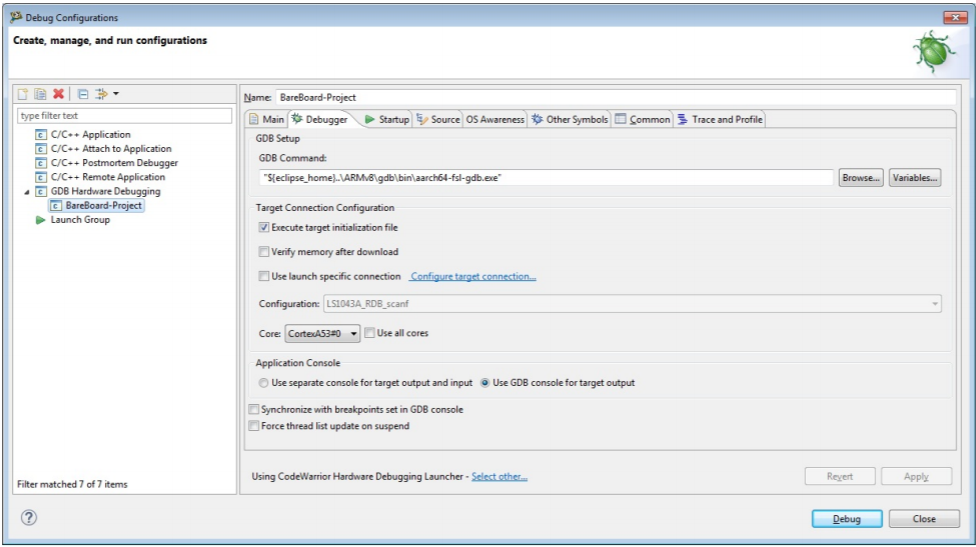
Anyway, I finally found the setting to disable target initialization when launching debug. When creating a barebone u-boot project.. Under GDB setting/Debugger tab, uncheck "Execute target initialization file"
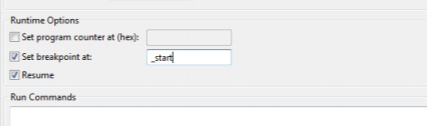
Also if it can help others, when using NXP's LSDK to generate u-boot code, don't load the EFL file in CW as it doesn't contains debug symbol. Use the file "u-boot" without extension. It's about 6-7MB in size. This one is compatible with CW debugger session. With this file, you will be able to tell CW to break execution at a particular function (_start) for example:
In my case, ATF was loading u-boot properly in RAM, so I unchecked "Load image" in the startup tab:

Hoping this can help others.
