- Forums
- Product Forums
- General Purpose MicrocontrollersGeneral Purpose Microcontrollers
- i.MX Forumsi.MX Forums
- QorIQ Processing PlatformsQorIQ Processing Platforms
- Identification and SecurityIdentification and Security
- Power ManagementPower Management
- Wireless ConnectivityWireless Connectivity
- RFID / NFCRFID / NFC
- Advanced AnalogAdvanced Analog
- MCX Microcontrollers
- S32G
- S32K
- S32V
- MPC5xxx
- Other NXP Products
- S12 / MagniV Microcontrollers
- Powertrain and Electrification Analog Drivers
- Sensors
- Vybrid Processors
- Digital Signal Controllers
- 8-bit Microcontrollers
- ColdFire/68K Microcontrollers and Processors
- PowerQUICC Processors
- OSBDM and TBDML
- S32M
- S32Z/E
-
- Solution Forums
- Software Forums
- MCUXpresso Software and ToolsMCUXpresso Software and Tools
- CodeWarriorCodeWarrior
- MQX Software SolutionsMQX Software Solutions
- Model-Based Design Toolbox (MBDT)Model-Based Design Toolbox (MBDT)
- FreeMASTER
- eIQ Machine Learning Software
- Embedded Software and Tools Clinic
- S32 SDK
- S32 Design Studio
- GUI Guider
- Zephyr Project
- Voice Technology
- Application Software Packs
- Secure Provisioning SDK (SPSDK)
- Processor Expert Software
- Generative AI & LLMs
-
- Topics
- Mobile Robotics - Drones and RoversMobile Robotics - Drones and Rovers
- NXP Training ContentNXP Training Content
- University ProgramsUniversity Programs
- Rapid IoT
- NXP Designs
- SafeAssure-Community
- OSS Security & Maintenance
- Using Our Community
-
- Cloud Lab Forums
-
- Knowledge Bases
- ARM Microcontrollers
- i.MX Processors
- Identification and Security
- Model-Based Design Toolbox (MBDT)
- QorIQ Processing Platforms
- S32 Automotive Processing Platform
- Wireless Connectivity
- CodeWarrior
- MCUXpresso Suite of Software and Tools
- MQX Software Solutions
- RFID / NFC
- Advanced Analog
-
- NXP Tech Blogs
I'm using hexiwear docking station for the probe, but it cannot be discovered by MCUxpress software, what's wrong?
- RSS フィードを購読する
- トピックを新着としてマーク
- トピックを既読としてマーク
- このトピックを現在のユーザーにフロートします
- ブックマーク
- 購読
- ミュート
- 印刷用ページ
I'm using hexiwear docking station for the probe, but it cannot be discovered by MCUxpress software, what's wrong?

- 新着としてマーク
- ブックマーク
- 購読
- ミュート
- RSS フィードを購読する
- ハイライト
- 印刷
- 不適切なコンテンツを報告
- 新着としてマーク
- ブックマーク
- 購読
- ミュート
- RSS フィードを購読する
- ハイライト
- 印刷
- 不適切なコンテンツを報告
Hi Eric,
You probably missed my previous email, now everything works, the Rapid IoT project can be compiled and I can run debugger.
Thanks for your help!
Charlie,
- 新着としてマーク
- ブックマーク
- 購読
- ミュート
- RSS フィードを購読する
- ハイライト
- 印刷
- 不適切なコンテンツを報告
Hi Eric,
I reinstalled everything again and this time it works, I think the debugger cannot be detected is due to my PC anti Virus software, it blocks an executable file like Linkerserver.exe(I don't remember the exact name).
Thank you very much for your help!
Charlie,
- 新着としてマーク
- ブックマーク
- 購読
- ミュート
- RSS フィードを購読する
- ハイライト
- 印刷
- 不適切なコンテンツを報告
Hi Eric,
I reinstalled everything and now the debugger can be detected, but the build of Rapid IoT has errors. See below:
18:23:22 **** Incremental Build of configuration Debug for project Rapid IoT Kit Out Of Box Demo ****
make -r -j4 all
make --no-print-directory pre-build
arm-none-eabi-gcc -E -x c -P -Iinclude "C:/Users/Hubert Huang/Documents/MCUXpressoIDE_10.2.1_795/workspace/SDK_2.3.0_RapidIoT_MK64F12/boards/rpk_k64f/rapid_iot_apps/atmosphere_app/MK64FN1M0xxx12_connectivity.lld" -o "C:/Users/Hubert Huang/Documents/MCUXpressoIDE_10.2.1_795/workspace/SDK_2.3.0_RapidIoT_MK64F12/boards/rpk_k64f/rapid_iot_apps/atmosphere_app/MK64FN1M0xxx12_connectivity.ld" -DgUseBootloaderLink_d=1 -DgUseInternalStorageLink_d=0 -DgUseNVMLink_d=0 -D__ram_vector_table__=1 -DgNVMSectorCountLink_d=32 -DgEraseNVMLink_d=0
make --no-print-directory main-build
Building file: C:/Users/Hubert Huang/Documents/MCUXpressoIDE_10.2.1_795/workspace/SDK_2.3.0_RapidIoT_MK64F12/middleware/atmosphere/user_buttons/user_buttons.c
Building file: C:/Users/Hubert Huang/Documents/MCUXpressoIDE_10.2.1_795/workspace/SDK_2.3.0_RapidIoT_MK64F12/middleware/atmosphere/ui_template/AtmosphereIoTSplashBlack.c
Building file: C:/Users/Hubert Huang/Documents/MCUXpressoIDE_10.2.1_795/workspace/SDK_2.3.0_RapidIoT_MK64F12/middleware/atmosphere/ui_template/ui_pagecontrol.c
Building file: C:/Users/Hubert Huang/Documents/MCUXpressoIDE_10.2.1_795/workspace/SDK_2.3.0_RapidIoT_MK64F12/middleware/atmosphere/ui_template/ui_template_iconlines.c
Invoking: MCU C Compiler
arm-none-eabi-gcc -std=gnu99 -DATMOSPHERE=1 -DRAPID_IOT -DTHREAD_BORDER_ROUTER_CONFIG -DSDK_DEBUGCONSOLE=1 -D__TARGET_FPU_VFP -DNDEBUG -DDEBUG -DUSE_RTOS -DFSL_RTOS_FREE_RTOS -DFRDM_K64F -DENABLE_RAM_VECTOR_TABLE=1 -DFRDM_K64F_KW41Z=1 -DFREEDOM -D__MCUXPRESSO -D__USE_CMSIS -DSDK_OS_FREE_RTOS -DCPU_MK64FN1M0VMD12 -D__REDLIB__ -DATMO_STATIC_CORE -I"../app_src" -I"../../../../../middleware/atmosphere" -I"../../../../../middleware/atmosphere/RapidIot_Base/devices/MK64F12" -I"../../../../../middleware/atmosphere/RapidIot_Base/middleware/authentication/a100x" -I"../../../../../middleware/atmosphere/RapidIot_Base/middleware/wireless/nwk_ip/base/interface" -I"../../../../../middleware/atmosphere/RapidIot_Base/middleware/wireless/nwk_ip/core/interface/thread" -I"../../../../../middleware/atmosphere/RapidIot_Base/middleware/lwip/port" -I"../../../../../middleware/atmosphere/RapidIot_Base/spi" -I"../../../../../middleware/atmosphere/RapidIot_Base/middleware/lwip/src/include" -I"../../../../../middleware/atmosphere/RapidIot_Base/middleware/wireless/nwk_ip/core/interface/modules" -I"../../../../../middleware/atmosphere/RapidIot_Base/middleware/wireless/nwk_ip/core/interface" -I"../../../../../middleware/atmosphere/RapidIot_Base/middleware/wireless/nwk_ip/examples/kinetis_host/inc" -I"../../../../../middleware/atmosphere/RapidIot_Base/middleware/wireless/bluetooth/ble_shell" -I"../../../../../middleware/atmosphere/RapidIot_Base/middleware/wireless/framework/TimersManager/Interface" -I"../../../../../middleware/atmosphere/RapidIot_Base/middleware/wireless/framework/TimersManager/Source" -I"../../../../../middleware/atmosphere/RapidIot_Base/middleware/wireless/framework/Shell/Interface" -I"../../../../../middleware/atmosphere/RapidIot_Base/middleware/wireless/framework/Shell/Source" -I"../../../../../middleware/atmosphere/RapidIot_Base/middleware/wireless/framework/SerialManager/Interface" -I"../../../../../middleware/atmosphere/RapidIot_Base/middleware/wireless/framework/SerialManager/Source" -I"../../../../../middleware/atmosphere/RapidIot_Base/middleware/wireless/framework/SerialManager/Source/SPI_Adapter" -I"../../../../../middleware/atmosphere/RapidIot_Base/middleware/wireless/framework/Reset" -I"../../../../../middleware/atmosphere/RapidIot_Base/middleware/wireless/framework/Panic/Interface" -I"../../../../../middleware/atmosphere/RapidIot_Base/middleware/wireless/framework/Panic/Source" -I"../../../../../middleware/atmosphere/RapidIot_Base/middleware/wireless/framework/OSAbstraction/Source" -I"../../../../../middleware/atmosphere/RapidIot_Base/middleware/wireless/framework/ModuleInfo" -I"../../../../../middleware/atmosphere/RapidIot_Base/middleware/wireless/framework/Messaging/Interface" -I"../../../../../middleware/atmosphere/RapidIot_Base/middleware/wireless/framework/MemManager/Interface" -I"../../../../../middleware/atmosphere/RapidIot_Base/middleware/wireless/framework/Lists" -I"../../../../../middleware/atmosphere/RapidIot_Base/middleware/wireless/framework/LED/Interface" -I"../../../../../middleware/atmosphere/RapidIot_Base/middleware/wireless/framework/Keyboard/Interface" -I"../../../../../middleware/atmosphere/RapidIot_Base/middleware/wireless/framework/GPIO" -I"../../../../../middleware/atmosphere/RapidIot_Base/middleware/wireless/framework/FunctionLib" -I"../../../../../middleware/atmosphere/RapidIot_Base/middleware/wireless/framework/FSCI/Interface" -I"../../../../../middleware/atmosphere/RapidIot_Base/middleware/wireless/framework/Common/rtos/FreeRTOS/config" -I"../../../../../middleware/atmosphere/RapidIot_Base/middleware/wireless/framework/Common" -I"../../../../../middleware/atmosphere/RapidIot_Base/middleware/wireless/framework/OSAbstraction/Interface" -I"../../../../../middleware/atmosphere/RapidIot_Base/middleware/wireless/nwk_ip/examples/border_router/config" -I"../../../../../middleware/atmosphere/RapidIot_Base/middleware/wireless/nwk_ip/examples/common" -I"../../../../../middleware/atmosphere/RapidIot_Base/CMSIS" -I"../../../../../middleware/atmosphere/RapidIot_Base/rtos/freertos/Source/include" -I"../../../../../middleware/atmosphere/RapidIot_Base/rtos/freertos/Source/portable/GCC/ARM_CM4F" -I"../../../../../middleware/atmosphere/RapidIot_Base/source" -I"../../../../../middleware/atmosphere/RapidIot_Base/drivers" -I"../../../../../middleware/atmosphere/RapidIot_Base/board" -I"../../../../../middleware/atmosphere/RapidIot_Base/CMSIS_driver" -I"../../../../../middleware/atmosphere/emWin" -I"../../../../../middleware/atmosphere/emWin/Config" -I"../../../../../middleware/atmosphere/emWin/GUI/Core" -I"../../../../../middleware/atmosphere/emWin/GUI/Widget" -I"../../../../../middleware/atmosphere/emWin/GUI/DisplayDriver" -I"../../../../../middleware/atmosphere/emWin/GUI/WM" -I"../../../../../middleware/atmosphere/board" -I"../../../../../middleware/atmosphere/adc" -I"../../../../../middleware/atmosphere/board" -I../../../../../middleware/atmosphere/adc -I../../../../../middleware/atmosphere/battery -I../../../../../middleware/atmosphere/ble -I../../../../../middleware/atmosphere/block -I../../../../../middleware/atmosphere/board -I../../../../../middleware/atmosphere/buzzer -I../../../../../middleware/atmosphere/ccs811 -I../../../../../middleware/atmosphere/cloud -I../../../../../middleware/atmosphere/core -I../../../../../middleware/atmosphere/datetime -I../../../../../middleware/atmosphere/emWin -I../../../../../middleware/atmosphere/ens210 -I../../../../../middleware/atmosphere/filesystem -I../../../../../middleware/atmosphere/fxas21002 -I../../../../../middleware/atmosphere/fxos8700 -I../../../../../middleware/atmosphere/gpio -I../../../../../middleware/atmosphere/i2c -I../../../../../middleware/atmosphere/interval -I../../../../../middleware/atmosphere/mpl3115 -I../../../../../middleware/atmosphere/pwm -I../../../../../middleware/atmosphere/ringbuffer -I../../../../../middleware/atmosphere/spi -I../../../../../middleware/atmosphere/sx9500 -I../../../../../middleware/atmosphere/thread -I../../../../../middleware/atmosphere/tsl2572 -I../../../../../middleware/atmosphere/uart -I../../../../../middleware/atmosphere/ui_template -I../../../../../middleware/atmosphere/user_buttons -O0 -fno-common -g -Wall -Wno-missing-braces -c -ffunction-sections -fdata-sections -ffreestanding -fno-builtin -imacros "../../../../../middleware/atmosphere/RapidIot_Base/middleware/wireless/nwk_ip/examples/border_router/config/config.h" -mcpu=cortex-m4 -mfpu=fpv4-sp-d16 -mfloat-abi=hard -mthumb -D__REDLIB__ -specs=redlib.specs -MMD -MP -MF"user_buttons/user_buttons.d" -MT"user_buttons/user_buttons.d" -o "user_buttons/user_buttons.o" "C:/Users/Hubert Huang/Documents/MCUXpressoIDE_10.2.1_795/workspace/SDK_2.3.0_RapidIoT_MK64F12/middleware/atmosphere/user_buttons/user_buttons.c"
cc1.exe: fatal error: ../../../../../middleware/atmosphere/RapidIot_Base/middleware/wireless/nwk_ip/examples/border_router/config/config.h: No such file or directory
Invoking: MCU C Compiler
compilation terminated.
arm-none-eabi-gcc -std=gnu99 -DATMOSPHERE=1 -DRAPID_IOT -DTHREAD_BORDER_ROUTER_CONFIG -DSDK_DEBUGCONSOLE=1 -D__TARGET_FPU_VFP -DNDEBUG -DDEBUG -DUSE_RTOS -DFSL_RTOS_FREE_RTOS -DFRDM_K64F -DENABLE_RAM_VECTOR_TABLE=1 -DFRDM_K64F_KW41Z=1 -DFREEDOM -D__MCUXPRESSO -D__USE_CMSIS -DSDK_OS_FREE_RTOS -DCPU_MK64FN1M0VMD12 -D__REDLIB__ -DATMO_STATIC_CORE -I"../app_src" -I"../../../../../middleware/atmosphere" -I"../../../../../middleware/atmosphere/RapidIot_Base/devices/MK64F12" -I"../../../../../middleware/atmosphere/RapidIot_Base/middleware/authentication/a100x" -I"../../../../../middleware/atmosphere/RapidIot_Base/middleware/wireless/nwk_ip/base/interface" -I"../../../../../middleware/atmosphere/RapidIot_Base/middleware/wireless/nwk_ip/core/interface/thread" -I"../../../../../middleware/atmosphere/RapidIot_Base/middleware/lwip/port" -I"../../../../../middleware/atmosphere/RapidIot_Base/spi" -I"../../../../../middleware/atmosphere/RapidIot_Base/middleware/lwip/src/include" -I"../../../../../middleware/atmosphere/RapidIot_Base/middleware/wireless/nwk_ip/core/interface/modules" -I"../../../../../middleware/atmosphere/RapidIot_Base/middleware/wireless/nwk_ip/core/interface" -I"../../../../../middleware/atmosphere/RapidIot_Base/middleware/wireless/nwk_ip/examples/kinetis_host/inc" -I"../../../../../middleware/atmosphere/RapidIot_Base/middleware/wireless/bluetooth/ble_shell" -I"../../../../../middleware/atmosphere/RapidIot_Base/middleware/wireless/framework/TimersManager/Interface" -I"../../../../../middleware/atmosphere/RapidIot_Base/middleware/wireless/framework/TimersManager/Source" -I"../../../../../middleware/atmosphere/RapidIot_Base/middleware/wireless/framework/Shell/Interface" -I"../../../../../middleware/atmosphere/RapidIot_Base/middleware/wireless/framework/Shell/Source" -I"../../../../../middleware/atmosphere/RapidIot_Base/middleware/wireless/framework/SerialManager/Interface" -I"../../../../../middleware/atmosphere/RapidIot_Base/middleware/wireless/framework/SerialManager/Source" -I"../../../../../middleware/atmosphere/RapidIot_Base/middleware/wireless/framework/SerialManager/Source/SPI_Adapter" -I"../../../../../middleware/atmosphere/RapidIot_Base/middleware/wireless/framework/Reset" -I"../../../../../middleware/atmosphere/RapidIot_Base/middleware/wireless/framework/Panic/Interface" -I"../../../../../middleware/atmosphere/RapidIot_Base/middleware/wireless/framework/Panic/Source" -I"../../../../../middleware/atmosphere/RapidIot_Base/middleware/wireless/framework/OSAbstraction/Source" -I"../../../../../middleware/atmosphere/RapidIot_Base/middleware/wireless/framework/ModuleInfo" -I"../../../../../middleware/atmosphere/RapidIot_Base/middleware/wireless/framework/Messaging/Interface" -I"../../../../../middleware/atmosphere/RapidIot_Base/middleware/wireless/framework/MemManager/Interface" -I"../../../../../middleware/atmosphere/RapidIot_Base/middleware/wireless/framework/Lists" -I"../../../../../middleware/atmosphere/RapidIot_Base/middleware/wireless/framework/LED/Interface" -I"../../../../../middleware/atmosphere/RapidIot_Base/middleware/wireless/framework/Keyboard/Interface" -I"../../../../../middleware/atmosphere/RapidIot_Base/middleware/wireless/framework/GPIO" -I"../../../../../middleware/atmosphere/RapidIot_Base/middleware/wireless/framework/FunctionLib" -I"../../../../../middleware/atmosphere/RapidIot_Base/middleware/wireless/framework/FSCI/Interface" -I"../../../../../middleware/atmosphere/RapidIot_Base/middleware/wireless/framework/Common/rtos/FreeRTOS/config" -I"../../../../../middleware/atmosphere/RapidIot_Base/middleware/wireless/framework/Common" -I"../../../../../middleware/atmosphere/RapidIot_Base/middleware/wireless/framework/OSAbstraction/Interface" -I"../../../../../middleware/atmosphere/RapidIot_Base/middleware/wireless/nwk_ip/examples/border_router/config" -I"../../../../../middleware/atmosphere/RapidIot_Base/middleware/wireless/nwk_ip/examples/common" -I"../../../../../middleware/atmosphere/RapidIot_Base/CMSIS" -I"../../../../../middleware/atmosphere/RapidIot_Base/rtos/freertos/Source/include" -I"../../../../../middleware/atmosphere/RapidIot_Base/rtos/freertos/Source/portable/GCC/ARM_CM4F" -I"../../../../../middleware/atmosphere/RapidIot_Base/source" -I"../../../../../middleware/atmosphere/RapidIot_Base/drivers" -I"../../../../../middleware/atmosphere/RapidIot_Base/board" -I"../../../../../middleware/atmosphere/RapidIot_Base/CMSIS_driver" -I"../../../../../middleware/atmosphere/emWin" -I"../../../../../middleware/atmosphere/emWin/Config" -I"../../../../../middleware/atmosphere/emWin/GUI/Core" -I"../../../../../middleware/atmosphere/emWin/GUI/Widget" -I"../../../../../middleware/atmosphere/emWin/GUI/DisplayDriver" -I"../../../../../middleware/atmosphere/emWin/GUI/WM" -I"../../../../../middleware/atmosphere/board" -I"../../../../../middleware/atmosphere/adc" -I"../../../../../middleware/atmosphere/board" -I../../../../../middleware/atmosphere/adc -I../../../../../middleware/atmosphere/battery -I../../../../../middleware/atmosphere/ble -I../../../../../middleware/atmosphere/block -I../../../../../middleware/atmosphere/board -I../../../../../middleware/atmosphere/buzzer -I../../../../../middleware/atmosphere/ccs811 -I../../../../../middleware/atmosphere/cloud -I../../../../../middleware/atmosphere/core -I../../../../../middleware/atmosphere/datetime -I../../../../../middleware/atmosphere/emWin -I../../../../../middleware/atmosphere/ens210 -I../../../../../middleware/atmosphere/filesystem -I../../../../../middleware/atmosphere/fxas21002 -I../../../../../middleware/atmosphere/fxos8700 -I../../../../../middleware/atmosphere/gpio -I../../../../../middleware/atmosphere/i2c -I../../../../../middleware/atmosphere/interval -I../../../../../middleware/atmosphere/mpl3115 -I../../../../../middleware/atmosphere/pwm -I../../../../../middleware/atmosphere/ringbuffer -I../../../../../middleware/atmosphere/spi -I../../../../../middleware/atmosphere/sx9500 -I../../../../../middleware/atmosphere/thread -I../../../../../middleware/atmosphere/tsl2572 -I../../../../../middleware/atmosphere/uart -I../../../../../middleware/atmosphere/ui_teInvoking: MCU C Compiler
mplate -I../../../../../middleware/atmosphere/user_buttons -O0 -fno-common -g -Wall -Wno-missing-braces -c -ffunction-sections -fdata-sections -ffreestanding -fno-builtin -imacros "../../../../../middleware/atmosphere/RapidIot_Base/middleware/wireless/nwk_ip/examples/border_router/config/config.h" -mcpu=cortex-m4 -mfpu=fpv4-sp-d16 -mfloat-abi=hard -mthumb -D__REDLIB__ -specs=redlib.specs -MMD -MP -MF"ui_template/AtmosphereIoTSplashBlack.d" -MT"ui_template/AtmosphereIoTSplashBlack.d" -o "ui_template/AtmosphereIoTSplashBlack.o" "C:/Users/Hubert Huang/Documents/MCUXpressoIDE_10.2.1_795/workspace/SDK_2.3.0_RapidIoT_MK64F12/middleware/atmosphere/ui_template/AtmosphereIoTSplashBlack.c"
Invoking: MCU C Compiler
make[1]: *** [user_buttons/user_buttons.o] Error 1
make[1]: *** Waiting for unfinished jobs....
arm-none-eabi-gcc -std=gnu99 -DATMOSPHERE=1 -DRAPID_IOT -DTHREAD_BORDER_ROUTER_CONFIG -DSDK_DEBUGCONSOLE=1 -D__TARGET_FPU_VFP -DNDEBUG -DDEBUG -DUSE_RTOS -DFSL_RTOS_FREE_RTOS -DFRDM_K64F -DENABLE_RAM_VECTOR_TABLE=1 -DFRDM_K64F_KW41Z=1 -DFREEDOM -D__MCUXPRESSO -D__USE_CMSIS -DSDK_OS_FREE_RTOS -DCPU_MK64FN1M0VMD12 -D__REDLIB__ -DATMO_STATIC_CORE -I"../app_src" -I"../../../../../middleware/atmosphere" -I"../../../../../middleware/atmosphere/RapidIot_Base/devices/MK64F12" -I"../../../../../middleware/atmosphere/RapidIot_Base/middleware/authentication/a100x" -I"../../../../../middleware/atmosphere/RapidIot_Base/middleware/wireless/nwk_ip/base/interface" -I"../../../../../middleware/atmosphere/RapidIot_Base/middleware/wireless/nwk_ip/core/interface/thread" -I"../../../../../middleware/atmosphere/RapidIot_Base/middleware/lwip/port" -I"../../../../../middleware/atmosphere/RapidIot_Base/spi" -I"../../../../../middleware/atmosphere/RapidIot_Base/middleware/lwip/src/include" -I"../../../../../middleware/atmosphere/RapidIot_Base/middleware/wireless/nwk_ip/core/interface/modules" -I"../../../../../middleware/atmosphere/RapidIot_Base/middleware/wireless/nwk_ip/core/interface" -I"../../../../../middleware/atmosphere/RapidIot_Base/middleware/wireless/nwk_ip/examples/kinetis_host/inc" -I"../../../../../middleware/atmosphere/RapidIot_Base/middleware/wireless/bluetooth/ble_shell" -I"../../../../../middleware/atmosphere/RapidIot_Base/middleware/wireless/framework/TimersManager/Interface" -I"../../../../../middleware/atmosphere/RapidIot_Base/middleware/wireless/framework/TimersManager/Source" -I"../../../../../middleware/atmosphere/RapidIot_Base/middleware/wireless/framework/Shell/Interface" -I"../../../../../middleware/atmosphere/RapidIot_Base/middleware/wireless/framework/Shell/Source" -I"../../../../../middleware/atmosphere/RapidIot_Base/middleware/wireless/framework/SerialManager/Interface" -I"../../../../../middleware/atmosphere/RapidIot_Base/middleware/wireless/framework/SerialManager/Source" -I"../../../../../middleware/atmosphere/RapidIot_Base/middleware/wireless/framework/SerialManager/Source/SPI_Adapter" -I"../../../../../middleware/atmosphere/RapidIot_Base/middleware/wireless/framework/Reset" -I"../../../../../middleware/atmosphere/RapidIot_Base/middleware/wireless/framework/Panic/Interface" -I"../../../../../middleware/atmosphere/RapidIot_Base/middleware/wireless/framework/Panic/Source" -I"../../../../../middleware/atmosphere/RapidIot_Base/middleware/wireless/framework/OSAbstraction/Source" -I"../../../../../middleware/atmosphere/RapidIot_Base/middleware/wireless/framework/ModuleInfo" -I"../../../../../middleware/atmosphere/RapidIot_Base/middleware/wireless/framework/Messaging/Interface" -I"../../../../../middleware/atmosphere/RapidIot_Base/middleware/wireless/framework/MemManager/Interface" -I"../../../../../middleware/atmosphere/RapidIot_Base/middleware/wireless/framework/Lists" -I"../../../../../middleware/atmosphere/RapidIot_Base/middleware/wireless/framework/LED/Interface" -I"../../../../../middleware/atmosphere/RapidIot_Base/middleware/wireless/framework/Keyboard/Interface" -I"../../../../../middleware/atmosphere/RapidIot_Base/middleware/wireless/framework/GPIO" -I"../../../../../middleware/atmosphere/RapidIot_Base/middleware/wireless/framework/FunctionLib" -I"../../../../../middleware/atmosphere/RapidIot_Base/middleware/wireless/framework/FSCI/Interface" -I"../../../../../middleware/atmosphere/RapidIot_Base/middleware/wireless/framework/Common/rtos/FreeRTOS/config" -I"../../../../../middleware/atmosphere/RapidIot_Base/middleware/wireless/framework/Common" -I"../../../../../middleware/atmosphere/RapidIot_Base/middleware/wireless/framework/OSAbstraction/Interface" -I"../../../../../middleware/atmosphere/RapidIot_Base/middleware/wireless/nwk_ip/examples/border_router/config" -I"../../../../../middleware/atmosphere/RapidIot_Base/middleware/wireless/nwk_ip/examples/common" -I"../../../../../middleware/atmosphere/RapidIot_Base/CMSIS" -I"../../../../../middleware/atmosphere/RapidIot_Base/rtos/freertos/Source/include" -I"../../../../../middleware/atmosphere/RapidIot_Base/rtos/freertos/Source/portable/GCC/ARM_CM4F" -I"../../../../../middleware/atmosphere/RapidIot_Base/source" -I"../../../../../middleware/atmosphere/RapidIot_Base/drivers" -I"../../../../../middleware/atmosphere/RapidIot_Base/board" -I"../../../../../middleware/atmosphere/RapidIot_Base/CMSIS_driver" -I"../../../../../middleware/atmosphere/emWin" -I"../../../../../middleware/atmosphere/emWin/Config" -I"../../../../../middleware/atmosphere/emWin/GUI/Core" -I"../../../../../middleware/atmosphere/emWin/GUI/Widget" -I"../../../../../middleware/atmosphere/emWin/GUI/DisplayDriver" -I"../../../../../middleware/atmosphere/emWin/GUI/WM" -I"../../../../../middleware/atmosphere/board" -I"../../../../../middleware/atmosphere/adc" -I"../../../../../middleware/atmosphere/board" -I../../../../../middleware/atmosphere/adc -I../../../../../middleware/atmosphere/battery -I../../../../../middleware/atmosphere/ble -I../../../../../middleware/atmosphere/block -I../../../../../middleware/atmosphere/board -I../../../../../middleware/atmosphere/buzzer -I../../../../../middleware/atmosphere/ccs811 -I../../../../../middleware/atmosphere/cloud -I../../../../../middleware/atmosphere/core -I../../../../../middleware/atmosphere/datetime -I../../../../../middleware/atmosphere/emWin -I../../../../../middleware/atmosphere/ens210 -I../../../../../middleware/atmosphere/filesystem -I../../../../../middleware/atmosphere/fxas21002 -I../../../../../middleware/atmosphere/fxos8700 -I../../../../../middleware/atmosphere/gpio -I../../../../../middleware/atmosphere/i2c -I../../../../../middleware/atmosphere/interval -I../../../../../middleware/atmosphere/mpl3115 -I../../../../../middleware/atmosphere/pwm -I../../../../../middleware/atmosphere/ringbuffer -I../../../../../middleware/atmosphere/spi -I../../../../../middleware/atmosphere/sx9500 -I../../../../../middleware/atmosphere/thread -I../../../../../middleware/atmosphere/tsl2572 -I../../../../../middleware/atmosphere/uart -I../../../../../middleware/atmosphere/ui_template -I../../../../../middleware/atmosphere/user_buttons -O0 -fno-common -g -Wall -Wno-missing-braces -c -ffunction-sections -fdata-sections -ffreestanding -fno-builtin -imacros "../../../../../middleware/atmosphere/RapidIot_Base/middleware/wireless/nwk_ip/examples/border_router/config/config.h" -mcpu=cortex-m4 -mfpu=fpv4-sp-d16 -mfloat-abi=hard -mthumb -D__REDLIB__ -specs=redlib.specs -MMD -MP -MF"ui_template/ui_template_iconlines.d" -MT"ui_template/ui_template_iconlines.d" -o "ui_template/ui_template_iconlines.o" "C:/Users/Hubert Huang/Documents/MCUXpressoIDE_10.2.1_795/workspace/SDK_2.3.0_RapidIoT_MK64F12/middleware/atmosphere/ui_template/ui_template_iconlines.c"
arm-none-eabi-gcc -std=gnu99 -DATMOSPHERE=1 -DRAPID_IOT -DTHREAD_BORDER_ROUTER_CONFIG -DSDK_DEBUGCONSOLE=1 -D__TARGET_FPU_VFP -DNDEBUG -DDEBUG -DUSE_RTOS -DFSL_RTOS_FREE_RTOS -DFRDM_K64F -DENABLE_RAM_VECTOR_TABLE=1 -DFRDM_K64F_KW41Z=1 -DFREEDOM -D__MCUXPRESSO -D__USE_CMSIS -DSDK_OS_FREE_RTOS -DCPU_MK64FN1M0VMD12 -D__REDLIB__ -DATMO_STATIC_CORE -I"../app_src" -I"../../../../../middleware/atmosphere" -I"../../../../../middleware/atmosphere/RapidIot_Base/devices/MK64F12" -I"../../../../../middleware/atmosphere/RapidIot_Base/middleware/authentication/a100x" -I"../../../../../middleware/atmosphere/RapidIot_Base/middleware/wireless/nwk_ip/base/interface" -I"../../../../../middleware/atmosphere/RapidIot_Base/middleware/wireless/nwk_ip/core/interface/thread" -I"../../../../../middleware/atmosphere/RapidIot_Base/middleware/lwip/port" -I"../../../../../middleware/atmosphere/RapidIot_Base/spi" -I"../../../../../middleware/atmosphere/RapidIot_Base/middleware/lwip/src/include" -I"../../../../../middleware/atmosphere/RapidIot_Base/middleware/wireless/nwk_ip/core/interface/modules" -I"../../../../../middleware/atmosphere/RapidIot_Base/middleware/wireless/nwk_ip/core/interface" -I"../../../../../middleware/atmosphere/RapidIot_Base/middleware/wireless/nwk_ip/examples/kinetis_host/inc" -I"../../../../../middleware/atmosphere/RapidIot_Base/middleware/wireless/bluetooth/ble_shell" -I"../../../../../middleware/atmosphere/RapidIot_Base/middleware/wireless/framework/TimersManager/Interface" -I"../../../../../middleware/atmosphere/RapidIot_Base/middleware/wireless/framework/TimersManager/Source" -I"../../../../../middleware/atmosphere/RapidIot_Base/middleware/wireless/framework/Shell/Interface" -I"../../../../../middleware/atmosphere/RapidIot_Base/middleware/wireless/framework/Shell/Source" -I"../../../../../middleware/atmosphere/RapidIot_Base/middleware/wireless/framework/SerialManager/Interface" -I"../../../../../middleware/atmosphere/RapidIot_Base/middleware/wireless/framework/SerialManager/Source" -I"../../../../../middleware/atmosphere/RapidIot_Base/middleware/wireless/framework/SerialManager/Source/SPI_Adapter" -I"../../../../../middleware/atmosphere/RapidIot_Base/middleware/wireless/framework/Reset" -I"../../../../../middleware/atmosphere/RapidIot_Base/middleware/wireless/framework/Panic/Interface" -I"../../../../../middleware/atmosphere/RapidIot_Base/middleware/wireless/framework/Panic/Source" -I"../../../../../middleware/atmosphere/RapidIot_Base/middleware/wireless/framework/OSAbstraction/Source" -I"../../../../../middleware/atmosphere/RapidIot_Base/middleware/wireless/framework/ModuleInfo" -I"../../../../../middleware/atmosphere/RapidIot_Base/middleware/wireless/framework/Messaging/Interface" -I"../../../../../middleware/atmosphere/RapidIot_Base/middleware/wireless/framework/MemManager/Interface" -I"../../../../../middleware/atmosphere/RapidIot_Base/middleware/wireless/framework/Lists" -I"../../../../../middleware/atmosphere/RapidIot_Base/middleware/wireless/framework/LED/Interface" -I"../../../../../middleware/atmosphere/RapidIot_Base/middleware/wireless/framework/Keyboard/Interface" -I"../../../../../middleware/atmosphere/RapidIot_Base/middleware/wireless/framework/GPIO" -I"../../../../../middleware/atmosphere/RapidIot_Base/middleware/wireless/framework/FunctionLib" -I"../../../../../middleware/atmosphere/RapidIot_Base/middleware/wireless/framework/FSCI/Interface" -I"../../../../../middleware/atmosphere/RapidIot_Base/middleware/wireless/framework/Common/rtos/FreeRTOS/config" -I"../../../../../middleware/atmosphere/RapidIot_Base/middleware/wireless/framework/Common" -I"../../../../../middleware/atmosphere/RapidIot_Base/middleware/wireless/framework/OSAbstraction/Interface" -I"../../../../../middleware/atmosphere/RapidIot_Base/middleware/wireless/nwk_ip/examples/border_router/config" -I"../../../../../middleware/atmosphere/RapidIot_Base/middleware/wireless/nwk_ip/examples/common" -I"../../../../../middleware/atmosphere/RapidIot_Base/CMSIS" -I"../../../../../middleware/atmosphere/RapidIot_Base/rtos/freertos/Source/include" -I"../../../../../middleware/atmosphere/RapidIot_Base/rtos/freertos/Source/portable/GCC/ARM_CM4F" -I"../../../../../middleware/atmosphere/RapidIot_Base/source" -I"../../../../../middleware/atmosphere/RapidIot_Base/drivers" -I"../../../../../middleware/atmosphere/RapidIot_Base/board" -I"../../../../../middleware/atmosphere/RapidIot_Base/CMSIS_driver" -I"../../../../../middleware/atmosphere/emWin" -I"../../../../../middleware/atmosphere/emWin/Config" -I"../../../../../middleware/atmosphere/emWin/GUI/Core" -I"../../../../../middleware/atmosphere/emWin/GUI/Widget" -I"../../../../../middleware/atmosphere/emWin/GUI/DisplayDriver" -I"../../../../../middleware/atmosphere/emWin/GUI/WM" -I"../../../../../middleware/atmosphere/board" -I"../../../../../middleware/atmosphere/adc" -I"../../../../../middleware/atmosphere/board" -I../../../../../middleware/atmosphere/adc -I../../../../../middleware/atmosphere/battery -I../../../../../middleware/atmosphere/ble -I../../../../../middleware/atmosphere/block -I../../../../../middleware/atmosphere/board -I../../../../../middleware/atmosphere/buzzer -I../../../../../middleware/atmosphere/ccs811 -I../../../../../middleware/atmosphere/cloud -I../../../../../middleware/atmosphere/core -I../../../../../middleware/atmosphere/datetime -I../../../../../middleware/atmosphere/emWin -I../../../../../middleware/atmosphere/ens210 -I../../../../../middleware/atmosphere/filesystem -I../../../../../middleware/atmosphere/fxas21002 -I../../../../../middleware/atmosphere/fxos8700 -I../../../../../middleware/atmosphere/gpio -I../../../../../middleware/atmosphere/i2c -I../../../../../middleware/atmosphere/interval -I../../../../../middleware/atmosphere/mpl3115 -I../../../../../middleware/atmosphere/pwm -I../../../../../middleware/atmosphere/ringbuffer -I../../../../../middleware/atmosphere/spi -I../../../../../middleware/atmosphere/sx9500 -I../../../../../middleware/atmosphere/thread -I../../../../../middleware/atmosphere/tsl2572 -I../../../../../middleware/atmosphere/uart -I../../../../../middleware/atmosphere/ui_template -I../../../../../middleware/atmosphere/user_buttons -O0 -fno-common -g -Wall -Wno-missing-braces -c -ffunction-sections -fdata-sections -ffreestanding -fno-builtin -imacros "../../../../../middleware/atmosphere/RapidIot_Base/middleware/wireless/nwk_ip/examples/border_router/config/config.h" -mcpu=cortex-m4 -mfpu=fpv4-sp-d16 -mfloat-abi=hard -mthumb -D__REDLIB__ -specs=redlib.specs -MMD -MP -MF"ui_template/ui_pagecontrol.d" -MT"ui_template/ui_pagecontrol.d" -o "ui_template/ui_pagecontrol.o" "C:/Users/Hubert Huang/Documents/MCUXpressoIDE_10.2.1_795/workspace/SDK_2.3.0_RapidIoT_MK64F12/middleware/atmosphere/ui_template/ui_pagecontrol.c"
cc1.exe: fatal error: ../../../../../middleware/atmosphere/RapidIot_Base/middleware/wireless/nwk_ip/examples/border_router/config/config.h: No such file or directory
compilation terminated.
cc1.exe: fatal error: ../../../../../middleware/atmosphere/RapidIot_Base/middleware/wireless/nwk_ip/examples/border_router/config/config.h: No such file or directory
compilation terminated.
make[1]: *** [ui_template/AtmosphereIoTSplashBlack.o] Error 1
make[1]: *** [ui_template/ui_template_iconlines.o] Error 1
cc1.exe: fatal error: ../../../../../middleware/atmosphere/RapidIot_Base/middleware/wireless/nwk_ip/examples/border_router/config/config.h: No such file or directory
compilation terminated.
make[1]: *** [ui_template/ui_pagecontrol.o] Error 1
make: *** [all] Error 2
18:23:24 Build Finished (took 2s.289ms)

 frq05186
- 新着としてマーク
- ブックマーク
- 購読
- ミュート
- RSS フィードを購読する
- ハイライト
- 印刷
- 不適切なコンテンツを報告
Hi Charlie,
I could not reproduce your issue exactly sofar but this look like the error occuring when you import a project and omit to uncheck 'Copy project into workspace'. I assume you did uncheck it, but mentionning it here just in case
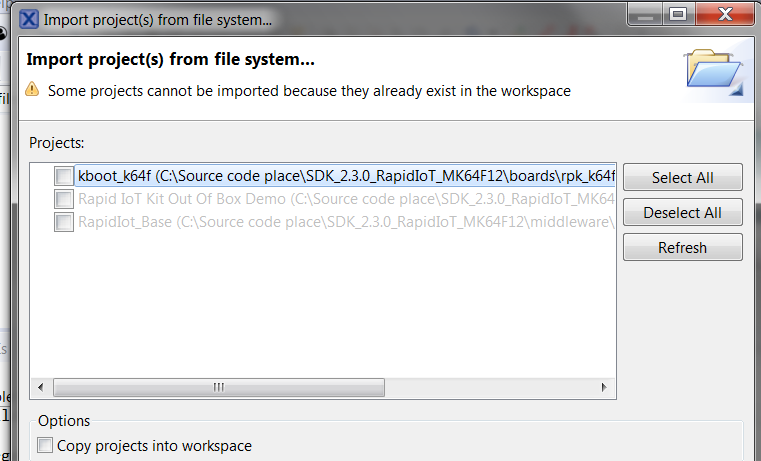
I will further do experiments to try ending up with the same log as you had.
Eric
frq05186
- 新着としてマーク
- ブックマーク
- 購読
- ミュート
- RSS フィードを購読する
- ハイライト
- 印刷
- 不適切なコンテンツを報告
Hi Charlie,
Looking back at your orginal post I detected that those were the projects in your explorer.
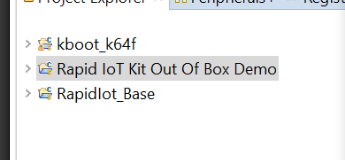
== > How did you import them ?
- If you followed the user guide and import the project from SDK, you shall have only 'Hellow World' project visible.
- From the screenshot I assume you import the files refering to SDK folder.
The Out of Box Demo files will be removed from the SDK as they are available from the Studio in a few days.
The Rapid IoT Studio service is unavailable for a couple of hours right now, but has soon as it get back live I advice doing the following:
- Delete the 3 projects and file from your work environment
- Compile Out Of Box application and download files (Hammer and arrow in box icons)
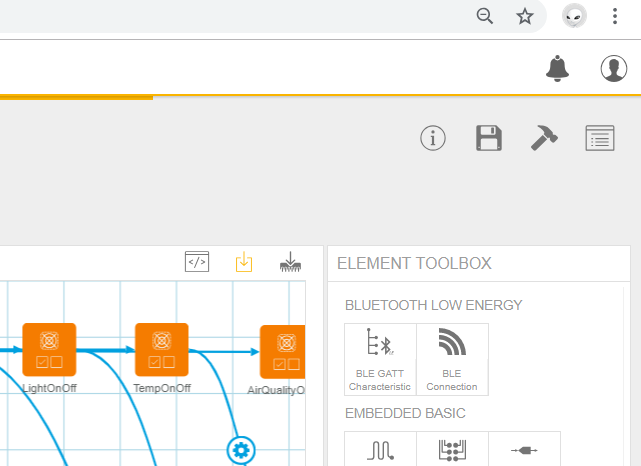
- Unzip the files clode to the root (c:\temps\OOB for example)
- Import this folder (from file system) in MCUXpresso.
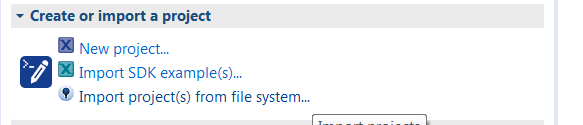
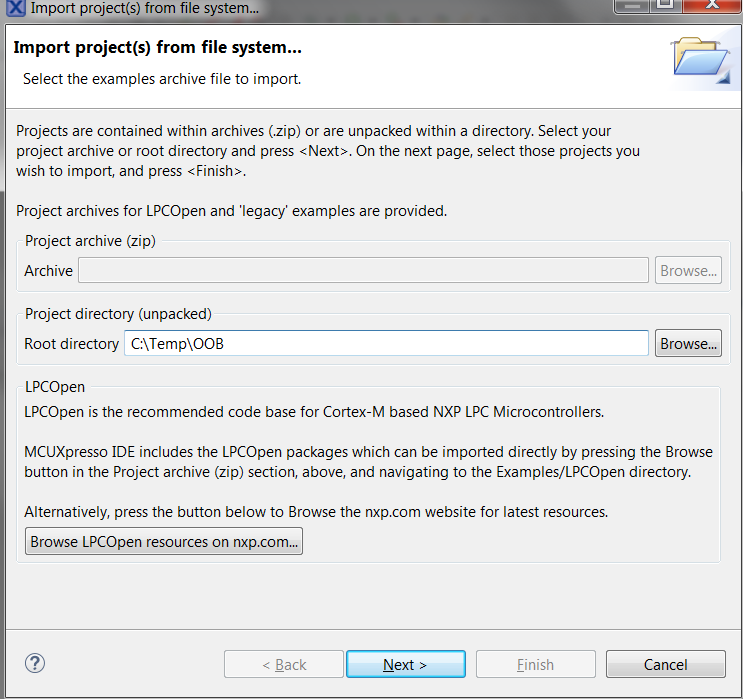
- Make sure you untick 'Copy projects into workspace'
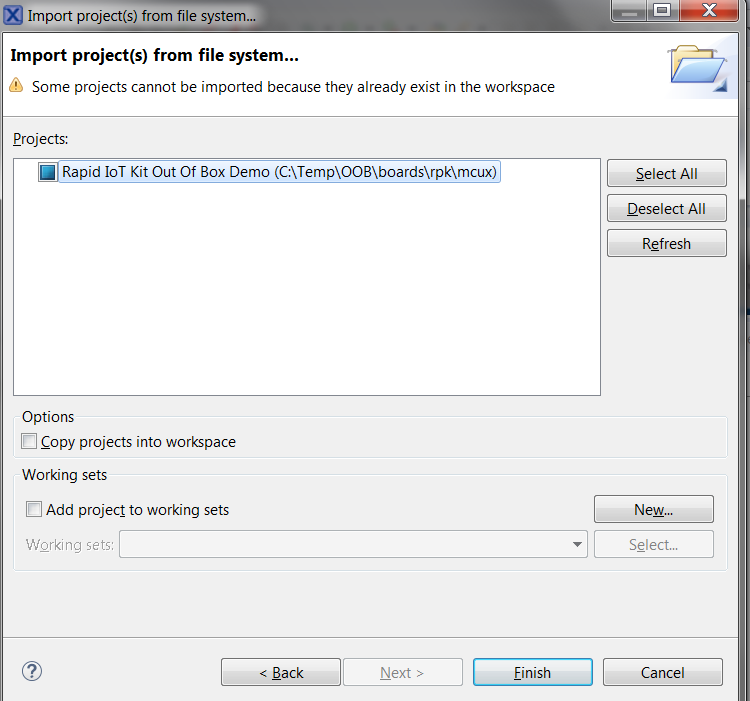
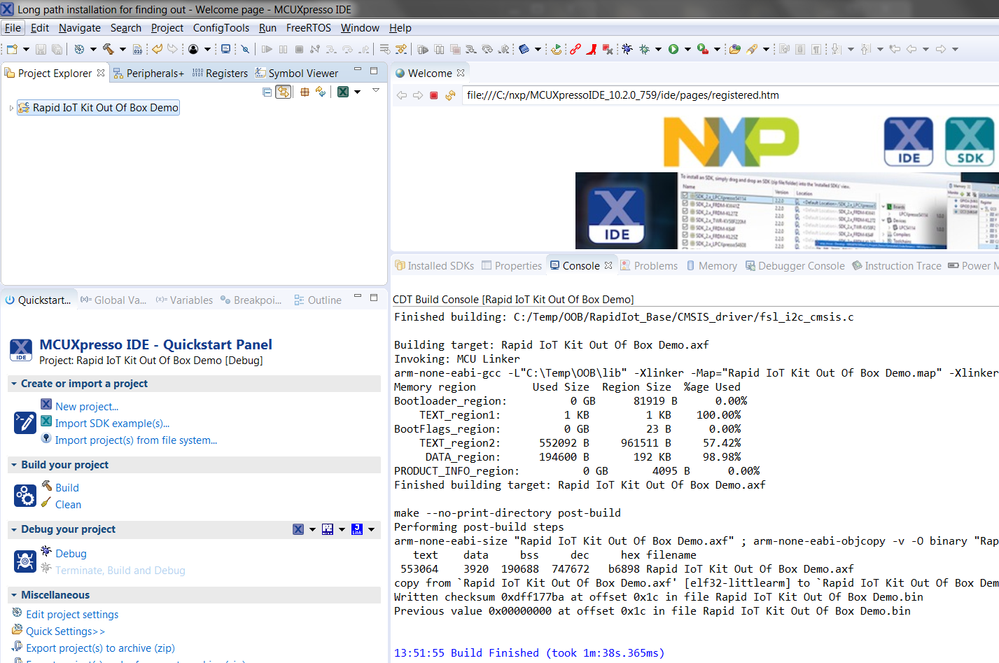
As you will see there is now only 1 project to build (Rapid_IoT based is integrated)
Build will then be successful:
If still not working, I propose to have a private conversation and a skype screen sharing session so we can check why the problem would persist on your side.
- 新着としてマーク
- ブックマーク
- 購読
- ミュート
- RSS フィードを購読する
- ハイライト
- 印刷
- 不適切なコンテンツを報告
Yes, there are 2 .launch files, I deleted both, and try "debug" again, but it still message below:
No compatible probes available. They may be disabled, disconnected, not powered, already in use or not compatible with this target.
- 新着としてマーク
- ブックマーク
- 購読
- ミュート
- RSS フィードを購読する
- ハイライト
- 印刷
- 不適切なコンテンツを報告
- You are working Under W10 I read. Charlie: Yes, Windows 10
- Are you using the latest MCUXpresso version ? Charlie: MCUXpresso IDE v10.2.1 [Build 795] [2018-07-25]
- I assume you downloaded the SDK from our web site correct and followed user guide instruction? Charlie: Yes
- Which project did you import? Hello world project or did you try importing a project whose code you imported from RApid IoT Studio? Charlie: Rapid IoT Kit Out of Box Demo
- Were you able to build your project properly before debugging it ? Charlie: Yes, no problem to build.
- Do you already have .launch files in your project explorer Under MCUXpresso for your project? Charlie: where to check? the following is the directory:
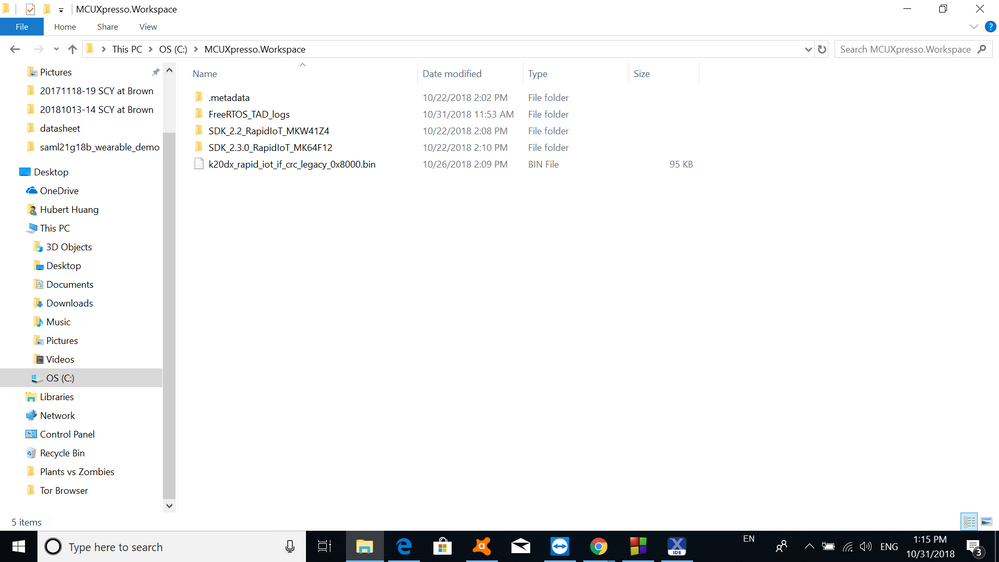 frq05186
- 新着としてマーク
- ブックマーク
- 購読
- ミュート
- RSS フィードを購読する
- ハイライト
- 印刷
- 不適切なコンテンツを報告
Context of my last question was refering to the MCUXpresso project explorer - see below screenshot. Should you have a .launch file, delete it and try again.
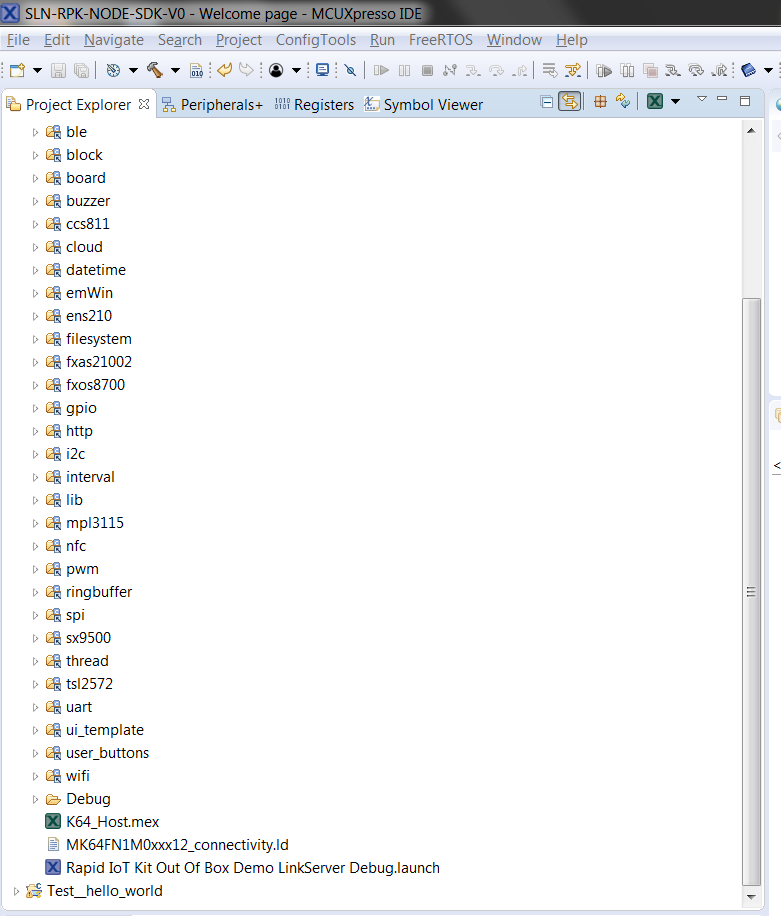
If you do not have any yet and never debuged the project, it is normal and is what I expect.
At this stage,your issue does not look to be depending on Rapid IoT kit specifcally, more like a driver issue or so. I will do some research to find similar occurrences.
- 新着としてマーク
- ブックマーク
- 購読
- ミュート
- RSS フィードを購読する
- ハイライト
- 印刷
- 不適切なコンテンツを報告
Hi Eric,
I watched your video about the programming and know what I did wrong, I released SW3 first before I release the reset, that's why the kit always did a reboot. Now I release reset first, watch the green LED blinking then release SW3, then I can program the firmware. Thank you for your help.
But puzzle 2 still remains: When using the docking station you cannot connect to it via MCUX
Is there a debug log file somewhere? I can let you remotely log in my PC(running windows 10) to check if needed.
BTW, my kit ID is 410467329406069B
Thanks, charlie,
frq05186
- 新着としてマーク
- ブックマーク
- 購読
- ミュート
- RSS フィードを購読する
- ハイライト
- 印刷
- 不適切なコンテンツを報告
Hi
Am glad to read that puzzle 1 is resolved.
About puzzle2: Am sorry to fire many questions, but usually this works without any problem, so I try identifying if you are doing something we did not expect.
- You are working Under W10 I read.
- Are you using the latest MCUXpresso version ?
- I assume you downloaded the SDK from our web site correct and followed user guide instruction?
- Which project did you import? Hello world project or did you try importing a project whose code you imported from RApid IoT Studio?
- Were you able to build your project properly before debugging it ?
- Do you already have .launch files in your project explorer Under MCUXpresso for your project?
I just performed the whole steps once more and it is working fine on my set-up
- 新着としてマーク
- ブックマーク
- 購読
- ミュート
- RSS フィードを購読する
- ハイライト
- 印刷
- 不適切なコンテンツを報告
Hi Eric,
forget telling you that I'm using Windows 10 PC.
Charlie,
- 新着としてマーク
- ブックマーク
- 購読
- ミュート
- RSS フィードを購読する
- ハイライト
- 印刷
- 不適切なコンテンツを報告
Hi Eric,
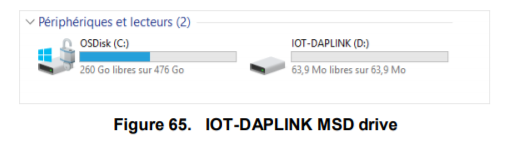
Yes, I upgraded the docking station firmware following the instruction and it's OK, I can see IOT-DAPLINK on D drive.
Also I found out that the Rapid-IoT kit firmware cannot be upgraded through Rapid-IoT studio either, I followed the below instructions:
- Connect one end of the provided USB cable to the computer and the other end to the micro USB type-B connector of the SLN-RPK-NODE
- Keep SW3 button pressed while pushing shortly SW5/Reset button
- Wait 1-2s for RGB LED to blink Green then release SW3 button
when I pressed SW3 button then push SW5/reset button, the Green LED won't blink, the kit will just reboot.
Not sure if it's related, can you tell me what to do next?
Thanks, charlie
frq05186
- 新着としてマーク
- ブックマーク
- 購読
- ミュート
- RSS フィードを購読する
- ハイライト
- 印刷
- 不適切なコンテンツを報告
Hi Charlie,
From what you describe nothing indicates to me it should not work.
- Can you provide me with the serial number at the back of your kit (The longer numer on the second line, starting with ID ...... ?
I consider there are 2 puzzles to resolve :smileyplain: :
- You cannot enter the programming mode of the Rapid Iot kit by simply pushing .bin into it
- When using the docking station you cannot connect to it via MCUX
Let's address item 1 first:
- Please confirm you have Out of the Box app installed. When the kit boots you should reach a white page with battery and time indication and NXP written in black
- Please confirm that when you plug the kit to PC via USB (no docking station) a blue LED turns on into the kit (indicates battery is charging)
- Check the File explorer on your PC - when you simply plug the kit nothing happens
- See attached video on sequence and duration of events:
- Press SW3 and maintain it pressed while pushing SW5 and keep it pressed for about 3 more seconds (like in video)
- When the green LED blinks, you will also see a Removable Disk in the file explorer
I will advise on next steps after your feedback
Eric
frq05186
- 新着としてマーク
- ブックマーク
- 購読
- ミュート
- RSS フィードを購読する
- ハイライト
- 印刷
- 不適切なコンテンツを報告
Hi Charlie,
This is likely a driver issue.
- Did you update your docking station FW as indicated here (p38 of the user guide)?

- Are you working under Linux or Window? and when you plug the docking station to your PC, do you see a drive called IOT-DAPLINK mounted ?