
- Forums
- Product Forums
- General Purpose MicrocontrollersGeneral Purpose Microcontrollers
- i.MX Forumsi.MX Forums
- QorIQ Processing PlatformsQorIQ Processing Platforms
- Identification and SecurityIdentification and Security
- Power ManagementPower Management
- Wireless ConnectivityWireless Connectivity
- RFID / NFCRFID / NFC
- Advanced AnalogAdvanced Analog
- Neural Processing UnitsNeural Processing Units
- MCX Microcontrollers
- S32G
- S32K
- S32V
- MPC5xxx
- Other NXP Products
- S12 / MagniV Microcontrollers
- Powertrain and Electrification Analog Drivers
- Sensors
- Vybrid Processors
- Digital Signal Controllers
- 8-bit Microcontrollers
- ColdFire/68K Microcontrollers and Processors
- PowerQUICC Processors
- OSBDM and TBDML
- S32M
- S32Z/E
-
- Solution Forums
- Software Forums
- MCUXpresso Software and ToolsMCUXpresso Software and Tools
- CodeWarriorCodeWarrior
- MQX Software SolutionsMQX Software Solutions
- Model-Based Design Toolbox (MBDT)Model-Based Design Toolbox (MBDT)
- FreeMASTER
- eIQ Machine Learning Software
- Embedded Software and Tools Clinic
- S32 SDK
- S32 Design Studio
- GUI Guider
- Zephyr Project
- Voice Technology
- Application Software Packs
- Secure Provisioning SDK (SPSDK)
- Processor Expert Software
- Generative AI & LLMs
-
- Topics
- Mobile Robotics - Drones and RoversMobile Robotics - Drones and Rovers
- NXP Training ContentNXP Training Content
- University ProgramsUniversity Programs
- Rapid IoT
- NXP Designs
- SafeAssure-Community
- OSS Security & Maintenance
- Using Our Community
-
- Cloud Lab Forums
-
- Knowledge Bases
- ARM Microcontrollers
- i.MX Processors
- Identification and Security
- Model-Based Design Toolbox (MBDT)
- QorIQ Processing Platforms
- S32 Automotive Processing Platform
- Wireless Connectivity
- CodeWarrior
- MCUXpresso Suite of Software and Tools
- MQX Software Solutions
- RFID / NFC
- Advanced Analog
- Neural Processing Units
-
- NXP Tech Blogs
- Home
- :
- Product Forums
- :
- MPC5xxx
- :
- SPT tool fails to install
SPT tool fails to install
- Subscribe to RSS Feed
- Mark Topic as New
- Mark Topic as Read
- Float this Topic for Current User
- Bookmark
- Subscribe
- Mute
- Printer Friendly Page
SPT tool fails to install

- Mark as New
- Bookmark
- Subscribe
- Mute
- Subscribe to RSS Feed
- Permalink
- Report Inappropriate Content
I tried to install the software from the following link:

 martin_kovar
- Mark as New
- Bookmark
- Subscribe
- Mute
- Subscribe to RSS Feed
- Permalink
- Report Inappropriate Content
Hi,
I tried to install SPT Tool into Win7 with account which is in Administrators group (account does not have administrator in it's name) and it works correct. Could you please try to install SPT Tool to different computer? It seems there is some problem in your operating system.
Could you please post here the screen of the installation error?
Regards,
Martin
- Mark as New
- Bookmark
- Subscribe
- Mute
- Subscribe to RSS Feed
- Permalink
- Report Inappropriate Content
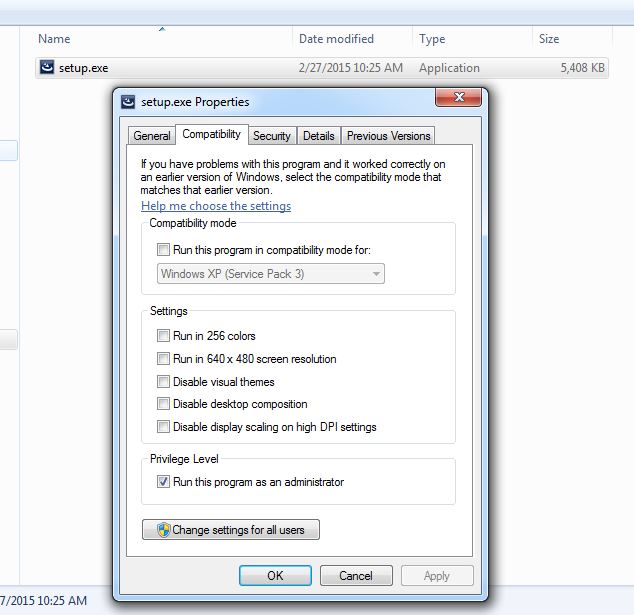
Thank you Martin,I solved the problem by ticking the "Run This Program as an Administrator" checkbox from the Right Click-> Properties->Compatibility Tab. Attached is the snip.However this does not solve my problem. I was after a tutorial/user guide/step by step example on how to use the SPT, the Graph functionality from D32DS and integrate it with a c/c++ program.The processor I use is S32DS but I assume the SPT is the same with MPC5775k.
From: b55689 <[email protected]>
To: adrian onea <[email protected]>
Sent: Tuesday, 27 December 2016, 19:54
Subject: Re: - Re: SPT tool fails to install
#yiv8690589555 * #yiv8690589555 a #yiv8690589555 body {font-family:Helvetica, Arial, sans-serif;}#yiv8690589555 #yiv8690589555 h1, #yiv8690589555 h2, #yiv8690589555 h3, #yiv8690589555 h4, #yiv8690589555 h5, #yiv8690589555 h6, #yiv8690589555 p, #yiv8690589555 hr {}#yiv8690589555 .yiv8690589555button td {}
|
NXP Community |
|
Re: SPT tool fails to install
reply from Martin Kovar in MPC5xxx - View the full discussionHi, I tried to install SPT Tool into Win7 with account which is in Administrators group (account does not have administrator in it's name) and it works correct. Could you please try to install SPT Tool to different computer? It seems there is some problem in your operating system. Could you please post here the screen of the installation error? Regards,Martin
Reply to this message by replying to this email, or go to the message on NXP Community |
Start a new discussion in MPC5xxx by email or at NXP Community |
Following Re: SPT tool fails to install in these streams: Inbox |
This email was sent by NXP Community because you are a registered user.
You may unsubscribe instantly from NXP Community, or adjust email frequency in your email preferences |
|
 martin_kovar
- Mark as New
- Bookmark
- Subscribe
- Mute
- Subscribe to RSS Feed
- Permalink
- Report Inappropriate Content
Hi,
I am not sure if I understand correct. Do you want some guide for SPT Graphical Tool included in S32 Design Studio? If yes, please open S32 Design Studio installation folder and go to the following path:
S32_Power_v1.1\S32DS\help\pdf\s32ds.pwr.win.gt_reference_manual.pdf
If no, please clarify me your requirement more detail.
Regards,
Martin
- Mark as New
- Bookmark
- Subscribe
- Mute
- Subscribe to RSS Feed
- Permalink
- Report Inappropriate Content
Yes, I want some guide on how to use the SPT graphical tool. I have already red the pdf but:It only discusses the ide very briefly. It does not say what else do you have to do to interact between the generated .spt and the rest of the program.Do we have to add anything manually to any of the memory maps or other config files? labels/sections/ assembler directives etc.
Also I can't open the "properties" page for one instruction.
There is an update "update 1" for S32DS listed on your web page but when I follow the link it is not available.
I have the 1.1 power PC version for windows from June 2016.
From: b55689 <[email protected]>
To: adrian onea <[email protected]>
Sent: Wednesday, 28 December 2016, 19:07
Subject: Re: - Re: SPT tool fails to install
#yiv4909912961 * #yiv4909912961 a #yiv4909912961 body {font-family:Helvetica, Arial, sans-serif;}#yiv4909912961 #yiv4909912961 h1, #yiv4909912961 h2, #yiv4909912961 h3, #yiv4909912961 h4, #yiv4909912961 h5, #yiv4909912961 h6, #yiv4909912961 p, #yiv4909912961 hr {}#yiv4909912961 .yiv4909912961button td {}
|
NXP Community |
|
Re: SPT tool fails to install
reply from Martin Kovar in MPC5xxx - View the full discussionHi, I am not sure if I understand correct. Do you want some guide for SPT Graphical Tool included in S32 Design Studio? If yes, please open S32 Design Studio installation folder and go to the following path:S32_Power_v1.1\S32DS\help\pdf\s32ds.pwr.win.gt_reference_manual.pdf If no, please clarify me your requirement more detail. Regards,Martin
Reply to this message by replying to this email, or go to the message on NXP Community |
Start a new discussion in MPC5xxx by email or at NXP Community |
Following Re: SPT tool fails to install in these streams: Inbox |
This email was sent by NXP Community because you are a registered user.
You may unsubscribe instantly from NXP Community, or adjust email frequency in your email preferences |
|
martin_kovar
- Mark as New
- Bookmark
- Subscribe
- Mute
- Subscribe to RSS Feed
- Permalink
- Report Inappropriate Content
Hi,
unfortunately, there is not any other manual to SPT graphical tool. There is only the one, which is part of S32DS installation.
I checked the link on web page and it does not work. Please try to download update1 directly from website. Click S32 Design Studio for power and on the next screen you will find the update.
Regards,
Martin
