
- Forums
- Product Forums
- General Purpose MicrocontrollersGeneral Purpose Microcontrollers
- i.MX Forumsi.MX Forums
- QorIQ Processing PlatformsQorIQ Processing Platforms
- Identification and SecurityIdentification and Security
- Power ManagementPower Management
- Wireless ConnectivityWireless Connectivity
- RFID / NFCRFID / NFC
- Advanced AnalogAdvanced Analog
- Neural Processing UnitsNeural Processing Units
- MCX Microcontrollers
- S32G
- S32K
- S32V
- MPC5xxx
- Other NXP Products
- S12 / MagniV Microcontrollers
- Powertrain and Electrification Analog Drivers
- Sensors
- Vybrid Processors
- Digital Signal Controllers
- 8-bit Microcontrollers
- ColdFire/68K Microcontrollers and Processors
- PowerQUICC Processors
- OSBDM and TBDML
- S32M
- S32Z/E
-
- Solution Forums
- Software Forums
- MCUXpresso Software and ToolsMCUXpresso Software and Tools
- CodeWarriorCodeWarrior
- MQX Software SolutionsMQX Software Solutions
- Model-Based Design Toolbox (MBDT)Model-Based Design Toolbox (MBDT)
- FreeMASTER
- eIQ Machine Learning Software
- Embedded Software and Tools Clinic
- S32 SDK
- S32 Design Studio
- GUI Guider
- Zephyr Project
- Voice Technology
- Application Software Packs
- Secure Provisioning SDK (SPSDK)
- Processor Expert Software
- Generative AI & LLMs
-
- Topics
- Mobile Robotics - Drones and RoversMobile Robotics - Drones and Rovers
- NXP Training ContentNXP Training Content
- University ProgramsUniversity Programs
- Rapid IoT
- NXP Designs
- SafeAssure-Community
- OSS Security & Maintenance
- Using Our Community
-
- Cloud Lab Forums
-
- Knowledge Bases
- ARM Microcontrollers
- i.MX Processors
- Identification and Security
- Model-Based Design Toolbox (MBDT)
- QorIQ Processing Platforms
- S32 Automotive Processing Platform
- Wireless Connectivity
- CodeWarrior
- MCUXpresso Suite of Software and Tools
- MQX Software Solutions
- RFID / NFC
- Advanced Analog
- Neural Processing Units
-
- NXP Tech Blogs
- Home
- :
- MCUXpresso Software and Tools
- :
- LPCXpresso IDE
- :
- LPCXpresso v8.2.0_647 - cannot find -lCMSISv1p30_LPC17xx
LPCXpresso v8.2.0_647 - cannot find -lCMSISv1p30_LPC17xx
- Subscribe to RSS Feed
- Mark Topic as New
- Mark Topic as Read
- Float this Topic for Current User
- Bookmark
- Subscribe
- Mute
- Printer Friendly Page
LPCXpresso v8.2.0_647 - cannot find -lCMSISv1p30_LPC17xx

- Mark as New
- Bookmark
- Subscribe
- Mute
- Subscribe to RSS Feed
- Permalink
- Report Inappropriate Content
Hi all,
I downloaded and installed LPCXpresso v8.2.0_647 and with built-in LPCXpresso programmer/probe is eveything OK.
For sure I downloaded into the LPC1769 microcontroller a *.axf file with my firmware and it works great.
But there is smal problem:
When I open my previous software project + CMSISv1p30_LPC17xx (as a project into a workspace) and I click the "Build" icon then the LPCXpresso console return me an error:
08:06:07 **** Incremental Build of configuration Debug for project PCBTest_FW06 ****
make -r all
Building target: PCBTest_FW06.axf
Invoking: MCU Linker
arm-none-eabi-gcc -nostdlib -L"D:\LPCXpresso_8.2.0_647 - workspace\CMSISv1p30_LPC17xx\Debug" -Xlinker -Map=PCBTest_FW06.map -Xlinker --gc-sections -mcpu=cortex-m3 -mthumb -T "PCBTest_FW06_Debug.ld" -o "PCBTest_FW06.axf" ./src/cr_startup_lpc175x.o ./src/main.o ./source/adc_ads8326.o ./source/adcbasic.o ./source/flash_memory_spi.o ./source/lcd_1.o ./source/lcd_2.o ./source/pwmbasic.o ./source/ssp.o ./source/ssp1.o ./source/timerbasic.o ./source/uartbasic.o -lCMSISv1p30_LPC17xx
c:/nxp/lpcxpresso_8.2.0_647/lpcxpresso/tools/bin/../lib/gcc/arm-none-eabi/5.3.1/../../../../arm-none-eabi/bin/ld.exe: cannot find -lCMSISv1p30_LPC17xx
collect2.exe: error: ld returned 1 exit status
make: *** [PCBTest_FW06.axf] Error 108:06:08 Build Finished (took 573ms)
I added CMSIS v1.30 libraries into CMSISv1p30_LPC17xx project as I show below (libraries added by me are marked in red rectangles):
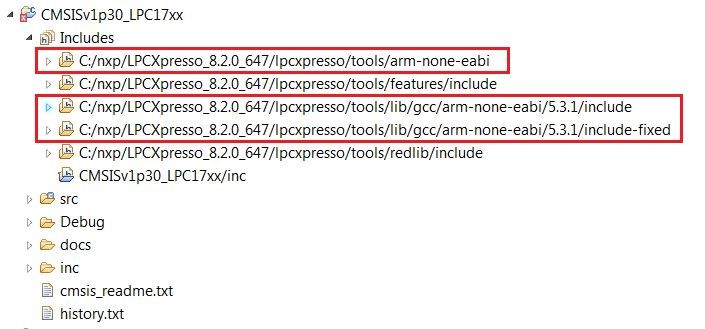
and it does not help... The error still occurs during Building.
What should I do in this case?

 lpcxpresso_supp
- Mark as New
- Bookmark
- Subscribe
- Mute
- Subscribe to RSS Feed
- Permalink
- Report Inappropriate Content
Sounds like you have not built the library project, or potentially not built the right build configuration. For more information see: https://community.nxp.com/message/630712
Regards,
LPCXpresso Support
- Mark as New
- Bookmark
- Subscribe
- Mute
- Subscribe to RSS Feed
- Permalink
- Report Inappropriate Content
Hello again,
I tried to do all things to fix the "cannot find library" error but with no results.
I downloaded and installed the lastest version of LPCXpresso - v8.2.2_650. I opened simultaneously my previous (old) LPCXpresso - v6.0.2_151 (works great) and the new LPCXpresso v8.2.2_650 (cannot find the library CMSIS).
In both LPCXpressos I opened the same project and I opened "Menu -> Project -> Properties" and I compared 3 positions of settings:
- "C/C++ Build -> Settings -> Tool Settings -> MCU C Compiler -> Includes -> Includes paths (-I)" - in "Debug" and "Release" configuration,
- "C/C++ Build -> Settings -> Tool Settings -> MCU Linker -> Libraries -> Libraries (-I)" - in "Debug" and "Release" configuration,
- "C/C++ General -> Paths and Symbols -> Includes -> Additional Assembly Source Files + Assembly + GNU C" - in "Debug" and "Release" configuration,
I compared this settings between old LPCXpresso (v6.0.2_151) and new LPCXpresso (v8.2.2_650) and I configured LPCXpresso v8.2.2_650 exactly in the same way as old LPCXpresso (v6.0.2_151) and it gives no results - "cannot find library CMSIS" sitll exists.
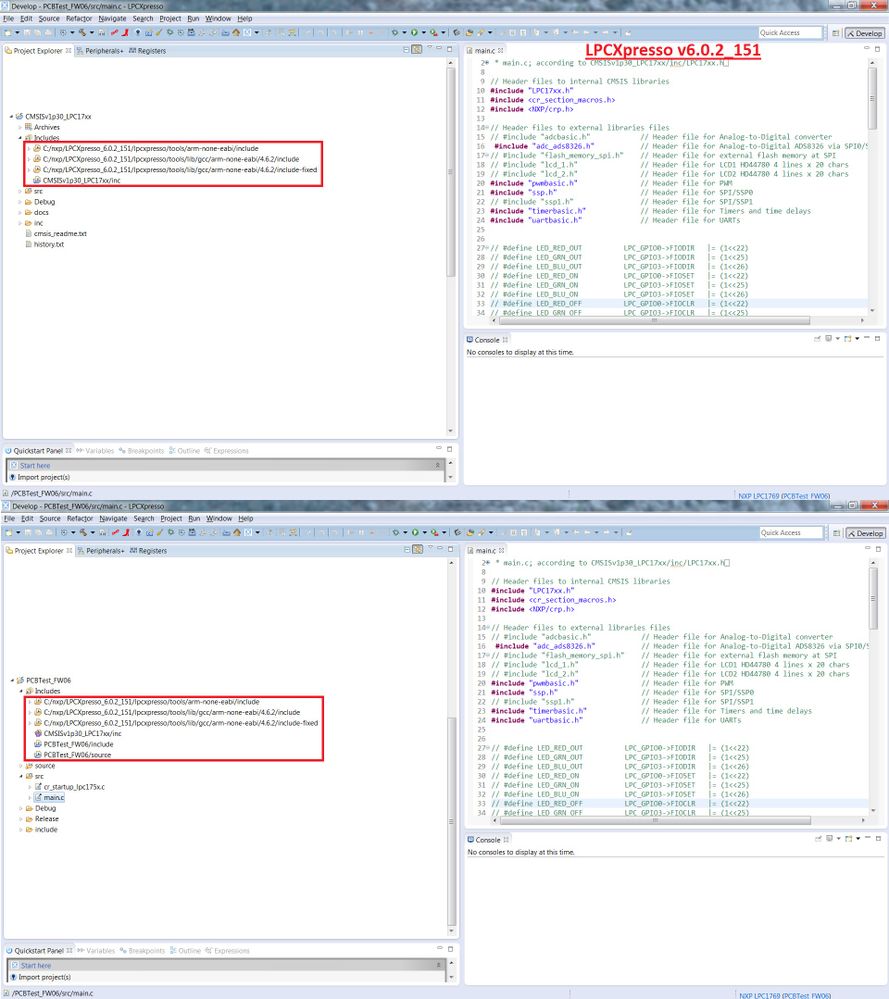
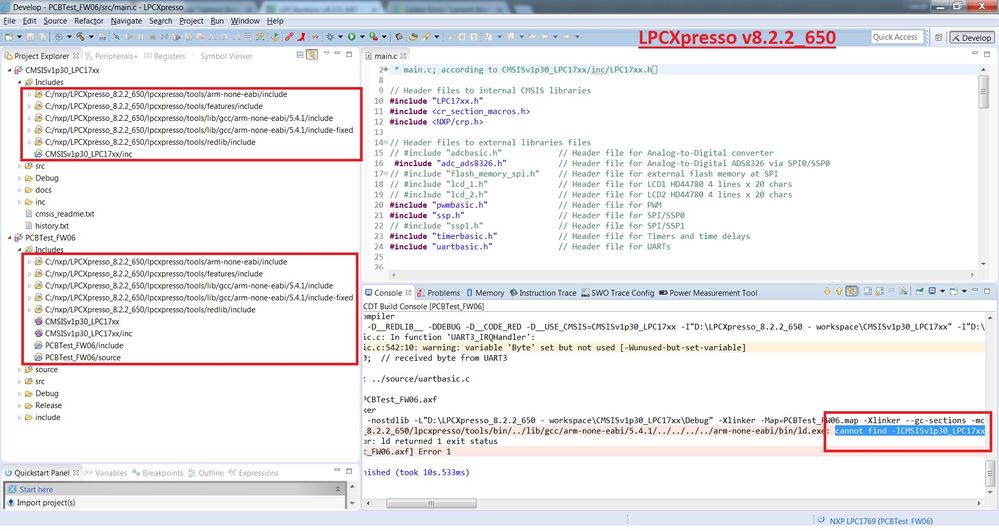
Below I send a screens of my old and new LPCXpresso software libraries in the projects.
01. Old LPCXpresso (v6.0.2_151):
02. New LPCXpresso (v8.2.2_650):
I also followed the steps according to Creating and Linking to Library Projects "Manually creating links to library projects" but it also did not give any positive results.
Is there any way to fix this error?
I will be very grateful for your help.
- Mark as New
- Bookmark
- Subscribe
- Mute
- Subscribe to RSS Feed
- Permalink
- Report Inappropriate Content
Hi again,
I fixed the problem and the solution was not the settings in the Menu -> Project -> Properties -> so on so on... but there was some issue with teh core_cm3.c file: CMSISv1p30_LPC13xx cannot be build in LPCXpresso IDE ver.7 | www.LPCware.com
Please let me give some feedback answer about the "&" character in this file and differences between LPCXpresso 8.2 and the older one LPCXpresso 6.0.
Best regards,
Jakub

- Mark as New
- Bookmark
- Subscribe
- Mute
- Subscribe to RSS Feed
- Permalink
- Report Inappropriate Content
Afaik, it was a bug in that version of cmsis.it was fixed in v2 of cmsis. I guess you could say there was a bug in earlier versions of the compiler in that they did not report the bug/error.
