
- Forums
- Product Forums
- General Purpose MicrocontrollersGeneral Purpose Microcontrollers
- i.MX Forumsi.MX Forums
- QorIQ Processing PlatformsQorIQ Processing Platforms
- Identification and SecurityIdentification and Security
- Power ManagementPower Management
- Wireless ConnectivityWireless Connectivity
- RFID / NFCRFID / NFC
- Advanced AnalogAdvanced Analog
- Neural Processing UnitsNeural Processing Units
- MCX Microcontrollers
- S32G
- S32K
- S32V
- MPC5xxx
- Other NXP Products
- S12 / MagniV Microcontrollers
- Powertrain and Electrification Analog Drivers
- Sensors
- Vybrid Processors
- Digital Signal Controllers
- 8-bit Microcontrollers
- ColdFire/68K Microcontrollers and Processors
- PowerQUICC Processors
- OSBDM and TBDML
- S32M
- S32Z/E
-
- Solution Forums
- Software Forums
- MCUXpresso Software and ToolsMCUXpresso Software and Tools
- CodeWarriorCodeWarrior
- MQX Software SolutionsMQX Software Solutions
- Model-Based Design Toolbox (MBDT)Model-Based Design Toolbox (MBDT)
- FreeMASTER
- eIQ Machine Learning Software
- Embedded Software and Tools Clinic
- S32 SDK
- S32 Design Studio
- GUI Guider
- Zephyr Project
- Voice Technology
- Application Software Packs
- Secure Provisioning SDK (SPSDK)
- Processor Expert Software
- Generative AI & LLMs
-
- Topics
- Mobile Robotics - Drones and RoversMobile Robotics - Drones and Rovers
- NXP Training ContentNXP Training Content
- University ProgramsUniversity Programs
- Rapid IoT
- NXP Designs
- SafeAssure-Community
- OSS Security & Maintenance
- Using Our Community
-
- Cloud Lab Forums
-
- Knowledge Bases
- ARM Microcontrollers
- i.MX Processors
- Identification and Security
- Model-Based Design Toolbox (MBDT)
- QorIQ Processing Platforms
- S32 Automotive Processing Platform
- Wireless Connectivity
- CodeWarrior
- MCUXpresso Suite of Software and Tools
- MQX Software Solutions
- RFID / NFC
- Advanced Analog
- Neural Processing Units
-
- NXP Tech Blogs
- Home
- :
- Product Forums
- :
- MPC5xxx
- :
- BAF configuration
BAF configuration
- Subscribe to RSS Feed
- Mark Topic as New
- Mark Topic as Read
- Float this Topic for Current User
- Bookmark
- Subscribe
- Mute
- Printer Friendly Page

- Mark as New
- Bookmark
- Subscribe
- Mute
- Subscribe to RSS Feed
- Permalink
- Report Inappropriate Content
Hello,
I am making a firmware update in flash memory of MPC5748G, and I am writing in a different sector a new startup code, text code, etc. I want to modify the BAF configuration so after a reset it will start from the new sector and not from the old one. What registers should I modify for that?
Thanks,
Vlad
Solved! Go to Solution.

 lukaszadrapa
- Mark as New
- Bookmark
- Subscribe
- Mute
- Subscribe to RSS Feed
- Permalink
- Report Inappropriate Content
Hi,
this is copied from reference manual:
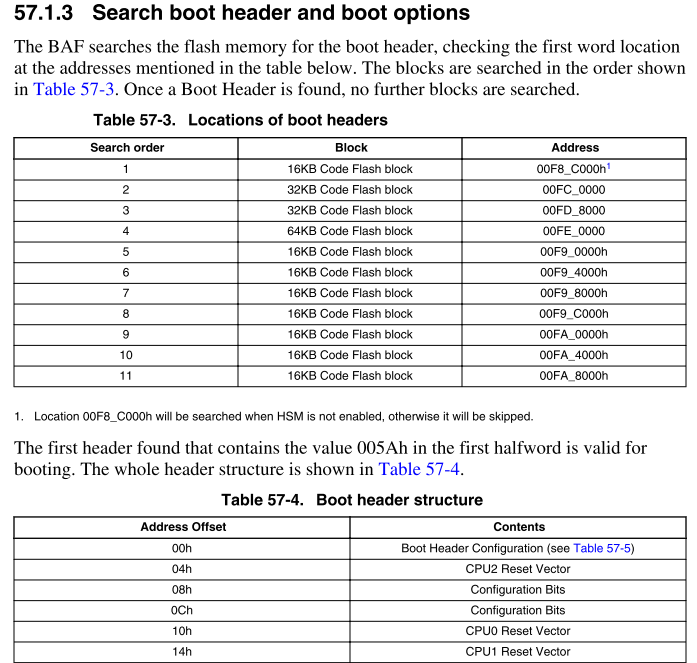

So, it is necessary to place a constant to one of addresses shown above. Something like this:
#pragma ghs section rodata=".boot_header"
const uint32_t bootheader = 0x005A0002; // e200z4a will start execution
const uint32_t z2_reset_vector = 0;
const uint32_t cnfg1_bits = 0;
const uint32_t cnfg2_bits = 0;
const uint32_t startAddress = (uint32_t) _start; //start address of e200z4a
const uint32_t z4b_reset_vector = 0;
const uint32_t reserved_for_future_use = 0;
#pragma ghs section rodata=default
If there are more valid boot headers, the first one is used. If you want to make other boot header active, it is necessary either erase the previous one or jump to specified start address of second application by your software.
Regards,
Lukas
lukaszadrapa
- Mark as New
- Bookmark
- Subscribe
- Mute
- Subscribe to RSS Feed
- Permalink
- Report Inappropriate Content
Hi,
this is copied from reference manual:
So, it is necessary to place a constant to one of addresses shown above. Something like this:
#pragma ghs section rodata=".boot_header"
const uint32_t bootheader = 0x005A0002; // e200z4a will start execution
const uint32_t z2_reset_vector = 0;
const uint32_t cnfg1_bits = 0;
const uint32_t cnfg2_bits = 0;
const uint32_t startAddress = (uint32_t) _start; //start address of e200z4a
const uint32_t z4b_reset_vector = 0;
const uint32_t reserved_for_future_use = 0;
#pragma ghs section rodata=default
If there are more valid boot headers, the first one is used. If you want to make other boot header active, it is necessary either erase the previous one or jump to specified start address of second application by your software.
Regards,
Lukas
- Mark as New
- Bookmark
- Subscribe
- Mute
- Subscribe to RSS Feed
- Permalink
- Report Inappropriate Content
Thank you very much!
