Supplicant & Hostapd support for WPA3 R3 Wi-Fi Security

cancel
Showing results for 
Show  only  | Search instead for 
Did you mean: 

Supplicant & Hostapd support for WPA3 R3 Wi-Fi Security

Supplicant & Hostapd support for WPA3 R3 Wi-Fi Security

Summary

  • WiFi alliance will mandate WPA3 R3 for the certification starting Januray 2022.
  • The existing wpa_supplicant v2.9 and hostapd v2.9 does not support WPA3-R3.
  • This article describe the methods to download the patch and enable WPA3 R3 patch for Linux using Yocto build system and also for standalone wpa_supplicant v2.9 and hostapd v2.9 source. 

Notes

  • For i.MX RT, the support for WPA3-R3 will be made available in the upcoming release of Jan’22.
  • The attached pre-compiled binaries(prebuilt-supplicants-WPA3R3.zip) for wpa_supplicant and hostapd are tested on i.MX8M host platform with Linux kernel version 5.10.72_2.2.0.

Attachments

  1. prebuilt-supplicants-WPA3R3.zip
  2. supplicants-WPA3R3-patches.zip
  3. supplicant_hostapd_conf.zip

Steps to Enable WPA3 R3

Follow below steps to include the patch for WPA3-R3 in hostapd and wpa_supplicant after successful installation of the Yocto Build System on the host machine. User can follow i.MX Yocto User Guide to setup the Yocto build system.

  • hostapd
    1. Download the patch file(supplicants-WPA3R3-patches.zip) from this page attached below.
    2. Copy the patch file (yocto_hostap_wpa3_r3.patch) to <path_to_yocto_build>/sources/meta-openembedded/meta-oe/recipes-connectivity/hostapd/hostapd
    3. Edit the hostapd_2.9.bb file:
    4. Add the patch file name in SRC_URI
    file:// yocto_hostap_wpa3_r3.patch \
    5. Build the imx image and flash on to the board to verify

  • wpa_supplicant
    1. Download the patch file(supplicants-WPA3R3-patches.zip) from this page attached below
    2. Copy the patch file(yocto_wpa_supp_wpa3_r3.patch) to <path_to_yocto_build> /sources/poky/meta/recipes-connectivity/wpa-supplicant/wpa-supplicant
    3. Edit the wpa-supplicant_2.9.bb file:
    4. Add the patch file name in SRC_URI
    file:// yocto_wpa_supp_wpa3_r3.patch \
    5. Build the imx image and flash on to the board to verify

This sections describes the steps to apply patch on standalone wpa_supplicant and hostapd.

  • hostapd
    1. Download the open source hostapd using the link hostapd_2.9
    2. Extract the package using command
        $ tar -xzf hostapd_2.9.tar.gz
    3. Download the patch file(supplicants-WPA3R3-patches.zip) from this page
    4. Change directory to hostapd_2.9
    5. Apply patch using command
        $ patch -p1 < standalone_hostapd_wpa3_r3.patch
    6. Compile the hostapd application

  • wpa_supplicant
    1. Download the open source wpa_supplicant using the link wpa_supplicant_2.9
    2. Extract the package using command
        $ tar -xzf wpa_supplicant-2.9.tar.gz
    3. Download the patch file(supplicants-WPA3R3-patches.zip) from this page
    4. Change directory to wpa_supplicant-2.9
    5. Apply patch using command
        $ patch -p1 < standalone_wpa_supplicant_wpa3_r3.patch
    6. Enable the config CONFIG_PMKSA_CACHE_EXTERNAL in the defconfig file in wpa_supplicant folder
    7. Compile the wpa_supplicant application

Validation

  • Download the wpa_supplicant and hostapd configuration files attached in this article.
  • Execute the generated hostapd and wpa_supplicant binaries with the downloaded configuration files.
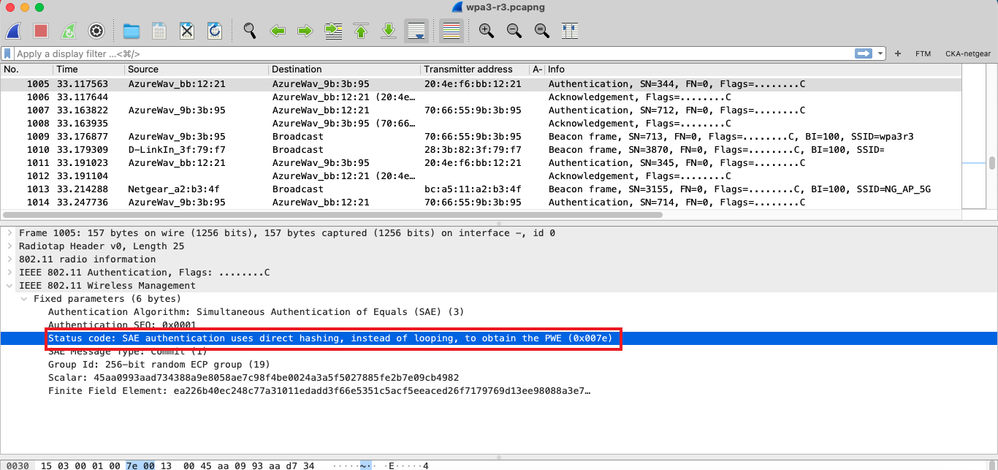
  • Once the connection is established between the WPA3-R3 enabled AP and STA, verify the status code in sniffer capture to confirm this is WPA3-R3 connection as highlighted in below image.
wpa3r3.png


Attachments
%3CLINGO-SUB%20id%3D%22lingo-sub-1390276%22%20slang%3D%22en-US%22%20mode%3D%22CREATE%22%3ESupplicant%20%26amp%3B%20Hostapd%20support%20for%20WPA3%20R3%20Wi-Fi%20Security%3C%2FLINGO-SUB%3E%3CLINGO-BODY%20id%3D%22lingo-body-1390276%22%20slang%3D%22en-US%22%20mode%3D%22CREATE%22%3E%0A%3CP%3E%3CSTRONG%3ESummary%3C%2FSTRONG%3E%3C%2FP%3E%0A%3CUL%3E%0A%3CLI%3E%3CSPAN%3EWiFi%20alliance%20will%20mandate%20WPA3%20R3%20for%20the%20certification%20starting%20Januray%202022.%3C%2FSPAN%3E%3C%2FLI%3E%0A%3CLI%3E%3CSPAN%3EThe%20existing%20wpa_supplicant%20v2.9%20and%20hostapd%20v2.9%20does%20not%20support%20WPA3-R3.%3C%2FSPAN%3E%3C%2FLI%3E%0A%3CLI%3E%3CSPAN%3EThis%20article%20describe%20the%20methods%20%3C%2FSPAN%3E%3CSPAN%3Eto%20download%20the%20patch%20and%20enable%20WPA3%20R3%20patch%20for%20Linux%20using%20Yocto%20build%20system%20and%20also%20for%20standalone%26nbsp%3B%3C%2FSPAN%3E%3CSPAN%3Ewpa_supplicant%20v2.9%20and%20hostapd%20v2.9%20source.%26nbsp%3B%3C%2FSPAN%3E%3C%2FLI%3E%0A%3C%2FUL%3E%0A%3CP%3E%3CSPAN%3E%3CSTRONG%3ENotes%3C%2FSTRONG%3E%3C%2FSPAN%3E%3C%2FP%3E%0A%3CUL%3E%0A%3CLI%3E%3CSPAN%3EFor%20i.MX%20RT%2C%20the%20support%20for%20WPA3-R3%20will%20be%20made%20available%20in%20the%20upcoming%20release%20of%20Jan%E2%80%9922.%3C%2FSPAN%3E%3C%2FLI%3E%0A%3CLI%3E%3CSPAN%3EThe%20attached%20pre-compiled%20binaries(prebuilt-supplicants-WPA3R3.zip)%20for%20wpa_supplicant%20and%20hostapd%20are%20tested%20on%20i.MX8M%20host%20platform%20with%20Linux%20kernel%20version%205.10.72_2.2.0.%3C%2FSPAN%3E%3C%2FLI%3E%0A%3C%2FUL%3E%0A%3CP%3E%3CSTRONG%3EAttachments%3C%2FSTRONG%3E%3C%2FP%3E%0A%3COL%3E%0A%3CLI%3Eprebuilt-supplicants-WPA3R3.zip%3C%2FLI%3E%0A%3CLI%3Esupplicants-WPA3R3-patches.zip%3C%2FLI%3E%0A%3CLI%3Esupplicant_hostapd_conf.zip%3C%2FLI%3E%0A%3C%2FOL%3E%0A%3CP%3E%3CFONT%20color%3D%22%23000000%22%3E%3CSTRONG%3ESteps%20to%20Enable%20WPA3%20R3%3C%2FSTRONG%3E%3C%2FFONT%3E%3C%2FP%3E%0A%3CP%3E%3CSPAN%3EFollow%20below%20steps%20to%20include%20the%20patch%20for%20WPA3-R3%20in%20hostapd%20and%20wpa_supplicant%20after%20successful%20installation%20of%20the%20Yocto%20Build%20System%20on%20the%20host%20machine.%20User%20can%20follow%20%3CA%20href%3D%22https%3A%2F%2Fwww.nxp.com%2Fdocs%2Fen%2Fuser-guide%2FIMX_YOCTO_PROJECT_USERS_GUIDE.pdf%22%20target%3D%22_self%22%20rel%3D%22nofollow%20noopener%20noreferrer%22%3Ei.MX%20Yocto%20User%20Guide%3C%2FA%3E%20to%20setup%20the%20Yocto%20build%20system.%3C%2FSPAN%3E%3C%2FP%3E%0A%3CUL%3E%0A%3CLI%3E%3CSPAN%3Ehostapd%3CBR%20%2F%3E1.%20Download%20the%20patch%20file(supplicants-WPA3R3-patches.zip)%20from%20this%20page%20attached%20below.%3CBR%20%2F%3E2.%20Copy%20the%20patch%20file%20(yocto_hostap_wpa3_r3.patch)%20to%20%3CPATH_TO_YOCTO_BUILD%3E%2Fsources%2Fmeta-openembedded%2Fmeta-oe%2Frecipes-connectivity%2Fhostapd%2Fhostapd%3CBR%20%2F%3E3.%20Edit%20the%20hostapd_2.9.bb%20file%3A%3CBR%20%2F%3E4.%20Add%20the%20patch%20file%20name%20in%20SRC_URI%3CBR%20%2F%3Efile%3A%2F%2F%20yocto_hostap_wpa3_r3.patch%20%5C%3CBR%20%2F%3E5.%20Build%20the%20imx%20image%20and%20flash%20on%20to%20the%20board%20to%20verify%3CBR%20%2F%3E%3CBR%20%2F%3E%3C%2FPATH_TO_YOCTO_BUILD%3E%3C%2FSPAN%3E%3C%2FLI%3E%0A%3CLI%3E%3CSPAN%3Ewpa_supplicant%3CBR%20%2F%3E1.%20Download%20the%20patch%20file(supplicants-WPA3R3-patches.zip)%20from%20this%20page%20attached%20below%3CBR%20%2F%3E2.%20Copy%20the%20patch%20file(yocto_wpa_supp_wpa3_r3.patch)%20to%20%3CPATH_TO_YOCTO_BUILD%3E%20%2Fsources%2Fpoky%2Fmeta%2Frecipes-connectivity%2Fwpa-supplicant%2Fwpa-supplicant%3CBR%20%2F%3E3.%20Edit%20the%20wpa-supplicant_2.9.bb%20file%3A%3CBR%20%2F%3E4.%20Add%20the%20patch%20file%20name%20in%20SRC_URI%3CBR%20%2F%3Efile%3A%2F%2F%20yocto_wpa_supp_wpa3_r3.patch%20%5C%3CBR%20%2F%3E5.%20Build%20the%20imx%20image%20and%20flash%20on%20to%20the%20board%20to%20verify%3C%2FPATH_TO_YOCTO_BUILD%3E%3C%2FSPAN%3E%3C%2FLI%3E%0A%3C%2FUL%3E%0A%3CP%3E%3CSPAN%3EThis%20sections%20describes%20the%20steps%20to%20apply%20patch%20on%20standalone%20wpa_supplicant%20and%20hostapd.%3C%2FSPAN%3E%3C%2FP%3E%0A%3CUL%3E%0A%3CLI%3E%3CSPAN%3Ehostapd%3CBR%20%2F%3E1.%20Download%20the%20open%20source%20hostapd%20using%20the%20link%20%3CA%20href%3D%22https%3A%2F%2Fw1.fi%2Freleases%2Fhostapd-2.9.tar.gz%22%20target%3D%22_self%22%20rel%3D%22nofollow%20noopener%20noreferrer%22%3Ehostapd_2.9%3C%2FA%3E%3CBR%20%2F%3E2.%20Extract%20the%20package%20using%20command%3CBR%20%2F%3E%26nbsp%3B%20%26nbsp%3B%20%24%20tar%20-xzf%20hostapd_2.9.tar.gz%3CBR%20%2F%3E3.%20Download%20the%20patch%20file(supplicants-WPA3R3-patches.zip)%20from%20this%20page%3CBR%20%2F%3E4.%20Change%20directory%20to%20hostapd_2.9%3CBR%20%2F%3E5.%20Apply%20patch%20using%20command%3CBR%20%2F%3E%26nbsp%3B%20%26nbsp%3B%20%24%20patch%20-p1%20%26lt%3B%20standalone_hostapd_wpa3_r3.patch%3CBR%20%2F%3E6.%20Compile%20the%20hostapd%20application%3CBR%20%2F%3E%3CBR%20%2F%3E%3C%2FSPAN%3E%3C%2FLI%3E%0A%3CLI%3E%3CSPAN%3Ewpa_supplicant%3CBR%20%2F%3E1.%20Download%20the%20open%20source%20wpa_supplicant%20using%20the%20link%20%3CA%20href%3D%22https%3A%2F%2Fw1.fi%2Freleases%2Fwpa_supplicant-2.9.tar.gz%22%20target%3D%22_self%22%20rel%3D%22nofollow%20noopener%20noreferrer%22%3Ewpa_supplicant_2.9%3C%2FA%3E%3CBR%20%2F%3E2.%20Extract%20the%20package%20using%20command%3CBR%20%2F%3E%26nbsp%3B%20%26nbsp%3B%20%24%20tar%20-xzf%20wpa_supplicant-2.9.tar.gz%3CBR%20%2F%3E3.%20Download%20the%20patch%20file(supplicants-WPA3R3-patches.zip)%20from%20this%20page%3CBR%20%2F%3E4.%20Change%20directory%20to%20wpa_supplicant-2.9%3CBR%20%2F%3E5.%20Apply%20patch%20using%20command%3CBR%20%2F%3E%26nbsp%3B%20%26nbsp%3B%20%24%20patch%20-p1%20%26lt%3B%20standalone_wpa_supplicant_wpa3_r3.patch%3CBR%20%2F%3E6.%20Enable%20the%20config%20CONFIG_PMKSA_CACHE_EXTERNAL%20in%20the%20defconfig%20file%20in%20wpa_supplicant%20folder%3CBR%20%2F%3E7.%20Compile%20the%20wpa_supplicant%20application%3C%2FSPAN%3E%3C%2FLI%3E%0A%3C%2FUL%3E%0A%3CP%3E%3CSTRONG%3EValidation%3C%2FSTRONG%3E%3C%2FP%3E%0A%3CUL%3E%0A%3CLI%3E%3CSPAN%20style%3D%22font-family%3A%20inherit%3B%22%3EDownload%20the%20wpa_supplicant%20and%20hostapd%20configuration%20files%20attached%20in%20this%20article.%3C%2FSPAN%3E%3C%2FLI%3E%0A%3CLI%3EExecute%20the%20generated%20hostapd%20and%20wpa_supplicant%20binaries%20with%20the%20downloaded%20configuration%20files.%3C%2FLI%3E%0A%3CLI%3E%3CSPAN%20style%3D%22font-family%3A%20inherit%3B%22%3EOnce%20the%20connection%20is%20established%20between%20the%20WPA3-R3%20enabled%20AP%20and%20STA%2C%20verify%20the%20status%20code%20in%20sniffer%20capture%20to%20confirm%20this%20is%20WPA3-R3%20connection%20as%20highlighted%20in%20below%20image.%3C%2FSPAN%3E%3C%2FLI%3E%0A%3C%2FUL%3E%0A%3CSPAN%20class%3D%22lia-inline-image-display-wrapper%20lia-image-align-center%22%20image-alt%3D%22wpa3r3.png%22%20style%3D%22width%3A%20999px%3B%22%3E%3Cspan%20class%3D%22lia-inline-image-display-wrapper%22%20image-alt%3D%22wpa3r3.png%22%20style%3D%22width%3A%20999px%3B%22%3E%3Cimg%20src%3D%22https%3A%2F%2Fcommunity.nxp.com%2Ft5%2Fimage%2Fserverpage%2Fimage-id%2F166074i421F736FB04B7C45%2Fimage-size%2Flarge%3Fv%3Dv2%26amp%3Bpx%3D999%22%20role%3D%22button%22%20title%3D%22wpa3r3.png%22%20alt%3D%22wpa3r3.png%22%20%2F%3E%3C%2Fspan%3E%3C%2FSPAN%3E%0A%3CBR%20%2F%3E%0A%3CBR%20%2F%3E%0A%3CBR%20%2F%3E%0A%3C%2FLINGO-BODY%3E%3CLINGO-TEASER%20id%3D%22lingo-teaser-1390276%22%20slang%3D%22en-US%22%20mode%3D%22CREATE%22%3E%3CP%3ESteps%20to%20add%20support%20for%20WPA3%20R3%20in%20supplicant%20and%20hostapd%3C%2FP%3E%3C%2FLINGO-TEASER%3E
No ratings
Version history
Last update:
‎12-29-2021 03:26 AM
Updated by: