
- Forums
- Product Forums
- General Purpose MicrocontrollersGeneral Purpose Microcontrollers
- i.MX Forumsi.MX Forums
- QorIQ Processing PlatformsQorIQ Processing Platforms
- Identification and SecurityIdentification and Security
- Power ManagementPower Management
- Wireless ConnectivityWireless Connectivity
- RFID / NFCRFID / NFC
- Advanced AnalogAdvanced Analog
- Neural Processing UnitsNeural Processing Units
- MCX Microcontrollers
- S32G
- S32K
- S32V
- MPC5xxx
- Other NXP Products
- S12 / MagniV Microcontrollers
- Powertrain and Electrification Analog Drivers
- Sensors
- Vybrid Processors
- Digital Signal Controllers
- 8-bit Microcontrollers
- ColdFire/68K Microcontrollers and Processors
- PowerQUICC Processors
- OSBDM and TBDML
- S32M
- S32Z/E
-
- Solution Forums
- Software Forums
- MCUXpresso Software and ToolsMCUXpresso Software and Tools
- CodeWarriorCodeWarrior
- MQX Software SolutionsMQX Software Solutions
- Model-Based Design Toolbox (MBDT)Model-Based Design Toolbox (MBDT)
- FreeMASTER
- eIQ Machine Learning Software
- Embedded Software and Tools Clinic
- S32 SDK
- S32 Design Studio
- GUI Guider
- Zephyr Project
- Voice Technology
- Application Software Packs
- Secure Provisioning SDK (SPSDK)
- Processor Expert Software
- Generative AI & LLMs
-
- Topics
- Mobile Robotics - Drones and RoversMobile Robotics - Drones and Rovers
- NXP Training ContentNXP Training Content
- University ProgramsUniversity Programs
- Rapid IoT
- NXP Designs
- SafeAssure-Community
- OSS Security & Maintenance
- Using Our Community
-
- Cloud Lab Forums
-
- Knowledge Bases
- ARM Microcontrollers
- i.MX Processors
- Identification and Security
- Model-Based Design Toolbox (MBDT)
- QorIQ Processing Platforms
- S32 Automotive Processing Platform
- Wireless Connectivity
- CodeWarrior
- MCUXpresso Suite of Software and Tools
- MQX Software Solutions
- RFID / NFC
- Advanced Analog
- Neural Processing Units
-
- NXP Tech Blogs
- Home
- :
- i.MX Forums
- :
- i.MX RT Crossover MCUs
- :
- Who has Blocking Transfer LPSPI demo?
Who has Blocking Transfer LPSPI demo?
- Subscribe to RSS Feed
- Mark Topic as New
- Mark Topic as Read
- Float this Topic for Current User
- Bookmark
- Subscribe
- Mute
- Printer Friendly Page
Who has Blocking Transfer LPSPI demo?

- Mark as New
- Bookmark
- Subscribe
- Mute
- Subscribe to RSS Feed
- Permalink
- Report Inappropriate Content
Who has Blocking Transfer LPSPI demo? now, i use LPSPI to read and write data from w25q64 (as dataflash),read data is fast,but written data is incorrect ,cannot be written successfully,how can i use LPSPI_MasterTransferBlocking() to complete write task successfully?
following is read function,is OK :
void W25QXX_Read_Boost(u8* pBuffer,u32 ReadAddr,u32 NumByteToRead)
{
lpspi_transfer_t spi_tranxfer;
spi_tranxfer.configFlags = kLPSPI_MasterPcs1|kLPSPI_MasterPcsContinuous;
spi_tranxfer.txData = spitxdata; //要发送的数据
spi_tranxfer.rxData = pBuffer; //接收到的数据
spi_tranxfer.dataSize = NumByteToRead; //数据长度
LPSPI_MasterTransferBlocking(LPSPI3,&spi_tranxfer); //SPI阻塞发送
W25QXX_CS(SET);
}
following is write function (cannot be written successfully) :
void W25QXX_Write_Page(const u8* pBuffer,u32 WriteAddr,u16 NumByteToWrite)
{
lpspi_transfer_t spi_tranxfer;
W25QXX_Write_Enable();
LPSPI3_ReadWriteByte((u8)WriteAddr);
..
..
spi_tranxfer.configFlags = kLPSPI_MasterPcs1|kLPSPI_MasterPcsContinuous;
spi_tranxfer.txData = pBuffer;
spi_tranxfer.rxData = spirxdata;
spi_tranxfer.dataSize = NumByteToWrite;
LPSPI_MasterTransferBlocking(LPSPI3,&spi_tranxfer);
W25QXX_CS(SET);
W25QXX_Wait_Busy();
}
Anyone with similar experience, or driver code, please give me some guidance. Thank you.
- Mark as New
- Bookmark
- Subscribe
- Mute
- Subscribe to RSS Feed
- Permalink
- Report Inappropriate Content
In fact, my post doesn't have the full code.Now, I'll publish the code as an attachment,Please check。
if use "u8 LPSPI3_ReadWriteByte(u8 TxData)//LPSPI3 读写一个字节"
Read or Write speed is very slow,
if i directly use LPSPI_MasterTransferBlocking(),such as:

such,reading is fast,but cannot write.
- Mark as New
- Bookmark
- Subscribe
- Mute
- Subscribe to RSS Feed
- Permalink
- Report Inappropriate Content
I have same issue but i am facing problem in reading data. Are you able to write data?

 kerryzhou
- Mark as New
- Bookmark
- Subscribe
- Mute
- Subscribe to RSS Feed
- Permalink
- Report Inappropriate Content
Hi Zhihui Liu,
I don't have the directly sample code which use the SDK to communicate with the W25Q64 for your reference.
But, from your description, you already make read works, so your hardware connection should don't have problems, then you have write problems, the main problem should still in the software side. Actually it is easy to check it.
From the W25Q64 datasheet, we can know this information:
Before do the page program instruction, you need to write enable instruction at first, then use the following wave to send the data:
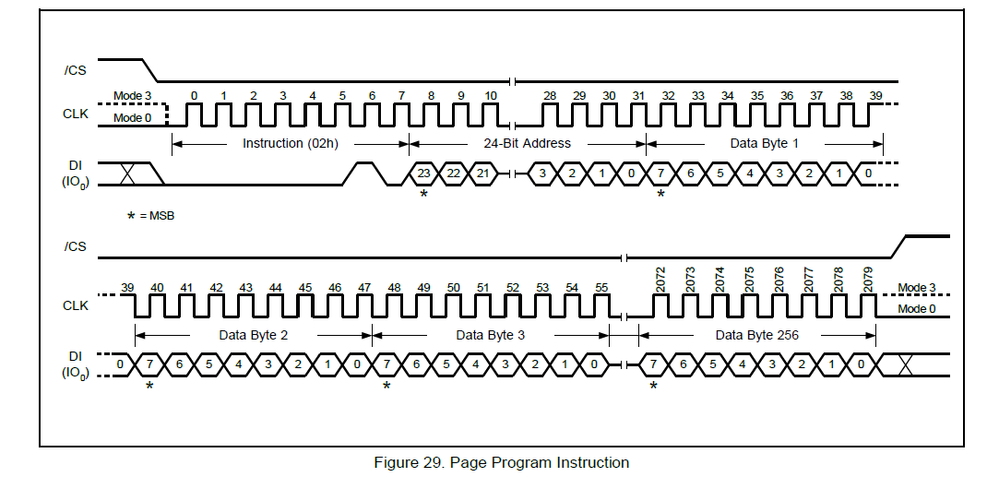
From your attached code for page write, after the write enable function, you are calling:
LPSPI3_ReadWriteByte((u8)WriteAddr);
Do you send the 0X02 write instruction at first? Besides, your write addr is u8, but from my above figure, you can find it is the 24 bit address.
So, the useful method to check your problem is find a logic Analyzer tool to check your page write wave, whether it is meet he W25Q64 demand, then modify the code, actually it is very simple, please try it on your side.
If you still have question about it, please send me your SPI bus wave for page write.
On my side, there has some bare metal function for other MCU, you can refer the flow:
//page write
int w25qxx_write_page(uint32_t addr, uint8_t *buf, uint32_t len)
{
w25qxx_write_enable();
/* send addr */
spi_xfer(W25X_PageProgram, W25QXX_CS_LOW);
spi_xfer((uint8_t)((addr)>>16), W25QXX_CS_LOW);
spi_xfer((uint8_t)((addr)>>8), W25QXX_CS_LOW);
spi_xfer((uint8_t)addr, W25QXX_CS_LOW);
w25_dev.ops.xfer(NULL, buf, len, W25QXX_CS_HIGH);
while(w25_dev.ops.get_reamin() != 0)
{
w25_dev.ops.delayms(10);
}
/* wait busy */
while((w25qxx_read_sr() & 0x01) == 0x01)
{
w25_dev.ops.delayms(1);
}
return 0;
}Wish it helps you!
Have a great day,
Kerry
-----------------------------------------------------------------------------------------------------------------------
Note: If this post answers your question, please click the Correct Answer button. Thank you!
-----------------------------------------------------------------------------------------------------------------------
