
- Forums
- Product Forums
- General Purpose MicrocontrollersGeneral Purpose Microcontrollers
- i.MX Forumsi.MX Forums
- QorIQ Processing PlatformsQorIQ Processing Platforms
- Identification and SecurityIdentification and Security
- Power ManagementPower Management
- Wireless ConnectivityWireless Connectivity
- RFID / NFCRFID / NFC
- Advanced AnalogAdvanced Analog
- Neural Processing UnitsNeural Processing Units
- MCX Microcontrollers
- S32G
- S32K
- S32V
- MPC5xxx
- Other NXP Products
- S12 / MagniV Microcontrollers
- Powertrain and Electrification Analog Drivers
- Sensors
- Vybrid Processors
- Digital Signal Controllers
- 8-bit Microcontrollers
- ColdFire/68K Microcontrollers and Processors
- PowerQUICC Processors
- OSBDM and TBDML
- S32M
- S32Z/E
-
- Solution Forums
- Software Forums
- MCUXpresso Software and ToolsMCUXpresso Software and Tools
- CodeWarriorCodeWarrior
- MQX Software SolutionsMQX Software Solutions
- Model-Based Design Toolbox (MBDT)Model-Based Design Toolbox (MBDT)
- FreeMASTER
- eIQ Machine Learning Software
- Embedded Software and Tools Clinic
- S32 SDK
- S32 Design Studio
- GUI Guider
- Zephyr Project
- Voice Technology
- Application Software Packs
- Secure Provisioning SDK (SPSDK)
- Processor Expert Software
- Generative AI & LLMs
-
- Topics
- Mobile Robotics - Drones and RoversMobile Robotics - Drones and Rovers
- NXP Training ContentNXP Training Content
- University ProgramsUniversity Programs
- Rapid IoT
- NXP Designs
- SafeAssure-Community
- OSS Security & Maintenance
- Using Our Community
-
- Cloud Lab Forums
-
- Knowledge Bases
- ARM Microcontrollers
- i.MX Processors
- Identification and Security
- Model-Based Design Toolbox (MBDT)
- QorIQ Processing Platforms
- S32 Automotive Processing Platform
- Wireless Connectivity
- CodeWarrior
- MCUXpresso Suite of Software and Tools
- MQX Software Solutions
- RFID / NFC
- Advanced Analog
- Neural Processing Units
-
- NXP Tech Blogs
- Home
- :
- i.MX フォーラム
- :
- i.MXプロセッサ
- :
- iMX28 EVK Board Bringup
iMX28 EVK Board Bringup
- RSS フィードを購読する
- トピックを新着としてマーク
- トピックを既読としてマーク
- このトピックを現在のユーザーにフロートします
- ブックマーク
- 購読
- ミュート
- 印刷用ページ
iMX28 EVK Board Bringup

- 新着としてマーク
- ブックマーク
- 購読
- ミュート
- RSS フィードを購読する
- ハイライト
- 印刷
- 不適切なコンテンツを報告
Hi,
I used L2.6.35_1.1.0_130130_source.tar.gz source code and I followed as per "ltib_for_i.mx28__a_step-by-step_guide.pdf" for compiling and flashing. For Flashing I downloaded "L2.6.31_10.08.01_SDK_scripts.tar.gz" script from freescale website. and I flashed. I changed DIP switch as per above Doc, BM3-1,BM2-0,BM1-0,BM0-1(1001). but board is not come up, it just showing 0x80502008, 0x8020a01d these two hex number,
Can you please suggest to resolve this issue. Do we need add any patches like, "Patch for the SDK 2010.12 to fix the incorrect polarity when boot mode is set as boot from SD/eMMC o..."
PLease help me to resolve this issue, Please find logs in the attachment
Original Attachment has been moved to: Sdcard-flashing-Logs.txt.zip

- 新着としてマーク
- ブックマーク
- 購読
- ミュート
- RSS フィードを購読する
- ハイライト
- 印刷
- 不適切なコンテンツを報告
An update to my status just to close the loop:
Following the MX28_EVK_Linux_User_Guide.pdf I'm able to build a uImage and rootfs that are bootable in the sense the kernel has started running.
My initial problem was purely caused by u-boot or linux-boot that for whatever reason (I will figure out later) what was built from the same package L2.6.35_1.1.0_130130_source.tar did not work. I built a bootlet from the original CD coming with the EVK board. After some adjustment to the loadaddress, now my board is runing.
However I still have a problem that the Busybox has not started. I do not see "init started: BusyBox" from the console (which I believe a good start should have because I've selected BusyBox). I have tried all kinds of command line arguments but have no success yet. I would appreciate if anybody can shed some light to it.
- 新着としてマーク
- ブックマーク
- 購読
- ミュート
- RSS フィードを購読する
- ハイライト
- 印刷
- 不適切なコンテンツを報告
Dear Karthikeyan,
Regarding your question about creating SD card, after many searches I find the easiest way is to use cfimager.exe to create SD card from Windows. cfimager.exe is in the latest IMX_MFG_TOOL that you can download from https://www.nxp.com/products/microcontrollers-and-processors/arm-based-processors-and-mcus/i.mx-appl.... The user guide has clear steps to use this cfimager.exe.
Jill

 igorpadykov
- 新着としてマーク
- ブックマーク
- 購読
- ミュート
- RSS フィードを購読する
- ハイライト
- 印刷
- 不適切なコンテンツを報告
Hi Jill
just for test one can try images from obds:
Lab and Test Software (1)
On-Board Diagnostic Suit for the i.MX28
https://www.nxp.com/products/microcontrollers-and-processors/arm-based-processors-and-mcus/i.mx-appl...
Best regards
igor
- 新着としてマーク
- ブックマーク
- 購読
- ミュート
- RSS フィードを購読する
- ハイライト
- 印刷
- 不適切なコンテンツを報告
Hello Igor,
thank you for the information. Yes I've downloaded the diagnostic suit, and I can build and run it. But that does not help me. I'm using NXP imx28evk board. The board itself is working.
The issues I have is how to rebuild the BSP on my system so that I can do customization. I have 2 versions of BSP:
One is downloaded from the link you attached, of Linux_2.6.35. I followed all steps and every step seams working, but at the end when imx28_linux.sb and rootfs.ext2 are written to a SD, I only see error codes 0x8050100f from the debug UART - no booting, no kernel
Another one comes from the virtual machine on the CD coming with the imx28evk board. For this I have better luck that the imx28_linux.sb and imx28_uboot.sb both work to certain degree. They both boot, but at the end of the booting, both end at "crc error, -system halt". Why?
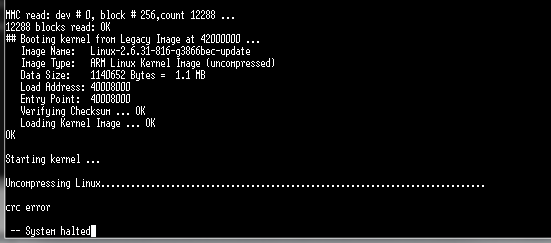
thank you,
Jill
igorpadykov
- 新着としてマーク
- ブックマーク
- 購読
- ミュート
- RSS フィードを購読する
- ハイライト
- 印刷
- 不適切なコンテンツを報告
Hi Karthikeyan
I think for i.MX28 EVK patch is not needed. Please try to flash image
using sect.5.1.3 Writing the Boot Stream and rootfs to a Boot Medium
attached Linux Guide and Demo Images :
Board Support Packages (4)
i.MX28 Linux Binary Demo Files
http://www.nxp.com/products/developer-resources/software-development-tools/i.mx-software-and-tools/i...
Best regards
igor
-----------------------------------------------------------------------------------------------------------------------
Note: If this post answers your question, please click the Correct Answer button. Thank you!
-----------------------------------------------------------------------------------------------------------------------
- 新着としてマーク
- ブックマーク
- 購読
- ミュート
- RSS フィードを購読する
- ハイライト
- 印刷
- 不適切なコンテンツを報告
Dear igor,
I've downloaded the demo image from the link you provided. I've used the images in SD card, as well as boot from USB. All come to the same conclusion: the boot stream, either Linux boot or u-boot, shows only error codes on the debug console (nothing else). As a proof to that my procedure works, I used an old boot image from the CD coming with my EVK board. The old boot image lets me boot, but it is not able to start the Linux kernel (as seen in the screenshot of above).
What can be the reason? Have you directly used the demo images on a EVK board? A label on my board shows "SCH-26241 REV D". A label above says "700-26241 REV A".
- 新着としてマーク
- ブックマーク
- 購読
- ミュート
- RSS フィードを購読する
- ハイライト
- 印刷
- 不適切なコンテンツを報告
Hi igor,
Thanks for your suggestion, Your comments made me move to next step.
I followed in the Doc, Sec 5.1.3
Build sdimage in host Linux computer. sdimage.c is in the “uuc” package in LTIB. Use below steps to build sdimage in Linux:
./ltib -p uuc.spec -m prep
cd rpm/BUILD/uuc-2.6.35.3-1.1.0
gcc sdimage.c -o sdimage
(Any C compiler can be used in the Linux)
and it generated sdimage.out file.
I could do till above. While I am running below command it gives "bash: sdimage: command not found..." error.
sdimage –f imx28_linux.sb –d /dev/sdd (sdd in my case)
and SInce i have not installed in /usr/bin, I did following commands
sudo ./sdimage -f imx28_linux.sb -d /dev/sdd it shows following error,
can't open file imx28_linux.sb
then i copied imx28_linux.sb from /rootfs/boot and save it in /rpm/BUILD/uuc-2.6.35.3-1.1.0
and i had run the command, and it was showing following error,
Can't found boot stream partition
and also please let me know how to create SDcard with following three parttion using commands in the terminal
Device Boot Start End Blocks Id System
/dev/sdb1 * 1 974 1840896 b W95 FAT32
/dev/sdb2 974 977 5339+ 53 OnTrack DM6 Aux3
/dev/sdb3 977 1016 74572 83 Linux
Kindly help me to resolve the above error as soon as possible
Thanks,
Karthik
- 新着としてマーク
- ブックマーク
- 購読
- ミュート
- RSS フィードを購読する
- ハイライト
- 印刷
- 不適切なコンテンツを報告
Dear Karthikeyan,
Have you solved your problem yet? I have the same problem. I tried 2 different version of bsp (2.6.31 and 2.6.35) but none of them work on the board I bought. Even the VM from the original CD does not work.
I'm testing on imx28evk with all out of factory default setting. This means boot from SD card. I use imx28_boot.sb and rootfs directly from the included CD. I get this error message:
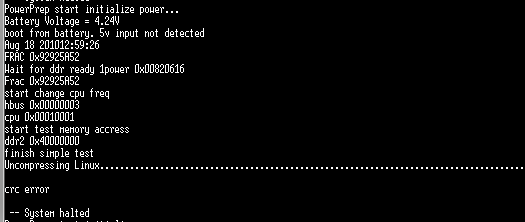
I saw this version number on my imx28evk board: 700-26241 REV A, SCH-26241 REV D.
Anybody can help out?
