
- Forums
- Product Forums
- General Purpose MicrocontrollersGeneral Purpose Microcontrollers
- i.MX Forumsi.MX Forums
- QorIQ Processing PlatformsQorIQ Processing Platforms
- Identification and SecurityIdentification and Security
- Power ManagementPower Management
- Wireless ConnectivityWireless Connectivity
- RFID / NFCRFID / NFC
- Advanced AnalogAdvanced Analog
- Neural Processing UnitsNeural Processing Units
- MCX Microcontrollers
- S32G
- S32K
- S32V
- MPC5xxx
- Other NXP Products
- S12 / MagniV Microcontrollers
- Powertrain and Electrification Analog Drivers
- Sensors
- Vybrid Processors
- Digital Signal Controllers
- 8-bit Microcontrollers
- ColdFire/68K Microcontrollers and Processors
- PowerQUICC Processors
- OSBDM and TBDML
- S32M
- S32Z/E
-
- Solution Forums
- Software Forums
- MCUXpresso Software and ToolsMCUXpresso Software and Tools
- CodeWarriorCodeWarrior
- MQX Software SolutionsMQX Software Solutions
- Model-Based Design Toolbox (MBDT)Model-Based Design Toolbox (MBDT)
- FreeMASTER
- eIQ Machine Learning Software
- Embedded Software and Tools Clinic
- S32 SDK
- S32 Design Studio
- GUI Guider
- Zephyr Project
- Voice Technology
- Application Software Packs
- Secure Provisioning SDK (SPSDK)
- Processor Expert Software
- Generative AI & LLMs
-
- Topics
- Mobile Robotics - Drones and RoversMobile Robotics - Drones and Rovers
- NXP Training ContentNXP Training Content
- University ProgramsUniversity Programs
- Rapid IoT
- NXP Designs
- SafeAssure-Community
- OSS Security & Maintenance
- Using Our Community
-
- Cloud Lab Forums
-
- Knowledge Bases
- ARM Microcontrollers
- i.MX Processors
- Identification and Security
- Model-Based Design Toolbox (MBDT)
- QorIQ Processing Platforms
- S32 Automotive Processing Platform
- Wireless Connectivity
- CodeWarrior
- MCUXpresso Suite of Software and Tools
- MQX Software Solutions
- RFID / NFC
- Advanced Analog
- Neural Processing Units
-
- NXP Tech Blogs
- Home
- :
- i.MX Forums
- :
- i.MX Processors
- :
- i.MX6Q SABRE-AI GPIO control
i.MX6Q SABRE-AI GPIO control
- Subscribe to RSS Feed
- Mark Topic as New
- Mark Topic as Read
- Float this Topic for Current User
- Bookmark
- Subscribe
- Mute
- Printer Friendly Page
i.MX6Q SABRE-AI GPIO control

- Mark as New
- Bookmark
- Subscribe
- Mute
- Subscribe to RSS Feed
- Permalink
- Report Inappropriate Content
Hello everyone,
I am working on imx6q sabre-AI board on Android 7.1 with Linux4.1.15. Now I am porting TI wl18xx wifi SDIO module to usdhc2 SD slot. But I cannot control the GPIO pin as wifi enable pin to enable/disable the wifi module.
Below is my dts configuration about wifi and usdhc:
wlan_en_reg: fixedregulator@2 {
compatible = "regulator-fixed";
regulator-name = "wlan-en-regulator";
regulator-min-microvolt = <1800000>;
regulator-max-microvolt = <1800000>;
/* WLAN_EN GPIO for this board – Bank2, pin7 */
gpio = <&gpio2 7 GPIO_ACTIVE_HIGH>; //MX6QDL_PAD_NANDF_D7__GPIO2_IO07 --> WL_REG_ON/WL_EN
/* WLAN card specific delay */
startup-delay-us = <70000>;
enable-active-high;
regulator-boot-on;
};
&usdhc2 {
pinctrl-names = "default";
pinctrl-0 = <&pinctrl_usdhc2_wifi>;
bus-width = <4>;
// no-1-8-v; //justin@20170606 Mornco target board will remove this
wifi-host;
pm-ignore-notify;
keep-power-in-suspend;
enable-sdio-wakeup;
//ty:1234
vmmc-supply = <®_3p3v>;
vqmmc-supply = <&wlan_en_reg>;
//ocr-limit = <0x80>;
#power-off-card;
#no-1-8-v;
non-removable;
enable-sdio-wakeup;
status = "okay";
wlcore: wlcore@0 {
pinctrl-names = "default";
compatible = "ti,wl1835";
reg = <2>;
interrupt-parent = <&gpio2>;
interrupts = <5 IRQ_TYPE_EDGE_RISING>; //MX6QDL_PAD_NANDF_D5__GPIO2_IO05 --> WL_IRQ
// platform-quirks = <1>;
board-ref-clock = <4>; /* BOARD reference clock, See /include/linux/wl12xx.h for more info*/
};
};
pinctrl_usdhc2_wifi: usdhc2wifigrp {
fsl,pins = <
MX6QDL_PAD_SD2_CMD__SD2_CMD 0x17069
MX6QDL_PAD_SD2_CLK__SD2_CLK 0x10069
MX6QDL_PAD_SD2_DAT0__SD2_DATA0 0x17069
MX6QDL_PAD_SD2_DAT1__SD2_DATA1 0x17069
MX6QDL_PAD_SD2_DAT2__SD2_DATA2 0x17069
MX6QDL_PAD_SD2_DAT3__SD2_DATA3 0x17069
MX6QDL_PAD_NANDF_D5__GPIO2_IO05 0x17069 //0x13059 // this is for WL_IRQ which driver will configure as an input with a pull down
MX6QDL_PAD_NANDF_D7__GPIO2_IO07 0x13059 // WL_REG_ON/WL_EN
>;
};
But when I connected GPIO2_IO07(wlan_en pin) to the module, I can't control that pin by using
ifconfig wlan0 up & ifconfig wlan0 down
When I probe that pin, it always at high once boot up the board and never goes to low. That pin is located in J32, #26pins
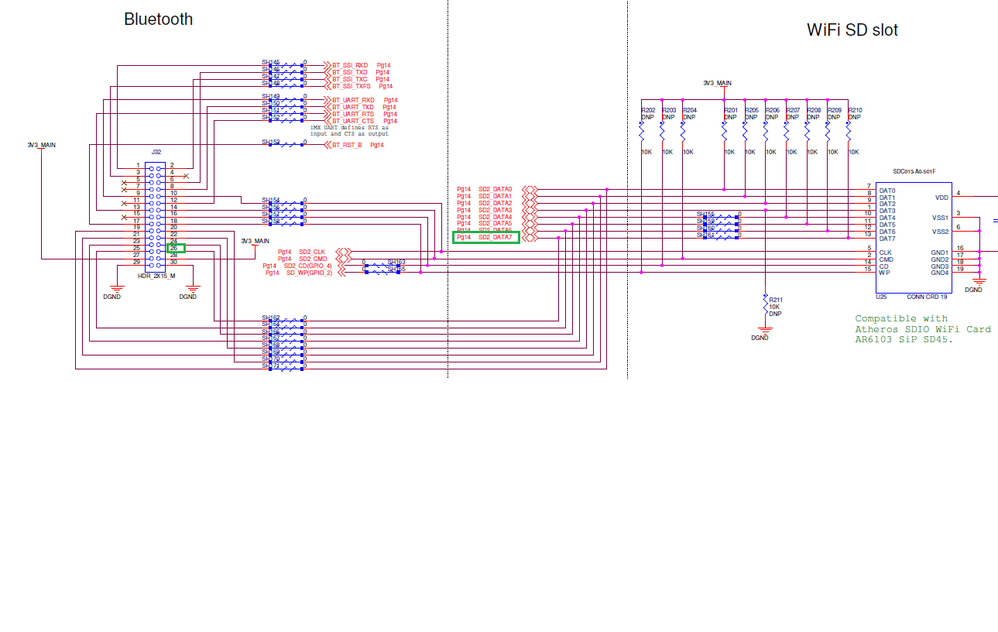
I can't even control this pin using sysfs entry as GPIO by below way:
echo 39 > /sys/class/gpio/export
echo out > /sys/class/gpio/gpio39/direction
echo 1 > /sys/class/gpio/gpio39/value
echo 0 > /sys/class/gpio/gpio39/value
It always remain high(3.3V) and never goes to low when I echo 0 to the value.
Can anyone help me how to control the high/low of this pin as GPIO in J32?
BR,
Wayne
- Mark as New
- Bookmark
- Subscribe
- Mute
- Subscribe to RSS Feed
- Permalink
- Report Inappropriate Content
Thanks all.
I have solved this issue by doing right configuration in DTS.
BR,
Wayne
- Mark as New
- Bookmark
- Subscribe
- Mute
- Subscribe to RSS Feed
- Permalink
- Report Inappropriate Content
what is the root cause? regulator-boot-on or wrong pad?
- Mark as New
- Bookmark
- Subscribe
- Mute
- Subscribe to RSS Feed
- Permalink
- Report Inappropriate Content
Hi Jersey,
Just use:
vmmc-supply = <&wlan_en_reg>; no "vqmmc-supply".
BR,
Wayne

- Mark as New
- Bookmark
- Subscribe
- Mute
- Subscribe to RSS Feed
- Permalink
- Report Inappropriate Content
Glad you got it working. I am working on similar stuff, can you post full dtb or patch file so I can see it?
- Mark as New
- Bookmark
- Subscribe
- Mute
- Subscribe to RSS Feed
- Permalink
- Report Inappropriate Content
Hi Wayne Lou:
1. you need check whether the GPIO2_IO07's iomux's PAD is correct or not, if it is correct, it seems the DTS
pin configuation is no problem.
2. with echo command to drive GPIO2_IO07, then try to more test point with this Pin, not just Pin 26 of J32, also R210's end close to U25's DATA7. it seems R210 not installed in your demo board according to the schematic.
3. if possible, you can directly test the pad of Pin GPIO2_IO07 near to the CPU. until to the point of Pin26.
frankly speaking, i encounter the similar issue, which there is lack of a resister installed in the demo board. it always keeps low, i check the line step by step close to CPU, and found the root cause. good luck to you.

 igorpadykov
- Mark as New
- Bookmark
- Subscribe
- Mute
- Subscribe to RSS Feed
- Permalink
- Report Inappropriate Content
Hi Wayne
please check gpio iomux settings with jtag or with printf,
try to toggle it with jtag to check if this is not hardware issue.
For usage GPIO sysfs entry one can look at
Definitive GPIO guide - Studio Kousagi Wiki
Best regards
igor
-----------------------------------------------------------------------------------------------------------------------
Note: If this post answers your question, please click the Correct Answer button. Thank you!
-----------------------------------------------------------------------------------------------------------------------
