
- Forums
- Product Forums
- General Purpose MicrocontrollersGeneral Purpose Microcontrollers
- i.MX Forumsi.MX Forums
- QorIQ Processing PlatformsQorIQ Processing Platforms
- Identification and SecurityIdentification and Security
- Power ManagementPower Management
- Wireless ConnectivityWireless Connectivity
- RFID / NFCRFID / NFC
- Advanced AnalogAdvanced Analog
- Neural Processing UnitsNeural Processing Units
- MCX Microcontrollers
- S32G
- S32K
- S32V
- MPC5xxx
- Other NXP Products
- S12 / MagniV Microcontrollers
- Powertrain and Electrification Analog Drivers
- Sensors
- Vybrid Processors
- Digital Signal Controllers
- 8-bit Microcontrollers
- ColdFire/68K Microcontrollers and Processors
- PowerQUICC Processors
- OSBDM and TBDML
- S32M
- S32Z/E
-
- Solution Forums
- Software Forums
- MCUXpresso Software and ToolsMCUXpresso Software and Tools
- CodeWarriorCodeWarrior
- MQX Software SolutionsMQX Software Solutions
- Model-Based Design Toolbox (MBDT)Model-Based Design Toolbox (MBDT)
- FreeMASTER
- eIQ Machine Learning Software
- Embedded Software and Tools Clinic
- S32 SDK
- S32 Design Studio
- GUI Guider
- Zephyr Project
- Voice Technology
- Application Software Packs
- Secure Provisioning SDK (SPSDK)
- Processor Expert Software
- Generative AI & LLMs
-
- Topics
- Mobile Robotics - Drones and RoversMobile Robotics - Drones and Rovers
- NXP Training ContentNXP Training Content
- University ProgramsUniversity Programs
- Rapid IoT
- NXP Designs
- SafeAssure-Community
- OSS Security & Maintenance
- Using Our Community
-
- Cloud Lab Forums
-
- Knowledge Bases
- ARM Microcontrollers
- i.MX Processors
- Identification and Security
- Model-Based Design Toolbox (MBDT)
- QorIQ Processing Platforms
- S32 Automotive Processing Platform
- Wireless Connectivity
- CodeWarrior
- MCUXpresso Suite of Software and Tools
- MQX Software Solutions
- RFID / NFC
- Advanced Analog
- Neural Processing Units
-
- NXP Tech Blogs
- Home
- :
- i.MX Forums
- :
- i.MX Processors
- :
- Re: i.MX53 Quick Start board - wall comments
i.MX53 Quick Start board - wall comments
- Subscribe to RSS Feed
- Mark Topic as New
- Mark Topic as Read
- Float this Topic for Current User
- Bookmark
- Subscribe
- Mute
- Printer Friendly Page
i.MX53 Quick Start board - wall comments

- Mark as New
- Bookmark
- Subscribe
- Mute
- Subscribe to RSS Feed
- Permalink
- Report Inappropriate Content
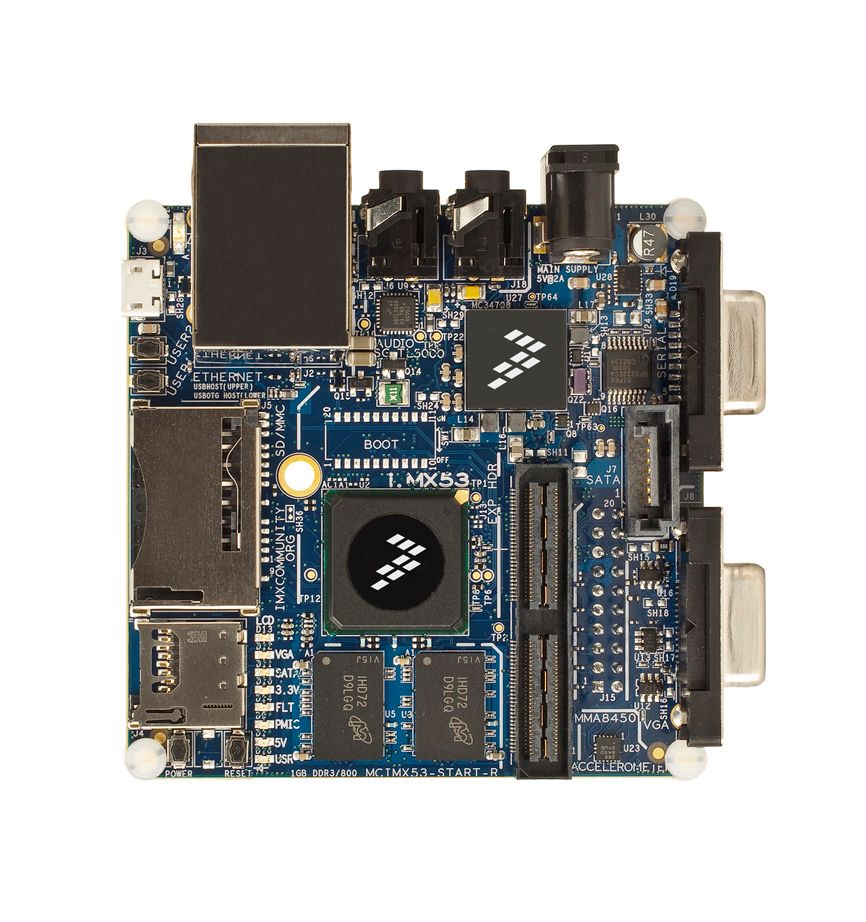
The i.MX53 Quick Start board is a 1GHz ARM Cortex-A8 embedded computer in a three-inch by three-inch board. Offered for $149.00, this development board offers 1GB of RAM, Freescale MC34708 PMIC, and ships with Linux Ubuntu out of the box!
(Part: MCIMX53-START-R)

- Mark as New
- Bookmark
- Subscribe
- Mute
- Subscribe to RSS Feed
- Permalink
- Report Inappropriate Content
As shipped the QSB can't boot from the full-sized SD card. You need to fit the DIP switch (SW1) first and then set switch SW1.2 to the ON position. Alternatively you could solder a wire between the pins for SW1.2.
I haven't tried copying an Linux image from one SD card to another, but it should go something like this:
Plug the micro SD card into a Linux PC with an SD card slot and on which you have permission to execute sudo. Wait a few seconds for the system to detect the card, then issue the following commands:
umount /dev/???*
sudo dd if=/dev/??? of=linux.img bs=1M
Where /dev/??? is the name of the raw device corresponding to the SD card slot (typically this will be /dev/sdb).
This command will take a considerable amount of time. When it finishes, remove the micro SD card and insert the full-sized SD card. Wait a few seconds then issue the following commands:
umount /dev/???*
sudo dd if=linux.img of==/dev/??? bs=1M
sync& sync
Finally use a disk partition editor such as gparted to increase the partition and file system size so that it uses up the full capacity of the card. I can't give you precise instructions here but you should be able to work it out for yourself quite easily.
When this finishes you should have a bootable image on the full-sized SD card.
- Mark as New
- Bookmark
- Subscribe
- Mute
- Subscribe to RSS Feed
- Permalink
- Report Inappropriate Content
hello,
after having a crisis with the capacity of the microSD i hoped i could buy a big SDHC (32GB) and use it to boot the qsb with a high capacity filesystem.
after a lot of googling and pdf's reading, i couldn't find a brief guide for copying the current microSD filesystem and boot files (actually all the data from the microSD as it was sheeped with the board) to the full size sd (SDHC) and then how to configure the board to boot from the SD slot (3 if i'm not wrong).
can someone please explain me the process and link me to the proper guide?
i actually saw some options in the imxstartlinuxbsp pdf but its so complicated and not "understanable" so i thought it can't be it.
hope someone can explain me how to make it, as Mark Middleton suggested earlier, but bot to an uSD but to a full size one.
thank you,
snir
- Mark as New
- Bookmark
- Subscribe
- Mute
- Subscribe to RSS Feed
- Permalink
- Report Inappropriate Content
Jeff Dye with Freescale has told me that the QSB-R "should be shipping by the end of November." Distributors continue to tell our purchasing folks14 weeks. I hope Jeff is right!
-Ted
- Mark as New
- Bookmark
- Subscribe
- Mute
- Subscribe to RSS Feed
- Permalink
- Report Inappropriate Content
While the QSB-R has the OrCAD files, it does not have the errors and warnings removed when you run a Capture Design Rule Check. It took me a while to get all the Errors out (mostly pins that should have been designated as "passive" that are "bidirectional" or "output" instead). I still have not gotten out all the Warnings, but it should not take much longer. It would have been more sensible to release this without errors, since it supposed to be reference design and 40+ errors and warnings do not inspire confidence.
-Ted
- Mark as New
- Bookmark
- Subscribe
- Mute
- Subscribe to RSS Feed
- Permalink
- Report Inappropriate Content
Hi Marsha;
the file "MCIMX53-START_RDesign_Files.zip" has the schematic in pdf format. it will take much time with lots of error to convert that into a design file(orcad's .DSN for example). The last version did have .DSN files.
And there is no Pcb Layout; only Gerber files.
Please Advise - thanks.

 marshachang
- Mark as New
- Bookmark
- Subscribe
- Mute
- Subscribe to RSS Feed
- Permalink
- Report Inappropriate Content
Hello Mike Asa, the design files are there. Go to www.freescale.com/imxquickstart
Click on Downloads in the orange bar
The design files are under "Development Tools" and then Printed Circuit Boards and Schematics-Schematics.
- Mark as New
- Bookmark
- Subscribe
- Mute
- Subscribe to RSS Feed
- Permalink
- Report Inappropriate Content
 TheAdmiral
- Mark as New
- Bookmark
- Subscribe
- Mute
- Subscribe to RSS Feed
- Permalink
- Report Inappropriate Content
I agree that the first thing to do is log in and make changes through the debug serial port. If you are getting a log in screen on the monitor, you should be getting the log in prompt on the serial terminal.
As second alternative would be to buy a second (or more) uSD cards and burn fresh images of the Ubuntu system on them. Boot from one of the fresh uSD cards with the problem uSD card in an adapter in the other slot. Once you are logged in, make your changes on the problem uSD card. I generally find that having a known good back up uSD card saves a lot of troubleshooting time.
- Mark as New
- Bookmark
- Subscribe
- Mute
- Subscribe to RSS Feed
- Permalink
- Report Inappropriate Content
the new revised imx53 QuickStart's page does not have any design files or layout. The last version's did. Can someone please tell me how to get them. Thanks.
- Mark as New
- Bookmark
- Subscribe
- Mute
- Subscribe to RSS Feed
- Permalink
- Report Inappropriate Content
The simplest way to get a shell is to connect a serial terminal(115200,N,8,1) to the debug serial port. This will give you root access to the system.
- Mark as New
- Bookmark
- Subscribe
- Mute
- Subscribe to RSS Feed
- Permalink
- Report Inappropriate Content
hello,
i have a little crisis in my project.
my uSD run out of space and therfore i can't login. the os is starting (with the penguin) and getting to the login screen but shows an error message says: "the configuration default or gnome power manger have not been installed properly please contact your adaminstrator"
i found a solution in the internet but it involves getting the terminal in login screen. i don't know why but i can't get it using ctrl+alt+F1 and any other Fx, i'm just getting black screens and need to plug of the power and connect again for restart. esc during startup also doesn't working... can someone help me ASAP.
thank you very much,
snir.
- Mark as New
- Bookmark
- Subscribe
- Mute
- Subscribe to RSS Feed
- Permalink
- Report Inappropriate Content
- Mark as New
- Bookmark
- Subscribe
- Mute
- Subscribe to RSS Feed
- Permalink
- Report Inappropriate Content
marshachang
- Mark as New
- Bookmark
- Subscribe
- Mute
- Subscribe to RSS Feed
- Permalink
- Report Inappropriate Content
Check out this article about the i.MX53 Quick Start board vs the Panda
marshachang
- Mark as New
- Bookmark
- Subscribe
- Mute
- Subscribe to RSS Feed
- Permalink
- Report Inappropriate Content
I ask as some have tried to insert the standard size sd card to boot and have had the same issue. The i.MX53 Quick Start board will only boot from the microSD card slot.
- Mark as New
- Bookmark
- Subscribe
- Mute
- Subscribe to RSS Feed
- Permalink
- Report Inappropriate Content
- Mark as New
- Bookmark
- Subscribe
- Mute
- Subscribe to RSS Feed
- Permalink
- Report Inappropriate Content
Timesys has an online university track in flight with i.MX53 Quick Start board on how to build a Linux based dual display video player device to play back high-resolution 720/1080p videos. The UI panel is developed with Qt Embedded, hardware accelerated video is played back on a display with blending between framebuffers using gstreamer. Its a free hands-on online learning program opened to everyone. More info can be found here:
http://www.timesys.com/embedded-linux/training/timesys-university/freescale_imx53
- Mark as New
- Bookmark
- Subscribe
- Mute
- Subscribe to RSS Feed
- Permalink
- Report Inappropriate Content
Could anyone help me? I have the following question.
I have enabled dual display on i.MX53, now I want the two monitors display the same. How can I do that?
- Mark as New
- Bookmark
- Subscribe
- Mute
- Subscribe to RSS Feed
- Permalink
- Report Inappropriate Content

- Mark as New
- Bookmark
- Subscribe
- Mute
- Subscribe to RSS Feed
- Permalink
- Report Inappropriate Content
Vince,
The list of supported of features has been updated at http://www.adeneo-embedded.com/en/Products/Board-Support-Packages/Freescale-i.MX53-QSB.
Can you please try using the latest binary image again? I just want to make sure we are on the same page.
- Mark as New
- Bookmark
- Subscribe
- Mute
- Subscribe to RSS Feed
- Permalink
- Report Inappropriate Content
I tried to use the binaries for WEC7, but can't get it to put anything on VGA screen I have plugged into the QSB pcba. I followed the instructions in the binary download and used the VGA version. I am using a 4GB sd micro and assume it would be enough (no information in the install instructions).
Oh, I also assumed that cfimager would format (-a) extenstion, but tried formatting as a FAT also with no luck
I have included the debug output here.
