
- Forums
- Product Forums
- General Purpose MicrocontrollersGeneral Purpose Microcontrollers
- i.MX Forumsi.MX Forums
- QorIQ Processing PlatformsQorIQ Processing Platforms
- Identification and SecurityIdentification and Security
- Power ManagementPower Management
- Wireless ConnectivityWireless Connectivity
- RFID / NFCRFID / NFC
- Advanced AnalogAdvanced Analog
- Neural Processing UnitsNeural Processing Units
- MCX Microcontrollers
- S32G
- S32K
- S32V
- MPC5xxx
- Other NXP Products
- S12 / MagniV Microcontrollers
- Powertrain and Electrification Analog Drivers
- Sensors
- Vybrid Processors
- Digital Signal Controllers
- 8-bit Microcontrollers
- ColdFire/68K Microcontrollers and Processors
- PowerQUICC Processors
- OSBDM and TBDML
- S32M
- S32Z/E
-
- Solution Forums
- Software Forums
- MCUXpresso Software and ToolsMCUXpresso Software and Tools
- CodeWarriorCodeWarrior
- MQX Software SolutionsMQX Software Solutions
- Model-Based Design Toolbox (MBDT)Model-Based Design Toolbox (MBDT)
- FreeMASTER
- eIQ Machine Learning Software
- Embedded Software and Tools Clinic
- S32 SDK
- S32 Design Studio
- GUI Guider
- Zephyr Project
- Voice Technology
- Application Software Packs
- Secure Provisioning SDK (SPSDK)
- Processor Expert Software
- Generative AI & LLMs
-
- Topics
- Mobile Robotics - Drones and RoversMobile Robotics - Drones and Rovers
- NXP Training ContentNXP Training Content
- University ProgramsUniversity Programs
- Rapid IoT
- NXP Designs
- SafeAssure-Community
- OSS Security & Maintenance
- Using Our Community
-
- Cloud Lab Forums
-
- Knowledge Bases
- ARM Microcontrollers
- i.MX Processors
- Identification and Security
- Model-Based Design Toolbox (MBDT)
- QorIQ Processing Platforms
- S32 Automotive Processing Platform
- Wireless Connectivity
- CodeWarrior
- MCUXpresso Suite of Software and Tools
- MQX Software Solutions
- RFID / NFC
- Advanced Analog
- Neural Processing Units
-
- NXP Tech Blogs
- Home
- :
- i.MX フォーラム
- :
- i.MXプロセッサ
- :
- Re: i.MX53 IPU Deinterlacer
i.MX53 IPU Deinterlacer
- RSS フィードを購読する
- トピックを新着としてマーク
- トピックを既読としてマーク
- このトピックを現在のユーザーにフロートします
- ブックマーク
- 購読
- ミュート
- 印刷用ページ
i.MX53 IPU Deinterlacer

- 新着としてマーク
- ブックマーク
- 購読
- ミュート
- RSS フィードを購読する
- ハイライト
- 印刷
- 不適切なコンテンツを報告

- 新着としてマーク
- ブックマーク
- 購読
- ミュート
- RSS フィードを購読する
- ハイライト
- 印刷
- 不適切なコンテンツを報告
Hello Charles and Jacky Huang,
I am using IMX53 ARD board with android 2.3.4.
I enabled the driver under Device Drivers > Multimedia device > Video Capture Adapters > MXC Camera/V4L2 PRP Features, and now my .config file is updated with "CONFIG_MXC_TVIN_ADV7180=y"...
Please let me know how shall I verify the video in? I have connected the camera to J42 connector of the ARD board.
I am not able to locate the unit test source. please suggest how to configure.
Regards,
Swamy
Jacky Huang said:
Hi charlesI use imx51, android 10.2 with ADV7180. but i found the screen rolling endless.
how did you porting the adv7180 driver to android 10.2
Is it need to modify the camera HAL?
after I porting the adv7180 driver which is run normally on android 9.4 to android 10.2,
i got a rolling screen.
Could you give me some advice?
thanks
charles chang said:
I use imx51, android 10.3 with ADV7180.
the unit test program : mxc_v4l2_tvin runs well , it output de-interlaced frame on screen.
the de-interlace seems be done on the output path, not the capturing path.

- 新着としてマーク
- ブックマーク
- 購読
- ミュート
- RSS フィードを購読する
- ハイライト
- 印刷
- 不適切なコンテンツを報告
I am using TV-in application.it is working fine for PAL but for NTSC,screen rolls :(
I am working on tvp5150 decoder driver and what registers have to set/modify to stop the the screen rolling for NTSC.
thanks,
- 新着としてマーク
- ブックマーク
- 購読
- ミュート
- RSS フィードを購読する
- ハイライト
- 印刷
- 不適切なコンテンツを報告
Actually, I stop the screen rolling through modify the adv7180 reg value, the reg is about the NTSC V bit and F bit ,
the reg addr is 0xe5, 0xe6, 0xe7.
however, I got some sync issue that make the screen appear some antialiasing.
Are you resolve the issue through modify the adv7180 reg value?
and, Could you explain how to passing the 480 lines of interest data to android camera routines?
actually, I can't get the point about the robust solution!
Hope you can tell me the detail of you solution.
Thanks advance!
Craig Petku said:
It's been several months since I got into the guts of the camera HAL and ADV7180, but here's some general comments.
The Gingerbread Camera HAL really wants a 4:3 aspect ratio. The only format that I found would work was to have the 7180 report 720x480 back to V4L2 and ignore the fact that the frame is actually 525 lines. This results in rolling video since the DMA buffer is configured for only 480 lines and the image is 525. It also has terrible frame combining in the IPU routines. One solution is to program the registers in the 7180 to only output 480 lines. This can be done by carefully adjusting where the AV codes occur in the stream. Once the blanked HS lines are discarded (on both fields) the IPU will do field combining which may result in combing artifacts but is usable in development. The down side to this appears that iPOD video has slightly different timing and the first few lines get clipped. A more robust approach would be to use the v4l2_capture routines to pull in 525 lines and de-interlace the video before passing the 480 lines of interest up to the android camera routines. I have not had time to implement this yet. I also reversed the field1 / field0 codes in the IPU routines since they seemed to be backwards, but this is not confirmed and the RM is of little use in interpreting the bitfields for the AV codes.

- 新着としてマーク
- ブックマーク
- 購読
- ミュート
- RSS フィードを購読する
- ハイライト
- 印刷
- 不適切なコンテンツを報告
Hii jacky, can you please tell me, what value you set for register E5, E6 and E7 to stop scroll of NTSC std.
Regards,
Bikash
- 新着としてマーク
- ブックマーク
- 購読
- ミュート
- RSS フィードを購読する
- ハイライト
- 印刷
- 不適切なコンテンツを報告
It's been several months since I got into the guts of the camera HAL and ADV7180, but here's some general comments.
The Gingerbread Camera HAL really wants a 4:3 aspect ratio. The only format that I found would work was to have the 7180 report 720x480 back to V4L2 and ignore the fact that the frame is actually 525 lines. This results in rolling video since the DMA buffer is configured for only 480 lines and the image is 525. It also has terrible frame combining in the IPU routines. One solution is to program the registers in the 7180 to only output 480 lines. This can be done by carefully adjusting where the AV codes occur in the stream. Once the blanked HS lines are discarded (on both fields) the IPU will do field combining which may result in combing artifacts but is usable in development. The down side to this appears that iPOD video has slightly different timing and the first few lines get clipped. A more robust approach would be to use the v4l2_capture routines to pull in 525 lines and de-interlace the video before passing the 480 lines of interest up to the android camera routines. I have not had time to implement this yet. I also reversed the field1 / field0 codes in the IPU routines since they seemed to be backwards, but this is not confirmed and the RM is of little use in interpreting the bitfields for the AV codes.
- 新着としてマーク
- ブックマーク
- 購読
- ミュート
- RSS フィードを購読する
- ハイライト
- 印刷
- 不適切なコンテンツを報告
Hi charles
I use imx51, android 10.2 with ADV7180. but i found the screen rolling endless.
how did you porting the adv7180 driver to android 10.2
Is it need to modify the camera HAL?
after I porting the adv7180 driver which is run normally on android 9.4 to android 10.2,
i got a rolling screen.
Could you give me some advice?
thanks
charles chang said:
I use imx51, android 10.3 with ADV7180.
the unit test program : mxc_v4l2_tvin runs well , it output de-interlaced frame on screen.
the de-interlace seems be done on the output path, not the capturing path.
- 新着としてマーク
- ブックマーク
- 購読
- ミュート
- RSS フィードを購読する
- ハイライト
- 印刷
- 不適切なコンテンツを報告
Hello,
I was unable to get the VDI module working but as for the display issue we managed to fix that.
We had the issue where Field A and B were displayed one above the other.
We now see interlaced video whereby the two fields are put into memory by interleaving their repsective lines. Of course you will see "combing artefacts" but that is becuase the video needs to be de-interlaced; however, it has been sufficient for us to use it this way.
The relevant entry is in the file ipu_common.c as mentioned earlier. If you ensure your IPU logical channel is calling the set_interlaced function, the memory writes will put the frames together as interleaved data not separate fields.

- 新着としてマーク
- ブックマーク
- 購読
- ミュート
- RSS フィードを購読する
- ハイライト
- 印刷
- 不適切なコンテンツを報告
I was able to fix this problem by programming drivers/media/video/mxc/capture/mxc_v4l2_capture.c .active_top =13 to .active_top = 3. And i was able to view the video in a good form using
mxc_v4l2_tvin.out -ow 720 -oh 480 -ol 20 -f UYVY
i was able to see a video interlaced form of video as told by Lautaro Carmona by using mxc_v4l2_capture.out file.
Queries
1. I am looking for any method/patches in IMX53 to avoid frame rolling issue (other than mentioned fix).
2. From my De-coder(tvp5147) i was able to get 720x480 but in my start of line and end of line i have some blank data getting appended.
So i wish to crop it from 720 to 700 by programming 20 pixel skip from left. so i tried "-l" option in mxc_v4l2_capture.out
but it is not working ... Any suggestion for this problem ?
3. i wish to take even lines frame and odd lines frame out of image. So i used -t as 240 and output dimension as 720x240 in mxc_v4l2_capture.out. My method it is not working ... Any suggestion for this problem ?
- 新着としてマーク
- ブックマーク
- 購読
- ミュート
- RSS フィードを購読する
- ハイライト
- 印刷
- 不適切なコンテンツを報告
I use TVP5151 + imx53
I use mxv_v4l2_tvin test app and in the output the image seen in the monitor "rolls".
I tried adding
p->u.bt656.clock_curr = 0;
nothing works :-(
Any fix/workaround for this problem ?
- 新着としてマーク
- ブックマーク
- 購読
- ミュート
- RSS フィードを購読する
- ハイライト
- 印刷
- 不適切なコンテンツを報告
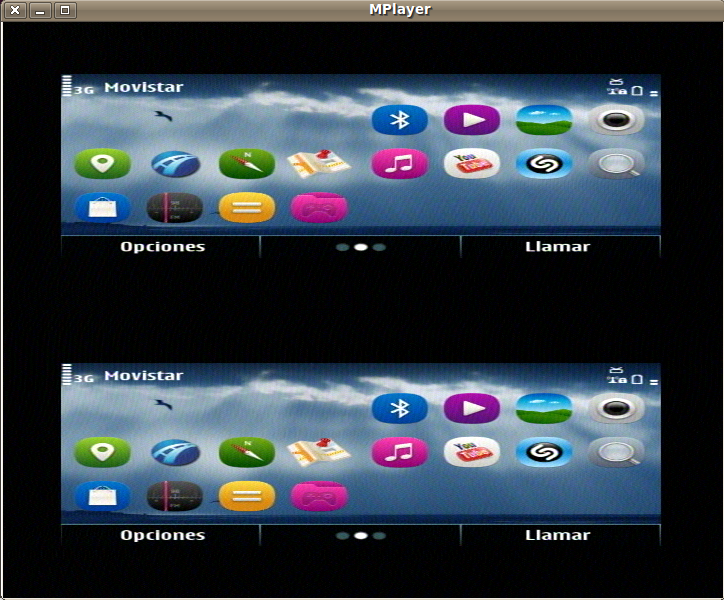
Here is a picture of what we are capturing with TVP5147 and i.MX51's CSI.
It seems that the CSI is not performing deinterlacing and here it can be seen that we are receiving the two fields of every frame as two separated image of 288 lines each, and that they are being drawn together.
To capture this raw video I executed this command:
/unit_tests/mxc_v4l2_capture.out -iw 720 -ih 576 -ow 720 -oh 576 -f UYVY -fr 15 test.yuv
Then we played it with this other command :
mplayer -rawvideo w=720:h=576:fps=15mat=uyvy -demuxer rawvideo test.yuv
P.S.: we also tried with both possible values (0 and 1) to the "-i" argument in order to try csi->prp->mem and csi->mem path with the same results! :(

- 新着としてマーク
- ブックマーク
- 購読
- ミュート
- RSS フィードを購読する
- ハイライト
- 印刷
- 不適切なコンテンツを報告
I use ADV7180 + imx51. android 10.3.1
the unit test program mxc_v4l2_tvin runs well, it output de-interlaced frame on overlay. and no need to memcpy each frame.
-- the mxv_v4l2_tvin code is different fromt imx53. though they have the same filename.
just a little bug , the default video standard is PAL, it sync fail when we input the NTSC video.
and
sometime it hangs when video source is disappeared for a short period.
iWavesystems said:
Eric,
We need de-interlace support in i.MX51 CSI1 interface & we are struggling to bring-up.
Can you share the de-interlacing support on i.mx51CSI1 interface+ADV7180?

- 新着としてマーク
- ブックマーク
- 購読
- ミュート
- RSS フィードを購読する
- ハイライト
- 印刷
- 不適切なコンテンツを報告
I found an earlier version of mxc_v4l2_tvin from 2009 which doesn't do a memcpy, however it only displays one field (288 lines) and expands this to cover the whole screen ie vertical resolution is halved. The 2011 version of mxc_v4l2_tvin uses memcpy and so has high latency. I am having trouble understanding why there doesn't seem to be demo code with low latency AND de-interlacing
- 新着としてマーク
- ブックマーク
- 購読
- ミュート
- RSS フィードを購読する
- ハイライト
- 印刷
- 不適切なコンテンツを報告
I was asking this around some time ago and got the answer that for using VDIC for de-interlacing, it needs three fields, but only one field can be input from CSI directly (the other two fields still need be sent from memory). That's why VDIC is only useful for output path where required fields can be sent from memory.
There could also be some ways to use CSI->MEM path without memcpy but I haven't figured out how it should work. At the moment I have exactly the same problems as you do.
- 新着としてマーク
- ブックマーク
- 購読
- ミュート
- RSS フィードを購読する
- ハイライト
- 印刷
- 不適切なコンテンツを報告
Has anyone had success experimenting with the Interlace Offset parameter referred to in iMX53RM.pdf page 2675? I know it is set by _ipu_ch_param_set_interlaced_scan but maybe the driver is not quite doing it correctly?
I am guessing the VDI is for motion blurring, but that is not really necessary for us, surely the DMA can just alternately copy each field into a single buffer separated by the Interlace Offset and thus accomplish de-interlacing quite simply.
- 新着としてマーク
- ブックマーク
- 購読
- ミュート
- RSS フィードを購読する
- ハイライト
- 印刷
- 不適切なコンテンツを報告
The VDIC is being fed a deinterlaced image. The deinterlacing is done the straightforward way, by writing lines with a stride twice the line width and offsetting the line write by the Interlace Offset.
However the VDIC effectively throws away one field (regardless of the motion blurring parameter which may be 0,1 or 2), and replaces it with an average of the pixels above and below it - quite unsuitable for our purposes.
To reduce latency we are capturing into one buffer and then samping this buffer at 20ms intervals using the Threshold IRQ and End of Frame IRQ. This is to reduce latency by 20ms. To further reduce latency we want to use a DMA-only approach, so the IC post-processing (resizing) input is set to the capture buffer, and in the MEM_PP_MEM IRQ the output is set to one of the display buffers. However the IC only seems to work about 5 frames per second. The data rate should be well within the capabilities of the IC (see Reference Manual section 8.2.2.3 page 552)
- 新着としてマーク
- ブックマーク
- 購読
- ミュート
- RSS フィードを購読する
- ハイライト
- 印刷
- 不適切なコンテンツを報告
I solved the IC problem by ensuring DMA 11 is set up to be double-buffered in ipu_init_channel_buffer. Now I get an IRQ 7ms after each ipu_select_buffer( MEM_PP_MEM, IPU_INPUT_BUFFER, 0 or 1 ). ipu_link_channels( MEM_PP_MEM, MEM_BG_SYNC ) avoids having to do any work in the IRQ. There is now no queue management and user-space has no involvement after setting up the streaming.
- 新着としてマーク
- ブックマーク
- 購読
- ミュート
- RSS フィードを購読する
- ハイライト
- 印刷
- 不適切なコンテンツを報告
Thanks, I might add the low-latency/non-memcpy approach also has the advantage of being resistant to an overloaded CPU or kernel panic - the video preview would continue running regardless - a good feature for mission-critical applications.
- 新着としてマーク
- ブックマーク
- 購読
- ミュート
- RSS フィードを購読する
- ハイライト
- 印刷
- 不適切なコンテンツを報告
Dear Craig,
Hi! Thanks for your advice! I could not test it until today!
As you suggested us, we looked at drivers/media/video/mxc/capture/mxc_v4l2_capture.c and we found this piece of code:
/* This may not work on other platforms. Check when adding a new one.*/
pr_debug(" clock_curr=mclk=%d\n", ifparm.u.bt656.clock_curr);
if (ifparm.u.bt656.clock_curr == 0) {
csi_param.clk_mode = IPU_CSI_CLK_MODE_CCIR656_INTERLACED;
} else {
csi_param.clk_mode = IPU_CSI_CLK_MODE_GATED_CLK;
}
csi_param.pixclk_pol = ifparm.u.bt656.latch_clk_inv;
if (ifparm.u.bt656.mode == V4L2_IF_TYPE_BT656_MODE_NOBT_8BIT) {
csi_param.data_width = IPU_CSI_DATA_WIDTH_8;
} else if (ifparm.u.bt656.mode== V4L2_IF_TYPE_BT656_MODE_NOBT_10BIT) {
csi_param.data_width = IPU_CSI_DATA_WIDTH_10;
} else {
csi_param.data_width = IPU_CSI_DATA_WIDTH_8;
}
So, we assumed that the clock setting you were talking about was ifparm.u.bt656.clock_curr .
Then, we modified our driver in order to set this value to return a 0, like this:
static int ioctl_g_ifparm(struct v4l2_int_device *s, struct v4l2_ifparm *p)
{
#ifdef DEBUG
printk("In tvp5147:ioctl_g_ifparm\n");
#endif
if (s == NULL) {
printk("<3>"" ERROR!! no slave device set!\n");
return -1;
}
/* Initialize structure to 0s then set any non-0 values. */
memset(p, 0, sizeof(*p));
p->if_type = V4L2_IF_TYPE_BT656; /* This is the only possibility.*/
p->u.bt656.mode = V4L2_IF_TYPE_BT656_MODE_BT_10BIT;
//p->u.bt656.nobt_hs_inv = 1;
p->u.bt656.bt_sync_correct = 1;
/* tvp5147 has a dedicated clock so no clock settings needed. */
p->u.bt656.clock_curr = 0;
return 0;
}
And then we also add some printk's in mxc_v4l2_capture.c :
if (ifparm.u.bt656.clock_curr == 0) {
csi_param.clk_mode = IPU_CSI_CLK_MODE_CCIR656_INTERLACED;
printk("INTERLACED!!\n");
} else {
csi_param.clk_mode = IPU_CSI_CLK_MODE_GATED_CLK;
printk("NOT INTERLACED!!\n");
}
Finally, we run the mxc_v4l2_overlay.out and mxc_v4l2_capture.out unit tests, but in both cases we saw the same results: two separated image of about 288 lines each vertically aligned (instead of one unique image of 576 lines), and in the serial console we could see the printk output "INTERLACED!!".
Any ideas?
Thanks in advance,
Lautaro
P.S.: We still have to try to capture using the csi->mem path
Craig Petku said:
To start with I am working with the 10.2 version of FSL android. However, looking at an older ltib release from 2010 it looks like ths has been out for awhile.
Look at ./drivers/mxc/ipu3/ipu_common.c. You should find something like...
if (_ipu_chan_is_interlaced(channel)) {
_ipu_ch_param_set_interlaced_scan(dma_chan);
}
In my case this handles the CSI-MEM deinterlacing.
So Where does the interlace parameter come from?...
Look at mxc_v4l_open in ./drivers/media/video/mxc/capture
Older distro's have something like
csi_param.pixclk_pol = ifparm.u.bt656.latch_clk_inv;
/* Once we handle multiple inputs this will need to change. */
csi_param.csi = 0;
if (ifparm.u.bt656.mode
== V4L2_IF_TYPE_BT656_MODE_NOBT_8BIT)
csi_param.data_width = IPU_CSI_DATA_WIDTH_8;
else if (ifparm.u.bt656.mode
== V4L2_IF_TYPE_BT656_MODE_NOBT_10BIT)
csi_param.data_width = IPU_CSI_DATA_WIDTH_10;
Newer ones include the magic parameter based upon a clock setting returned by the sensor driver. Sorry I can't post the actual code tonight, so I'll try from work tomorrow. Worst case, pull down the latest version of the linux OS and look in the mxc_capture around where I posted, then update your sensor driver to return a 0 (I think) in the parameter that results in interlaced video being identified.
- 新着としてマーク
- ブックマーク
- 購読
- ミュート
- RSS フィードを購読する
- ハイライト
- 印刷
- 不適切なコンテンツを報告
I use imx51, android 10.3 with ADV7180.
the unit test program : mxc_v4l2_tvin runs well , it output de-interlaced frame on screen.
the de-interlace seems be done on the output path, not the capturing path.
- 新着としてマーク
- ブックマーク
- 購読
- ミュート
- RSS フィードを購読する
- ハイライト
- 印刷
- 不適切なコンテンツを報告
The problem with the latest version of mxc_v4l2_tvin is that it does a memcpy from an output buffer to the framebuffer. This adds noticable latency. Whereas using the DMA has much lower latency, around 40ms.
- 新着としてマーク
- ブックマーク
- 購読
- ミュート
- RSS フィードを購読する
- ハイライト
- 印刷
- 不適切なコンテンツを報告
To start with I am working with the 10.2 version of FSL android. However, looking at an older ltib release from 2010 it looks like ths has been out for awhile.
Look at ./drivers/mxc/ipu3/ipu_common.c. You should find something like...
if (_ipu_chan_is_interlaced(channel)) {
_ipu_ch_param_set_interlaced_scan(dma_chan);
}
In my case this handles the CSI-MEM deinterlacing.
So Where does the interlace parameter come from?...
Look at mxc_v4l_open in ./drivers/media/video/mxc/capture
Older distro's have something like
csi_param.pixclk_pol = ifparm.u.bt656.latch_clk_inv;
/* Once we handle multiple inputs this will need to change. */
csi_param.csi = 0;
if (ifparm.u.bt656.mode
== V4L2_IF_TYPE_BT656_MODE_NOBT_8BIT)
csi_param.data_width = IPU_CSI_DATA_WIDTH_8;
else if (ifparm.u.bt656.mode
== V4L2_IF_TYPE_BT656_MODE_NOBT_10BIT)
csi_param.data_width = IPU_CSI_DATA_WIDTH_10;
Newer ones include the magic parameter based upon a clock setting returned by the sensor driver. Sorry I can't post the actual code tonight, so I'll try from work tomorrow. Worst case, pull down the latest version of the linux OS and look in the mxc_capture around where I posted, then update your sensor driver to return a 0 (I think) in the parameter that results in interlaced video being identified.
