
- Forums
- Product Forums
- General Purpose MicrocontrollersGeneral Purpose Microcontrollers
- i.MX Forumsi.MX Forums
- QorIQ Processing PlatformsQorIQ Processing Platforms
- Identification and SecurityIdentification and Security
- Power ManagementPower Management
- Wireless ConnectivityWireless Connectivity
- RFID / NFCRFID / NFC
- Advanced AnalogAdvanced Analog
- MCX Microcontrollers
- S32G
- S32K
- S32V
- MPC5xxx
- Other NXP Products
- S12 / MagniV Microcontrollers
- Powertrain and Electrification Analog Drivers
- Sensors
- Vybrid Processors
- Digital Signal Controllers
- 8-bit Microcontrollers
- ColdFire/68K Microcontrollers and Processors
- PowerQUICC Processors
- OSBDM and TBDML
- S32M
- S32Z/E
-
- Solution Forums
- Software Forums
- MCUXpresso Software and ToolsMCUXpresso Software and Tools
- CodeWarriorCodeWarrior
- MQX Software SolutionsMQX Software Solutions
- Model-Based Design Toolbox (MBDT)Model-Based Design Toolbox (MBDT)
- FreeMASTER
- eIQ Machine Learning Software
- Embedded Software and Tools Clinic
- S32 SDK
- S32 Design Studio
- GUI Guider
- Zephyr Project
- Voice Technology
- Application Software Packs
- Secure Provisioning SDK (SPSDK)
- Processor Expert Software
- Generative AI & LLMs
-
- Topics
- Mobile Robotics - Drones and RoversMobile Robotics - Drones and Rovers
- NXP Training ContentNXP Training Content
- University ProgramsUniversity Programs
- Rapid IoT
- NXP Designs
- SafeAssure-Community
- OSS Security & Maintenance
- Using Our Community
-
- Cloud Lab Forums
-
- Knowledge Bases
- ARM Microcontrollers
- i.MX Processors
- Identification and Security
- Model-Based Design Toolbox (MBDT)
- QorIQ Processing Platforms
- S32 Automotive Processing Platform
- Wireless Connectivity
- CodeWarrior
- MCUXpresso Suite of Software and Tools
- MQX Software Solutions
- RFID / NFC
- Advanced Analog
-
- NXP Tech Blogs
- Home
- :
- i.MX Forums
- :
- i.MX Processors
- :
- Re: SAI时钟问题
SAI时钟问题
- Subscribe to RSS Feed
- Mark Topic as New
- Mark Topic as Read
- Float this Topic for Current User
- Bookmark
- Subscribe
- Mute
- Printer Friendly Page

- Mark as New
- Bookmark
- Subscribe
- Mute
- Subscribe to RSS Feed
- Permalink
- Report Inappropriate Content
你好,
当前我正在使用i.mx6ull调试SAI功能,想要产生3079.04kHz和1634.55kHz的SAI_BCLK时钟。
请问如何配置或者如何修改才能产生该时钟波形呢?谢谢
Solved! Go to Solution.
- Mark as New
- Bookmark
- Subscribe
- Mute
- Subscribe to RSS Feed
- Permalink
- Report Inappropriate Content
在IMX6ULL Application Processors Reference Manual资料中 :
1、Charpter 18,提及PLL4 also referenced as Audio PLL。是否此PLL4就是Figure 45-2的PLL_OUT呢?此PLL_OUT的范围值是多少,精度多少?
2、同时我想了解一下,章节45.3.1.1 Audio master clock Figure 45-2 SAI master clock generation 中的 Fractional Clock Divider是怎么应用的,配置哪些寄存器值?同时产生的MCLK的范围、精度是多少?
- Mark as New
- Bookmark
- Subscribe
- Mute
- Subscribe to RSS Feed
- Permalink
- Report Inappropriate Content
我们的产品不是播放音频的,是用于发送数据的,自己实现的i2s驱动,clk要求有点特殊
- Mark as New
- Bookmark
- Subscribe
- Mute
- Subscribe to RSS Feed
- Permalink
- Report Inappropriate Content
hi,Wigros Sun:
经过我阅读IMX6ULL Applications Processors Reference Manual资料,关于SAI功能,想要产生3090.94kHz(与上次所说有点偏差)和1634.55kHz的SAI_BCLK时钟,有了以下见解,请给以确认,谢谢。
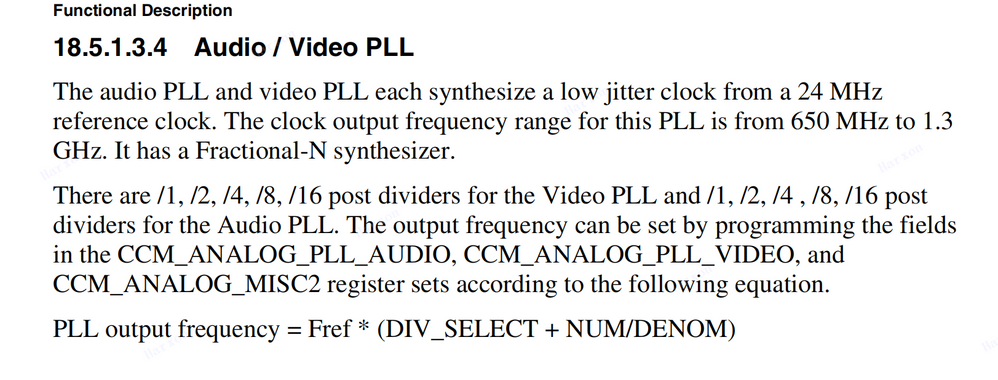
见资料章节18.5.1.3.4
见资料章节45.3.1.1
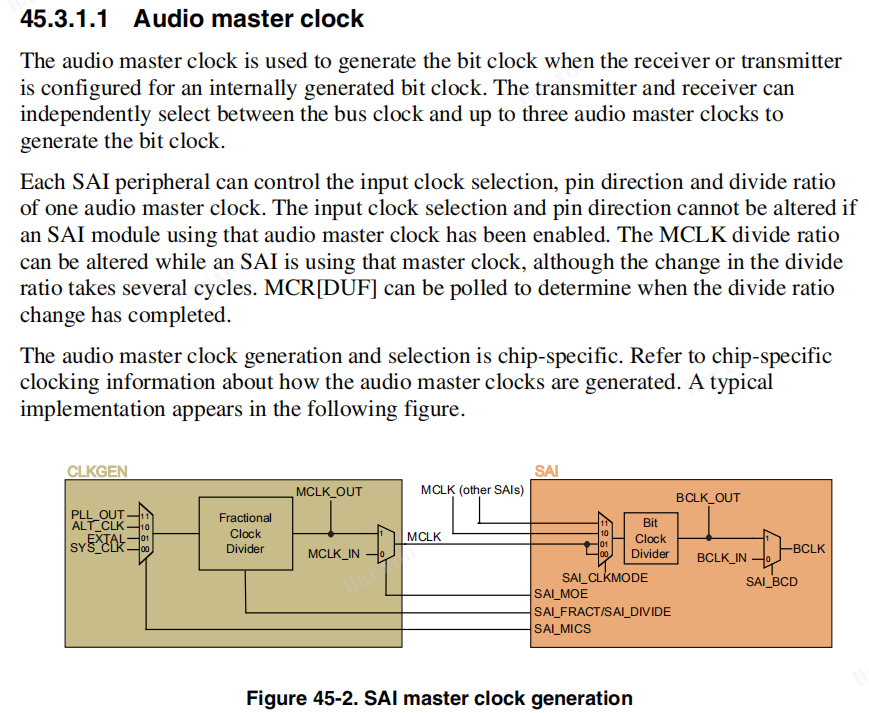
Fref=24MHz,DIV_SELECT=32,NUM=888212658,DENOM=1073741823,计算得出PLL output frequency 为787853100,设置Bit Clock Divider 为482,计算得出BCLK=1634550 Hz。
Fref=24MHz,DIV_SELECT=32,NUM=764985569,DENOM=1073741823,计算得出PLL output frequency 为785098760,设置Bit Clock Divider 为254,计算得出BCLK=3090940 Hz。
上述设计是否正确,请给以确认。
由于本设计关乎项目重要参数设计,麻烦帮忙及时、仔细阅读,谢谢!

 weidong_sun
- Mark as New
- Bookmark
- Subscribe
- Mute
- Subscribe to RSS Feed
- Permalink
- Report Inappropriate Content
Hi,
你看到的计算方法没错,clock driver里已经做好了,你只需要通过下面的节点配置clock source parent & output 频率就可以。但是,能不能同时支持你需要的2个不同的频率,你需要自己算一下。
你把这个数值787853100和785098760分别填写到device tree里的:
&clks {
assigned-clocks = <&clks IMX6UL_CLK_PLL4_AUDIO_DIV>;
assigned-clock-rates = <786432000>;
Weidong
- Mark as New
- Bookmark
- Subscribe
- Mute
- Subscribe to RSS Feed
- Permalink
- Report Inappropriate Content
一个系统中能不能同时支持787853100和785098760这两个时钟的相互切换设置呢?可以的话,需要如何设置,这样切换设置会影响其他设备么?
weidong_sun
- Mark as New
- Bookmark
- Subscribe
- Mute
- Subscribe to RSS Feed
- Permalink
- Report Inappropriate Content
PLL4 Audio和PLL5 video可以做成切换的方式。但是默认情况下,clock driver clk_imx6ul.c这个文件做好初始化之后就不改变了。你需要想办法做一个接口来控制PLL4输出频率的切换。我们目前没有现成的方案或者patch来实现这个目的。但是,提供一个思路:
I.MX6Q HDMI,它会根据EDID获取的时序信息来配置PLL5 VIDEO的输出频率,这个就是动态的切换,你可以找一下相关代码,参考一下。或者您在clk_imx6ul.c基础上做一些必要的扩展,提供必要接口给你调用,也可以实现。
weidong
- Mark as New
- Bookmark
- Subscribe
- Mute
- Subscribe to RSS Feed
- Permalink
- Report Inappropriate Content
hi,weidong
我们将pll4的clk配置成784007840,mclk配置成784007840,这样相当于1:1分频,这样,配置好bit clock divider后能正确得到想要的bclk,但是很奇怪,fs上没有波形,请问可能是什么原因?
weidong_sun
- Mark as New
- Bookmark
- Subscribe
- Mute
- Subscribe to RSS Feed
- Permalink
- Report Inappropriate Content
这个问题,您可以查看imx-wm8960.c,这个是machine driver,它内部有一个参数配置函数,这个函数可以获取音频文件的Channels和sample rate,BCLK和LRCLK(帧同步时钟)有对应关系,换句话说,LRCLK是从BCLK计算得到的。一般是BCLK = channels x sample rate(LRCLK,即FS) x bits(量化位数),所以你在SAIx_TXFS脚上要得到相应的频率,可以播放一个文件试试,或者根据fsl_sai.c里方法,自己配置一下。
一般应用时,客户不用自己配置,driver会自己计算并随BCLK一起输出FS。
weidong
weidong_sun
- Mark as New
- Bookmark
- Subscribe
- Mute
- Subscribe to RSS Feed
- Permalink
- Report Inappropriate Content
Hi,
从I.MX6UL的clock tree来看,SAI的时钟源来自PLL4,系统配置PLL4输出为786432000Hz,经过多次分频之后,得到BCLK。因此,BCLK的实际输出频率与786432000Hz相除,必须是整数。而您需要的2个时钟,都不是整数倍,因此得不到这2个时钟。
&clks {
assigned-clocks = <&clks IMX6UL_CLK_PLL4_AUDIO_DIV>;
assigned-clock-rates = <786432000>;
另外,BCLK时钟的输出,是CPU工作在Master模式时,声卡驱动和平台端SAI驱动根据实际播放的音频文件进行配置的,如果不能整除,也会输出一个与理论BLCK非常接近的时钟,让音频播放出来。
如果您正在调试audio codec,您可以配置CPU端I2S为Slave模式,codec做Master模式,由codec提供 BCLK和LRCLK时钟及左右声道同步信号给CPU端。那么,你可以利用codec的PLL配置输出你所需要的频率。
-------------In English--------------
In addition, when the CPU is working in master mode, the output of the BCLK clock is configured by the sound card driver and the Sai driver at the platform end according to the actual played audio file. If it can't be divided, it will also output a clock very close to the theoretical blck to play the audio. If you are debugging audio codec, you can configure I2S on CPU side as slave mode and codec as master mode. Codec provides BCLK and lrclk clocks and left and right channel synchronization signals to CPU side. Then, you can use codec's PLL configuration to output the frequency you need.
BR,
Wedong
- Mark as New
- Bookmark
- Subscribe
- Mute
- Subscribe to RSS Feed
- Permalink
- Report Inappropriate Content
你好,
上述提及,SAI的时钟源来自PLL4,系统配置PLL4输出为786432000Hz,经过多次分频之后,得到BCLK。能否修改外部振荡晶体,重新配置PLL4,从而得到一个合适的PLL4时钟,再分频产生BCLK呢
weidong_sun
- Mark as New
- Bookmark
- Subscribe
- Mute
- Subscribe to RSS Feed
- Permalink
- Report Inappropriate Content
理论上可以,你可以在device tree里把786432000修改一下,尝试一下。但是,PLL也不是任何时钟都可以输出的,频点是有限的。
weidong
- Mark as New
- Bookmark
- Subscribe
- Mute
- Subscribe to RSS Feed
- Permalink
- Report Inappropriate Content
那PLL 的时钟是如何 产生的,范围在多少?谢谢
weidong_sun
- Mark as New
- Bookmark
- Subscribe
- Mute
- Subscribe to RSS Feed
- Permalink
- Report Inappropriate Content
PLL时钟计算方法在Reference Manual里给出了说明。原则上,在BSP里你不需要再去关注它的算法,你只要修改786432000这个数值,clock driver会自己去配置。
Weidong
- Mark as New
- Bookmark
- Subscribe
- Mute
- Subscribe to RSS Feed
- Permalink
- Report Inappropriate Content
hi,Wigros:
请问下这个clk除了786432000这个值之外还有哪些可配置?我们按照自己的计算配置了一个,好像不对,我跟卓工是同一个项目的。
weidong_sun
- Mark as New
- Bookmark
- Subscribe
- Mute
- Subscribe to RSS Feed
- Permalink
- Report Inappropriate Content
可以 配置的一般有2个频率:22.5792M 和 24.576MHz的整数倍。以分别支持常用的44.1K和48K的常用采样频率。
weidong
- Mark as New
- Bookmark
- Subscribe
- Mute
- Subscribe to RSS Feed
- Permalink
- Report Inappropriate Content
在IMX6ULL Application Processors Reference Manual资料中 :
1、Charpter 18,提及PLL4 also referenced as Audio PLL。是否此PLL4就是Figure 45-2的PLL_OUT呢?此PLL_OUT的范围值是多少,精度多少?
2、同时我想了解一下,章节45.3.1.1 Audio master clock Figure 45-2 SAI master clock generation 中的 Fractional Clock Divider是怎么应用的,配置哪些寄存器值?同时产生的MCLK的范围、精度是多少?
