
- Forums
- Product Forums
- General Purpose MicrocontrollersGeneral Purpose Microcontrollers
- i.MX Forumsi.MX Forums
- QorIQ Processing PlatformsQorIQ Processing Platforms
- Identification and SecurityIdentification and Security
- Power ManagementPower Management
- Wireless ConnectivityWireless Connectivity
- RFID / NFCRFID / NFC
- Advanced AnalogAdvanced Analog
- Neural Processing UnitsNeural Processing Units
- MCX Microcontrollers
- S32G
- S32K
- S32V
- MPC5xxx
- Other NXP Products
- S12 / MagniV Microcontrollers
- Powertrain and Electrification Analog Drivers
- Sensors
- Vybrid Processors
- Digital Signal Controllers
- 8-bit Microcontrollers
- ColdFire/68K Microcontrollers and Processors
- PowerQUICC Processors
- OSBDM and TBDML
- S32M
- S32Z/E
-
- Solution Forums
- Software Forums
- MCUXpresso Software and ToolsMCUXpresso Software and Tools
- CodeWarriorCodeWarrior
- MQX Software SolutionsMQX Software Solutions
- Model-Based Design Toolbox (MBDT)Model-Based Design Toolbox (MBDT)
- FreeMASTER
- eIQ Machine Learning Software
- Embedded Software and Tools Clinic
- S32 SDK
- S32 Design Studio
- GUI Guider
- Zephyr Project
- Voice Technology
- Application Software Packs
- Secure Provisioning SDK (SPSDK)
- Processor Expert Software
- Generative AI & LLMs
-
- Topics
- Mobile Robotics - Drones and RoversMobile Robotics - Drones and Rovers
- NXP Training ContentNXP Training Content
- University ProgramsUniversity Programs
- Rapid IoT
- NXP Designs
- SafeAssure-Community
- OSS Security & Maintenance
- Using Our Community
-
- Cloud Lab Forums
-
- Knowledge Bases
- ARM Microcontrollers
- i.MX Processors
- Identification and Security
- Model-Based Design Toolbox (MBDT)
- QorIQ Processing Platforms
- S32 Automotive Processing Platform
- Wireless Connectivity
- CodeWarrior
- MCUXpresso Suite of Software and Tools
- MQX Software Solutions
- RFID / NFC
- Advanced Analog
- Neural Processing Units
-
- NXP Tech Blogs

Hi All,
I am working on customer imx6q board and getting issue with HDMI.
I am getting HDMI panel detection kernel log but no display on HDMI panel.
I am using rootfs which i have created by busybox.
So my question, Is there any need of "mxc hdmi cec" lib or application in user space to enable HDMI in kernel ?
or HDMI display should start by default ?
Kernel Logs:---------------------------------
mxc_sdc_fb mxc_sdc_fb.0: register mxc display driver hdmi
mxc_hdmi mxc_hdmi: Detected HDMI controller 0x13:0xa:0xa0:0xc1
fbcvt: 1920x1080@60: CVT Name - 2.073M9
imx-ipuv3 imx-ipuv3.0: IPU DMFC DP HIGH RESOLUTION: 1(0,1), 5B(2~5), 5F(6,7)
mxc_sdc_fb mxc_sdc_fb.1: Can't get fb option for mxcfb1!
mxc_sdc_fb mxc_sdc_fb.2: Can't get fb option for mxcfb2!
mxc_sdc_fb mxc_sdc_fb.3: Can't get fb option for mxcfb3!
imx-sdma imx-sdma: loaded firmware 1.1
imx-sdma imx-sdma: initialized
mxc_hdmi mxc_hdmi: mxc_hdmi_set_mode: setting to default=1920x1080M@60 bpp=16
fbcvt: 1920x1080@60: CVT Name - 2.073M9
mxc_hdmi mxc_hdmi: mxc_hdmi_set_mode: New video mode
Serial: IMX driver
imx-uart.0: ttymxc0 at MMIO 0x2020000 (irq = 58) is a IMX
imx-uart.1: ttymxc1 at MMIO 0x21e8000 (irq = 59) is a IMX
console [ttymxc1] enabled, bootconsole disabled
console [ttymxc1] enabled, bootconsole disabled
loop: module loaded
已解决! 转到解答。
Hi Jimmychan,
I have just found that:-
TMDS data/clk lines from imx6 should be directly connected to HDMI port and Corresponding TMDS data/clk lines of CM2020 should be connected with imx6 HDMI TMDS data lines to provide ESD protection etc as below schematic
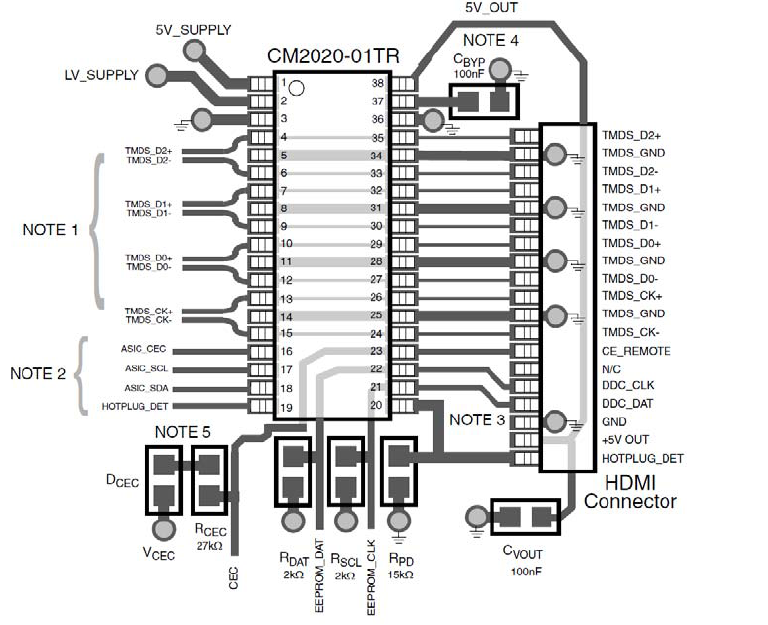
Take one example TDMI_D1+ from imx6 is connected to pin 7, then pin 32 of CM2020 and then connected to HDMI Port. Sabre SD board do like that.
But in my board TDMI_D1+ from imx6 is connected to pin 7 of CM2020 only and pin 32 of CM2020 is connected to HDMI Port. Means there is no connection from pin 7 to pin 32.
Means TDMI data/clk lines from imx6 are not connected to HDMI port so there will be no HDMI data display.
Am I right in this case? Could you please verify?
You can find data sheet of CM2020 from link. Sabre Sd use same Chip.
http://www.onsemi.com/pub_link/Collateral/CM2020-01TR-D.PDF
Now i tried with below boot argument also but getting No signal message
setenv bootargs console=ttymxc1,115200 rw rootwait root=/dev/mmcblk0p1 init=/linurc video=mxcfb0:dev=hdmi,1920x1080M@60,if=RGB24 video=mxcfb1:off video=mxcfb2:off video=mxcfb3:off fbmem=20M vmalloc=400M

I tried with below boot argument but getting No Signal message on HDMI Panel
setenv bootargs console=ttymxc1,115200 rw rootwait root=/dev/mmcblk0p1 init=/linurc video=mxcfb0:dev=ldb,LDB-XGA,if=RGB666 video=mxcfb0:dev=hdmi,1920x1080M@60,if=RGB24 video=mxcfb1:off video=mxcfb2:off video=mxcfb3:off fbmem=20M vmalloc=400M
and
setenv bootargs console=ttymxc1,115200 rw rootwait root=/dev/mmcblk0p1 init=/linurc video=mxcfb0:dev=ldb,LDB-XGA,if=RGB24 video=mxcfb1:dev=hdmi,1920x1080M@60,if=RGB24
Hi Anil,
Maybe you should post your boot config as well (while in u-boot, do 'printenv' and post it back) - there is a line there which states to which framebuffer did you map hdmi. For instance in our kernel all the secondary devices (other than fb0) are blanked by default and hdmi was mapped to fb2 and was blanked.
If it's a custom board you also might have a hardware fault with HDMI TMDS pairs.
