
- Forums
- Product Forums
- General Purpose MicrocontrollersGeneral Purpose Microcontrollers
- i.MX Forumsi.MX Forums
- QorIQ Processing PlatformsQorIQ Processing Platforms
- Identification and SecurityIdentification and Security
- Power ManagementPower Management
- Wireless ConnectivityWireless Connectivity
- RFID / NFCRFID / NFC
- Advanced AnalogAdvanced Analog
- Neural Processing UnitsNeural Processing Units
- MCX Microcontrollers
- S32G
- S32K
- S32V
- MPC5xxx
- Other NXP Products
- S12 / MagniV Microcontrollers
- Powertrain and Electrification Analog Drivers
- Sensors
- Vybrid Processors
- Digital Signal Controllers
- 8-bit Microcontrollers
- ColdFire/68K Microcontrollers and Processors
- PowerQUICC Processors
- OSBDM and TBDML
- S32M
- S32Z/E
-
- Solution Forums
- Software Forums
- MCUXpresso Software and ToolsMCUXpresso Software and Tools
- CodeWarriorCodeWarrior
- MQX Software SolutionsMQX Software Solutions
- Model-Based Design Toolbox (MBDT)Model-Based Design Toolbox (MBDT)
- FreeMASTER
- eIQ Machine Learning Software
- Embedded Software and Tools Clinic
- S32 SDK
- S32 Design Studio
- GUI Guider
- Zephyr Project
- Voice Technology
- Application Software Packs
- Secure Provisioning SDK (SPSDK)
- Processor Expert Software
- Generative AI & LLMs
-
- Topics
- Mobile Robotics - Drones and RoversMobile Robotics - Drones and Rovers
- NXP Training ContentNXP Training Content
- University ProgramsUniversity Programs
- Rapid IoT
- NXP Designs
- SafeAssure-Community
- OSS Security & Maintenance
- Using Our Community
-
- Cloud Lab Forums
-
- Knowledge Bases
- ARM Microcontrollers
- i.MX Processors
- Identification and Security
- Model-Based Design Toolbox (MBDT)
- QorIQ Processing Platforms
- S32 Automotive Processing Platform
- Wireless Connectivity
- CodeWarrior
- MCUXpresso Suite of Software and Tools
- MQX Software Solutions
- RFID / NFC
- Advanced Analog
- Neural Processing Units
-
- NXP Tech Blogs
- Home
- :
- i.MX フォーラム
- :
- i.MXプロセッサ
- :
- Re: Moving second (custom) Bootloader + Application to SDRAM on i.MX RT1050 platform
Moving second (custom) Bootloader + Application to SDRAM on i.MX RT1050 platform
- RSS フィードを購読する
- トピックを新着としてマーク
- トピックを既読としてマーク
- このトピックを現在のユーザーにフロートします
- ブックマーク
- 購読
- ミュート
- 印刷用ページ
Moving second (custom) Bootloader + Application to SDRAM on i.MX RT1050 platform

- 新着としてマーク
- ブックマーク
- 購読
- ミュート
- RSS フィードを購読する
- ハイライト
- 印刷
- 不適切なコンテンツを報告
Hello there,
on i.MX RT1050 EVKB I developed a second Bootloader including XIP to execute from QSPI Flash, then I developed an Application in which I just defined XIP_EXTERNAL_FLASH = 1 macro and to which I jump from second Bootloader.
Everything works as expected and until now I was happy with this configuration.
Now, for a set of reasons which I don't explain here for brevity, I would like to move the whole Application (and possibly second Bootloader too) to external SDRAM and execute/debug from there. I found other threads on the topic but not covering exactly my platform or my configuration, is there somebody who could help in finding documentation on this topic?
Thanks in advance
- 新着としてマーク
- ブックマーク
- 購読
- ミュート
- RSS フィードを購読する
- ハイライト
- 印刷
- 不適切なコンテンツを報告
As a first step advancing towards the goal in the title, I would like to completely understand the process of configuring, loading, running and debugging an application in external SDRAM, which is as far as I see not completely documented, nor completely discussed (in a single thread) here on NXP forum... so I would appreciate very much if someone like @Miguel04 or @lpcxpresso_supp expert in the topic can confirm my understandings.
Let's get started!
I picked evkbimxrt1050_iled_blinky demo application as starting point:
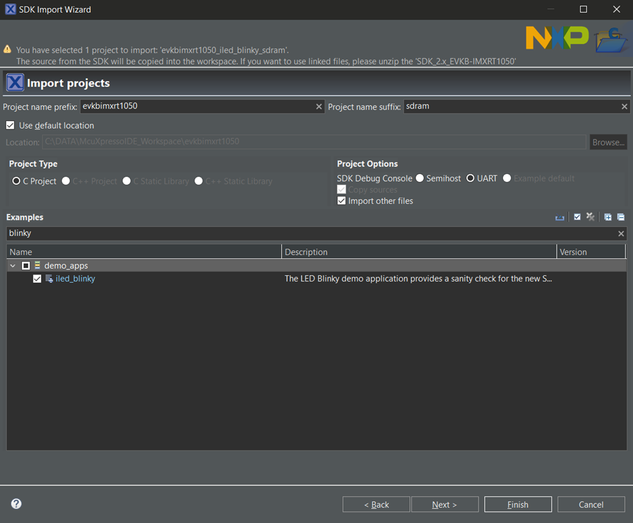
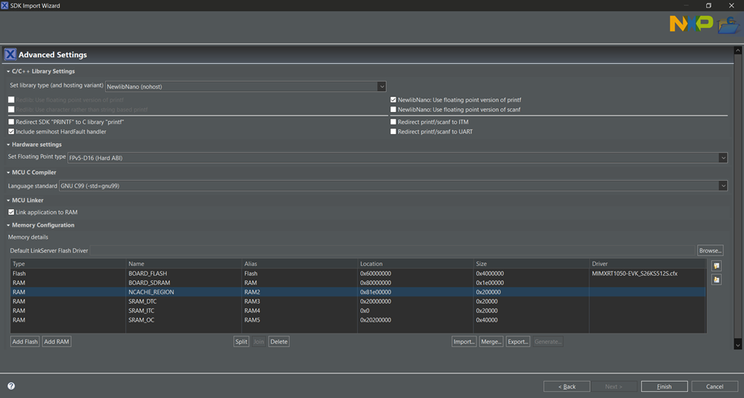
Because this project is configured by default to run using eXecution In-Place (XIP), while importing I immediately checked "Link application to RAM" and moved BOARD_SDRAM as the first RAM area listed in Memory Configuration. These two operations should be sufficient to instruct MCU Linker to move all the code in external SDRAM starting from 0x80000000 address.
I also moved NCACHE_REGION right after BOARD_SDRAM to have all the external SDRAM contiguous in memory configuration, thinking (and hoping) this will not affect MCU Linker in any way.
After SDK sample project import completes, if I build the project this is what I see in build console output and MAP file:

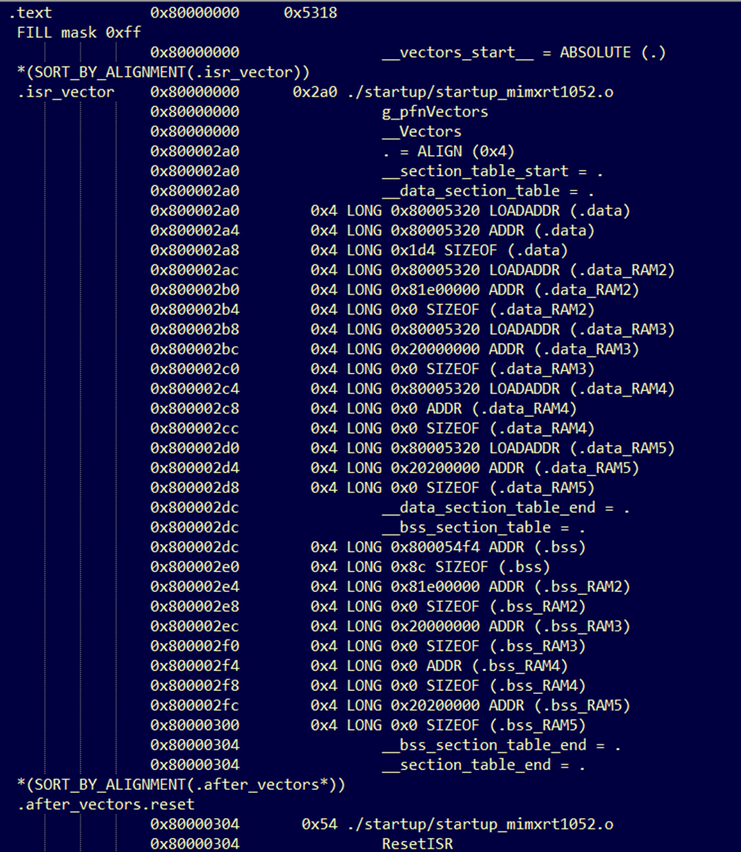
What I see in above listings makes me think I am right, but please... again... correct me if NOT.
But now, if when I tried to debug the project, this is what happened:

and I said to myself: "Ok, he's right. How could he be able to load the code to SDRAM if nobody initialized it before?"
Then, thanks to this article in NXP community blog I figured out that LinkServer needed a "customized" Connect Script to initialize the Smart External Memory Controller (SEMC) to enable the SDRAM, and consequenly to program and jump to 0x80000000 successfully. The connection script for RT1050 SDRAM initialization is provided at above link, and when added in Debug Configuration something starts to work.
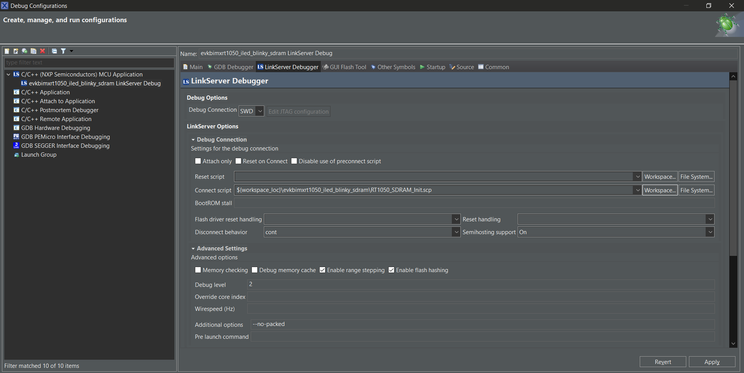

Loading to SDRAM now works, but if I press Resume (F8) then a crash immediately occurs:


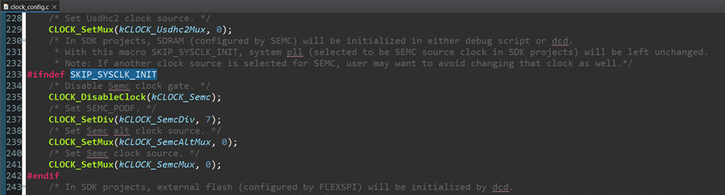
The Hard Fault seems to be triggered by BOARD_InitBootClocks(), when SEMC clock configuration is performed. Then I said to myself: "Ok, right. If LinkServer already configured SEMC to support external SDRAM and instruction are fetched from there, it's natural that changing clocks configuration while fetching instructions may cause some malfunctioning. Let's define SKIP_SYSCLK_INIT symbol.
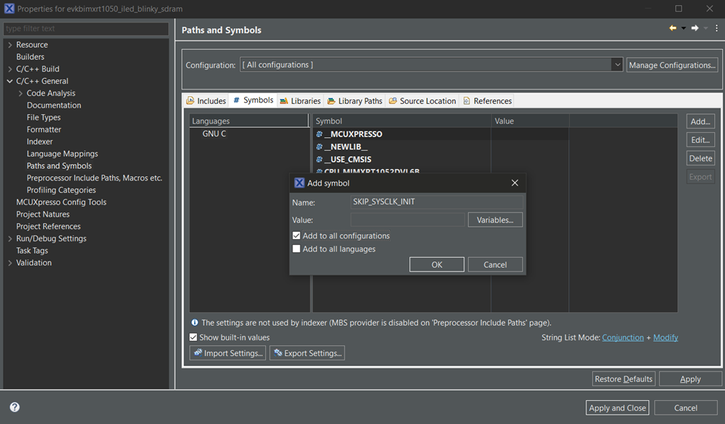
Now, if I start debugging and just press Resume (F8) the program runs and LED starts to blink.
HURRAY! No... wait.... I cannot set breakpoints..... or better, I can set breakpoints, but they'll be never hitted. As you can see in the screenshot below, program is running, breakpoint is set, but no triggering.
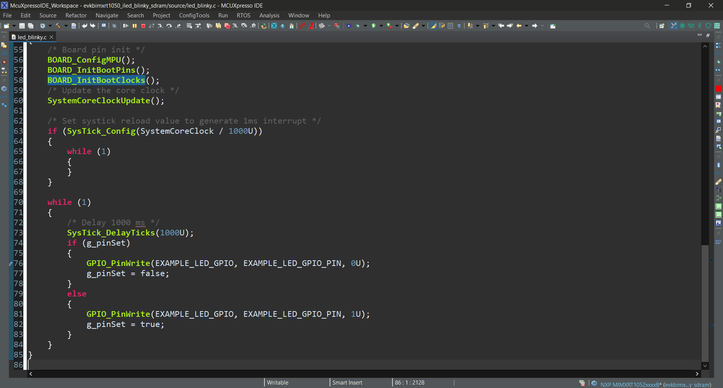
The only way to have a breakpoint triggered is to set it up using right mouse button --> Add breakpoint... --> Type: Hardware

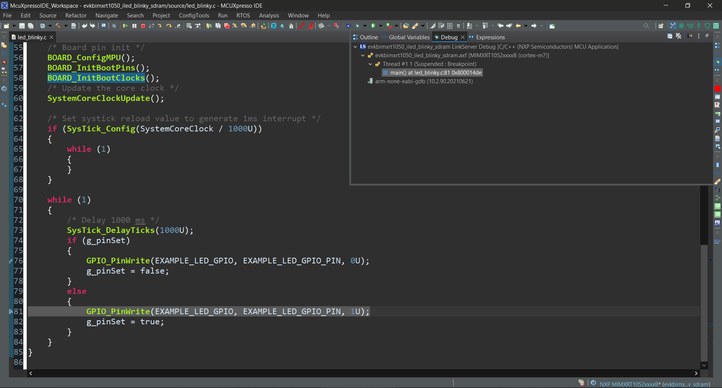
HURRAY! Now the breakpoint is working! No... wait.... if I try to step....... it's resuming execution, then stopping when hitting the same breakpoint again...........
So, debugging was impossible... until I found this thread in NXP forum in which @kerryzhou hinted at --cachelib libm7_cache.so LinkServer option, which I later found also explained in RT1050_BriefOverview_v201.pdf document provided at the same first link providing the connection script too. The document says (let me replace the screenshot, just to make it less outdated):
Debug performance and the Data Cache
When debugging images that make use of SDRAM or OC_RAM for storage of variable data (globals, stack, heap etc.) then the following option should be set within the LinkServer debug launch configuraton as shown below:
This module ensures that debug cache coherence is maintained, and correct debug operations may fail if this module is not specified. However there will be a debug performance penalty when this module is used.
Note: this module is not required io the SDRAM (or OC_TAX) only contains constant or uncached data.
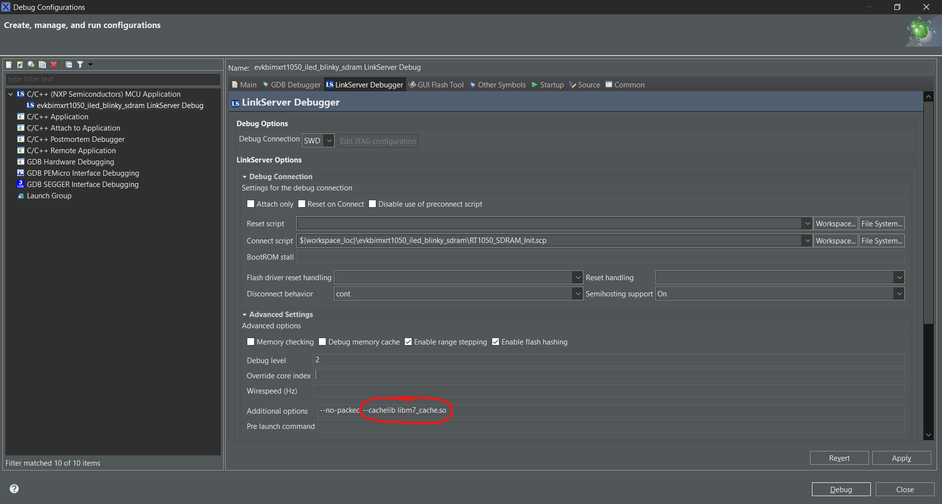
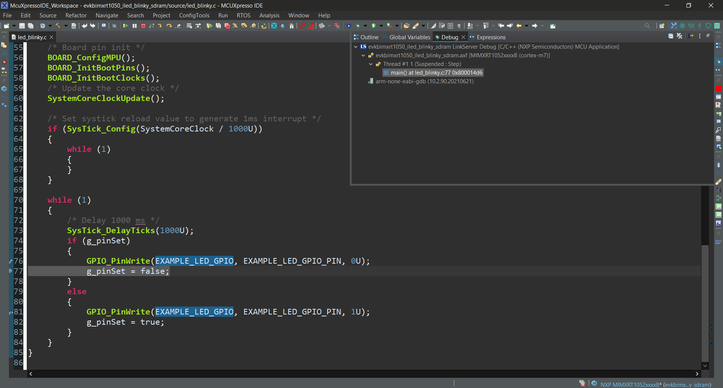
HURRAY! Load works! Execute works! Breakpoints are triggering! Stepping works!
The only drawback is that stepping through the code is reaaaally, really slow.
As a very last step, I removed xip_device and xip_board from SDK components, which are no more necessary because now the project is no more executing code in-place from FLASH memory, and I also set XIP_BOOT_HEADER_ENABLE symbol to 0 in both Debug and Release configurations because, for the same reason, I don't need XIP boot header to be included in generated image anymore.

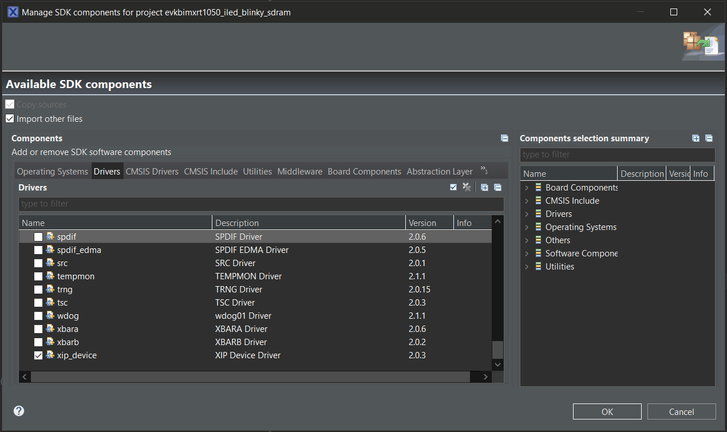


QUESTIONS:
- Is the above procedure correct? Am I missing something, or doing something wrong?
- Moving NCACHE_REGION right after BOARD_SDRAM in Memory Configuration may cause some problem?
- I read somewhere here on the forum about the need of setting Reset Handling to SOFT in Debug Configuration, is it really necessary and what may be the benefits? It looks like the debugger is working even if I did not explicitly set this option.
- How can I write output binary to FLASH memory from McuXpresso IDE starting from a prescribed address, to avoid (1) to overwrite my Bootloader, which lives at 0x60000000 address and is XIP, and (2) allow my Bootloader to pick this binary, copy it to SDRAM then jump there?
- 新着としてマーク
- ブックマーク
- 購読
- ミュート
- RSS フィードを購読する
- ハイライト
- 印刷
- 不適切なコンテンツを報告
In the end, I finally succeeded also in the second part of the story, the one concerning with flashing my SDRAM application to Hyperflash (or QSPI Flash, doesn't really matter so much) and creating a XIP Second Bootloader copying it from Flash to SDRAM and jumping.
About writing evkbimxrt1050_iled_blinky to external Flash memory, directly from McuXpresso IDE:
I sadly had to accept the fact that it seems impossible to achieve the goal strictly remaining inside the IDE, indeed McuXpresso IDE is offering what's called "GUI Flash Tool" but it fails without any apparent reason in "Ef(11). No flash configured." error if "Link application to RAM" is checked in Managed Linker Script settings.................
Anyway, I did the trick by enabling binary output generation in "C/C++ Build --> Settings --> Build steps --> Post-build steps":

by removing the sharp in front of the second line, then rebuilding the project to generate evkbimxrt1050_iled_blinky_sdram.bin output file: this is the file I had to write in Flash at a proper offset from Flash beginning (to avoid overwriting my Second Bootloader).
Then, to allow GUI Flash Tool working correctly at least one time, I temporarily disabled "Link Application to RAM" option in Managed Linker Script:

and I launched GUI Flash Tool to generate the correct script command to flash, specifying that I would program starting from the .bin file previously generated and I would program at a prescribed address (0x60040000 in my case, but you can decide for yourself):

By checking "Preview command", when I clicked "Run..." button I finally obtained the command I need to invoke from command line (i.e. Windows batch file) to write my Application to Flash:

and that's it, copying-pasting this command inside a convenient flash.bat file added to the root of the project makes it very comfortable to write Application to Flash directly from McuXpresso (double clicking on the batch file from inside the IDE).
A little ending note, for the ones keen to know: leaving "Link application to RAM" flag checked in Managed Linker Script makes GUI Flash Tool invoke crt_emu_cm_redlink without --flash-driver option, which then doesn't open any flash driver and generate "No flash configured" error.
About copying the Application from Flash to SDRAM then jumping:
This is easier than I thought, since for the Second Bootloader it's sufficient to create a XIP project including DCD header for SEMC configuration to have access to external SDRAM:

then copying code from Flash to SDRAM and jump as it was in the external Flash but adjusting the jump address, Vector Table Offset Register (VTOR) etc. to point to SDRAM:
/*! @brief Application base address and size in bytes. */
#define APP_FLASH_BASE_ADDRESS (0x60040000)
#define APP_FLASH_SIZE (0x400000)

/*! @brief SDRAM base address. */
#define SDRAM_BASE_ADDRESS (0x80000000)

/*! @brief Jump to application function pointer datatype. */
typedef void (*F_Bootloader_Jump_t)(void);

/*! @brief Bootloader entry point. */
int main(void)
{
    // Initialize board hardware.
    BOARD_ConfigMPU();
    BOARD_InitBootPins();
    BOARD_InitBootClocks();

    // Set systick reload value to generate 1ms interrupt.
    assert(SysTick_Config(SystemCoreClock / 1000U) == 0UL);

    // While SDRAM content doesn't match Application in FLASH memory,
    while (memcmp((void*)SDRAM_BASE_ADDRESS, (void*)APP_FLASH_BASE_ADDRESS, APP_FLASH_SIZE) != 0)
    {
        // Copy the whole Application partition from FLASH to SDRAM.
	memcpy((void*)SDRAM_BASE_ADDRESS, (void*)APP_FLASH_BASE_ADDRESS, APP_FLASH_SIZE);
    }

    // Disable both D and I caches, Application will enable them back.
    SCB_DisableDCache();
    SCB_DisableICache();

    // Data memory barrier.
    __DMB();

    // Relocate vector table.
    SCB->VTOR = (__IOM uint32_t)SDRAM_BASE_ADDRESS;

    // Define Application function.
    uint32_t jumpAddress = *(uint32_t*)(SDRAM_BASE_ADDRESS + 4U);
    F_Bootloader_Jump_t jump = (F_Bootloader_Jump_t)jumpAddress;

    // Set stack pointers to the Application stack pointer.
    __set_MSP(*(uint32_t*)SDRAM_BASE_ADDRESS);
    __set_PSP(*(uint32_t*)SDRAM_BASE_ADDRESS);

    // Jump to Application.
    jump();

    // Program execution will never reach this line.
    return 0;
}
FINAL QUESTIONS (please @lpcxpresso_supp or @Miguel04 or @kerryzhou or someone else from NXP give your feedbacks):
- Is the above procedure correct? Am I missing something, or doing something wrong?
- Moving NCACHE_REGION right after BOARD_SDRAM in Memory Configuration may cause some problem?
- THE MOST IMPORTANT: How can I speed up debugging from SDRAM? Stepping by one line takes about 1~2 seconds which makes it more or less unusable.

 lpcxpresso_supp
- 新着としてマーク
- ブックマーク
- 購読
- ミュート
- RSS フィードを購読する
- ハイライト
- 印刷
- 不適切なコンテンツを報告
Good post. Also take a look at sections 18.8.5 and 20.6 in the User Guide.
I think reordering of memory regions is not necessary when enabling "Link Application to RAM" is used. However, "soft" reset is kind of a must - the IDE must set PC/SP after downloading the app in RAM.
You mentioned something about the need to force HW breakpoints. If that's what you want, you can instruct GDB to always use HW breakpoints (limited number though) by marking a memory region as read-only - see [1].
If you want to write the app to a different address, you'll have to make sure a bin (at a given address) is written, not an AXF/ELF (that has all the sections/addresses information). See section 15.2 from User Guide.
Also, in one of the previous posts you asked about debugging a relocated app (from flash to RAM). If my understanding is correct, you build/link your app to flash addresses but you still want to be able to debug it once it gets relocated to RAM (using the original ELF from the IDE). This might not be easy to accomplish. I'd say you first need to make sure the IDE does an "attach" to the target running the app in RAM, instead of the regular flash/RAM download. Then, you'll have to make GDB (re)load the ELF file at the actual (execution) addresses - see [2]. In other words, you'll have to reload debug symbols at address 0xABC0 (assuming this is the base address for text at execution time in RAM) instead of 0xFED0 (assuming this is the address for flash execution).
Regards,
MCUXpresso IDE Support
[1] https://sourceware.org/gdb/onlinedocs/gdb/Memory-Region-Attributes.html
[2] https://sourceware.org/gdb/onlinedocs/gdb/Files.html
- 新着としてマーク
- ブックマーク
- 購読
- ミュート
- RSS フィードを購読する
- ハイライト
- 印刷
- 不適切なコンテンツを報告
@lpcxpresso_supp thanks for your quick feedback!
I think reordering of memory regions is not necessary when enabling "Link Application to RAM" is used.
If I just check "Link Application to RAM" without touching memory regions order, what happens is that auto-generated linker file links all sections to the FIRST RAM found in that list, resulting in linking everything to SRAM_DTC instead of BOARD_SDRAM.
However, "soft" reset is kind of a must - the IDE must set PC/SP after downloading the app in RAM.
As far as I can deduce from my tests is that SOFT reset is the default reset method, even if I don't explicitly select it in Debug Configuration? I'm saying this because, otherwise how it could be possible that Restart button:

is working without executing (again) RT1050_SDRAM_Init.scp connection script, which configures SEMC, after a MCU hardware reset? This looks impossible, am I right?
You mentioned something about the need to force HW breakpoints. If that's what you want, you can instruct GDB to always use HW breakpoints (limited number though) by marking a memory region as read-only - see [1].
No, this is NOT what I want. This was simply the only way I found to set an effectively triggered breakpoint (even if after triggering it was impossible to step forward) before discovering --cachelib option for LinkServer. The really annoying point now is that debugging is really very, very, very, very slow. In any case I'll investigate about this option you're mentioning even if I don't know if it may help in resolving /mitigating this speed issue somehow.
If you want to write the app to a different address, you'll have to make sure a bin (at a given address) is written, not an AXF/ELF (that has all the sections/addresses information). See section 15.2 from User Guide.
Yes, sure. But I was asking something a little different. Let's imagine that I'm working on my "evkbimxrt1050_iled_blinky_sdram" project in McuXpresso and I'm satisfied with it, then I would like to write bin to QSPI Flash (or HyperFlash, doesn't matter) at 0x60010000 address; how can I accomplish to this task using a single button through McuXpresso? I'm able to do this manually with MCU Boot Utility or tools like that, and maybe (I didn't investigated about this yet) I can create a batch script to accomplish to this task based on MCU Boot Utility or MCU Secure Provisioning, but... I was searching for the NXP way, the right way, to accomplish to this task simply, elegantly, from the IDE.
Also, in one of the previous posts you asked about debugging a relocated app (from flash to RAM). If my understanding is correct, you build/link your app to flash addresses but you still want to be able to debug it once it gets relocated to RAM (using the original ELF from the IDE).
Not exactly: as explained above, I would like my project is built and linked (and debuggable) to SDRAM, then I would like to be able to write its binary to Flash, and finally I want that my Second Bootloader (XIP) is able to check-and-copy to SDRAM then jump to it. Obviously (more or less) I would also be able to debug the project as launched by my Second Bootloader, but this would be accomplishable by setting up a Debug Configuration able to just attach to target, skipping flashing or loading to SDRAM or whatever.
 Miguel04
- 新着としてマーク
- ブックマーク
- 購読
- ミュート
- RSS フィードを購読する
- ハイライト
- 印刷
- 不適切なコンテンツを報告
Hi @SpoonMan
Here are some posts and appnote that can guide you to run bootloader and application from SDRAM. However, there isn't information about running both at the same time.
Secondary Bootloader flash to ram.
Appnote 12604 Implement Secondary Bootloader
Booting from serial nor flash to SDRAM
Application image running on SDRAM in RT1160
Best Regards, Miguel.
- 新着としてマーク
- ブックマーク
- 購読
- ミュート
- RSS フィードを購読する
- ハイライト
- 印刷
- 不適切なコンテンツを報告
Hi @Miguel04
Apologize for the delay but I got overwhelmed with other tasks not regarding this topic.
For now, please forget about the complication about having a Second Bootloader and a separate Application and just think about the basic problem, to which nobody of the linked posts is responding completely.
The situation is the following: I have a simple executable, let's pick evkbimxrt1050_led_demo_evk_ram for example, and I want to load it permanently to QSPI Flash or Hyperflash (doesn't really matter, choose the one you prefer), than I would like that the processor when it's exiting reset state loads it from QSPI Flash to SDRAM and execute from there. Obviously I would also need all the debugging stuff during development, so this should be applicable not using MCU Boot Utility or third-party software like that, but from McuXpresso IDE.
