
- Forums
- Product Forums
- General Purpose MicrocontrollersGeneral Purpose Microcontrollers
- i.MX Forumsi.MX Forums
- QorIQ Processing PlatformsQorIQ Processing Platforms
- Identification and SecurityIdentification and Security
- Power ManagementPower Management
- Wireless ConnectivityWireless Connectivity
- RFID / NFCRFID / NFC
- Advanced AnalogAdvanced Analog
- Neural Processing UnitsNeural Processing Units
- MCX Microcontrollers
- S32G
- S32K
- S32V
- MPC5xxx
- Other NXP Products
- S12 / MagniV Microcontrollers
- Powertrain and Electrification Analog Drivers
- Sensors
- Vybrid Processors
- Digital Signal Controllers
- 8-bit Microcontrollers
- ColdFire/68K Microcontrollers and Processors
- PowerQUICC Processors
- OSBDM and TBDML
- S32M
- S32Z/E
-
- Solution Forums
- Software Forums
- MCUXpresso Software and ToolsMCUXpresso Software and Tools
- CodeWarriorCodeWarrior
- MQX Software SolutionsMQX Software Solutions
- Model-Based Design Toolbox (MBDT)Model-Based Design Toolbox (MBDT)
- FreeMASTER
- eIQ Machine Learning Software
- Embedded Software and Tools Clinic
- S32 SDK
- S32 Design Studio
- GUI Guider
- Zephyr Project
- Voice Technology
- Application Software Packs
- Secure Provisioning SDK (SPSDK)
- Processor Expert Software
- Generative AI & LLMs
-
- Topics
- Mobile Robotics - Drones and RoversMobile Robotics - Drones and Rovers
- NXP Training ContentNXP Training Content
- University ProgramsUniversity Programs
- Rapid IoT
- NXP Designs
- SafeAssure-Community
- OSS Security & Maintenance
- Using Our Community
-
- Cloud Lab Forums
-
- Knowledge Bases
- ARM Microcontrollers
- i.MX Processors
- Identification and Security
- Model-Based Design Toolbox (MBDT)
- QorIQ Processing Platforms
- S32 Automotive Processing Platform
- Wireless Connectivity
- CodeWarrior
- MCUXpresso Suite of Software and Tools
- MQX Software Solutions
- RFID / NFC
- Advanced Analog
- Neural Processing Units
-
- NXP Tech Blogs
- Home
- :
- i.MX Forums
- :
- i.MX Processors
- :
- How to add custom board entry in Android source code?
How to add custom board entry in Android source code?
- Subscribe to RSS Feed
- Mark Topic as New
- Mark Topic as Read
- Float this Topic for Current User
- Bookmark
- Subscribe
- Mute
- Printer Friendly Page
How to add custom board entry in Android source code?

- Mark as New
- Bookmark
- Subscribe
- Mute
- Subscribe to RSS Feed
- Permalink
- Report Inappropriate Content
Hello Community,
We are using a custom board running on i.MX6 solo.We have successfully ported the Embedded Linux on our board.
Now,we want to port the android .For that we followed the Android USers Guide but in that they mentioned the Image building procedure for development boards.
I want to build the Android Images for our custom borad but I don't know How to add our new boards entry in Android source code.
Kindly help me regarding this issue
Best Regards,
Hrushi

 weidong_sun
- Mark as New
- Bookmark
- Subscribe
- Mute
- Subscribe to RSS Feed
- Permalink
- Report Inappropriate Content
Hello Hrushi,
It is not difficult to add a new board to android source code if your board is based on i.MX6 evaluation board, I only give you general steps, see below:
asume your board's name is: MX6Q_MyBoard
(1)Creating directory For the board
Open "myandroid/device/fsl/", and create a directory named "MX6Q_MyBoard".

(2)Copying all files in sabresd_6dq to the directory
If your board is based on sabread EVK, copy all file in sabresd_6dq to MX6Q_MyBoard
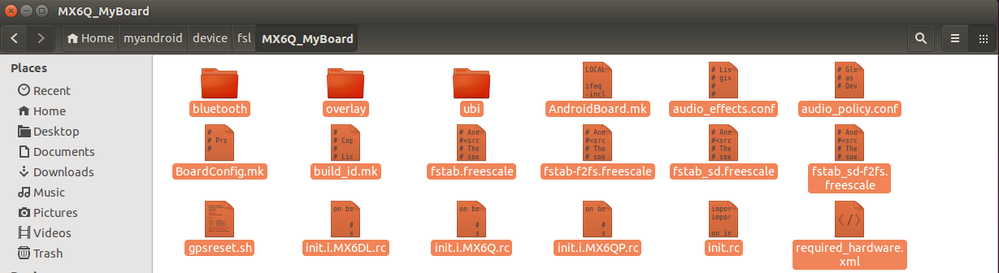
(3)Changing configurations in BoardConfig.mk to yours
Check the file carefully, and modify some contents, such as device/fsl/sabresd_6dq, it should be changed to device/fsl/MX6Q_MyBoad, TARGET_BOOTLOADER_BOARD_NAME := SABRESD to TARGET_BOOTLOADER_BOARD_NAME := MyBoard, etc. That is to say, you should change all information on sabresd to be yours.
(4)Add your products to AndroidProducts.mk
Open device/fsl/imx6/AndroidProducts.mk, and add it in:
PRODUCT_MAKEFILES := \
$(LOCAL_DIR)/evk_6sl.mk \
$(LOCAL_DIR)/sabreauto_6q.mk \
$(LOCAL_DIR)/sabresd_6dq.mk \
$(LOCAL_DIR)/sabresd_6sx.mk \
$(LOCAL_DIR)/sabreauto_6sx.mk \
$(LOCAL_DIR)/MX6Q_MyBoard.mk \
(5)Creating MX6Q_MyBoard.mk file in current directory
In device/fsl/imx6 path, create MX6Q_MyBoard.mk file, and copy all contents of sabresd_6dq.mk to it.
Then according to your schematic, adjust correcponding configurations, don't forget it.
(6)Adding your products to vendorsetup.sh
Open the file , and add 2 lines at the end:
......
add_lunch_combo MX6Q_MyBoard-eng
add_lunch_combo MX6Q_MyBoard-user
OK, generally speaking, you need to do above 6 steps, then your products can be compiled independently, but don't forget to modify configurations to be in accord with your board.
Hope these steps are helpful for you!
Best Regards,
Weidong
- Mark as New
- Bookmark
- Subscribe
- Mute
- Subscribe to RSS Feed
- Permalink
- Report Inappropriate Content
Hello Sir,
Thanks for your help.
I Added the Board entry as per the above post and I am getting the bootloader image and kernel image in my myandroid/out directory .
But I am not getting the recovery and system image .
Do I need to modify any other files apart from the above post like recovery folder etc.
Kindly guide me regarding this issue.
Thanks & Regards,
Hrushi
- Mark as New
- Bookmark
- Subscribe
- Mute
- Subscribe to RSS Feed
- Permalink
- Report Inappropriate Content
Thanks You So much for your Guidance.
