
- Forums
- Product Forums
- General Purpose MicrocontrollersGeneral Purpose Microcontrollers
- i.MX Forumsi.MX Forums
- QorIQ Processing PlatformsQorIQ Processing Platforms
- Identification and SecurityIdentification and Security
- Power ManagementPower Management
- Wireless ConnectivityWireless Connectivity
- RFID / NFCRFID / NFC
- Advanced AnalogAdvanced Analog
- Neural Processing UnitsNeural Processing Units
- MCX Microcontrollers
- S32G
- S32K
- S32V
- MPC5xxx
- Other NXP Products
- S12 / MagniV Microcontrollers
- Powertrain and Electrification Analog Drivers
- Sensors
- Vybrid Processors
- Digital Signal Controllers
- 8-bit Microcontrollers
- ColdFire/68K Microcontrollers and Processors
- PowerQUICC Processors
- OSBDM and TBDML
- S32M
- S32Z/E
-
- Solution Forums
- Software Forums
- MCUXpresso Software and ToolsMCUXpresso Software and Tools
- CodeWarriorCodeWarrior
- MQX Software SolutionsMQX Software Solutions
- Model-Based Design Toolbox (MBDT)Model-Based Design Toolbox (MBDT)
- FreeMASTER
- eIQ Machine Learning Software
- Embedded Software and Tools Clinic
- S32 SDK
- S32 Design Studio
- GUI Guider
- Zephyr Project
- Voice Technology
- Application Software Packs
- Secure Provisioning SDK (SPSDK)
- Processor Expert Software
- Generative AI & LLMs
-
- Topics
- Mobile Robotics - Drones and RoversMobile Robotics - Drones and Rovers
- NXP Training ContentNXP Training Content
- University ProgramsUniversity Programs
- Rapid IoT
- NXP Designs
- SafeAssure-Community
- OSS Security & Maintenance
- Using Our Community
-
- Cloud Lab Forums
-
- Knowledge Bases
- ARM Microcontrollers
- i.MX Processors
- Identification and Security
- Model-Based Design Toolbox (MBDT)
- QorIQ Processing Platforms
- S32 Automotive Processing Platform
- Wireless Connectivity
- CodeWarrior
- MCUXpresso Suite of Software and Tools
- MQX Software Solutions
- RFID / NFC
- Advanced Analog
- Neural Processing Units
-
- NXP Tech Blogs
- Home
- :
- i.MX フォーラム
- :
- i.MXプロセッサ
- :
- Re: Freescale's hardware accelerated h264 codec
Freescale's hardware accelerated h264 codec
- RSS フィードを購読する
- トピックを新着としてマーク
- トピックを既読としてマーク
- このトピックを現在のユーザーにフロートします
- ブックマーク
- 購読
- ミュート
- 印刷用ページ
Freescale's hardware accelerated h264 codec

- 新着としてマーク
- ブックマーク
- 購読
- ミュート
- RSS フィードを購読する
- ハイライト
- 印刷
- 不適切なコンテンツを報告
I installed the Freescale's codecs following i.MX Linux Mulimedia Framework User's Guide.
While trying to use a h264 codec we get the following error:
0:11.053 PExternalT...0x2f2be420 GStreamer mfw_gst_h264_getbuffer: >>DECODER: Error -4 in allocating the Framebuffer[0]
Could anybody point to a document that may help to interpret codec errors? What the "Error -4" means?
I printed that question in my old thread, but I have doubts because the old thread status assumed answered. That is a reason I reprinted the question starting new thread.

- 新着としてマーク
- ブックマーク
- 購読
- ミュート
- RSS フィードを購読する
- ハイライト
- 印刷
- 不適切なコンテンツを報告
Robert,
You should use /dev/video16 for the GUI (Ubuntu) and /dev/video17 for the video. But, the ALPHA is hard coded in mfw_v4lsink gstreamer element. I am not sure how to change this from outside or without modifying the element. I *thought* I saw another post somewhere on the forums on how to set and environmental variable to override this.
I just modified the alpha in mfw_v4lsink source and set it to 0. That will make the video look correct. It will also not interfere with your Ubuntu GUI.
As for your resolution, your pipeline looks correct. But, possibly not showing up right if you are using /dev/video16 and the Ubuntu GUI is there?
Tim
- 新着としてマーク
- ブックマーク
- 購読
- ミュート
- RSS フィードを購読する
- ハイライト
- 印刷
- 不適切なコンテンツを報告
Thanks Tim,
The system has /dev/video0 and /dev/video16. No /dev/video17 is presented.
As per my understanding for Linux GUI uses /dev/fb0 (fb1 etc. may be used as well). /dev/video0 is a camera /dev/video16 is a video output ("MXC Video Output"). What the video17 is?

 juangutierrez
- 新着としてマーク
- ブックマーク
- 購読
- ミュート
- RSS フィードを購読する
- ハイライト
- 印刷
- 不適切なコンテンツを報告
My understanding is that video17 is used as overly used for video, and I guess is the default if you don't specify the device in the mfw_v4lsink.
video16 as Tim mentioned is used by the GUI, that is why if you use video16 in your video pipeline the GUI is gone and you will need to restart the x-server
- 新着としてマーク
- ブックマーク
- 購読
- ミュート
- RSS フィードを購読する
- ハイライト
- 印刷
- 不適切なコンテンツを報告
I am not sure how to add it under Ubuntu, but video16 is RGB output and video17 is YUV output. Maybe someone from Freescale can assist with how to add this. I don't use Ubunut, I build from LTIB.
Tim
juangutierrez
- 新着としてマーク
- ブックマーク
- 購読
- ミュート
- RSS フィードを購読する
- ハイライト
- 印刷
- 不適切なコンテンツを報告
Regarding the transparency, you can use this piece of code I tested is working in imx6 too

- 新着としてマーク
- ブックマーク
- 購読
- ミュート
- RSS フィードを購読する
- ハイライト
- 印刷
- 不適切なコンテンツを報告
Thank you very much, I tried this code, with some slight modifications, and it certainly fixes the opacity problem.
Might I suggest adding and "alpha" element property to the gstreamer plugin for mfw_v4lsink?
- 新着としてマーク
- ブックマーク
- 購読
- ミュート
- RSS フィードを購読する
- ハイライト
- 印刷
- 不適切なコンテンツを報告
Thank you, Juan,
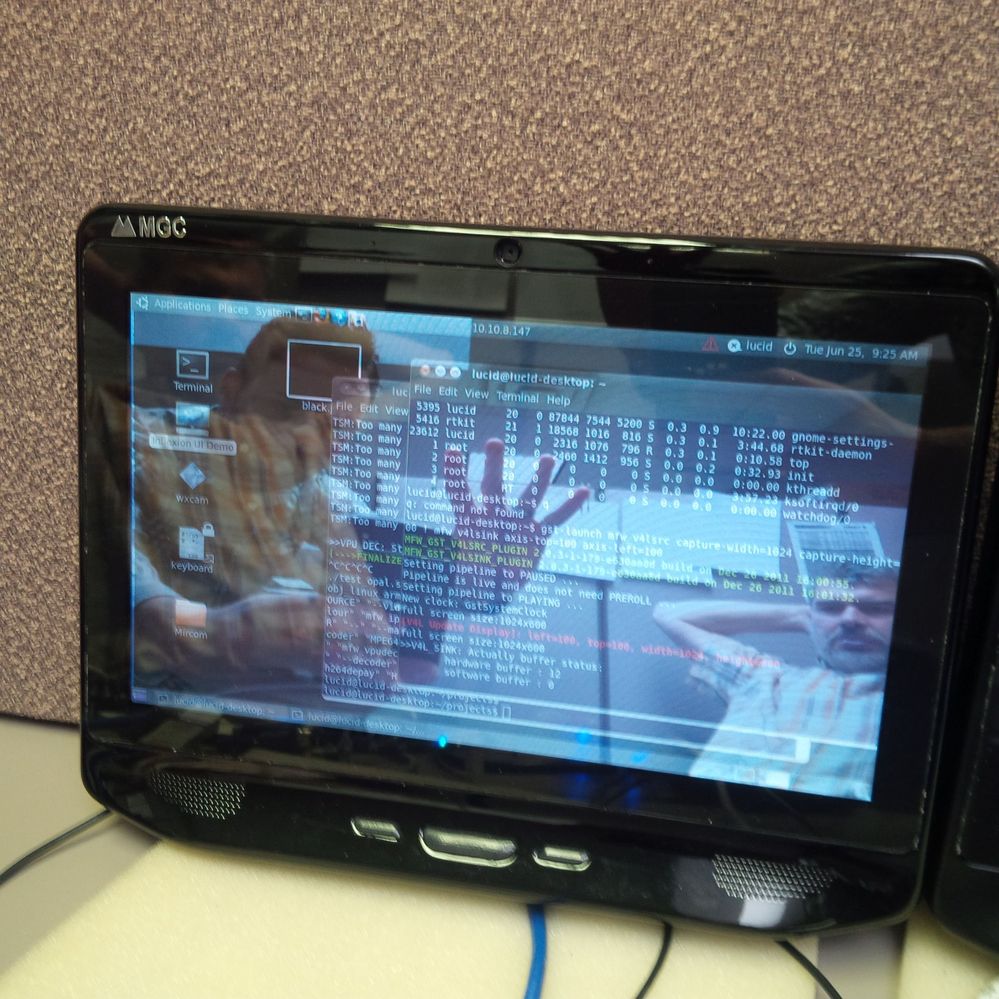
I supposed that display output to mfw_v4lsink has its own alpha setting and frame buffer does nothing with it. We have an opaque Ubuntu display that is visible through the transparent mfw_v4lsink created video.
- 新着としてマーク
- ブックマーク
- 購読
- ミュート
- RSS フィードを購読する
- ハイライト
- 印刷
- 不適切なコンテンツを報告
Additional to this, any idea why the following:
gst-launch mfw_v4lsrc capture-width=352 capture-height=288 ! mfw_v4lsink axis-top=100 axis-left=100 disp-width=352 disp-height=288
is full screen and not CIF sized?

- 新着としてマーク
- ブックマーク
- 購読
- ミュート
- RSS フィードを購読する
- ハイライト
- 印刷
- 不適切なコンテンツを報告
For the resolution issue, check this link Re: Gstreamer dual display resoultions
Regarding VSALPHA, it is a way to enable the ALPHA feature. I know this is confusing to have two video sinks, but for multiple displays in a SINGLE screen, use mfw_isink.
Leo
juangutierrez
- 新着としてマーク
- ブックマーク
- 購読
- ミュート
- RSS フィードを購読する
- ハイライト
- 印刷
- 不適切なコンテンツを報告
Other option is that you can add the video device in the gst pipeline (I think is 16 but try with 17 too)
mfw_v4lsink device=/dev/video16
But this way probably you will need to reset the x-server to get back the Ubuntu GUI.
I guess the alpha application should do the work
- 新着としてマーク
- ブックマーク
- 購読
- ミュート
- RSS フィードを購読する
- ハイライト
- 印刷
- 不適切なコンテンツを報告
Hi Robert.
Yes, the pipeline you are running is valid, that is no doubt. on MX53 I have not seen any pipelines like the ones you are seeing. On MX6, there are some pipelines I have executed but using a RTP bin element, but I do not know what issues you will face on your setup; take a look here. BTW, if you got streaming working, any other issue is stopping you to advance?
Leo
- 新着としてマーク
- ブックマーク
- 購読
- ミュート
- RSS フィードを購読する
- ハイライト
- 印刷
- 不適切なコンテンツを報告
Both pipelines run on the same machine.
- 新着としてマーク
- ブックマーク
- 購読
- ミュート
- RSS フィードを購読する
- ハイライト
- 印刷
- 不適切なコンテンツを報告
Thank you, that has got us a bit further. Now there seems to be a transparency issue.
Do you have any additional documentation on the mfw_v4lsink?
The Linux_Multimedia_Framework_User_Guide.pdf file I have doesn't say much about it.
- 新着としてマーク
- ブックマーク
- 購読
- ミュート
- RSS フィードを購読する
- ハイライト
- 印刷
- 不適切なコンテンツを報告
Hi Robert,
The only information you can get comes from either the document you pointed out or typing gst-inspect to the specific element.
- 新着としてマーク
- ブックマーク
- 購読
- ミュート
- RSS フィードを購読する
- ハイライト
- 印刷
- 不適切なコンテンツを報告
Leonardo,
Could you please recommend some documents regarding the codecs?
- 新着としてマーク
- ブックマーク
- 購読
- ミュート
- RSS フィードを購読する
- ハイライト
- 印刷
- 不適切なコンテンツを報告
By codecs you mean freescale gstreamer elements? If yes, as I told Robert, only the Multimedia User Guide and gst-inspect from the command line are the sources of info.
leo
