
- Forums
- Product Forums
- General Purpose MicrocontrollersGeneral Purpose Microcontrollers
- i.MX Forumsi.MX Forums
- QorIQ Processing PlatformsQorIQ Processing Platforms
- Identification and SecurityIdentification and Security
- Power ManagementPower Management
- Wireless ConnectivityWireless Connectivity
- RFID / NFCRFID / NFC
- Advanced AnalogAdvanced Analog
- Neural Processing UnitsNeural Processing Units
- MCX Microcontrollers
- S32G
- S32K
- S32V
- MPC5xxx
- Other NXP Products
- S12 / MagniV Microcontrollers
- Powertrain and Electrification Analog Drivers
- Sensors
- Vybrid Processors
- Digital Signal Controllers
- 8-bit Microcontrollers
- ColdFire/68K Microcontrollers and Processors
- PowerQUICC Processors
- OSBDM and TBDML
- S32M
- S32Z/E
-
- Solution Forums
- Software Forums
- MCUXpresso Software and ToolsMCUXpresso Software and Tools
- CodeWarriorCodeWarrior
- MQX Software SolutionsMQX Software Solutions
- Model-Based Design Toolbox (MBDT)Model-Based Design Toolbox (MBDT)
- FreeMASTER
- eIQ Machine Learning Software
- Embedded Software and Tools Clinic
- S32 SDK
- S32 Design Studio
- GUI Guider
- Zephyr Project
- Voice Technology
- Application Software Packs
- Secure Provisioning SDK (SPSDK)
- Processor Expert Software
- Generative AI & LLMs
-
- Topics
- Mobile Robotics - Drones and RoversMobile Robotics - Drones and Rovers
- NXP Training ContentNXP Training Content
- University ProgramsUniversity Programs
- Rapid IoT
- NXP Designs
- SafeAssure-Community
- OSS Security & Maintenance
- Using Our Community
-
- Cloud Lab Forums
-
- Knowledge Bases
- ARM Microcontrollers
- i.MX Processors
- Identification and Security
- Model-Based Design Toolbox (MBDT)
- QorIQ Processing Platforms
- S32 Automotive Processing Platform
- Wireless Connectivity
- CodeWarrior
- MCUXpresso Suite of Software and Tools
- MQX Software Solutions
- RFID / NFC
- Advanced Analog
- Neural Processing Units
-
- NXP Tech Blogs
- Home
- :
- i.MX Forums
- :
- i.MX Processors
- :
- Control GPIO In IMX8ULP EVK9
Control GPIO In IMX8ULP EVK9
- Subscribe to RSS Feed
- Mark Topic as New
- Mark Topic as Read
- Float this Topic for Current User
- Bookmark
- Subscribe
- Mute
- Printer Friendly Page
Control GPIO In IMX8ULP EVK9

- Mark as New
- Bookmark
- Subscribe
- Mute
- Subscribe to RSS Feed
- Permalink
- Report Inappropriate Content
Hello,
I'm using IMX8ULP EVK9 and i have one onboard RGB LED, now i want to control from command (A- Core) how can i do? RGB LED is connected with PTF10, PTF27, PTF20.
If i need to change in DTS file please provide patch so i can apply.
Thanks in advance
- Mark as New
- Bookmark
- Subscribe
- Mute
- Subscribe to RSS Feed
- Permalink
- Report Inappropriate Content
Hello,
Thanks for quick response.
I have applied patch and it's working, now i'm able to control LED. Now i want to control LED using PWM signal so how can i?
Thanks

 Manuel_Salas
- Mark as New
- Bookmark
- Subscribe
- Mute
- Subscribe to RSS Feed
- Permalink
- Report Inappropriate Content
Hello @dhruvinrajpura
As i.MX8ULP has not a dedicated PWM modules you must to try with TPM modules. One can try to the pwm-imx-tpm.c driver.
Another solution is using RPMSG, control the PWM signal from Cortex M with RPMSG from Cortex A processor.
Best regards
Salas.
- Mark as New
- Bookmark
- Subscribe
- Mute
- Subscribe to RSS Feed
- Permalink
- Report Inappropriate Content
Hello,
I want to use TPM module in A core, please provide patch to enable TPM module and also provide command to conrol pwm signal from user space.
Also I have two pushbutton on IMX8ULP EVK9 for A core which is SW4 and SW2. SW4 is connected with PTF26 and SW2 is connected with PTE17. I have attached patch which i applied to enable PTF26 and PTE17. To get status of pin i'm using "gpioget -c 4 26" command, but all time i'm getting following log:
Manuel_Salas
- Mark as New
- Bookmark
- Subscribe
- Mute
- Subscribe to RSS Feed
- Permalink
- Report Inappropriate Content
Hello @dhruvinrajpura
I hope you are doing well.
Sure, I tested on the i.MX8ULP EKV (PTF20, PTF29 and PTE6):
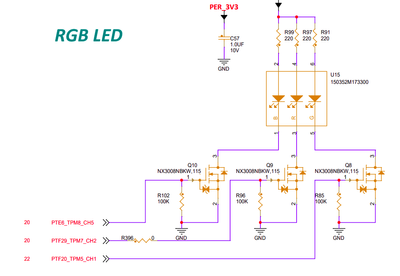
Please see the attached patch to add gpios on imx8ulp. You must change the pads for your EVK9, just changing PTF10, PTF27 and PTF20 instead of PTF20, PTF29 and PTE6.
Then, you will be able to use the gpioset command:
root@imx8ulpevk:~# gpioset -c 3 6=0
^C
root@imx8ulpevk:~# gpioset -c 4 20=0
^C
root@imx8ulpevk:~# gpioset -c 4 29=0
Best regards,
Salas.
