
- Forums
- Product Forums
- General Purpose MicrocontrollersGeneral Purpose Microcontrollers
- i.MX Forumsi.MX Forums
- QorIQ Processing PlatformsQorIQ Processing Platforms
- Identification and SecurityIdentification and Security
- Power ManagementPower Management
- Wireless ConnectivityWireless Connectivity
- RFID / NFCRFID / NFC
- Advanced AnalogAdvanced Analog
- Neural Processing UnitsNeural Processing Units
- MCX Microcontrollers
- S32G
- S32K
- S32V
- MPC5xxx
- Other NXP Products
- S12 / MagniV Microcontrollers
- Powertrain and Electrification Analog Drivers
- Sensors
- Vybrid Processors
- Digital Signal Controllers
- 8-bit Microcontrollers
- ColdFire/68K Microcontrollers and Processors
- PowerQUICC Processors
- OSBDM and TBDML
- S32M
- S32Z/E
-
- Solution Forums
- Software Forums
- MCUXpresso Software and ToolsMCUXpresso Software and Tools
- CodeWarriorCodeWarrior
- MQX Software SolutionsMQX Software Solutions
- Model-Based Design Toolbox (MBDT)Model-Based Design Toolbox (MBDT)
- FreeMASTER
- eIQ Machine Learning Software
- Embedded Software and Tools Clinic
- S32 SDK
- S32 Design Studio
- GUI Guider
- Zephyr Project
- Voice Technology
- Application Software Packs
- Secure Provisioning SDK (SPSDK)
- Processor Expert Software
- Generative AI & LLMs
-
- Topics
- Mobile Robotics - Drones and RoversMobile Robotics - Drones and Rovers
- NXP Training ContentNXP Training Content
- University ProgramsUniversity Programs
- Rapid IoT
- NXP Designs
- SafeAssure-Community
- OSS Security & Maintenance
- Using Our Community
-
- Cloud Lab Forums
-
- Knowledge Bases
- ARM Microcontrollers
- i.MX Processors
- Identification and Security
- Model-Based Design Toolbox (MBDT)
- QorIQ Processing Platforms
- S32 Automotive Processing Platform
- Wireless Connectivity
- CodeWarrior
- MCUXpresso Suite of Software and Tools
- MQX Software Solutions
- RFID / NFC
- Advanced Analog
- Neural Processing Units
-
- NXP Tech Blogs
- Home
- :
- i.MX Processors
- :
- i.MX Processors Knowledge Base
- :
- All Boards Qt v2
All Boards Qt v2
- Subscribe to RSS Feed
- Mark as New
- Mark as Read
- Bookmark
- Subscribe
- Printer Friendly Page
- Report Inappropriate Content
All Boards Qt v2
All Boards Qt v2
After Nokia acquisition of Trolltech, QT has become an even more interesting framework/tool for UI and graphics development. The new release 4.6 can be obtained under LGPL license and comes with a new integrated IDE for software development (QT Creator) with many demos, some of them using OpenGL.
In order to create an environment to create, simulate and cross-compile, it's needed to build three versions of QT:
Qt/X11, qmake-x11. This is the Qt version that you will be using on your PC. It is also used for building the tools, such as Designer and Linguist.
Qt/QVFb, qmake-qvfb. This is an embedded Qt configuration that runs on host, but works with the virtual framebuffer instead of the actual screen. It let’s you emulate the target system, but run your code on your host machine.
Qt/target, qmake-target. This is the embedded Qt configuration that runs on your target platform. This is what you use to build an actual application running on your embedded device.
On Host you need TO install following package (for Ubuntu distri) to install this QT toolsuit:
[X] libx11-dev
[X] libpng-dev
[X] libjpeg-dev
[X] libxext-dev
[X] x11proto-xext-dev
[X] qt3-dev-tools-embedded
[X] libxtst-dev
Building Qt/X11
Extract downloaded Qt package (from here) and install it by running:
./configure
make
sudo make install
Qt will be installed on /usr/local/Trolltech/Qt-version directory.
We also need to build qvfb tool that will provide virtual framebuffer for X11. To build and install it run:
cd tools/qvfb
make
sudo make install
qvfb will be installed on /usr/local/Trolltech/Qt-version/bin directory.
Building Qt/QVFb
To build Qt/QVFb, will be needed some parameters on configure file. Extract again Qt package on other folder and build as following:
./configure -embedded -qt-gfx-qvfb -qt-kbd-qvfb -qt-mouse-qvfb -prefix /usr/local/Trolltech/Qt-qvfb-version
make
sudo make install
Used parameters:
-qt-gfx-qvfb, the graphics driver will be for QVFb, i.e., the virtual framebuffer.
-qt-kbd-qvfb, the keyboard input will come from the QVFb.
-qt-mouse-qvfb, the mouse input will come from the QVFb.
-prefix /usr/local/Trolltech/Qt-qvfb-version, the prefix is used to separate the QVFb version of embedded Qt from the target version.
Testing QVFb
So far you have two versions of Qt:
1. Qt/X11 built for PC host using X11 and located at /usr/local/Trolltech/Qt-version
2. Qt/QVFb built for PC host using Qt virtual framebuffer and located at /usr/local/Trolltech/Qt-qvfb-version
Call qvfb from X11 version
cd /usr/local/Trolltech/Qt-version/bin
./qvfb &
A simple virtual framebuffer will open. To change screen configuration and add a skin, click in "file -> configure". The following window will open:
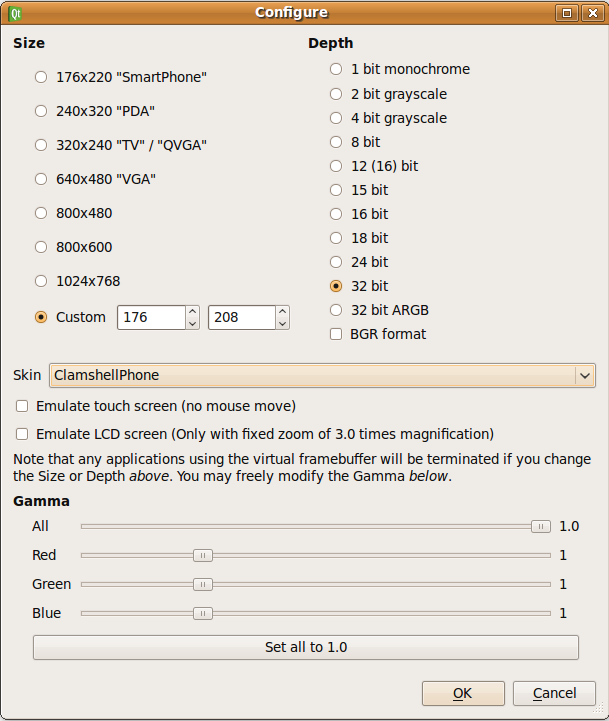
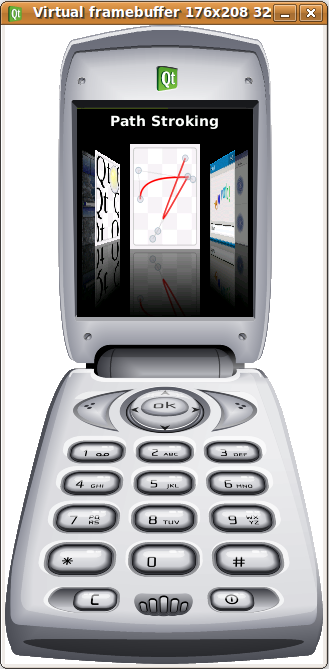
i.e., choose ClamshellPhone and click ok. A cell phone skin will open.
On QVFb version, there are a lot of example applications that can be run using Qt virtual framebuffer.
Let's open fluidlauncher demo:
cd /usr/local/Trolltech/Qt-qvfb-version/demos/embedded/fluidlauncher
./fluidlauncher -qws
The argument -qws is used to inform that the application will run on Qt virtual framebuffer.
Building Qt/Target
To build Qt for target (i.MX), it's necessary to build Ltib with some required packages. In this example, a kernel and rootfs will be built for i.MX51 EVK with the following extra packages.
[x] amd-gpu-bin-mx51
[x] freetype
[x] glib2
[x] gstreamer
[x] gstreamer-plugins-base
[x] gstreamer-plugins-good
[x] gstreamer-plugins-bad
[x] gstreamer-plugins-ugly
[x] libxml2
[x] tslib
[x] zlib
If you are building for any other i.MX processor, you don't need the "amd-gpu-bin-mx51" option.
After build ltib, make a symbolic link /tftpboot/ltib pointing to your rootfs folder. It's needed to make the i.MX libs and incs available to qmake.
ln -s <rootfs folder dir> /tftpboot/ltib
Restart nfs server. If using Ubuntu, the command is:
sudo /etc/init.d/nfs-kernel-server restart
Extract downloaded Qt package on a new folder.
Export the crosscompiler path. Usually it's located at /opt/freescale/usr/local/gcc-4.1.2-glibc-2.5-nptl-3/arm-none-linux-gnueabi/bin:
export PATH=$PATH:/opt/freescale/usr/local/gcc-4.1.2-glibc-2.5-nptl-3/arm-none-linux-gnueabi/bin
If you are building Qt for i.MX51
Download the mkspec package and extract the folder linux-mxc-g++ under <Qt source code folder>/mkspecs/qws
Configure, build and install with the following commands:
./configure -embedded arm -xplatform qws/linux-mxc-g++ -release -prefix /usr/local/Trolltech/Qt-target-version -qt-gfx-linuxfb -qt-kbd-tty -qt-mouse-tslib -opengl es2 -little-endian -host-little-endian make sudo make install
For targets without 3D engine support
If you are building Qt for a target that doesn't support OpenGL, i.e., i.MX25, 233:
Download the makespecs_no3D package and extract the folder linux-mxc-g++ under <Qt source code folder>/mkspecs/qws
Configure, build and install with the following commands:
./configure -embedded arm -xplatform qws/linux-mxc-g++ -release -prefix /usr/local/Trolltech/Qt-target-version -qt-gfx-linuxfb -qt-kbd-tty -qt-mouse-tslib -little-endian -host-little-endian
make
sudo make install
Copy Cross Qt to target's RFS
The crosscompiled version of Qt will be located on your host machine as indicated on -prefix, in this case /usr/local/Trolltech/Qt-target-version
Copy Qt-target-version folder to rootfs:
cd /tftpboot/usr/local
mkdir Trolltech
cd Trolltech
cp -a /usr/local/Trolltech/Qt-target-version .
Now it's ready to use. On target, run:
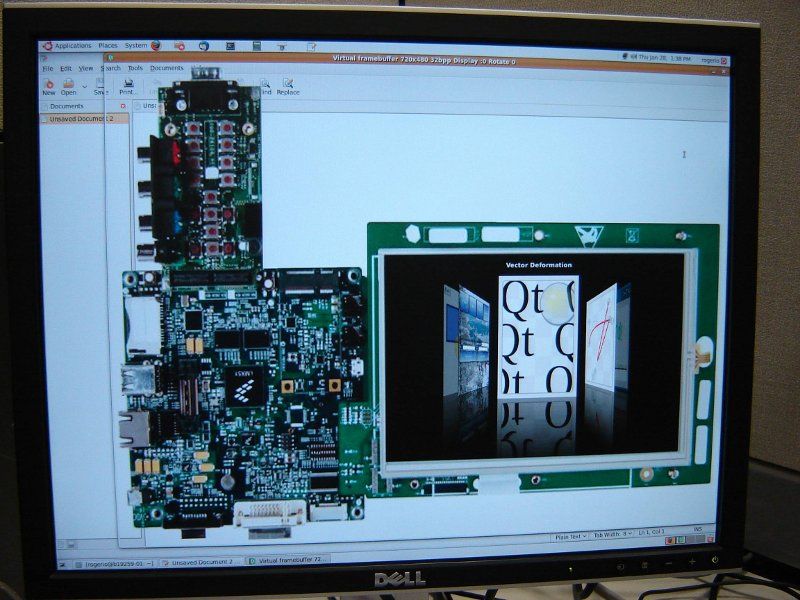
/usr/local/Trolltech/Qt-qvfb-version/demos/embedded/fluidlauncher/fluidlauncher -qws
See some pictures of the same application running on host and on EVK:

Tips
1. To clean all Qt configuration settings:
make confclean
2. To check the current configuration:
On Qt source code folder, you can open the file config.status to check the current configuration settings.

- Mark as Read
- Mark as New
- Bookmark
- Permalink
- Report Inappropriate Content
Hi, you mentioned a mkspec-file for i.MX51 but it is nowhere to be found.
"Download the mkspec package and extract the folder linux-mxc-g++ under <Qt source code folder>/mkspecs/qws"
