
- Forums
- Product Forums
- General Purpose MicrocontrollersGeneral Purpose Microcontrollers
- i.MX Forumsi.MX Forums
- QorIQ Processing PlatformsQorIQ Processing Platforms
- Identification and SecurityIdentification and Security
- Power ManagementPower Management
- Wireless ConnectivityWireless Connectivity
- RFID / NFCRFID / NFC
- Advanced AnalogAdvanced Analog
- Neural Processing UnitsNeural Processing Units
- MCX Microcontrollers
- S32G
- S32K
- S32V
- MPC5xxx
- Other NXP Products
- S12 / MagniV Microcontrollers
- Powertrain and Electrification Analog Drivers
- Sensors
- Vybrid Processors
- Digital Signal Controllers
- 8-bit Microcontrollers
- ColdFire/68K Microcontrollers and Processors
- PowerQUICC Processors
- OSBDM and TBDML
- S32M
- S32Z/E
-
- Solution Forums
- Software Forums
- MCUXpresso Software and ToolsMCUXpresso Software and Tools
- CodeWarriorCodeWarrior
- MQX Software SolutionsMQX Software Solutions
- Model-Based Design Toolbox (MBDT)Model-Based Design Toolbox (MBDT)
- FreeMASTER
- eIQ Machine Learning Software
- Embedded Software and Tools Clinic
- S32 SDK
- S32 Design Studio
- GUI Guider
- Zephyr Project
- Voice Technology
- Application Software Packs
- Secure Provisioning SDK (SPSDK)
- Processor Expert Software
- Generative AI & LLMs
-
- Topics
- Mobile Robotics - Drones and RoversMobile Robotics - Drones and Rovers
- NXP Training ContentNXP Training Content
- University ProgramsUniversity Programs
- Rapid IoT
- NXP Designs
- SafeAssure-Community
- OSS Security & Maintenance
- Using Our Community
-
- Cloud Lab Forums
-
- Knowledge Bases
- ARM Microcontrollers
- i.MX Processors
- Identification and Security
- Model-Based Design Toolbox (MBDT)
- QorIQ Processing Platforms
- S32 Automotive Processing Platform
- Wireless Connectivity
- CodeWarrior
- MCUXpresso Suite of Software and Tools
- MQX Software Solutions
- RFID / NFC
- Advanced Analog
- Neural Processing Units
-
- NXP Tech Blogs
- Home
- :
- Wireless Connectivity
- :
- Wireless MCU
- :
- KW36 IOT Toolbox (APP)
KW36 IOT Toolbox (APP)
- Subscribe to RSS Feed
- Mark Topic as New
- Mark Topic as Read
- Float this Topic for Current User
- Bookmark
- Subscribe
- Mute
- Printer Friendly Page
KW36 IOT Toolbox (APP)

- Mark as New
- Bookmark
- Subscribe
- Mute
- Subscribe to RSS Feed
- Permalink
- Report Inappropriate Content
KW36 OTA update from mobile phone to peripheral that use IOT Toolbox(APP) on the mobile phone side.
If we want to develop our own APP on phone,
What information can NXP provide (e.g. flow chat、PDF ...) for our reference?
- Mark as New
- Bookmark
- Subscribe
- Mute
- Subscribe to RSS Feed
- Permalink
- Report Inappropriate Content
Dear Sebastian,
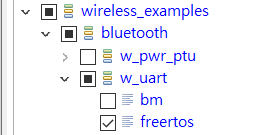
Is there a flow chat for "wireless UART" from IOT Toolbox to KW36
Daniel

 Sebastian_Del_R
- Mark as New
- Bookmark
- Subscribe
- Mute
- Subscribe to RSS Feed
- Permalink
- Report Inappropriate Content
Hi Daniel,
There's a description of the Wireless UART SDK example in chapter 5.17 (of the Bluetooth Low Energy Demo Applications User Guide, in the following path: <SDK_2.2.2_FRDM-KW36\docs\wireless\Bluetooth>), detailing the setup for this example, and providing a general description of its functionality, but, unfortunately, there's currently no flowchart for the process on one of the included documents.
However, in general, the flow of the program after the connection procedure (assuming that the IoT Toolbox app is working as a Central device, and the KW36 is the Peripheral) is as follows:
- On the App's end, the app interprets and parses the information input by the user, and writes the wireless UART characteristic.
- On the receiving end, the BleApp_GattServerCallback is triggered, and the funciton manages the gEvtAttributeWrittenWithoutResponse_c event, which will call the BleApp_ReceivedUartStream.
This function will take the received information, clean it up and format it for the UART in the receiving device. It will also allocate memory, and then write it to the Serial Manager's Tx Buffer for transmission to the other card or transmission.
- For transmitting from the KW36 to the App, the serial data is received through the KW36's UART, using the Serial Manager functions. This information is then flushed to the corresponding Wireless UART characteristic through the BleApp_FlushUartStream function, writing the characteristic in the process.
Please let me know if you need any more information.
Best regards,
Sebastian
- Mark as New
- Bookmark
- Subscribe
- Mute
- Subscribe to RSS Feed
- Permalink
- Report Inappropriate Content
Thanks for the help, I have understood the subject.
Sebastian_Del_R- Mark as New
- Bookmark
- Subscribe
- Mute
- Subscribe to RSS Feed
- Permalink
- Report Inappropriate Content
Hi Daniel,
Please let me know if you need any more information!
Best regards,
Sebastian
Sebastian_Del_R- Mark as New
- Bookmark
- Subscribe
- Mute
- Subscribe to RSS Feed
- Permalink
- Report Inappropriate Content
Hi Daniel, I hope you're doing well!
Information about the OTAP process, as well as a general event flowchart can be found in section 11 of the BLE Application Developer's Guide; specifically, section 11.3.3 shows the following chart explaining the general flow of the OTAP procedure from Server to Client:
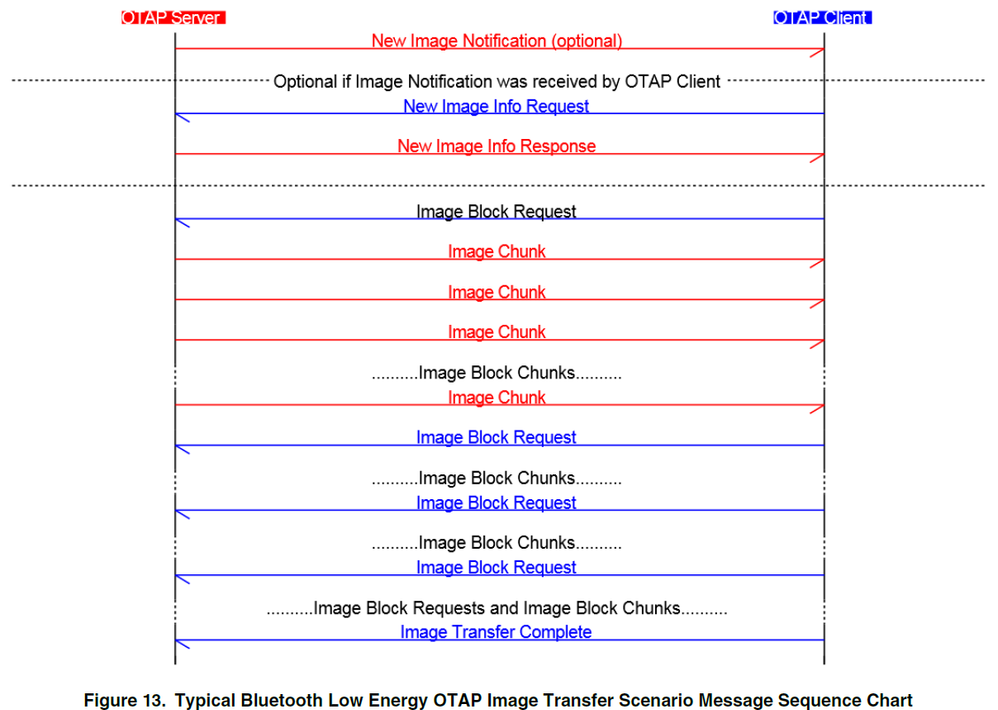
This document can be found in the following path of the SDK package:
<…\SDK_2.2.2_FRDM-KW36 - MCUXpresso\docs\wireless\Bluetooth\Bluetooth Low Energy Application Developer Guide.pdf>
Please let me know if you need any more information, please let me know.
Best regards,
Sebastian
