
- Forums
- Product Forums
- General Purpose MicrocontrollersGeneral Purpose Microcontrollers
- i.MX Forumsi.MX Forums
- QorIQ Processing PlatformsQorIQ Processing Platforms
- Identification and SecurityIdentification and Security
- Power ManagementPower Management
- Wireless ConnectivityWireless Connectivity
- RFID / NFCRFID / NFC
- Advanced AnalogAdvanced Analog
- MCX Microcontrollers
- S32G
- S32K
- S32V
- MPC5xxx
- Other NXP Products
- S12 / MagniV Microcontrollers
- Powertrain and Electrification Analog Drivers
- Sensors
- Vybrid Processors
- Digital Signal Controllers
- 8-bit Microcontrollers
- ColdFire/68K Microcontrollers and Processors
- PowerQUICC Processors
- OSBDM and TBDML
- S32M
- S32Z/E
-
- Solution Forums
- Software Forums
- MCUXpresso Software and ToolsMCUXpresso Software and Tools
- CodeWarriorCodeWarrior
- MQX Software SolutionsMQX Software Solutions
- Model-Based Design Toolbox (MBDT)Model-Based Design Toolbox (MBDT)
- FreeMASTER
- eIQ Machine Learning Software
- Embedded Software and Tools Clinic
- S32 SDK
- S32 Design Studio
- GUI Guider
- Zephyr Project
- Voice Technology
- Application Software Packs
- Secure Provisioning SDK (SPSDK)
- Processor Expert Software
- Generative AI & LLMs
-
- Topics
- Mobile Robotics - Drones and RoversMobile Robotics - Drones and Rovers
- NXP Training ContentNXP Training Content
- University ProgramsUniversity Programs
- Rapid IoT
- NXP Designs
- SafeAssure-Community
- OSS Security & Maintenance
- Using Our Community
-
- Cloud Lab Forums
-
- Knowledge Bases
- ARM Microcontrollers
- i.MX Processors
- Identification and Security
- Model-Based Design Toolbox (MBDT)
- QorIQ Processing Platforms
- S32 Automotive Processing Platform
- Wireless Connectivity
- CodeWarrior
- MCUXpresso Suite of Software and Tools
- MQX Software Solutions
- RFID / NFC
- Advanced Analog
-
- NXP Tech Blogs
- Home
- :
- Wireless Connectivity
- :
- Wi-Fi® + Bluetooth® + 802.15.4
- :
- Re: requesting IW416 NXP Driver
requesting IW416 NXP Driver
- Subscribe to RSS Feed
- Mark Topic as New
- Mark Topic as Read
- Float this Topic for Current User
- Bookmark
- Subscribe
- Mute
- Printer Friendly Page
requesting IW416 NXP Driver

- Mark as New
- Bookmark
- Subscribe
- Mute
- Subscribe to RSS Feed
- Permalink
- Report Inappropriate Content
Hi ,
i am working on wifi (iw416 chip - LBEE5CJ1XK )
Interface : wifi - sdio , BT - uart .
could you please share the wifi-bt driver and firmware ?
also please mention what are changes required to enable it in the kernel ?
Thanks,
Naresh
- Mark as New
- Bookmark
- Subscribe
- Mute
- Subscribe to RSS Feed
- Permalink
- Report Inappropriate Content
Hi Christine ,
Thanks for your quick response.
now , moal.ko is able to load .
actually the issue with other drivers (rtc/humidity sensor/charger ) .so once i disabled from kernel , moal.ko is able to load .
but bluetooth getting below issue , couldd you pleasee help me on this .
[ 1078.802054] Bluetooth: hci0: command 0x1003 tx timeout
[ 1078.807565] Bluetooth: hci0: Opcode 0x1003 failed: -110
[ 1124.049960] Bluetooth: hci0: command 0x1003 tx timeout
[ 1124.055269] Bluetooth: hci0: Opcode 0x1003 failed: -110
[ 1145.842072] Bluetooth: hci0: Opcode 0x1003 failed: -110
[ 1145.847603] Bluetooth: hci0: command 0x1003 tx timeout
[ 1267.410075] Bluetooth: hci0: command 0x1003 tx timeou
Bluetooth: hci0: Frame reassembly failed
Thanks,
Naresh.

 Christine_Li
- Mark as New
- Bookmark
- Subscribe
- Mute
- Subscribe to RSS Feed
- Permalink
- Report Inappropriate Content
Hi, @naresh_nakka
Great job!
Is it ok for you to create a new thread to discuss about the Bluetooth failure?
This thread has too long history, and we always suggest customers to track one issue in one thread. It will also be very helpful for our future reference.
Sure, even on the new thread, I will also still reply you at the first time as this one.
Thanks for your corporation.
Best regards,
Christine.
- Mark as New
- Bookmark
- Subscribe
- Mute
- Subscribe to RSS Feed
- Permalink
- Report Inappropriate Content
Sure , Christine.
But with the below steps i am able to pair a BT device .
please find below steps .
home# hciattach /dev/ttyS3 any
Device setup complete
:/home# [ 102.291439] Bluetooth: MGMT ver 1.22
[ 102.312353] kauditd_printk_skb: 3 callbacks suppressed
[ 102.312370] audit: type=1334 audit(1651171518.340:13): prog-id=13 op=LOAD
[ 102.335144] audit: type=1334 audit(1651171518.356:14): prog-id=14 op=LOAD
home# hciconfig -a hci0 up
:/home# hciconfig
hci0: Type: Primary Bus: UART
BD Address: 04:C4:61:AC:81:26 ACL MTU: 1021:7 SCO MTU: 120:6
UP RUNNING
RX bytes:1495 acl:0 sco:0 events:89 errors:0
TX bytes:1261 acl:0 sco:0 commands:89 errors:0
/home# [ 132.742604] audit: type=1334 audit(1651171548.772:15): prog-id=14 op=UNLOAD
[ 132.753282] audit: type=1334 audit(1651171548.772:16): prog-id=13 op=UNLOAD
/home# bluetoothctl
Agent registered
[CHG] Controller 04:C4:61:AC:81:26 Pairable: yes
[bluetooth]# help
Menu main:
Available commands:
-------------------
advertise Advertise Options Submenu
monitor Advertisement Monitor Options Submenu
scan Scan Options Submenu
gatt Generic Attribute Submenu
admin Admin Policy Submenu
player Media Player Submenu
endpoint Media Endpoint Submenu
transport Media Transport Submenu
list List available controllers
show [ctrl] Controller information
select <ctrl> Select default controller
devices [Paired/Bonded/Trusted/Connected] List available devices, with an optional property as the filter
system-alias <name> Set controller alias
reset-alias Reset controller alias
power <on/off> Set controller power
pairable <on/off> Set controller pairable mode
discoverable <on/off> Set controller discoverable mode
discoverable-timeout [value] Set discoverable timeout
agent <on/off/capability> Enable/disable agent with given capability
default-agent Set agent as the default one
advertise <on/off/type> Enable/disable advertising with given type
set-alias <alias> Set device alias
scan <on/off/bredr/le> Scan for devices
info [dev] Device information
pair [dev] Pair with device
cancel-pairing [dev] Cancel pairing with device
trust [dev] Trust device
untrust [dev] Untrust device
block [dev] Block device
unblock [dev] Unblock device
remove <dev> Remove device
connect <dev> Connect device
disconnect [dev] Disconnect device
menu <name> Select submenu
version Display version
quit Quit program
exit Quit program
help Display help about this program
export Print environment variables
[bluetooth]# power on
Changing power on succeeded
[bluetooth]# discoverable on
Changing discoverable on succeeded
[CHG] Controller 04:C4:61:AC:81:26 Discoverable: yes
[bluetooth]# agent on
Agent is already registered
[bluetooth]# default-agent
Default agent request successful
[bluetooth]# scan on
Discovery started
[CHG] Controller 04:C4:61:AC:81:26 Discovering: yes
[bluetooth]# inf0
Invalid command in menu main: inf0
Use "help" for a list of available commands in a menu.
Use "menu <submenu>" if you want to enter any submenu.
Use "back" if you want to return to menu main.
[NEW] Device 30:KK:7D:BF:D4:2A Naresh_BT_Device
[bluetooth]# info
Missing device address argument
[CHG] Device 30:KK:7D:BF:D4:2A RSSI: -89
[CHG] Device 30:KK:7D:BF:D4:2A RSSI: -80
[CHG] Device 30:KK:7D:BF:D4:2A RSSI: -89
[CHG] Device 30:KK:7D:BF:D4:2A RSSI: -80
[CHG] Device 30:KK:7D:BF:D4:2A RSSI: -89
[bluetooth]# piar 30:KK:7D:BF:D4:2A
Invalid command in menu main: piar
Use "help" for a list of available commands in a menu.
Use "menu <submenu>" if you want to enter any submenu.
Use "back" if you want to return to menu main.
[bluetooth]# pair 30:KK:7D:BF:D4:2A
Attempting to pair with 30:KK7D:BF:D4:2A
[CHG] Device 30:KK:7D:BF:D4:2A Connected: yes
Request confirmation
[agent] Confirm passkey 890227 (yes/no): yes
[CHG] Device 30:KK:7D:BF:D4:2A Bonded: yes
[CHG] Device 30:KK:7D:BF:D4:2A Modalias: bluetooth:v0046p1200d1436
[CHG] Device 30:KK:7D:BF:D4:2A UUIDs: 00001105-0000-1000-8000-00805f9b34fb
[CHG] Device 30:KK:7D:BF:D4:2A UUIDs: 0000110a-0000-1000-8000-00805f9b34fb
[CHG] Device 30:KK:7D:BF:D4:2A UUIDs: 0000110c-0000-1000-8000-00805f9b34fb
[CHG] Device 30:KK:7D:BF:D4:2A UUIDs: 0000110e-0000-1000-8000-00805f9b34fb
[CHG] Device 30:KK:7D:BF:D4:2A UUIDs: 00001112-0000-1000-8000-00805f9b34fb
[CHG] Device 30:KK:7D:BF:D4:2A UUIDs: 00001115-0000-1000-8000-00805f9b34fb
[CHG] Device 30:KK:7D:BF:D4:2A UUIDs: 00001116-0000-1000-8000-00805f9b34fb
[CHG] Device 30:KK:7D:BF:D4:2A UUIDs: 0000111f-0000-1000-8000-00805f9b34fb
[CHG] Device 30:KK:7D:BF:D4:2A UUIDs: 0000112f-0000-1000-8000-00805f9b34fb
[CHG] Device 30:KK:7D:BF:D4:2A UUIDs: 00001132-0000-1000-8000-00805f9b34fb
[CHG] Device 30:KK:7D:BF:D4:2A UUIDs: 00001200-0000-1000-8000-00805f9b34fb
[CHG] Device 30:KK:7D:BF:D4:2A UUIDs: 00001800-0000-1000-8000-00805f9b34fb
[CHG] Device 30:KK7D:BF:D4:2A UUIDs: 00001801-0000-1000-8000-00805f9b34fb
[CHG] Device 30:KK7D:BF:D4:2A ServicesResolved: yes
[CHG] Device 30:KK7D:BF:D4:2A Paired: yes
Pairing successful
[CHG] Device 30:KK7D:BF:D4:2A ServicesResolved: no
[CHG] Device 30:KK7D:BF:D4:2A Connected: no
[bluetooth]# connect 30:KK:7D:BF:D4:2A
Attempting to connect to 30:KK:7D:BF:D4:2A
Failed to connect: org.bluez.Error.Failed br-connection-profile-unavailable
[bluetooth]# connect 30:KK7D:BF:D4:2A
Attempting to connect to 30:KKD:BF:D4:2A
Failed to connect: org.bluez.Error.Failed br-connection-profile-unavailable
[bluetooth]# connect 30:F:D4:2A
Attempting to connect to 30D:BF:D4:2A
Failed to connect: org.bluez.Error.Failed br-connection-profile-unavailab
file transfer is failing using obexftp
root@am62xx-evm:/home# obexftp --nopath --noconn --uuid none --bluetooth 30:F:D4:2A --channel 12 --put t.txt
Suppressing FBS.
Connecting...failed: connect
unknown error on connect
Still trying to connect
Connecting...failed: connect
unknown error on connect
Still trying to connect
Connecting...failed: connect
unknown error on connect
Still trying to connect
I just want to test with GATT .,could you please help me on this
Thanks,
Naresh
Christine_Li
- Mark as New
- Bookmark
- Subscribe
- Mute
- Subscribe to RSS Feed
- Permalink
- Report Inappropriate Content
Hi, @naresh_nakka
Great job.
It seems like the Bluetooth also works on you side.
So until now, Bluetooth and Wi-Fi driver can work well.
Before connect command and after pair command, please trust the device to have a try.
Like below:
pair 30:KK:7D:BF:D4:2A
trust 30:KK:7D:BF:D4:2A
connect 30:KK:7D:BF:D4:2A
For other topics please create a new case to us.
Thanks for your corporation.
Best regards,
Christine.
- Mark as New
- Bookmark
- Subscribe
- Mute
- Subscribe to RSS Feed
- Permalink
- Report Inappropriate Content
Thanks christine for your support .
i will create new case for file trnasfer issue
- Mark as New
- Bookmark
- Subscribe
- Mute
- Subscribe to RSS Feed
- Permalink
- Report Inappropriate Content
HI christine ,
I am getting while loading the moal.ko
root@am62xx-evm:/home# insmod moal.ko
[ 2215.240901] wlan: Loading MWLAN driver
[ 2215.245232] wlan: Register to Bus Driver...
[ 2215.332663] vendor=0x02DF device=0x9159 class=0 function=1
[ 2215.338413] Attach moal handle ops, card interface type: 0x108
[ 2215.345108] rps set to 0 from module param
[ 2215.349601] No module param cfg file specified
[ 2215.354615] SDIO: max_segs=128 max_seg_size=65536
[ 2215.359709] rx_work=1 cpu_num=4
[ 2215.363303] Attach mlan adapter operations.card_type is 0x108.
[ 2215.370537] wlan: Enable TX SG mode
[ 2215.374336] wlan: Enable RX SG mode
[ 2215.381962] Request firmware: nxp/sduartiw416_combo.bin
[ 2215.646446] Wlan: FW download over, firmwarelen=534196 downloaded 534196
[ 2216.929996] WLAN FW is active
[ 2216.933025] on_time is 2216735392920
[ 2216.938483] Please add cal_data_cfg for 8887/8977/8997/8987/8978
[ 2216.945966] woal_request_fw failed
[ 2216.949399] Firmware Init Failed
[ 2216.955693] Free module params
[ 2216.958846] woal_add_card failed
[ 2216.962796] wlan_sdio: probe of mmc2:0001:1 failed with error -1
[ 2216.973980] wlan: Register to Bus Driver Done
[ 2216.984557] wlan: Driver loaded successfully
please help me on this.
Thanks,
Naresh
Christine_Li
- Mark as New
- Bookmark
- Subscribe
- Mute
- Subscribe to RSS Feed
- Permalink
- Report Inappropriate Content
Hi, @naresh_nakka
From your given log, I see that: "Please add cal_data_cfg for 8887/8977/8997/8987/8978"
So please add cal_data_cfg parameter when you load the Wi-Fi driver, like below in /lib/firmware/nxp/wifi_mod_para.conf
SDIW416 = {
cfg80211_wext=0xf
max_vir_bss=1
cal_data_cfg=none
ps_mode=1
auto_ds=1
host_mlme=1
fw_name=nxp/sdiouartiw416_combo_v0.bin
}
Or directly load like this:
insmod moal fw_name=nxp/sdiouartiw416_combo_v0.bin cal_data_cfg=none ps_mode=1 auto_ds=1 host_mlme=1
Please have a try with this parameter and if still have problem, share me your full dmesg logs to check further.
Best regards,
Christine.
- Mark as New
- Bookmark
- Subscribe
- Mute
- Subscribe to RSS Feed
- Permalink
- Report Inappropriate Content
I am facing some challenge sdiouartiw416_combo_v0.bin IOCTL FAILED.
- Mark as New
- Bookmark
- Subscribe
- Mute
- Subscribe to RSS Feed
- Permalink
- Report Inappropriate Content
Hi Christine ,
I am able to load cfg80211.ko , mac80211.ko and mlan.ko and getting issue while loading the moal.ko .
please let me know the what is the issue might be ?
root@am62xx-evm:/home# insmod moal.ko cfg_file=wifi_mod_para.conf
[ 530.608766] moal: unknown parameter 'cfg_file' ignored
[ 530.614516] wlan: Loading MWLAN driver
[ 530.619443] wlan: Register to Bus Driver...
[ 530.709007] vendor=0x02DF device=0x9159 class=0 function=1
[ 530.715105] Attach moal handle ops, card interface type: 0x108
[ 530.722336] rps set to 0 from module param
[ 530.726822] No module param cfg file specified
[ 530.731841] SDIO: max_segs=128 max_seg_size=65536
[ 530.736931] rx_work=1 cpu_num=4
[ 530.740509] Attach mlan adapter operations.card_type is 0x108.
[ 530.747800] wlan: Enable TX SG mode
[ 530.751748] wlan: Enable RX SG mode
[ 530.757840] Request firmware: nxp/sduartiw416_combo.bin
[ 531.023595] Wlan: FW download over, firmwarelen=534196 downloaded 534196
[ 532.306750] Fail to poll firmware status: firmwarestat=0x5f5f
[ 532.312520] FW failed to be active in time!
[ 532.317205] wlan_dnld_fw fail ret=0xffffffff
[ 532.321657] WLAN: Fail download FW with nowwait: 0
[ 532.326788] SDIO Func0 (0x0-0x9): ERR
[ 532.330703] SDIO Func1 (0x10-0x17): ERR
[ 532.334775] SDIO Func1: (0x8) ERR
[ 532.338321] SDIO Func1 (0xe8-0xf2): ERR
[ 532.442396] SDIO Func1 (0xe8-0xf2): ERR
[ 532.446353] woal_request_fw failed
[ 532.450055] Firmware Init Failed
[ 532.454207] Free module params
[ 532.457270] woal_add_card failed
[ 532.460971] wlan_sdio: probe of mmc2:0001:1 failed with error -1
[ 532.470608] wlan: Register to Bus Driver Done
[ 532.476904] wlan: Driver loaded successfully
Thanks,
Naresh
Christine_Li
- Mark as New
- Bookmark
- Subscribe
- Mute
- Subscribe to RSS Feed
- Permalink
- Report Inappropriate Content
Hi, @naresh_nakka
Thanks for your feedback. Can you please help check whether has below configurations in your board /lib/firmware/nxp/wifi_mod_para.conf?
SDIW416 = {
cfg80211_wext=0xf
max_vir_bss=1
cal_data_cfg=none
ps_mode=1
auto_ds=1
host_mlme=1
fw_name=nxp/sdiouartiw416_combo_v0.bin
}
And then try to load Wi-Fi driver like below as our module partner CEL's Ryan's suggestion.
insmod moal.ko mod_para=nxp/wifi_mod_para.conf
If still have any problem, please share your full dmesg logs for further checking.
Regards,
Christine.
- Mark as New
- Bookmark
- Subscribe
- Mute
- Subscribe to RSS Feed
- Permalink
- Report Inappropriate Content
Thanks for your help.
i have loaded with below command
insmod moal.ko cal_data_cfg=none
then wifi is up.
could you please give steps how to enable bluetooth in the kernel and device tree configuration of node ?
Christine_Li
- Mark as New
- Bookmark
- Subscribe
- Mute
- Subscribe to RSS Feed
- Permalink
- Report Inappropriate Content
Hi, @naresh_nakka
For Bluetooth driver, it depends on your Linux kernel version:
Before Linux kernel 6.1.22, we use the default Bluetooth UART driver in Linux Kernel BSP. You can compile it with "make menuconfig" under your Linux kernel BSP directory. Make sure BT_HCIUART is enabled.
After Linux kernel 6.1.22, please see below link for detailed reference:
And also, this thread topic is requesting for IW416 NXP driver, right now I have shared to you our Wi-Fi driver GitHub download link and you have compiled and loaded successfully and also shared above Bluetooth driver information. Can you please help to close this thread and create a new one to discuss new queries? This thread has been closed 2 times because of delay reply. It has been open for too long time.
Thanks for your corporation and have a nice day~
Best regards,
Christine.
- Mark as New
- Bookmark
- Subscribe
- Mute
- Subscribe to RSS Feed
- Permalink
- Report Inappropriate Content
Naresh,
try:
insmod moal.ko mod_para=nxp/wifi_mod_para.conf
(or whatever the path is to your config file. it looks first in /lib/firmware/ so the path above is equivalent to /lib/firmware/nxp/wifi_mod_para.conf)
If you're looking for more support or better performance, CEL has a iw416 based module too (CMP9010).
best,
-ryan
- Mark as New
- Bookmark
- Subscribe
- Mute
- Subscribe to RSS Feed
- Permalink
- Report Inappropriate Content
Hi Christine,
Thanks for your quick response,
what might be the flag to select in menuconfig of kernel ?
Thanks,
Naresh.
Christine_Li
- Mark as New
- Bookmark
- Subscribe
- Mute
- Subscribe to RSS Feed
- Permalink
- Report Inappropriate Content
Hi, @naresh_nakka
For ubuntu, I don't think need to modify any special configurations in menuconfig, but please make sure cfg80211 is chosen as the basic option of Wi-Fi.
Please firstly make with default configurations.
For our I.MX8 series product, I know we have to use make imx_v8_defconfig.
Best regards,
Christine.
- Mark as New
- Bookmark
- Subscribe
- Mute
- Subscribe to RSS Feed
- Permalink
- Report Inappropriate Content
Hi Christine,
Thanks for information.
please find below below details.
kernel version :
VERSION = 6
PATCHLEVEL = 1
SUBLEVEL = 33
platform : 20.04.1-Ubuntu
May i know what is the kernel flag for iw416 in kernel source code ? as well as what is the compatible name in dts file ?
is it compatible name is sd8978 ?
Thanks,
Naresh.
Christine_Li
- Mark as New
- Bookmark
- Subscribe
- Mute
- Subscribe to RSS Feed
- Permalink
- Report Inappropriate Content
Hi, @naresh_nakka
Thanks for your feedback.
For mass market FP92 drivers, it is compatible to our several Wi-Fi chipsets including IW416.
It means, after download from this git hub, compile it with your cross-compile tool chain, you can directly use. The only one point you need to pay attention to is choose correct tag, such as, you are using Linux kernel :6.1.33, you can choose our tag: lf-6.1.36_2.1.0
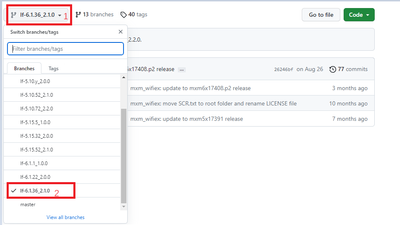
The differences between different Wi-Fi chips are firmwares.
You need to download IW416 firmware and wifi_mod_para.conf, then put it to your /lib/firmware/nxp/ directory.

For compiling driver, you can refer to below my cross-compiling 88W8987 driver method:
====================
编译Driver:
nxf93258@lsv07252:~/wifi-drivers/marvell-sd-uapsta-8987$source /opt/fsl-imx-xwayland/4.14-sumo/environment-setup-aarch64-poky-linux
nxf93258@lsv07252:~/wifi-drivers/marvell-sd-uapsta-8987$export KERNELDIR=/home/nxf93258/linux-source-code/rel_imx_4.14.98_2.0.0_ga/linux-imx
nxf93258@lsv07252:~/wifi-drivers/marvell-sd-uapsta-8987$ echo $ARCH
arm64
nxf93258@lsv07252:~/wifi-drivers/marvell-sd-uapsta-8987$ echo $CROSS_COMPILE
aarch64-poky-linux-
nxf93258@lsv07252:~/wifi-drivers/marvell-sd-uapsta-8987$ unset LDFLAGS
nxf93258@lsv07252:~/wifi-drivers/marvell-sd-uapsta-8987$ make -j8
===============
Best regards,
Christine.
Christine_Li
- Mark as New
- Bookmark
- Subscribe
- Mute
- Subscribe to RSS Feed
- Permalink
- Report Inappropriate Content
Hi, @naresh_nakka
I saw you are using Ubuntu, then I think you can directly compile without configuring cross-compile toolchain.
You can directly use "make -j8" command to compile driver.
Best regards,
Christine.
Christine_Li
- Mark as New
- Bookmark
- Subscribe
- Mute
- Subscribe to RSS Feed
- Permalink
- Report Inappropriate Content
Hi, @naresh_nakka
You can download our IW416 driver from our github:
git clone https://github.com/nxp-imx/mwifiex.git
git tag // to list our tags according to your Linux kernel version.
git checkout -b TAG(the tag you chose) such as: git checkout -b lf-6.1.1_1.0.0
And I think Firmware is also needed for you, please download Firmware from our github:
git clone https://github.com/NXP/imx-firmware.git
git tag // to list our tags according to your Linux kernel version.
git checkout -b TAG(the tag you chose) such as: git checkout -b lf-6.1.1_1.0.0
After download, you need to cross compile according to your kernel BSP with your cross compile tool chain.
Please let me know your platform, kernel version and your host MPU/MCU for further support.
Best regards,
Christine.
