Operating KW36 with a 26MHz XTAL

cancel
Showing results for 
Show  only  | Search instead for 
Did you mean: 

Operating KW36 with a 26MHz XTAL

Operating KW36 with a 26MHz XTAL

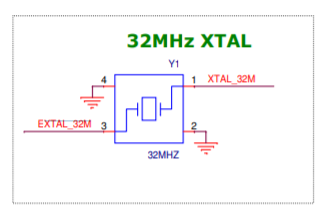
By default, FRDM-KW36 board includes a 32MHz XTAL (YI) as shown in Figure 1 but there are cases where a 26MHz XTAL is needed instead of 32MHz XTAL for FRDM-KW36 or a custom KW36 board.
 

y1.png

Figure 1. 32MHz XTAL from FRDM-KW36 schematics

Wireless connectivity demos from FRDM-KW36 Sofware Development Kit are configured to run with a 32MHz XTAL by default, but it's very easy to modify the software to operate with a 26MHz XTAL.

Follow next steps to configure a FRDM-KW36 wireless connectivity demo to operate with a 26MHz XTAL:

1. In clock_config.h file, change BOARD_XTAL0_CLK_HZ define from 32000000U to 26000000U as shown in Figure 2.

 

26mh.png

Figure 2. BOARD_XTAL0_CLK_HZ define in clock_config.h

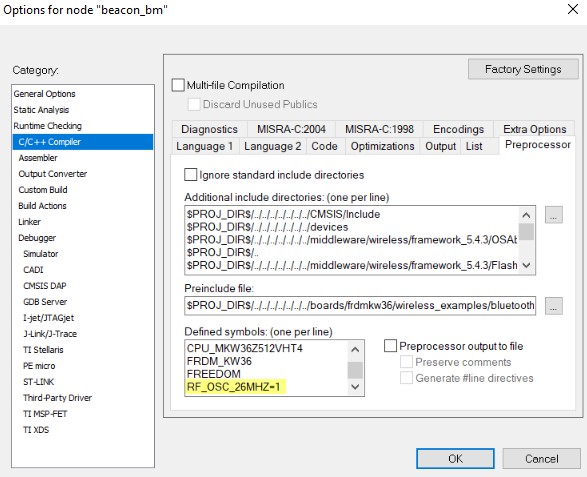
2. Add RF_OSC_26MHZ=1 line in preprocessor:

If using IAR IDE:

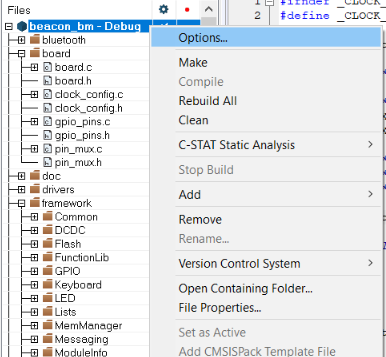
  • Right click on your project, then click options (Figure 3).
iar1.png

Figure 3. IAR project options

  • Go to C/C++ Compiler tab, then Preprocessor, and add RF_OSC_26MHZ=1 line in defined symbols window (Figure 4).
iar2.png

Figure 4. IAR Preprocessor

If using MCUXpresso IDE:

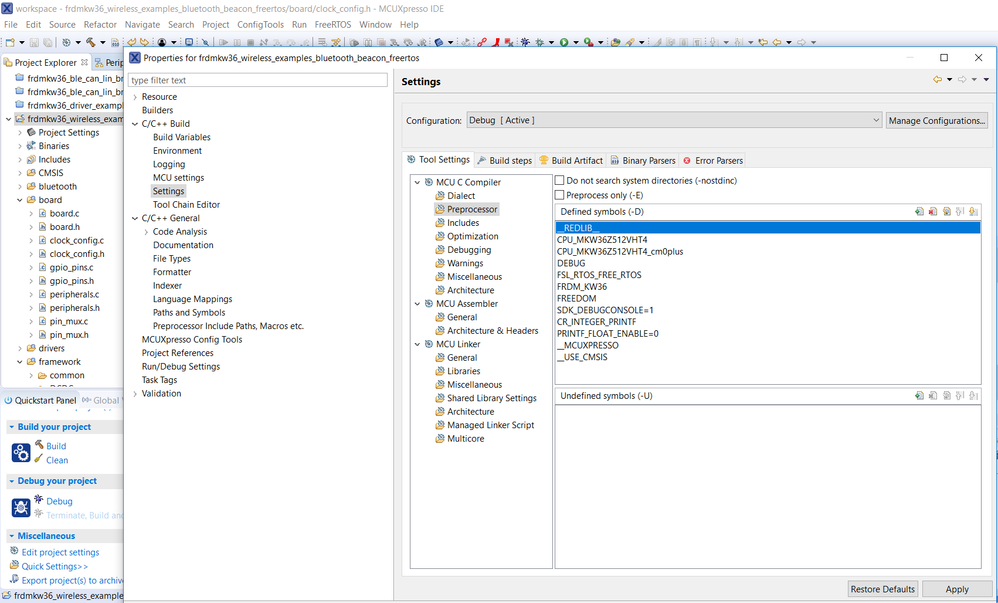
  • Right click on your project, select Properties, go to Settings under C/C++ Build, then Preprocessor under MCU C Compiler (Figure 5).
11.png

Figure 5. MCUXpresso Preprocessor

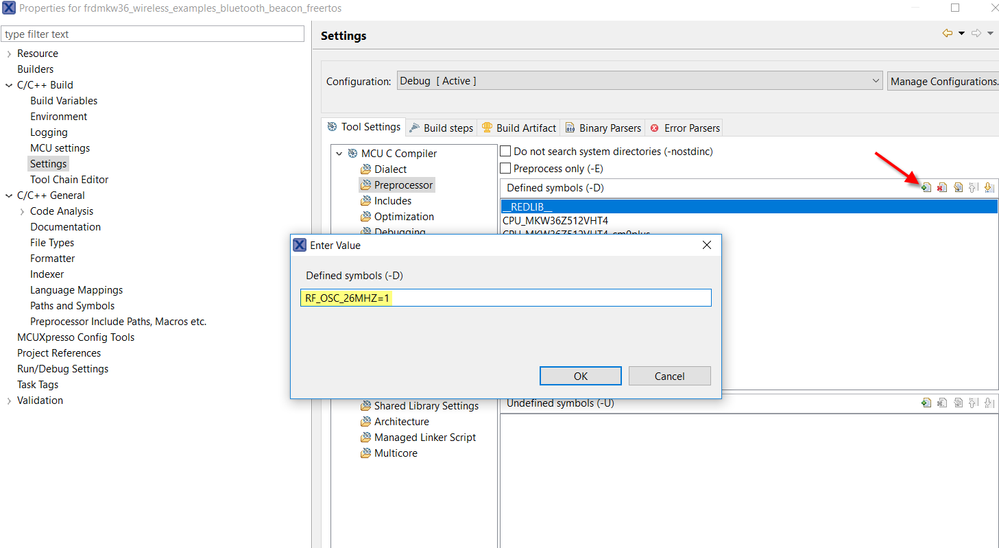
  • Click on add button from Defined symbols, write RF_OSC_26MHZ=1 and click OK to finish (Figure 6).
new.png

Figure 6. MCUXpresso Defined symbols

To finish, re-compile your project and it will be ready to operate with a 26MHz XTAL.

FRDM-KW36 SDK can be downloaded from the MCUXpresso webpage.

Labels (2)
Tags (3)
%3CLINGO-SUB%20id%3D%22lingo-sub-1117984%22%20slang%3D%22en-US%22%20mode%3D%22CREATE%22%3EOperating%20KW36%20with%20a%2026MHz%20XTAL%3C%2FLINGO-SUB%3E%3CLINGO-BODY%20id%3D%22lingo-body-1117984%22%20slang%3D%22en-US%22%20mode%3D%22CREATE%22%3E%3CP%3EBy%20default%2C%20FRDM-KW36%20board%20includes%20a%2032MHz%20XTAL%20(YI)%20as%20shown%20in%20%3CSTRONG%3EFigure%3C%2FSTRONG%3E%20%3CSTRONG%3E1%3C%2FSTRONG%3E%26nbsp%3Bbut%20there%20are%20cases%20where%20a%2026MHz%20XTAL%20is%20needed%20instead%20of%2032MHz%20XTAL%20for%20FRDM-KW36%20or%20a%20custom%20KW36%20board.%3C%2FP%3E%3CP%3E%3CSTRONG%3E%26nbsp%3B%3C%2FSTRONG%3E%3C%2FP%3E%3CP%3E%3CSTRONG%3E%3CSPAN%20class%3D%22lia-inline-image-display-wrapper%22%20image-alt%3D%22y1.png%22%3E%3Cspan%20class%3D%22lia-inline-image-display-wrapper%22%20image-alt%3D%22y1.png%22%20style%3D%22width%3A%20333px%3B%22%3E%3Cimg%20src%3D%22https%3A%2F%2Fcommunity.nxp.com%2Ft5%2Fimage%2Fserverpage%2Fimage-id%2F73619i38854AB8F1DC6DE8%2Fimage-size%2Flarge%3Fv%3Dv2%26amp%3Bpx%3D999%22%20role%3D%22button%22%20title%3D%22y1.png%22%20alt%3D%22y1.png%22%20%2F%3E%3C%2Fspan%3E%3C%2FSPAN%3E%3C%2FSTRONG%3E%3C%2FP%3E%3CP%20style%3D%22text-align%3A%20center%3B%22%3E%3CSTRONG%3EFigure%201.%2032MHz%20XTAL%20from%20FRDM-KW36%20schematics%3C%2FSTRONG%3E%3C%2FP%3E%3CP%3E%3C%2FP%3E%3CP%3EWireless%20connectivity%20demos%20from%3CSTRONG%3E%26nbsp%3B%3C%2FSTRONG%3EFRDM-KW36%20Sofware%20Development%20Kit%20are%20configured%20to%20run%20with%20a%2032MHz%20XTAL%20by%20default%2C%20but%20it's%20very%20easy%20to%20modify%20the%20software%20to%20operate%20with%20a%2026MHz%20XTAL.%3C%2FP%3E%3CP%3E%3C%2FP%3E%3CP%3EFollow%20next%20steps%20to%20configure%20a%20FRDM-KW36%20wireless%20connectivity%20demo%20to%20operate%20with%20a%2026MHz%20XTAL%3A%3C%2FP%3E%3CP%3E%3C%2FP%3E%3CP%3E%3CSTRONG%3E1.%3C%2FSTRONG%3E%20In%20clock_config.h%20file%2C%20change%26nbsp%3BBOARD_XTAL0_CLK_HZ%20define%20from%26nbsp%3B32000000U%20to%26nbsp%3B26000000U%20as%20shown%20in%20%3CSTRONG%3EFigure%202.%3C%2FSTRONG%3E%3C%2FP%3E%3CP%3E%3CSTRONG%3E%26nbsp%3B%3C%2FSTRONG%3E%3C%2FP%3E%3CP%3E%3CSPAN%20class%3D%22lia-inline-image-display-wrapper%22%20image-alt%3D%2226mh.png%22%3E%3Cspan%20class%3D%22lia-inline-image-display-wrapper%22%20image-alt%3D%2226mh.png%22%20style%3D%22width%3A%20999px%3B%22%3E%3Cimg%20src%3D%22https%3A%2F%2Fcommunity.nxp.com%2Ft5%2Fimage%2Fserverpage%2Fimage-id%2F73871iAC006B5F378B9B1C%2Fimage-size%2Flarge%3Fv%3Dv2%26amp%3Bpx%3D999%22%20role%3D%22button%22%20title%3D%2226mh.png%22%20alt%3D%2226mh.png%22%20%2F%3E%3C%2Fspan%3E%3C%2FSPAN%3E%3C%2FP%3E%3CP%20style%3D%22text-align%3A%20center%3B%22%3E%3CSTRONG%3EFigure%202.%26nbsp%3BBOARD_XTAL0_CLK_HZ%20define%20in%20clock_config.h%3C%2FSTRONG%3E%3C%2FP%3E%3CP%3E%3C%2FP%3E%3CP%3E%3C%2FP%3E%3CP%3E%3CSTRONG%3E2.%26nbsp%3B%3C%2FSTRONG%3EAdd%26nbsp%3BRF_OSC_26MHZ%3D1%20line%20in%20preprocessor%3A%3C%2FP%3E%3CP%3E%3C%2FP%3E%3CP%3E%3CSTRONG%3EIf%20using%20IAR%20IDE%3A%3C%2FSTRONG%3E%3C%2FP%3E%3CUL%3E%3CLI%3ERight%20click%20on%20your%20project%2C%20then%20click%20options%20(%3CSTRONG%3EFigure%203%3C%2FSTRONG%3E).%3C%2FLI%3E%3C%2FUL%3E%3CP%3E%3CSPAN%20class%3D%22lia-inline-image-display-wrapper%22%20image-alt%3D%22iar1.png%22%3E%3Cspan%20class%3D%22lia-inline-image-display-wrapper%22%20image-alt%3D%22iar1.png%22%20style%3D%22width%3A%20386px%3B%22%3E%3Cimg%20src%3D%22https%3A%2F%2Fcommunity.nxp.com%2Ft5%2Fimage%2Fserverpage%2Fimage-id%2F73919iBE746FF81B075DD0%2Fimage-size%2Flarge%3Fv%3Dv2%26amp%3Bpx%3D999%22%20role%3D%22button%22%20title%3D%22iar1.png%22%20alt%3D%22iar1.png%22%20%2F%3E%3C%2Fspan%3E%3C%2FSPAN%3E%3C%2FP%3E%3CP%20style%3D%22text-align%3A%20center%3B%22%3E%3CSTRONG%3EFigure%203.%20IAR%20project%20options%3C%2FSTRONG%3E%3C%2FP%3E%3CP%3E%3C%2FP%3E%3CUL%3E%3CLI%3EGo%20to%20C%2FC%2B%2B%20Compiler%20tab%2C%20then%20Preprocessor%2C%20and%20add%26nbsp%3B%3CSPAN%3ERF_OSC_26MHZ%3D1%20line%20in%20defined%20symbols%20window%20(%3CSTRONG%3EFigure%204%3C%2FSTRONG%3E).%3C%2FSPAN%3E%3C%2FLI%3E%3C%2FUL%3E%3CP%3E%3C%2FP%3E%3CP%3E%3CSPAN%20class%3D%22lia-inline-image-display-wrapper%22%20image-alt%3D%22iar2.png%22%3E%3Cspan%20class%3D%22lia-inline-image-display-wrapper%22%20image-alt%3D%22iar2.png%22%20style%3D%22width%3A%20587px%3B%22%3E%3Cimg%20src%3D%22https%3A%2F%2Fcommunity.nxp.com%2Ft5%2Fimage%2Fserverpage%2Fimage-id%2F73954iCA70ADD6EA432424%2Fimage-size%2Flarge%3Fv%3Dv2%26amp%3Bpx%3D999%22%20role%3D%22button%22%20title%3D%22iar2.png%22%20alt%3D%22iar2.png%22%20%2F%3E%3C%2Fspan%3E%3C%2FSPAN%3E%3C%2FP%3E%3CP%20style%3D%22text-align%3A%20center%3B%22%3E%3CSTRONG%3EFigure%204.%26nbsp%3BIAR%20Preprocessor%3C%2FSTRONG%3E%3C%2FP%3E%3CP%3E%3C%2FP%3E%3CP%3E%3CSTRONG%3EIf%20using%20MCUXpresso%20IDE%3A%3C%2FSTRONG%3E%3C%2FP%3E%3CP%3E%3C%2FP%3E%3CUL%3E%3CLI%3ERight%20click%20on%20your%20project%2C%20select%20Properties%2C%20go%20to%20Settings%20under%20C%2FC%2B%2B%20Build%2C%20then%20Preprocessor%20under%20MCU%20C%20Compiler%20(%3CSTRONG%3EFigure%205%3C%2FSTRONG%3E).%3C%2FLI%3E%3C%2FUL%3E%3CP%3E%3C%2FP%3E%3CP%3E%3CSPAN%20class%3D%22lia-inline-image-display-wrapper%22%20image-alt%3D%2211.png%22%3E%3Cspan%20class%3D%22lia-inline-image-display-wrapper%22%20image-alt%3D%2211.png%22%20style%3D%22width%3A%20999px%3B%22%3E%3Cimg%20src%3D%22https%3A%2F%2Fcommunity.nxp.com%2Ft5%2Fimage%2Fserverpage%2Fimage-id%2F74002i81DDBE3A7EAB68B8%2Fimage-size%2Flarge%3Fv%3Dv2%26amp%3Bpx%3D999%22%20role%3D%22button%22%20title%3D%2211.png%22%20alt%3D%2211.png%22%20%2F%3E%3C%2Fspan%3E%3C%2FSPAN%3E%3C%2FP%3E%3CP%20style%3D%22text-align%3A%20center%3B%22%3E%3CSTRONG%3EFigure%205.%20MCUXpresso%20Preprocessor%3C%2FSTRONG%3E%3C%2FP%3E%3CP%3E%3C%2FP%3E%3CUL%3E%3CLI%3EClick%20on%20add%20button%20from%20Defined%20symbols%2C%20write%26nbsp%3B%3CSPAN%3ERF_OSC_26MHZ%3D1%20and%20click%20OK%20to%20finish%20%3CSTRONG%3E(Figure%206%3C%2FSTRONG%3E).%3C%2FSPAN%3E%3C%2FLI%3E%3C%2FUL%3E%3CP%3E%3C%2FP%3E%3CP%3E%3CSPAN%20class%3D%22lia-inline-image-display-wrapper%22%20image-alt%3D%22new.png%22%3E%3Cspan%20class%3D%22lia-inline-image-display-wrapper%22%20image-alt%3D%22new.png%22%20style%3D%22width%3A%20999px%3B%22%3E%3Cimg%20src%3D%22https%3A%2F%2Fcommunity.nxp.com%2Ft5%2Fimage%2Fserverpage%2Fimage-id%2F74052iD1379471684EA105%2Fimage-size%2Flarge%3Fv%3Dv2%26amp%3Bpx%3D999%22%20role%3D%22button%22%20title%3D%22new.png%22%20alt%3D%22new.png%22%20%2F%3E%3C%2Fspan%3E%3C%2FSPAN%3E%3C%2FP%3E%3CP%20style%3D%22text-align%3A%20center%3B%22%3E%3CSTRONG%3EFigure%206.%20MCUXpresso%26nbsp%3BDefined%20symbols%3C%2FSTRONG%3E%3C%2FP%3E%3CP%3E%3C%2FP%3E%3CP%3ETo%20finish%2C%20re-compile%20your%20project%20and%20it%20will%20be%20ready%20to%20operate%20with%20a%2026MHz%20XTAL.%3C%2FP%3E%3CP%3E%3C%2FP%3E%3CP%3EFRDM-KW36%20SDK%20can%20be%20downloaded%20from%20the%20%3CA%20href%3D%22https%3A%2F%2Fmcuxpresso.nxp.com%2Fen%2Fwelcome%22%20rel%3D%22nofollow%20noopener%20noreferrer%22%20target%3D%22_blank%22%3EMCUXpresso%20webpage%3C%2FA%3E.%3C%2FP%3E%3C%2FLINGO-BODY%3E%3CLINGO-LABS%20id%3D%22lingo-labs-1117984%22%20slang%3D%22en-US%22%20mode%3D%22CREATE%22%3E%3CLINGO-LABEL%3EBLE%20Software%3C%2FLINGO-LABEL%3E%3CLINGO-LABEL%3EKW%3C%2FLINGO-LABEL%3E%3C%2FLINGO-LABS%3E
No ratings
Version history
Last update:
‎10-01-2018 03:13 PM
Updated by: