
- Forums
- Product Forums
- General Purpose MicrocontrollersGeneral Purpose Microcontrollers
- i.MX Forumsi.MX Forums
- QorIQ Processing PlatformsQorIQ Processing Platforms
- Identification and SecurityIdentification and Security
- Power ManagementPower Management
- Wireless ConnectivityWireless Connectivity
- RFID / NFCRFID / NFC
- Advanced AnalogAdvanced Analog
- Neural Processing UnitsNeural Processing Units
- MCX Microcontrollers
- S32G
- S32K
- S32V
- MPC5xxx
- Other NXP Products
- S12 / MagniV Microcontrollers
- Powertrain and Electrification Analog Drivers
- Sensors
- Vybrid Processors
- Digital Signal Controllers
- 8-bit Microcontrollers
- ColdFire/68K Microcontrollers and Processors
- PowerQUICC Processors
- OSBDM and TBDML
- S32M
- S32Z/E
-
- Solution Forums
- Software Forums
- MCUXpresso Software and ToolsMCUXpresso Software and Tools
- CodeWarriorCodeWarrior
- MQX Software SolutionsMQX Software Solutions
- Model-Based Design Toolbox (MBDT)Model-Based Design Toolbox (MBDT)
- FreeMASTER
- eIQ Machine Learning Software
- Embedded Software and Tools Clinic
- S32 SDK
- S32 Design Studio
- GUI Guider
- Zephyr Project
- Voice Technology
- Application Software Packs
- Secure Provisioning SDK (SPSDK)
- Processor Expert Software
- Generative AI & LLMs
-
- Topics
- Mobile Robotics - Drones and RoversMobile Robotics - Drones and Rovers
- NXP Training ContentNXP Training Content
- University ProgramsUniversity Programs
- Rapid IoT
- NXP Designs
- SafeAssure-Community
- OSS Security & Maintenance
- Using Our Community
-
- Cloud Lab Forums
-
- Knowledge Bases
- ARM Microcontrollers
- i.MX Processors
- Identification and Security
- Model-Based Design Toolbox (MBDT)
- QorIQ Processing Platforms
- S32 Automotive Processing Platform
- Wireless Connectivity
- CodeWarrior
- MCUXpresso Suite of Software and Tools
- MQX Software Solutions
- RFID / NFC
- Advanced Analog
- Neural Processing Units
-
- NXP Tech Blogs
Forum Format

If I am wrong on this please let me know.
The forum format makes it impossible to just browse thought post. The only posts visible are recent activity. On other forums I find it helpful, and a way to learn by reading post and solutions given currently and in the past.
Also I cannot find how to change my avatar to a image I uploaded.
Ray.

> The forum format makes it impossible to just browse thought post. The only posts visible are recent activity.
Of course! A lot of recent work has gone into hiding features, making things hard to use and effectively making the Forums look "Modern and Content Free" ,just like Facebook and Twitter. Or like an Adventure Game (you're in a maze of twisty little passages...)
First click on the "HOME" label at top left.
Then, until the last "Update" in July, all the forums were listed at the top of the Home Page, as if they were the most important part of the Forum Site. What a strange idea!
So in the recent Update they were carefully moved further down the page into a scrolling section under the "Places" bar. If you don't have a huge screen then this is likely to be scrolled off the bottom where you can't immediately see it. As well, you have to scroll within that section to find the forum you want. So now the Forums are double-scroll-hidden.
Once you've found the "Places" and found the Forum and clicked on it you then what you're looking for is hidden a few more times.
At the top of the page under the Grey Menu Bar there's a "Content" label. DON'T CLICK ON THAT ONE, as it is a "Decoy" placed to show you ever post in every forum, as if that could ever be useful!
Click on the SECOND grey-on-grey "Content" tab hiding in plain sight next to the selected "Overview" tab.
THAT (finally) shows you what you used to be able to get to with a single click on the Lithium Forums, and on pretty much every other manufacturer's Forum sites.
Well, almost finally. It usually defaults to a "Thumbnail mode" so you then have to click the "Thumbnail/Detail" button at upper right to get a more normal list.
You've now finally navigated your way to the Forum of posts, ordered by date.
> reading post and solutions given currently and in the past.
The "Search" field at the top-right of the page is very powerful if you're clever with the keywords. If you're having problems with a peripheral, then type the register name into it as it appears in code samples, like "LSSAR". If you're looking for known problem, use a phrase like "bear pit" (go on, try it).
Get the keywords right in Google and it will bypass the "Adventure Game" and get you straight to a Freescale Forum Post in one click.
Of course getting the right Avatar is far more important than finding actual technical content ... :-)
Tom

Hello Ray!
I did not understand clearly your first comment, if you enlighten me a bit more I might be able to help you through that.
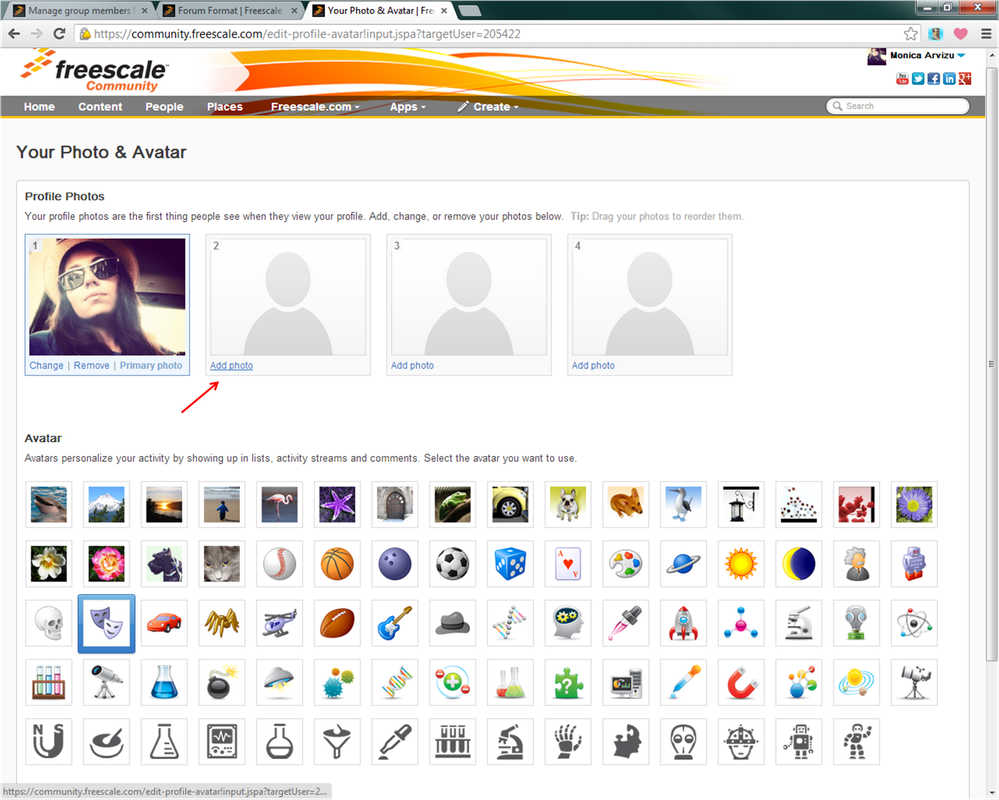
As for the avatar picture, there are two ways, and I'll explain with the following screenshots.
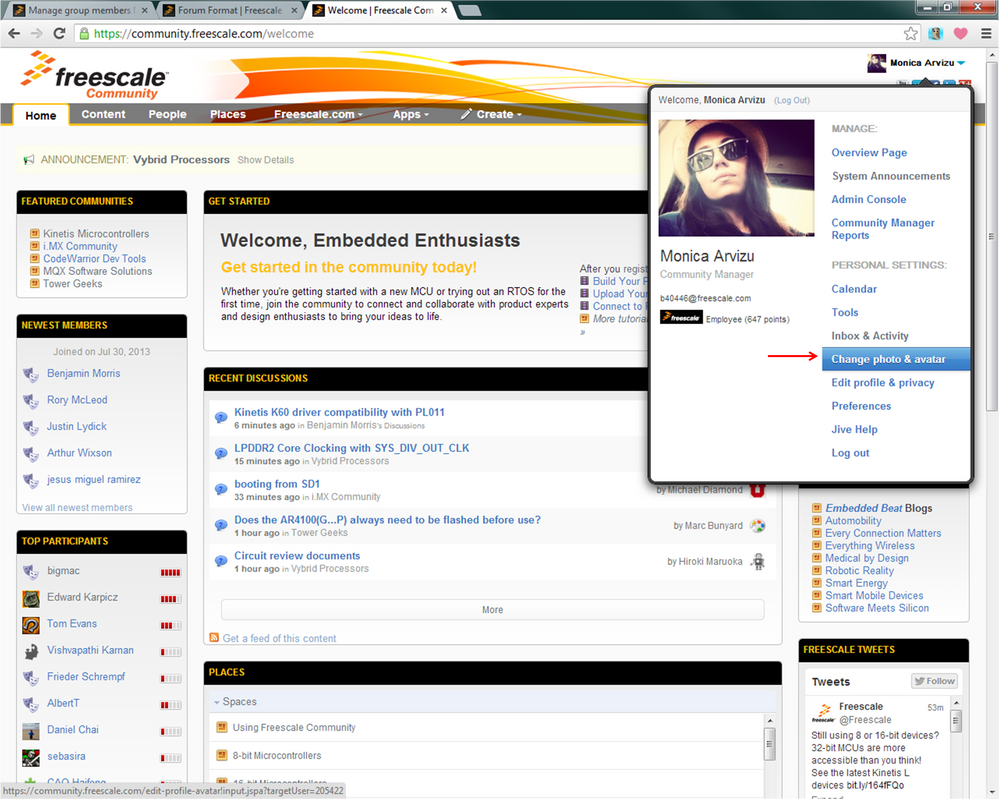
In case you see the little message on the bottom saying: "You can not add another avatar picture", in that case you delete the one you have default or just go to the top and click on "Add photo". There you'll be able to choose one from your library (as I think you already did and the following window opening will lead you to crop the avatar image, as it is shown.
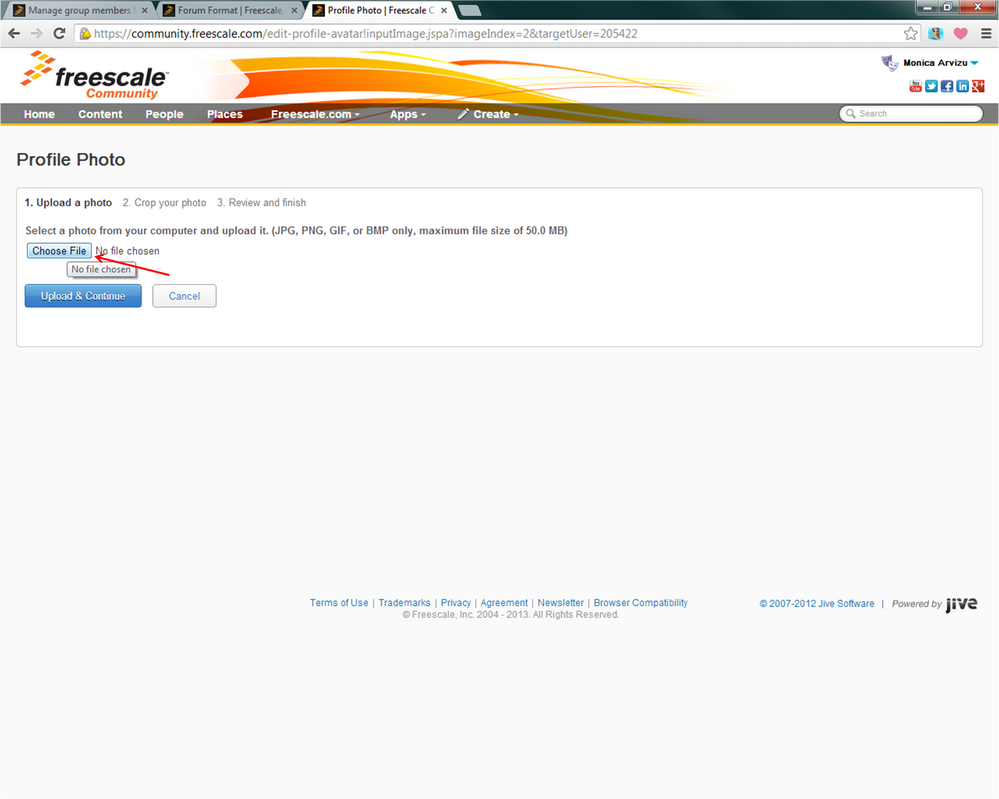
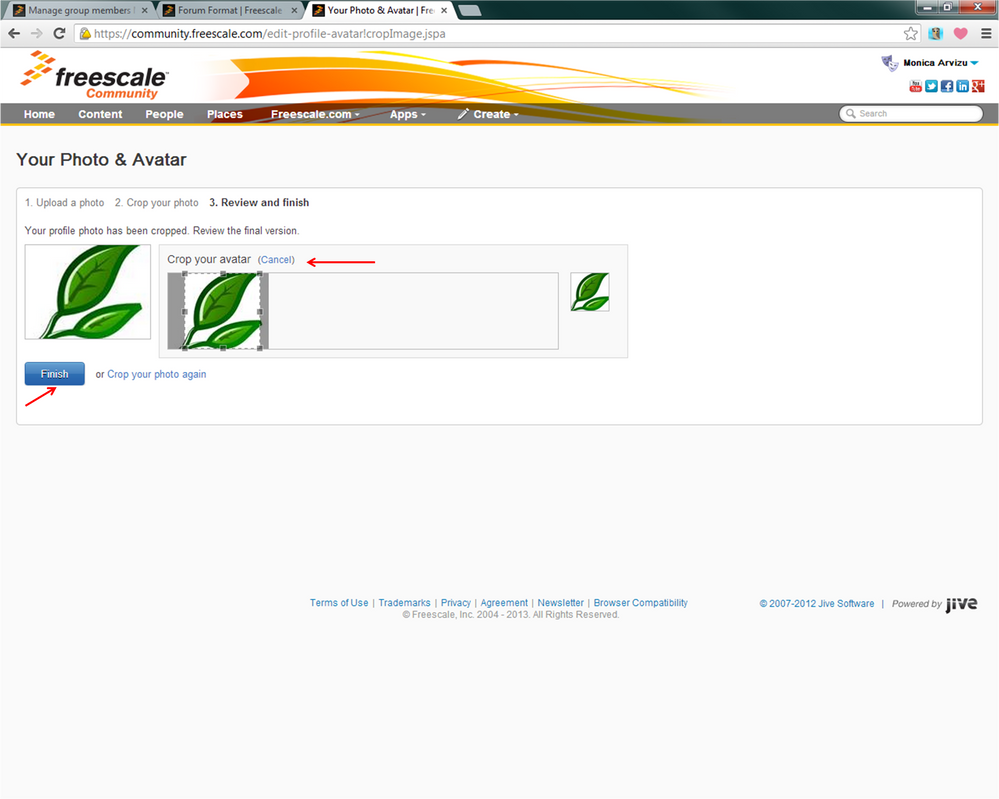
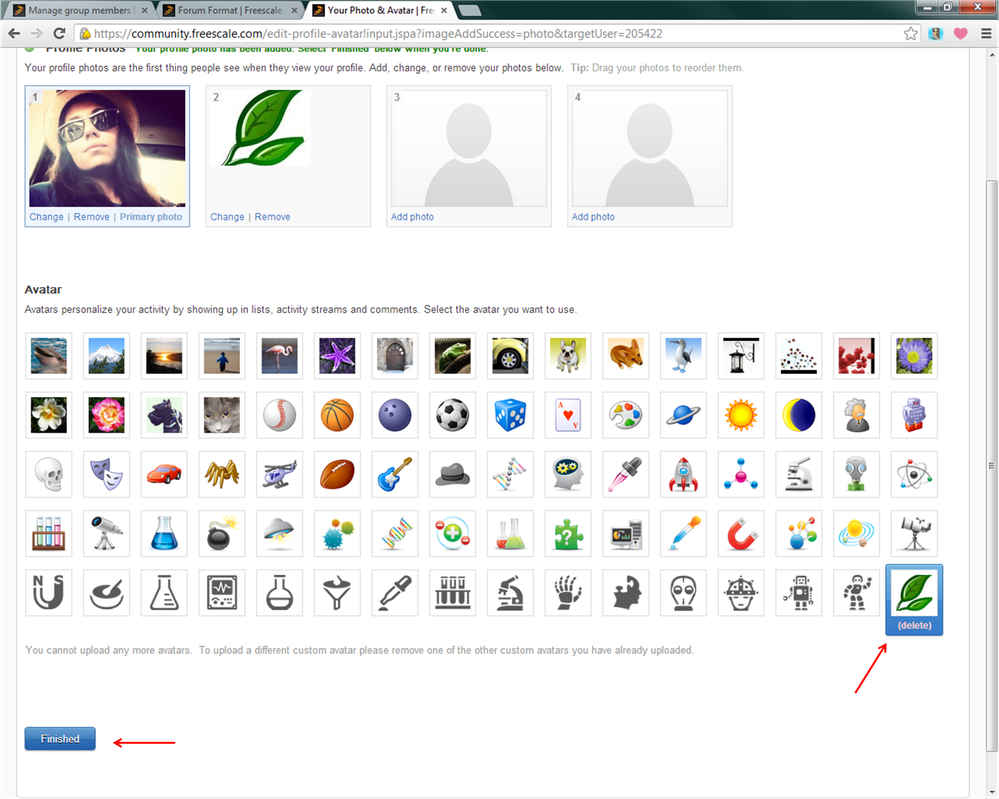
If the message I mention before does not show, you can just "Add another avatar"
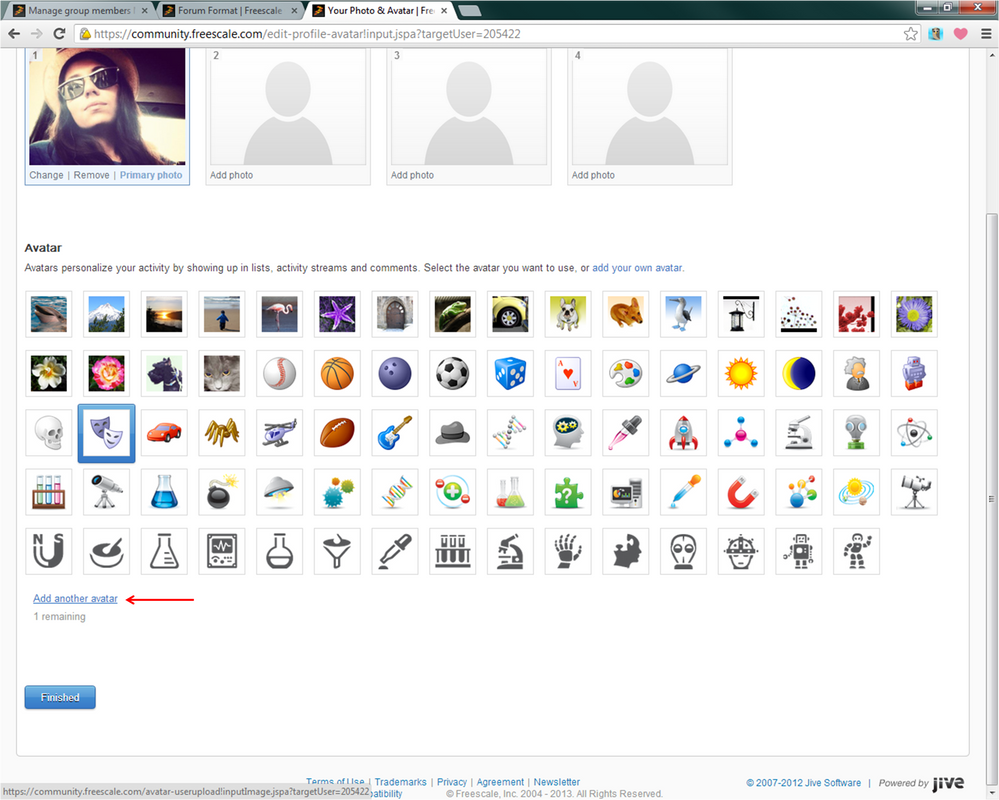
If this doesn't help you out, please attach your own screen shot where the problem seems to be occurring, I'll be happy to help.
Best regards,
Monica.
