
- Forums
- Product Forums
- General Purpose MicrocontrollersGeneral Purpose Microcontrollers
- i.MX Forumsi.MX Forums
- QorIQ Processing PlatformsQorIQ Processing Platforms
- Identification and SecurityIdentification and Security
- Power ManagementPower Management
- Wireless ConnectivityWireless Connectivity
- RFID / NFCRFID / NFC
- Advanced AnalogAdvanced Analog
- Neural Processing UnitsNeural Processing Units
- MCX Microcontrollers
- S32G
- S32K
- S32V
- MPC5xxx
- Other NXP Products
- S12 / MagniV Microcontrollers
- Powertrain and Electrification Analog Drivers
- Sensors
- Vybrid Processors
- Digital Signal Controllers
- 8-bit Microcontrollers
- ColdFire/68K Microcontrollers and Processors
- PowerQUICC Processors
- OSBDM and TBDML
- S32M
- S32Z/E
-
- Solution Forums
- Software Forums
- MCUXpresso Software and ToolsMCUXpresso Software and Tools
- CodeWarriorCodeWarrior
- MQX Software SolutionsMQX Software Solutions
- Model-Based Design Toolbox (MBDT)Model-Based Design Toolbox (MBDT)
- FreeMASTER
- eIQ Machine Learning Software
- Embedded Software and Tools Clinic
- S32 SDK
- S32 Design Studio
- GUI Guider
- Zephyr Project
- Voice Technology
- Application Software Packs
- Secure Provisioning SDK (SPSDK)
- Processor Expert Software
- Generative AI & LLMs
-
- Topics
- Mobile Robotics - Drones and RoversMobile Robotics - Drones and Rovers
- NXP Training ContentNXP Training Content
- University ProgramsUniversity Programs
- Rapid IoT
- NXP Designs
- SafeAssure-Community
- OSS Security & Maintenance
- Using Our Community
-
- Cloud Lab Forums
-
- Knowledge Bases
- ARM Microcontrollers
- i.MX Processors
- Identification and Security
- Model-Based Design Toolbox (MBDT)
- QorIQ Processing Platforms
- S32 Automotive Processing Platform
- Wireless Connectivity
- CodeWarrior
- MCUXpresso Suite of Software and Tools
- MQX Software Solutions
- RFID / NFC
- Advanced Analog
- Neural Processing Units
-
- NXP Tech Blogs
- RSS フィードを購読する
- トピックを新着としてマーク
- トピックを既読としてマーク
- このトピックを現在のユーザーにフロートします
- ブックマーク
- 購読
- ミュート
- 印刷用ページ
S32K146EVB Bootloader Mode

- 新着としてマーク
- ブックマーク
- 購読
- ミュート
- RSS フィードを購読する
- ハイライト
- 印刷
- 不適切なコンテンツを報告
I posted this request elsewhere, but since it was an already solved problem, I will repost.
In trying to get Freemaster to connect to my S32K146EVB, I was following this solution:
https://community.nxp.com/t5/S32K/S32K146EVB-Quick-Start-Guide/m-p/1077560#M7567
but copied in bootloader mode. Now my eval board will not go back to application mode.
My questions are:
how do I get this back to the OOBE boot, where the lights blink.
how do I setup the communication between the board and my system. The quick start guide was incorrect in the setup, which is how I ended up here.
Is there any up to date guides for this board, the current one is riddled with mistakes and is not useable for a linux system which supposedly is supported.
Thank you,
James

 Robin_Shen
- 新着としてマーク
- ブックマーク
- 購読
- ミュート
- RSS フィードを購読する
- ハイライト
- 印刷
- 不適切なコンテンツを報告
Hi James,
Please refer: 1.2 Flash the Out-of-Box Demo
Download the S32K146EVB_OOBE_FreeMASTER_Firmware.srec from Software and Tools tab. Then drag and drop the downloaded image file into your S32K146EVB disk that is listed in your PC window.
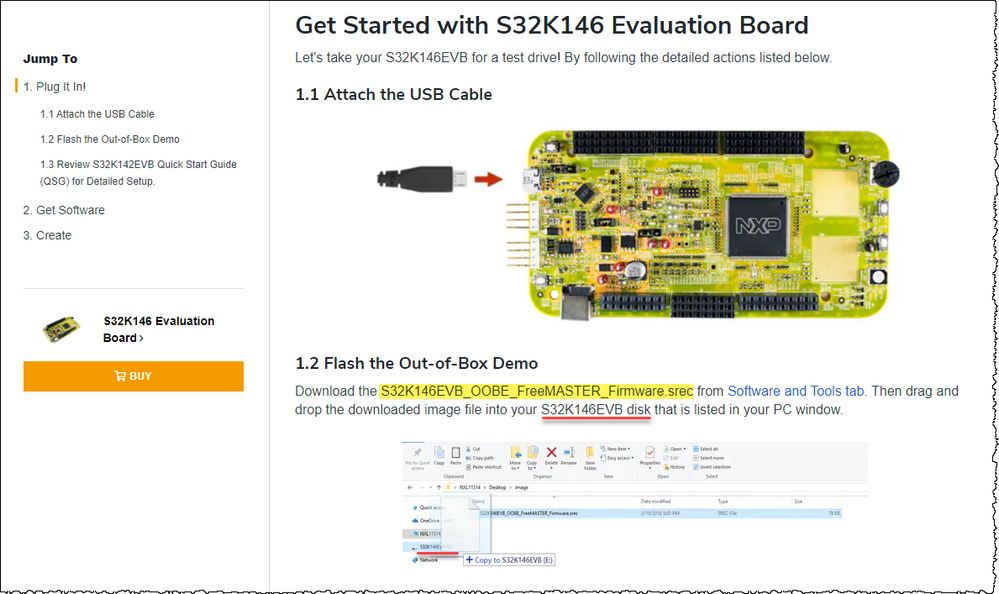
Do not copy it in bootloader mode. This will cause your board to lose the application firmware.
Please refer to this post What is the power supply voltage range over which the S32K144EVB-Q100 can operate? to restore the application firmware. Please use: MSD-DEBUG-S32K146EVB-Q144_Pemicro_v121.SDA
Then you can drop S32K146EVB_OOBE_FreeMASTER_Firmware.srec into your S32K146EVB disk.
Please follow the S32K146EVB-QSG
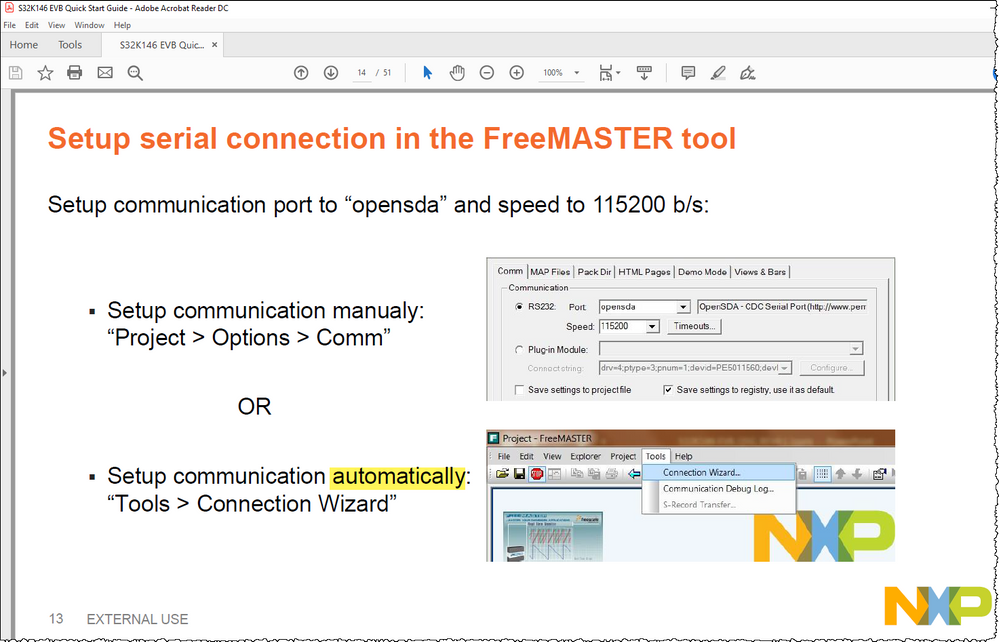
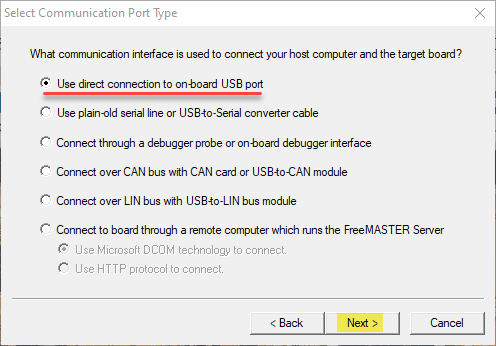
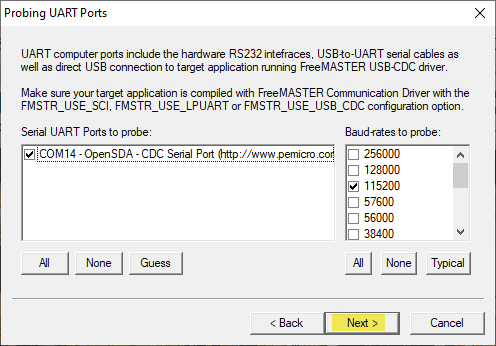
At "Setup serial connection in the FreeMASTER tool" page, I think you can select automatically mode.
Setup communication automatically: Tools > Connection Wizard
Best Regards,
Robin
-------------------------------------------------------------------------------
Note:
- If this post answers your question, please click the "Mark Correct" button. Thank you!
- We are following threads for 7 weeks after the last post, later replies are ignored
Please open a new thread and refer to the closed one, if you have a related question at a later point in time.
-------------------------------------------------------------------------------
