RTC callback function cannot be triggered

cancel
Showing results for 
Show  only  | Search instead for 
Did you mean: 

RTC callback function cannot be triggered

Jump to solution
871 Views
SCoder41
Contributor III

I am using the S32K344 chip and plan to use RTC to generate logs with timestamps and store them in the SD card, but I am unable to access callback functions.1.png

0 Kudos
Reply
1 Solution
833 Views
SCoder41
Contributor III

Yes, I did all of these。

2.png3.png4.png

View solution in original post

0 Kudos
Reply
2 Replies
851 Views
Julián_AragónM
NXP TechSupport
NXP TechSupport

Hi @SCoder41,

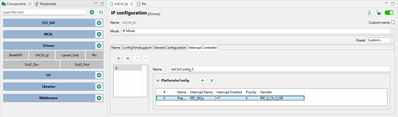
Have you set a date and time configuration for the RTC? You also need to set the interrupt driver for the RTC IRQ:

DateandTime.png

InterruptControllerRTC.png

After setting a date and time, and the RTC IRQ, the RTC alarm callback should be stepped into when the alarm date&time = current date&time.

Keep in mind you do need to install the handler and enable the IRQ in the source code, as well as setting the time&date, configuring the alarm, enabling interrupt and starting the counter to enable the basic functionality of the RTC alarm.

Best regards,
Julián

0 Kudos
Reply
834 Views
SCoder41
Contributor III

Yes, I did all of these。

2.png3.png4.png

0 Kudos
Reply
%3CLINGO-SUB%20id%3D%22lingo-sub-2038522%22%20slang%3D%22en-US%22%20mode%3D%22CREATE%22%3ERTC%20callback%20function%20cannot%20be%20triggered%3C%2FLINGO-SUB%3E%3CLINGO-BODY%20id%3D%22lingo-body-2038522%22%20slang%3D%22en-US%22%20mode%3D%22CREATE%22%3E%3CP%3EI%20am%20using%20the%20S32K344%20chip%20and%20plan%20to%20use%20RTC%20to%20generate%20logs%20with%20timestamps%20and%20store%20them%20in%20the%20SD%20card%2C%20but%20I%20am%20unable%20to%20access%20callback%20functions.%3CSPAN%20class%3D%22lia-inline-image-display-wrapper%20lia-image-align-inline%22%20image-alt%3D%221.png%22%20style%3D%22width%3A%20999px%3B%22%3E%3Cspan%20class%3D%22lia-inline-image-display-wrapper%22%20image-alt%3D%221.png%22%20style%3D%22width%3A%20999px%3B%22%3E%3Cimg%20src%3D%22https%3A%2F%2Fcommunity.nxp.com%2Ft5%2Fimage%2Fserverpage%2Fimage-id%2F322524i67FEED2F90E20AA0%2Fimage-size%2Flarge%3Fv%3Dv2%26amp%3Bpx%3D999%22%20role%3D%22button%22%20title%3D%221.png%22%20alt%3D%221.png%22%20%2F%3E%3C%2Fspan%3E%3C%2FSPAN%3E%3C%2FP%3E%3C%2FLINGO-BODY%3E%3CLINGO-SUB%20id%3D%22lingo-sub-2038909%22%20slang%3D%22en-US%22%20mode%3D%22CREATE%22%3ERe%3A%20RTC%20callback%20function%20cannot%20be%20triggered%3C%2FLINGO-SUB%3E%3CLINGO-BODY%20id%3D%22lingo-body-2038909%22%20slang%3D%22en-US%22%20mode%3D%22CREATE%22%3E%3CP%3EYes%2C%20I%20did%20all%20of%20these%E3%80%82%3C%2FP%3E%3CP%3E%3CSPAN%20class%3D%22lia-inline-image-display-wrapper%20lia-image-align-inline%22%20image-alt%3D%222.png%22%20style%3D%22width%3A%20741px%3B%22%3E%3Cspan%20class%3D%22lia-inline-image-display-wrapper%22%20image-alt%3D%222.png%22%20style%3D%22width%3A%20741px%3B%22%3E%3Cimg%20src%3D%22https%3A%2F%2Fcommunity.nxp.com%2Ft5%2Fimage%2Fserverpage%2Fimage-id%2F322626i237D7B94EA74085E%2Fimage-size%2Flarge%3Fv%3Dv2%26amp%3Bpx%3D999%22%20role%3D%22button%22%20title%3D%222.png%22%20alt%3D%222.png%22%20%2F%3E%3C%2Fspan%3E%3C%2FSPAN%3E%3CSPAN%20class%3D%22lia-inline-image-display-wrapper%20lia-image-align-inline%22%20image-alt%3D%223.png%22%20style%3D%22width%3A%20999px%3B%22%3E%3Cspan%20class%3D%22lia-inline-image-display-wrapper%22%20image-alt%3D%223.png%22%20style%3D%22width%3A%20999px%3B%22%3E%3Cimg%20src%3D%22https%3A%2F%2Fcommunity.nxp.com%2Ft5%2Fimage%2Fserverpage%2Fimage-id%2F322625i3AB74A86671E353A%2Fimage-size%2Flarge%3Fv%3Dv2%26amp%3Bpx%3D999%22%20role%3D%22button%22%20title%3D%223.png%22%20alt%3D%223.png%22%20%2F%3E%3C%2Fspan%3E%3C%2FSPAN%3E%3CSPAN%20class%3D%22lia-inline-image-display-wrapper%20lia-image-align-inline%22%20image-alt%3D%224.png%22%20style%3D%22width%3A%20474px%3B%22%3E%3Cspan%20class%3D%22lia-inline-image-display-wrapper%22%20image-alt%3D%224.png%22%20style%3D%22width%3A%20474px%3B%22%3E%3Cimg%20src%3D%22https%3A%2F%2Fcommunity.nxp.com%2Ft5%2Fimage%2Fserverpage%2Fimage-id%2F322627i559300E3A06D6F54%2Fimage-size%2Flarge%3Fv%3Dv2%26amp%3Bpx%3D999%22%20role%3D%22button%22%20title%3D%224.png%22%20alt%3D%224.png%22%20%2F%3E%3C%2Fspan%3E%3C%2FSPAN%3E%3C%2FP%3E%3C%2FLINGO-BODY%3E%3CLINGO-SUB%20id%3D%22lingo-sub-2038785%22%20slang%3D%22en-US%22%20mode%3D%22CREATE%22%3ERe%3A%20RTC%20callback%20function%20cannot%20be%20triggered%3C%2FLINGO-SUB%3E%3CLINGO-BODY%20id%3D%22lingo-body-2038785%22%20slang%3D%22en-US%22%20mode%3D%22CREATE%22%3E%3CP%3EHi%26nbsp%3B%3CA%20href%3D%22https%3A%2F%2Fcommunity.nxp.com%2Ft5%2Fuser%2Fviewprofilepage%2Fuser-id%2F230508%22%20target%3D%22_blank%22%3E%40SCoder41%3C%2FA%3E%2C%3C%2FP%3E%0A%3CP%3EHave%20you%20set%20a%20date%20and%20time%20configuration%20for%20the%20RTC%3F%26nbsp%3BYou%20also%20need%20to%20set%20the%20interrupt%20driver%20for%20the%20RTC%20IRQ%3A%3C%2FP%3E%0A%3CP%3E%3CSPAN%20class%3D%22lia-inline-image-display-wrapper%20lia-image-align-inline%22%20image-alt%3D%22DateandTime.png%22%20style%3D%22width%3A%20400px%3B%22%3E%3Cspan%20class%3D%22lia-inline-image-display-wrapper%22%20image-alt%3D%22DateandTime.png%22%20style%3D%22width%3A%20400px%3B%22%3E%3Cimg%20src%3D%22https%3A%2F%2Fcommunity.nxp.com%2Ft5%2Fimage%2Fserverpage%2Fimage-id%2F322592iF0DFA012A0049289%2Fimage-size%2Fmedium%3Fv%3Dv2%26amp%3Bpx%3D400%22%20role%3D%22button%22%20title%3D%22DateandTime.png%22%20alt%3D%22DateandTime.png%22%20%2F%3E%3C%2Fspan%3E%3C%2FSPAN%3E%3C%2FP%3E%0A%3CP%3E%3CSPAN%20class%3D%22lia-inline-image-display-wrapper%20lia-image-align-inline%22%20image-alt%3D%22InterruptControllerRTC.png%22%20style%3D%22width%3A%20400px%3B%22%3E%3Cspan%20class%3D%22lia-inline-image-display-wrapper%22%20image-alt%3D%22InterruptControllerRTC.png%22%20style%3D%22width%3A%20400px%3B%22%3E%3Cimg%20src%3D%22https%3A%2F%2Fcommunity.nxp.com%2Ft5%2Fimage%2Fserverpage%2Fimage-id%2F322593i14B3D5C59D641266%2Fimage-size%2Fmedium%3Fv%3Dv2%26amp%3Bpx%3D400%22%20role%3D%22button%22%20title%3D%22InterruptControllerRTC.png%22%20alt%3D%22InterruptControllerRTC.png%22%20%2F%3E%3C%2Fspan%3E%3C%2FSPAN%3E%3C%2FP%3E%0A%3CP%3EAfter%20setting%20a%20date%20and%20time%2C%20and%20the%20RTC%20IRQ%2C%20the%20RTC%20alarm%20callback%20should%20be%20stepped%20into%20when%20the%20alarm%20date%26amp%3Btime%20%3D%20current%20date%26amp%3Btime.%3C%2FP%3E%0A%3CP%3EKeep%20in%20mind%20you%20do%20need%20to%20install%20the%20handler%20and%20enable%20the%20IRQ%20in%20the%20source%20code%2C%20as%20well%20as%20setting%20the%20time%26amp%3Bdate%2C%20configuring%20the%20alarm%2C%20enabling%20interrupt%20and%20starting%20the%20counter%20to%20enable%20the%20basic%20functionality%20of%20the%20RTC%20alarm.%3C%2FP%3E%0A%3CP%3EBest%20regards%2C%3CBR%20%2F%3EJuli%C3%A1n%3C%2FP%3E%3C%2FLINGO-BODY%3E