
- Forums
- Product Forums
- General Purpose MicrocontrollersGeneral Purpose Microcontrollers
- i.MX Forumsi.MX Forums
- QorIQ Processing PlatformsQorIQ Processing Platforms
- Identification and SecurityIdentification and Security
- Power ManagementPower Management
- Wireless ConnectivityWireless Connectivity
- RFID / NFCRFID / NFC
- Advanced AnalogAdvanced Analog
- Neural Processing UnitsNeural Processing Units
- MCX Microcontrollers
- S32G
- S32K
- S32V
- MPC5xxx
- Other NXP Products
- S12 / MagniV Microcontrollers
- Powertrain and Electrification Analog Drivers
- Sensors
- Vybrid Processors
- Digital Signal Controllers
- 8-bit Microcontrollers
- ColdFire/68K Microcontrollers and Processors
- PowerQUICC Processors
- OSBDM and TBDML
- S32M
- S32Z/E
-
- Solution Forums
- Software Forums
- MCUXpresso Software and ToolsMCUXpresso Software and Tools
- CodeWarriorCodeWarrior
- MQX Software SolutionsMQX Software Solutions
- Model-Based Design Toolbox (MBDT)Model-Based Design Toolbox (MBDT)
- FreeMASTER
- eIQ Machine Learning Software
- Embedded Software and Tools Clinic
- S32 SDK
- S32 Design Studio
- GUI Guider
- Zephyr Project
- Voice Technology
- Application Software Packs
- Secure Provisioning SDK (SPSDK)
- Processor Expert Software
- Generative AI & LLMs
-
- Topics
- Mobile Robotics - Drones and RoversMobile Robotics - Drones and Rovers
- NXP Training ContentNXP Training Content
- University ProgramsUniversity Programs
- Rapid IoT
- NXP Designs
- SafeAssure-Community
- OSS Security & Maintenance
- Using Our Community
-
- Cloud Lab Forums
-
- Knowledge Bases
- ARM Microcontrollers
- i.MX Processors
- Identification and Security
- Model-Based Design Toolbox (MBDT)
- QorIQ Processing Platforms
- S32 Automotive Processing Platform
- Wireless Connectivity
- CodeWarrior
- MCUXpresso Suite of Software and Tools
- MQX Software Solutions
- RFID / NFC
- Advanced Analog
- Neural Processing Units
-
- NXP Tech Blogs
- RSS フィードを購読する
- トピックを新着としてマーク
- トピックを既読としてマーク
- このトピックを現在のユーザーにフロートします
- ブックマーク
- 購読
- ミュート
- 印刷用ページ
Questions about CSEc Secure Boot, Key Management, IFR, and Counters on S32K144

- 新着としてマーク
- ブックマーク
- 購読
- ミュート
- RSS フィードを購読する
- ハイライト
- 印刷
- 不適切なコンテンツを報告
Hi NXP team,
We are working on enabling CSEc secure boot on the S32K144 and have several technical questions regarding the key management flow, IFR behavior, and secure boot configuration. I would appreciate your clarification on the following points:
1. Chain of Trust
Based on the documentation, secure boot uses the BOOT_MAC_KEY to generate a MAC for the firmware and compares it at boot time.
1.1 When we generate the MAC for the flash region we want to verify,
where is the expected MAC stored for comparison?
Is it stored inside a key slot?
1.2 We plan to implement A/B firmware partitions, so each firmware update will produce a new MAC.
Can we configure the flash address range that secure boot will verify?
If the MAC is stored in a CSEc key slot, does this mean each firmware update requires writing a new MAC into that key slot?
1.3 If the expected MAC must be updated after every firmware upgrade,
are there any precautions or recommended practices for repeatedly updating MAC-related key slots?
2. Questions About IFR
2.1 What exactly is the IFR?
2.2 The documentation mentions “Erase All Blocks” before using CSEc.
Does this operation need to be performed only once before first-time CSEc use,
or must it be repeated whenever we update keys?
2.3 If we already used CSEc previously but now need to update a key,
do we need to perform Erase All Blocks again?
3.Counter Value Usage
What happens if the counter value wraps or is reused?
Can we get counter value for specific key?
4.For key provisioning, should the keys be written through a special image that programs the keys automatically, or do we need to implement a task in our application to perform the key-writing procedure?
Thank you very much for your assistance.
We appreciate any additional documents, examples, or application notes that could help us better understand CSEc usage and secure boot integration.
Best regards,
WT Liao
- 新着としてマーク
- ブックマーク
- 購読
- ミュート
- RSS フィードを購読する
- ハイライト
- 印刷
- 不適切なコンテンツを報告
Hi Lukas,
Thanks for the clarification.
I have two questions regarding the secure boot configuration and recovery behavior on the S32K series:
If the device is initially configured to Parallel Boot Mode, is it possible to switch the boot mode to Strict Sequential Mode later from the application?
If yes, are there any prerequisites or restrictions for this transition?
When the MCU is operating in Strict Sequential Mode, if an incorrect or corrupted bootloader is programmed and causes the device to continuously reset,
is it still possible to reprogram a correct bootloader via JTAG / debugger to recover the device?
Regards,
WT_Liao_GARM

 lukaszadrapa
- 新着としてマーク
- ブックマーク
- 購読
- ミュート
- RSS フィードを購読する
- ハイライト
- 印刷
- 不適切なコンテンツを報告
It is possible to update boot mode and boot size by execution of CMD_BOOT_DEFINE command.
The only restriction is - once strict boot mode is configured, it's not possible to do any further updates. It's not possible to change it back to normal sequential or parallel mode and it is not possible to change the boot size. Notice that S32K1 reference manual explicitly says that it is possible to change the boot size in strict sequential mode but that's not correct. I already reported it some time ago and it should be updated in the manual.
If you are in strict sequential boot mode, you can only update the BOOT_MAC. So, the firmware update is still allowed.
If strict sequential boot mode fails, there's no way to recover. The device will stay in reset forever. The only option is to replace the device.
Regards,
Lukas
- 新着としてマーク
- ブックマーク
- 購読
- ミュート
- RSS フィードを購読する
- ハイライト
- 印刷
- 不適切なコンテンツを報告
Hi Lukas,
I am trying to run the csec_boot_protection example on S32K144 and encountered an issue during D-Flash partitioning.
After executing this function FLASH_DRV_DEFlashPartition();
an ACCERR error is reported, and the D-Flash partitioning fails.

Initially, I suspected that the failure might be caused by the device already being partitioned. However, I checked the DEPART register and confirmed that it is still at its default value, which indicates that D-Flash has not been partitioned yet and should be allowed to perform partitioning.

Could you please advise what might cause this ACCERR error in this scenario?
Is there any prerequisite condition, configuration, or flash state that must be met before calling FLASH_DRV_DEFlashPartition()?
Any guidance on how to properly resolve this issue would be greatly appreciated.
Thank you for your support.
Regards,
WT Liao
lukaszadrapa
- 新着としてマーク
- ブックマーク
- 購読
- ミュート
- RSS フィードを購読する
- ハイライト
- 印刷
- 不適切なコンテンツを報告
Yes, it looks like the device is not partitioned yet.
Do you use original example or are there any modifications?
Do you have CSEs enabled device? What is the exact part number and what is the content of SDID register in SIM module?
Regards,
Lukas
- 新着としてマーク
- ブックマーク
- 購読
- ミュート
- RSS フィードを購読する
- ハイライト
- 印刷
- 不適切なコンテンツを報告
Hi Lukas,
I used the original example.
The SDID is shown below.

The part number is FS32K144HRT0VLLR.
Regards,
WT_Liao_GARM
lukaszadrapa
- 新着としてマーク
- ブックマーク
- 購読
- ミュート
- RSS フィードを購読する
- ハイライト
- 印刷
- 不適切なコンテンツを報告
This is older version of the chip which is no longer offered. 'R' letter in the part number means that it has basic feature set without Security. SDID register confirms this. You need to order a device with Security feature. See "3.2 Ordering information" in the datasheet for details:
https://www.nxp.com/docs/en/data-sheet/S32K1xx.pdf


Regards,
Lukas
- 新着としてマーク
- ブックマーク
- 購読
- ミュート
- RSS フィードを購読する
- ハイライト
- 印刷
- 不適切なコンテンツを報告
Hi Lukas,
thanks for the clarification.
I have a follow-up question regarding the A/B firmware partition setup.
I understand that BOOT_MAC is used for the bootloader authentication in the autonomous secure boot flow. For the application images in the A/B partitions:
1. Where should the MAC for each application be stored?
Should the MAC be stored inside a CSEc key slot?
Or is there another recommended location for storing the expected MAC when using CMD_VERIFY_MAC for application verification?
2. Is there any reference example or application note showing the chain of trust implementation, where:
Autonomous secure boot verifies the bootloader at 0x0000
The bootloader then verifies the A/B applications using CMD_VERIFY_MAC?
If you have sample code or a recommended implementation pattern, it would be very helpful for us.
Thank you again for your support.
Regards,
WT Liao
lukaszadrapa
- 新着としてマーク
- ブックマーク
- 購読
- ミュート
- RSS フィードを購読する
- ハイライト
- 印刷
- 不適切なコンテンツを報告
1. Only BOOT_MAC has dedicated key slot assigned. You are not allowed to store other MACs or data to CSEc key slots.
The only option is to store the MAC to normal code flash or data flash.
2. There’s an application note for MPC5646C device. That was the first device with CSE module. It’s not the same module like CSEc on S32K1 but it has the same functionality, it still follows the same SHE specification:
https://www.nxp.com/docs/en/application-note/AN4235.pdf
https://www.nxp.com/docs/en/application-note-software/AN4235SW.zip
https://www.nxp.com/docs/en/application-note-software/AN4235video.zip
We don’t have example directly for S32K1.
And also take a look at this post where I explained how to use CMD_BOOT_OK and CMD_BOOT_FAILURE commands:
https://community.nxp.com/t5/S32K/about-secure-boot-of-CSEc-model/m-p/1579770/highlight/true#M19927
Regards,
Lukas
lukaszadrapa
- 新着としてマーク
- ブックマーク
- 購読
- ミュート
- RSS フィードを購読する
- ハイライト
- 印刷
- 不適切なコンテンツを報告
Hi
See my embedded answers below. The screenshots come from application note AN5401 which answers most of the questions and from S32K1 reference manual:
- Chain of Trust
Based on the documentation, secure boot uses the BOOT_MAC_KEY to generate a MAC for the firmware and compares it at boot time.
1.1 When we generate the MAC for the flash region we want to verify,
where is the expected MAC stored for comparison?
- Is it stored inside a key slot?
[NXP] Yes, there’s a slot for BOOT_MAC and it can be updated using standard memory update protocol as any other key.
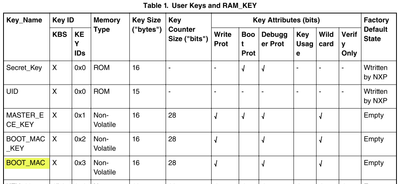

1.2 We plan to implement A/B firmware partitions, so each firmware update will produce a new MAC.
- Can we configure the flash address range that secure boot will verify?
[NXP] The start address is hardwired to 0x0, the size is supposed to be defined by CMD_BOOT_DEFINE command.
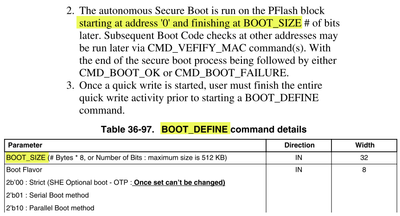
For A/B FW partitions, there's an option to create a chain of trust. That means Autonomous secure boot is used to check the bootloader placed at address 0x0 and the bootloader then can check CMAC of application(s) using CMD_VERIFY_MAC command.
- If the MAC is stored in a CSEc key slot, does this mean each firmware update requires writing a new MAC into that key slot?
[NXP] If flash area covered by secure boot is modified, BOOT_MAC must be update accordingly using memory update protocol.

See AN5401 for further details.
1.3 If the expected MAC must be updated after every firmware upgrade,
are there any precautions or recommended practices for repeatedly updating MAC-related key slots?
[NXP] You just need to follow standard memory update protocol to update the BOOT_MAC. There’s an option to let CSEc to calculate the BOOT_MAC first time but next updates must be done directly by user.
2. Questions About IFR
2.1 What exactly is the IFR?
[NXP] As the reference manual says, it’s “Nonvolatile information register found in each flash block, separate from the main memory array”. User can’t access IFR directly. There are stored information like – details about flash partition, user data which can be programmed and read by Program Once command and by Read Once command, etc.
2.2 The documentation mentions “Erase All Blocks” before using CSEc.
- Does this operation need to be performed only once before first-time CSEc use,
or must it be repeated whenever we update keys?
[NXP] In production, it’s not necessary to run this command ever. The devices are shipped in fully erased and unsecured state, so you can directly program your application and run the Program Partition command. You are supposed to use this command in development when you want to change the partition, for example.
2.3 If we already used CSEc previously but now need to update a key,
do we need to perform Erase All Blocks again?
[NXP] If you are going to develop new application on a device which has already CSEc enabled and there are some keys loaded, it makes sense to erase everything and start over. To erase all the keys and partition, it’s necessary to run CMD_DBG_CHAL and CMD_DBG_AUTH commands with knowledge of MASTER_ECU_KEY. See section “4.5 Resetting Flash to the Factory State” in AN5401.
3.Counter Value Usage
What happens if the counter value wraps or is reused?
[NXP] It won’t work. The counter must be increased on every update.
Can we get counter value for specific key?
[NXP] No, you can’t read the keys (only RAM key imported in plain can be exported) or its attributes and counter. It’s up to user to track the counter values.
4.For key provisioning, should the keys be written through a special image that programs the keys automatically, or do we need to implement a task in our application to perform the key-writing procedure?
[NXP] The only way how to import the keys is to run standard memory update protocol defined by SHE specification. See “4.2 Key Management” in AN5401. So, the keys should be imported by your application or by configuration application.
Documentation and examples:
S32K1 reference manual, section "36.5.13 Cryptographic Services Engine (CSEc)":
https://www.nxp.com/webapp/Download?colCode=S32K1XXRM
Application note AN5401:
https://www.nxp.com/webapp/Download?colCode=AN5401&location=null
https://www.nxp.com/webapp/Download?colCode=AN5401SW&location=null
If you use SDK, you can find SW examples at path like this:
c:\NXP\S32DS.3.4\S32DS\software\S32SDK_S32K1XX_RTM_4.0.3\examples\
You can find:
..\examples\S32K144\demo_apps\csec_boot_protection\
..\examples\S32K144\demo_apps\flexcan_encrypted\
..\examples\S32K144\driver_examples\system\csec_keyconfig\
..\examples\S32K144\driver_examples\system\security_pal\
If you use newer RTD drivers for S32K1 devices, you can find some examples in Crypto driver:
https://www.nxp.com/webapp/swlicensing/sso/downloadSoftware.sp?catid=SW32K1-RTD44-D
But there are only some simple examples showing how to do AES encryption and decryption in autosar and non-autosar layer. There’s no example for secure boot.
And then I saw this CSEc tool on github:
https://github.com/weltry/S32K1xx-CSEc-Tool
It's not official tool, it's a draft only and we will not provide support for the tool. But maybe it could be useful for you.
Regards,
Lukas
lukaszadrapa
- 新着としてマーク
- ブックマーク
- 購読
- ミュート
- RSS フィードを購読する
- ハイライト
- 印刷
- 不適切なコンテンツを報告
And I will add one more thing about AB swap updates. Here's what I already wrote here on the community:
We have following application note “S32K1xx Firmware updates”:
https://www.nxp.com/docs/en/application-note/AN12323.pdf
https://www.nxp.com/docs/en/application-note-software/AN12323SW.zip
The best option is to use position independent code, so you can use only one linker file and you do not need to check which version of the image should be uploaded. But not all tools support that. S32 Design Studio and included GCC toolchain does not support this, it was discussed here several times.
You can take a look at section “6.3 A/B swap using Position Independent Code (PIC)” in the application note. It says that IAR compiler support this feature with some small limitations.
If you can’t use PIC code for whatever reason, usage of two linker files is also possible but, as mentioned, the disadvantage is that you always need to select the correct one for update.
In other words, there's no direct support for AB swap. AB swap including automatic remapping and including advanced secure boot is supported by HSE on S32K3 devices, not on S32K1. On S32K1, it must be completely managed by software. The only way to use secure boot also for A/B applications is to use mentioned chain of trust.
