
- Forums
- Product Forums
- General Purpose MicrocontrollersGeneral Purpose Microcontrollers
- i.MX Forumsi.MX Forums
- QorIQ Processing PlatformsQorIQ Processing Platforms
- Identification and SecurityIdentification and Security
- Power ManagementPower Management
- Wireless ConnectivityWireless Connectivity
- RFID / NFCRFID / NFC
- Advanced AnalogAdvanced Analog
- Neural Processing UnitsNeural Processing Units
- MCX Microcontrollers
- S32G
- S32K
- S32V
- MPC5xxx
- Other NXP Products
- S12 / MagniV Microcontrollers
- Powertrain and Electrification Analog Drivers
- Sensors
- Vybrid Processors
- Digital Signal Controllers
- 8-bit Microcontrollers
- ColdFire/68K Microcontrollers and Processors
- PowerQUICC Processors
- OSBDM and TBDML
- S32M
- S32Z/E
-
- Solution Forums
- Software Forums
- MCUXpresso Software and ToolsMCUXpresso Software and Tools
- CodeWarriorCodeWarrior
- MQX Software SolutionsMQX Software Solutions
- Model-Based Design Toolbox (MBDT)Model-Based Design Toolbox (MBDT)
- FreeMASTER
- eIQ Machine Learning Software
- Embedded Software and Tools Clinic
- S32 SDK
- S32 Design Studio
- GUI Guider
- Zephyr Project
- Voice Technology
- Application Software Packs
- Secure Provisioning SDK (SPSDK)
- Processor Expert Software
- Generative AI & LLMs
-
- Topics
- Mobile Robotics - Drones and RoversMobile Robotics - Drones and Rovers
- NXP Training ContentNXP Training Content
- University ProgramsUniversity Programs
- Rapid IoT
- NXP Designs
- SafeAssure-Community
- OSS Security & Maintenance
- Using Our Community
-
- Cloud Lab Forums
-
- Knowledge Bases
- ARM Microcontrollers
- i.MX Processors
- Identification and Security
- Model-Based Design Toolbox (MBDT)
- QorIQ Processing Platforms
- S32 Automotive Processing Platform
- Wireless Connectivity
- CodeWarrior
- MCUXpresso Suite of Software and Tools
- MQX Software Solutions
- RFID / NFC
- Advanced Analog
- Neural Processing Units
-
- NXP Tech Blogs
- RSS フィードを購読する
- トピックを新着としてマーク
- トピックを既読としてマーク
- このトピックを現在のユーザーにフロートします
- ブックマーク
- 購読
- ミュート
- 印刷用ページ

- 新着としてマーク
- ブックマーク
- 購読
- ミュート
- RSS フィードを購読する
- ハイライト
- 印刷
- 不適切なコンテンツを報告
1. I am using this board for the first time. Whenever I try the Connection Wizard in Create New Project. I get the Error 'Could not open project file from link : 'http://www.nxp.com/assets/downloads/data/en/application-software/S32K148EVB_OOBE.pmpx' . Later, I realised this link doesnt exist anymore. And I found this message on that page
The system is currently unavailable..
Please accept our apologies for any inconvenience this may cause.
Feel free to contact our Technical Helpline at one of the following numbers:
+44 203 510 0690
Apparently this number too does not work.
2. So I thought I can directly try to build a simple Led blink code to start with and Installed the 'S32 Design Studio for ARM Version 2018.R1' Created an SD32DS project from the example and tried to debug. Where I got the error 'Error in services launch sequence
PEmicro GDB Launch Failure : Unable to auto-detect debug hardware. Please specify on the command-line. If running from Eclipse, check the launch Debug Configuration settings. Halting.'
I think my hardware is not getting detected or I am missing something in this process.
I would really appreciate if you could help.
解決済! 解決策の投稿を見る。

- 新着としてマーク
- ブックマーク
- 購読
- ミュート
- RSS フィードを購読する
- ハイライト
- 印刷
- 不適切なコンテンツを報告
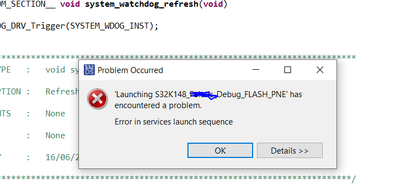
Something similar i tried to reproduce, see the below image (This is happening when the USB is not connected). That means, in your case there is issue with USB connection. may be PEMacro usb drivers not installed properly.

 Robin_Shen
- 新着としてマーク
- ブックマーク
- 購読
- ミュート
- RSS フィードを購読する
- ハイライト
- 印刷
- 不適切なコンテンツを報告
Hi
Please check if the Windows USB Drivers(PEDrivers_install.exe ) of PEMicro is installed.(You should be able to find it in Device Manager after plug USB cable at J24)
OpenSDA should be selected in Debug Configurations.
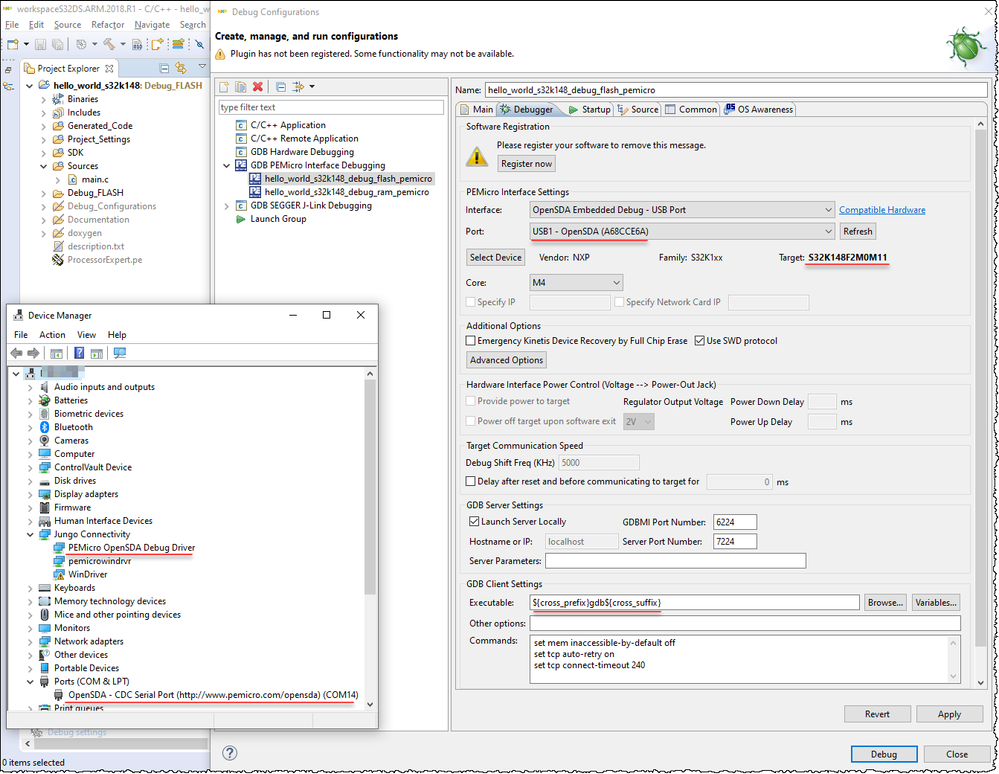
If the OpenSDA is not working, please refer to S32K148EVB Dead after OpenSDA Update. Need help to recover.
Best Regards,
Robin
-------------------------------------------------------------------------------
Note:
- If this post answers your question, please click the "Mark Correct" button. Thank you!
- We are following threads for 7 weeks after the last post, later replies are ignored
Please open a new thread and refer to the closed one, if you have a related question at a later point in time.
-------------------------------------------------------------------------------
- 新着としてマーク
- ブックマーク
- 購読
- ミュート
- RSS フィードを購読する
- ハイライト
- 印刷
- 不適切なコンテンツを報告
Hi Robin,
Thank you so much for your reply.
Yes, I realised my driver was not up to update. This has solved my debug issue. However, whenever I simply try to Run the program on the board I am still getting some error.
Error starting process.
Cannot run program "C:\NXP\S32DS_ARM_v2018.R1\S32DS\S32SDK_S32K14x_RTM_2.0.0\examples\S32K148\driver_examples\communication\enet_loopback\Debug_FLASH\enet_loopback_s32k148.elf": Launching failed
Cannot run program "C:\NXP\S32DS_ARM_v2018.R1\S32DS\S32SDK_S32K14x_RTM_2.0.0\examples\S32K148\driver_examples\communication\enet_loopback\Debug_FLASH\enet_loopback_s32k148.elf": Launching failed
Cannot run program "C:\NXP\S32DS_ARM_v2018.R1\S32DS\S32SDK_S32K14x_RTM_2.0.0\examples\S32K148\driver_examples\communication\enet_loopback\Debug_FLASH\enet_loopback_s32k148.elf": Launching failed
Can you please help me with this?
- 新着としてマーク
- ブックマーク
- 購読
- ミュート
- RSS フィードを購読する
- ハイライト
- 印刷
- 不適切なコンテンツを報告
Hi Akshay,
I am also using the same board, but i have not faced this kind of issue.
Check by importing any of the example project provided in SDK, and if it builds successfully then you can modify the same one instead of creating new project.
- 新着としてマーク
- ブックマーク
- 購読
- ミュート
- RSS フィードを購読する
- ハイライト
- 印刷
- 不適切なコンテンツを報告
Hi, Thank you for you reply. I tried importing a pre-existing project, it gets successfully built but while debugging. I get an error saying.
'Error in services launch sequence
PEmicro GDB Launch Failure : Unable to auto-detect debug hardware. Please specify on the command-line. If running from Eclipse, check the launch Debug Configuration settings. Halting.'
- 新着としてマーク
- ブックマーク
- 購読
- ミュート
- RSS フィードを購読する
- ハイライト
- 印刷
- 不適切なコンテンツを報告
Something similar i tried to reproduce, see the below image (This is happening when the USB is not connected). That means, in your case there is issue with USB connection. may be PEMacro usb drivers not installed properly.
