
- Forums
- Product Forums
- General Purpose MicrocontrollersGeneral Purpose Microcontrollers
- i.MX Forumsi.MX Forums
- QorIQ Processing PlatformsQorIQ Processing Platforms
- Identification and SecurityIdentification and Security
- Power ManagementPower Management
- Wireless ConnectivityWireless Connectivity
- RFID / NFCRFID / NFC
- Advanced AnalogAdvanced Analog
- Neural Processing UnitsNeural Processing Units
- MCX Microcontrollers
- S32G
- S32K
- S32V
- MPC5xxx
- Other NXP Products
- S12 / MagniV Microcontrollers
- Powertrain and Electrification Analog Drivers
- Sensors
- Vybrid Processors
- Digital Signal Controllers
- 8-bit Microcontrollers
- ColdFire/68K Microcontrollers and Processors
- PowerQUICC Processors
- OSBDM and TBDML
- S32M
- S32Z/E
-
- Solution Forums
- Software Forums
- MCUXpresso Software and ToolsMCUXpresso Software and Tools
- CodeWarriorCodeWarrior
- MQX Software SolutionsMQX Software Solutions
- Model-Based Design Toolbox (MBDT)Model-Based Design Toolbox (MBDT)
- FreeMASTER
- eIQ Machine Learning Software
- Embedded Software and Tools Clinic
- S32 SDK
- S32 Design Studio
- GUI Guider
- Zephyr Project
- Voice Technology
- Application Software Packs
- Secure Provisioning SDK (SPSDK)
- Processor Expert Software
- Generative AI & LLMs
-
- Topics
- Mobile Robotics - Drones and RoversMobile Robotics - Drones and Rovers
- NXP Training ContentNXP Training Content
- University ProgramsUniversity Programs
- Rapid IoT
- NXP Designs
- SafeAssure-Community
- OSS Security & Maintenance
- Using Our Community
-
- Cloud Lab Forums
-
- Knowledge Bases
- ARM Microcontrollers
- i.MX Processors
- Identification and Security
- Model-Based Design Toolbox (MBDT)
- QorIQ Processing Platforms
- S32 Automotive Processing Platform
- Wireless Connectivity
- CodeWarrior
- MCUXpresso Suite of Software and Tools
- MQX Software Solutions
- RFID / NFC
- Advanced Analog
- Neural Processing Units
-
- NXP Tech Blogs
- RSS フィードを購読する
- トピックを新着としてマーク
- トピックを既読としてマーク
- このトピックを現在のユーザーにフロートします
- ブックマーク
- 購読
- ミュート
- 印刷用ページ
How to uninstall FreeMASTER?

- 新着としてマーク
- ブックマーク
- 購読
- ミュート
- RSS フィードを購読する
- ハイライト
- 印刷
- 不適切なコンテンツを報告
How do I completely uninstall FreeMASTER 2.0 and get it removed from the Programs and Features control panel in Windows 7?
"FreeMASTER 2.0" shows up in my list of installed programs but when I select it there is no option to uninstall. I also don't see any uninstall options in the FreeMASTER setup program, nor any uninstall instructions in C:\Program Files (x86)\Freescale\FreeMASTER 2.0.
- 新着としてマーク
- ブックマーク
- 購読
- ミュート
- RSS フィードを購読する
- ハイライト
- 印刷
- 不適切なコンテンツを報告
Has this been resolved?
I am trying to un-install freemaster 3.1 and it simply gets stuck during the uninstall process. The windows registry is full of freemaster references. I am on a windows 10 system.
1. What is the uninstall issues update ?
2. How can I force an install of a newer freemaster version with out it trying to un-install an older version ?
- 新着としてマーク
- ブックマーク
- 購読
- ミュート
- RSS フィードを購読する
- ハイライト
- 印刷
- 不適切なコンテンツを報告
Bump. Anybody at NXP care to answer this?
 dianabatrlova
- 新着としてマーク
- ブックマーク
- 購読
- ミュート
- RSS フィードを購読する
- ハイライト
- 印刷
- 不適切なコンテンツを報告
Hello Bob,
Until now, no one needs to completely uninstall the FreeMASTER.
However, the path of Unistal Freemaster 2.0 see below:
C:\ProgramData\Microsoft\Windows\Start Menu\Programs\FreeMASTER 2.0
After uninstalling, the folder of FreeMaster 2.0 in Freescale folder will be uninstalled and also from the Start menu.
But we can see the application in Programs and Features control panel.
I hope it helps you.
Best Regards,
Diana
- 新着としてマーク
- ブックマーク
- 購読
- ミュート
- RSS フィードを購読する
- ハイライト
- 印刷
- 不適切なコンテンツを報告
I get the following error when I run the uninstaller you suggested.
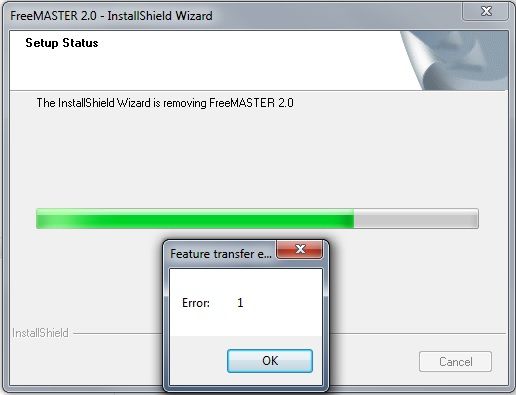
It does seem to delete all files from C:\Program Files*, but the FreeMaster 2.0 item still shows up in the Programs and Features control panel, and the registry on my PC still contains a lot of FreeMASTER entries. This means my company's IT audits will probably still flag this as non-authorized software.
NXP should fix these issues.
dianabatrlova
- 新着としてマーク
- ブックマーク
- 購読
- ミュート
- RSS フィードを購読する
- ハイライト
- 印刷
- 不適切なコンテンツを報告
Dear Bob,
You are right.
I will report this issue.
Best Regards,
Diana
