
- Forums
- Product Forums
- General Purpose MicrocontrollersGeneral Purpose Microcontrollers
- i.MX Forumsi.MX Forums
- QorIQ Processing PlatformsQorIQ Processing Platforms
- Identification and SecurityIdentification and Security
- Power ManagementPower Management
- Wireless ConnectivityWireless Connectivity
- RFID / NFCRFID / NFC
- Advanced AnalogAdvanced Analog
- Neural Processing UnitsNeural Processing Units
- MCX Microcontrollers
- S32G
- S32K
- S32V
- MPC5xxx
- Other NXP Products
- S12 / MagniV Microcontrollers
- Powertrain and Electrification Analog Drivers
- Sensors
- Vybrid Processors
- Digital Signal Controllers
- 8-bit Microcontrollers
- ColdFire/68K Microcontrollers and Processors
- PowerQUICC Processors
- OSBDM and TBDML
- S32M
- S32Z/E
-
- Solution Forums
- Software Forums
- MCUXpresso Software and ToolsMCUXpresso Software and Tools
- CodeWarriorCodeWarrior
- MQX Software SolutionsMQX Software Solutions
- Model-Based Design Toolbox (MBDT)Model-Based Design Toolbox (MBDT)
- FreeMASTER
- eIQ Machine Learning Software
- Embedded Software and Tools Clinic
- S32 SDK
- S32 Design Studio
- GUI Guider
- Zephyr Project
- Voice Technology
- Application Software Packs
- Secure Provisioning SDK (SPSDK)
- Processor Expert Software
- Generative AI & LLMs
-
- Topics
- Mobile Robotics - Drones and RoversMobile Robotics - Drones and Rovers
- NXP Training ContentNXP Training Content
- University ProgramsUniversity Programs
- Rapid IoT
- NXP Designs
- SafeAssure-Community
- OSS Security & Maintenance
- Using Our Community
-
- Cloud Lab Forums
-
- Knowledge Bases
- ARM Microcontrollers
- i.MX Processors
- Identification and Security
- Model-Based Design Toolbox (MBDT)
- QorIQ Processing Platforms
- S32 Automotive Processing Platform
- Wireless Connectivity
- CodeWarrior
- MCUXpresso Suite of Software and Tools
- MQX Software Solutions
- RFID / NFC
- Advanced Analog
- Neural Processing Units
-
- NXP Tech Blogs
D-Flash and P-Flash Memory Access and Programming in S32K118

Hi,
I am currently using S32 Design Studio v3.4 with SDK version: s32sdk_s32k1xx_rtm_4.0.1.
I attempted to write data to D-Flash using the following API:
FLASH_DRV_Program(const flash_ssd_config_t *pSSDConfig, uint32_t dest, uint32_t size, const uint8_t *pData);
However, I am unable to write data to D-Flash. I’m not sure if there is a concept of unlocking/locking the memory regions before performing read/write operations.
I also tried using:
FLASH_DRV_SetDFlashProtection(const flash_ssd_config_t *pSSDConfig, uint8_t protectStatus);
But it returns STATUS_UNSUPPORTED.
I need help with the correct sequence of API calls and steps required to access and perform read/write operations on both D-Flash and P-Flash memory regions.
Additionally, if there is any UART-based Bootloader example code available for S32K118, please share it.
I'm also unsure whether any changes to the linker script are needed for this operation.
Please assist at the earliest.
Thank you!
Hi,
I am currently working on writing data to the D-Flash of the S32K118. However, during the FLASH_DRV_Init process, the D-Flash size is being detected as 0 Bytes, as shown in the code snippet below:
/* Temporary solution for FTFC and S32K144 CSEc part */
/* Get DEPART from Flash Configuration Register 1 */
DEPartitionCode = (uint8_t)((SIM->FCFG1 & SIM_FCFG1_DEPART_MASK) >> SIM_FCFG1_DEPART_SHIFT);
/* Get data flash size */
FLASH_DRV_GetDEPartitionCode(pSSDConfig, DEPartitionCode);
if (pSSDConfig->DFlashSize < FEATURE_FLS_DF_BLOCK_SIZE)
{
pSSDConfig->EEESize = FEATURE_FLS_FLEX_RAM_SIZE;
}
else
{
pSSDConfig->EEESize = 0U;
}
Due to this, I'm unable to perform read/write operations on the D-Flash. I also attempted to hardcode DEPartitionCode = 0, which results in the D-Flash size being set to 32KB, but when executing FLASH_DRV_CommandSequence(pSSDConfig), the MCU jumps to the DefaultISR.
I suspect the issue is related to the partitioning and configuration of the D-Flash memory region, possibly requiring a one-time setup or special procedure.
Could you please help me with the following:
- How can I enable or partition the full 32KB of D-Flash memory?
- Whether any additional configuration or one-time setup (e.g., using a specific tool or code sequence) is needed?
- If there are any constraints or dependencies based on DEPART/EEE settings?
- Do I need to update the linker file to support D-Flash access or memory mapping?
Your guidance or a reference example project for configuring and using D-Flash on S32K118 would be extremely helpful.
Thank you in advance for your support.

 lukaszadrapa
Hi @Arunpk
If the FLASH_DRV_Init returns DFlash size 0, the device has been already partitioned and whole DFlash is used as a backup memory for Emulated EEPROM. To be able to use the DFlash directly, you need to remove the partition and then set new partition which will configure the DFlash as normal flash.
You can take a look at this example in SDK 4.0.1 folder:
c:\NXP\S32DS.3.5\S32DS\software\S32SDK_S32K1XX_RTM_4.0.1\examples\S32K118\driver_examples\system\flash_partitioning\
This example contains everything you need. To remove the partition (i.e. to erase whole device), you need to build the RAM target.
This will erase the device and partition, reprogram back the flash configuration field and then it will set the partition:

To use whole DFlash as normal flash (so Emulated EEPROM is not used), use following parameters:
ret = FLASH_DRV_DEFlashPartition(&flashSSDConfig, 0x0Fu, 0x00u, 0x0u, false, true);

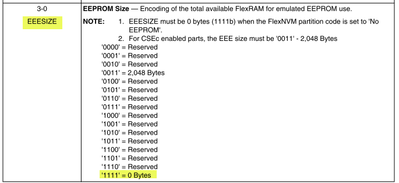

The rest of the example then shows how to erase and program both PFlash and Dflash.
And one more thing - if CSEc was enabled in this device, FLASH_DRV_EraseAllBlock() function needed to remove the partition won't be successful. This command is blocked when CSEc is enabled. The only way to remove the partition is to run CMD_DBG_CHAL and CMD_DBG_AUTH commands with knowledge of MASTER_ECU_KEY. This is shown in following example:
c:\NXP\S32DS.3.5\S32DS\software\S32SDK_S32K1XX_RTM_4.0.1\examples\S32K118\driver_examples\system\csec_keyconfig\
Search for function eraseKeys().
If you don't know the MASTER_ECU_KEY, you are not allowed to remove the partition. There's no workaround for this.

Regards,
Lukas
Hi Lukaszadrapa,
I am currently trying to run a bootloader (within 20KB in size) from D-Flash. From this bootloader, I am also attempting to write runtime data to the last sector of the same D-Flash, without performing any partitioning.
Writing to P-Flash works as expected. However, when writing to D-Flash, the first erase-and-write operation completes successfully. On the second attempt, during the erase operation, the system jumps to the DefaultISR handler.
Could you please help me resolve this issue? If this approach is incorrect, should I partition the D-Flash into two regions—one with 25KB for the bootloader and the other for storing runtime data?
If partitioning is required, could you also please provide the necessary steps or recommended procedure to do so?
Thank you in advance for your support.
lukaszadrapa
Hi @Arunpk
If you want to program data flash, the code must run from either from RAM or from code flash. That's the only solution.
There's no feature which would split the data flash to two different RWW partitions.
Regards,
Lukas
Hi @lukaszadrapa ,
Thank you for your quick response.
I am now able to successfully write data to D-Flash using the FLASH_DRV_Program() API.
However, I am unsure which API should be used to read data from D-Flash and P-Flash. Could you please share the correct API or recommended method to read data from flash memory?
Thanks in advance for your support.
lukaszadrapa
There's no API for flash read. You can read the flash using pointers. Minimalist example:
unsigned int data;
data = *(unsigned int*)0x10000000; //read data from DFlash at 0x1000_0000
Hi @lukaszadrapa ,
I need assistance in partitioning the flash memory on the S32K118 as follows:
D-Flash → To store the bootloader and runtime data
P-Flash → To be divided into A/B partitions for firmware updates
Specifically, I’m looking for:
- I intend to receive the firmware image over UART and write it to either the A or B partition (passive partition) in P-Flash. However, I am unsure how to build the image in such a way that it can execute correctly from both A and B partitions(independent of its physical memory address).
- An example linker script showing how to split both P-Flash and D-Flash into separate partitions.
- Any example projects or documentation references that could help with this setup.
Your guidance on these topics would be greatly appreciated.
Thank you,
lukaszadrapa
You can take a look at this application note:
https://www.nxp.com/docs/en/application-note/AN12323.pdf
https://www.nxp.com/docs/en/application-note-software/AN12323SW.zip
S32K11x has only one read partition in code flash, so follow example for S32K144. That means it is not possible to run "old "application in active block when updating passive block.
But notice that there's no HW support for AB swap and for remapping. Everything is up to user. The "partitioning" is done by user by adjusting of linker files.
Then be aware that S32 Design Studio does not support generation of PIE (position independent executable). As mentioned in the application note, IAR compiler supports it.
If you require HW support for AB swap and automatic remapping, take a look at S32K3 devices.
Regards,
Lukas
