- Forums
- Product Forums
- General Purpose MicrocontrollersGeneral Purpose Microcontrollers
- i.MX Forumsi.MX Forums
- QorIQ Processing PlatformsQorIQ Processing Platforms
- Identification and SecurityIdentification and Security
- Power ManagementPower Management
- Wireless ConnectivityWireless Connectivity
- RFID / NFCRFID / NFC
- Advanced AnalogAdvanced Analog
- Neural Processing UnitsNeural Processing Units
- MCX Microcontrollers
- S32G
- S32K
- S32V
- MPC5xxx
- Other NXP Products
- S12 / MagniV Microcontrollers
- Powertrain and Electrification Analog Drivers
- Sensors
- Vybrid Processors
- Digital Signal Controllers
- 8-bit Microcontrollers
- ColdFire/68K Microcontrollers and Processors
- PowerQUICC Processors
- OSBDM and TBDML
- S32M
- S32Z/E
-
- Solution Forums
- Software Forums
- MCUXpresso Software and ToolsMCUXpresso Software and Tools
- CodeWarriorCodeWarrior
- MQX Software SolutionsMQX Software Solutions
- Model-Based Design Toolbox (MBDT)Model-Based Design Toolbox (MBDT)
- FreeMASTER
- eIQ Machine Learning Software
- Embedded Software and Tools Clinic
- S32 SDK
- S32 Design Studio
- GUI Guider
- Zephyr Project
- Voice Technology
- Application Software Packs
- Secure Provisioning SDK (SPSDK)
- Processor Expert Software
- Generative AI & LLMs
-
- Topics
- Mobile Robotics - Drones and RoversMobile Robotics - Drones and Rovers
- NXP Training ContentNXP Training Content
- University ProgramsUniversity Programs
- Rapid IoT
- NXP Designs
- SafeAssure-Community
- OSS Security & Maintenance
- Using Our Community
-
- Cloud Lab Forums
-
- Knowledge Bases
- ARM Microcontrollers
- i.MX Processors
- Identification and Security
- Model-Based Design Toolbox (MBDT)
- QorIQ Processing Platforms
- S32 Automotive Processing Platform
- Wireless Connectivity
- CodeWarrior
- MCUXpresso Suite of Software and Tools
- MQX Software Solutions
- RFID / NFC
- Advanced Analog
- Neural Processing Units
-
- NXP Tech Blogs
Compile problems with S32K344 example projects: Can't find Std_Types.h or Platform_Types.h

I am new to S32 Design Studio, I'm using the S32K3X4EVB-Q172, and have gone through the "Getting Started with the S32K3X4EVB-Q172 Evaluation Board" process to set up S32 Design Studio.
I've downloaded several example projects, including the Port_Example_S32K344 project. When I build I get the following errors:
Building file: ../Project_Settings/Startup_Code/system.c
../Project_Settings/Startup_Code/exceptions.c:29:10: fatal error: Platform_Types.h: No such file or directory
29 | #include "Platform_Types.h"
arm-none-eabi-gcc "@Project_Settings/Startup_Code/exceptions.args" -MMD -MP -MF"Project_Settings/Startup_Code/system.d" -MT"Project_Settings/Startup_Code/system.o" -o "Project_Settings/Startup_Code/system.o" "../Project_Settings/Startup_Code/system.c"
../Project_Settings/Startup_Code/startup.c:29:10: fatal error: Std_Types.h: No such file or directory
29 | #include "Std_Types.h"
I'm guessing this is a path issue, but I'm not sure where to start.
The Update Code button is shadowed and can't be selected, and I get the error message:
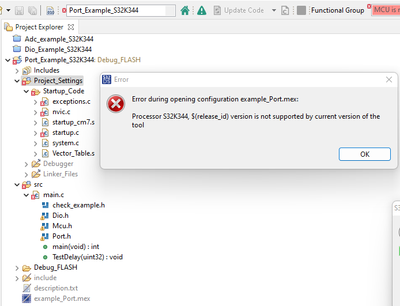
Any assistance in resolving this would be appreciated.


1. First check whether you have installed the IDE and SDK correctly,
Are you using S32 Design Studio for S32 Platform V3.4? Is S32K3 RTD AUTOSAR 4.4 Version 1.0.0 installed?(PS:S32 DS have to update to V3.4.3 when using RTD 2.0.0)
If you have installed these correctly, you can import these example projects by opening New->S32DS Project from example, and this error should not occur again.
2. The latest version is S32 Design Studio for S32 Platform V3.5, you can try to use this latest version.
S32 Design Studio download address
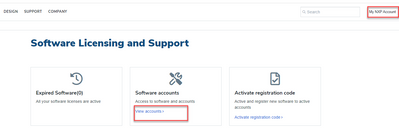
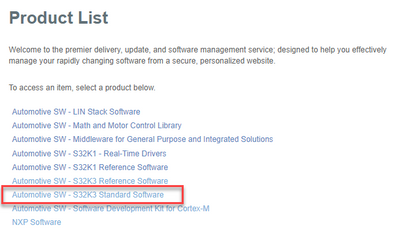
After you install V3.5, you also need to install RTD separately, the address of RTD can refer to the picture below