
- Forums
- Product Forums
- General Purpose MicrocontrollersGeneral Purpose Microcontrollers
- i.MX Forumsi.MX Forums
- QorIQ Processing PlatformsQorIQ Processing Platforms
- Identification and SecurityIdentification and Security
- Power ManagementPower Management
- Wireless ConnectivityWireless Connectivity
- RFID / NFCRFID / NFC
- Advanced AnalogAdvanced Analog
- Neural Processing UnitsNeural Processing Units
- MCX Microcontrollers
- S32G
- S32K
- S32V
- MPC5xxx
- Other NXP Products
- S12 / MagniV Microcontrollers
- Powertrain and Electrification Analog Drivers
- Sensors
- Vybrid Processors
- Digital Signal Controllers
- 8-bit Microcontrollers
- ColdFire/68K Microcontrollers and Processors
- PowerQUICC Processors
- OSBDM and TBDML
- S32M
- S32Z/E
-
- Solution Forums
- Software Forums
- MCUXpresso Software and ToolsMCUXpresso Software and Tools
- CodeWarriorCodeWarrior
- MQX Software SolutionsMQX Software Solutions
- Model-Based Design Toolbox (MBDT)Model-Based Design Toolbox (MBDT)
- FreeMASTER
- eIQ Machine Learning Software
- Embedded Software and Tools Clinic
- S32 SDK
- S32 Design Studio
- GUI Guider
- Zephyr Project
- Voice Technology
- Application Software Packs
- Secure Provisioning SDK (SPSDK)
- Processor Expert Software
- Generative AI & LLMs
-
- Topics
- Mobile Robotics - Drones and RoversMobile Robotics - Drones and Rovers
- NXP Training ContentNXP Training Content
- University ProgramsUniversity Programs
- Rapid IoT
- NXP Designs
- SafeAssure-Community
- OSS Security & Maintenance
- Using Our Community
-
- Cloud Lab Forums
-
- Knowledge Bases
- ARM Microcontrollers
- i.MX Processors
- Identification and Security
- Model-Based Design Toolbox (MBDT)
- QorIQ Processing Platforms
- S32 Automotive Processing Platform
- Wireless Connectivity
- CodeWarrior
- MCUXpresso Suite of Software and Tools
- MQX Software Solutions
- RFID / NFC
- Advanced Analog
- Neural Processing Units
-
- NXP Tech Blogs
- RSS フィードを購読する
- トピックを新着としてマーク
- トピックを既読としてマーク
- このトピックを現在のユーザーにフロートします
- ブックマーク
- 購読
- ミュート
- 印刷用ページ
UART example hands-on with S32G-VNP-RDB2.

- 新着としてマーク
- ブックマーク
- 購読
- ミュート
- RSS フィードを購読する
- ハイライト
- 印刷
- 不適切なコンテンツを報告
Hi Team,
We were working with S32G-VNP-RDB2. And we wanted to get hands-on on the UART example given in S32 Design Studio(Uart_Example_S32G274A_M7 or Linflexd_Uart_Ip_Example_S32G274A_M7).
As shown in the "S32G-VNP-RDB2 Reference Design – RTD Example Guide.pdf", to debug the example, the S32 Debug Probe is used. But we don't have the S32 Debug Probe available. So, we tried flashing the binary using the SD card.
What we are observing over here is that on the serial screen, only the first character is getting printed, i.e, "T". And after that, there is no input or output activity.
What can be the possible reason? What are we missing here? Please suggest.

 tristan_mcdanie
- 新着としてマーク
- ブックマーク
- 購読
- ミュート
- RSS フィードを購読する
- ハイライト
- 印刷
- 不適切なコンテンツを報告
Hi Dhruvit,
Apologies for the delay, but I can step in to try to help. One of the first things to consider with both examples projects is that they both use the following serial connection settings:
- Baudrate (bps): 9600
- Number of Data Bits: 8
- Parity: none
- Number of Stop Bits: 1
- Flow Control: Xon/Xoff
Based upon your explanation, this could be an issue with the baudrate. If this is not the case, you can test if data is successfully being sent or received over UART1 by referring to the LED next to the UART1 microUSB port on the RDB2. If it blinks whenever you enter data within the serial console, then that data is being received by the board. If it is not blinking, then you may have a connection issue.
Let's first focus on the LINFlexD UART sample project. The welcome message is being sent asynchronously in this application, as highlighted below. To test whether this may be an issue with asynchronous send and/or with the use of interrupts, you can convert this send to a synchronous send such that the welcome message should finish printing before user input is accepted by the application.
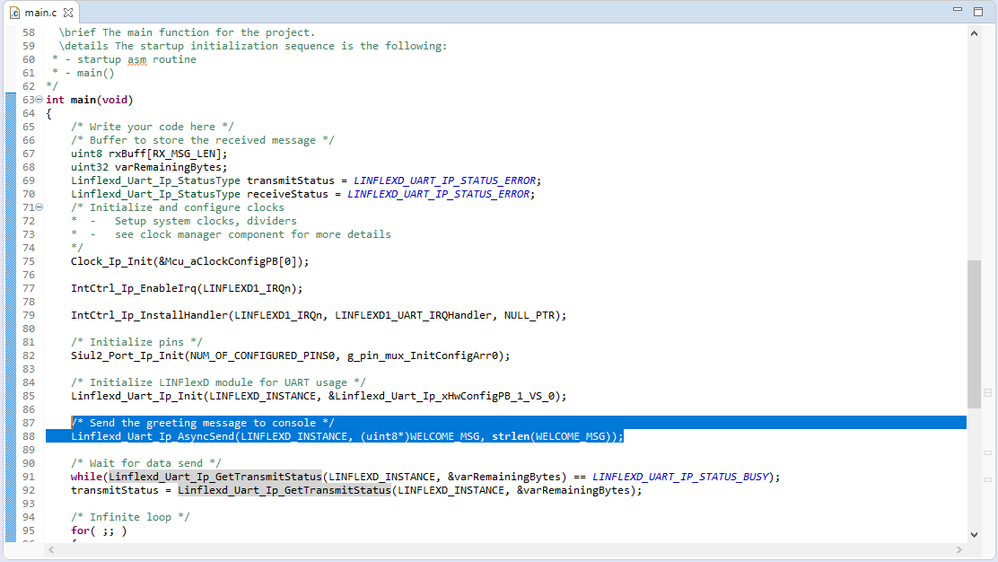
To change to a synchronous send, you only need to change the highlighted function call with the following:
/* Send the greeting message to console */
    Linflexd_Uart_Ip_SyncSend(LINFLEXD_INSTANCE, (uint8*)WELCOME_MSG, strlen(WELCOME_MSG));
If the issue continues to persist, you can also experiment with the priority of the LINFlexD_1 interrupt, especially if you have other applications concurrently running on the other cores. To change the priority of the interrupt, access the interrupt driver configuration through the Peripherals ConfigTool, as highlighted below. Under the tab "Interrupt Controller", change the priority listed next to "LINFLEXD1_IRQn".

Please let us know if any of these steps help or if you are still facing problems with the project.
Thanks,
Tristan
- 新着としてマーク
- ブックマーク
- 購読
- ミュート
- RSS フィードを購読する
- ハイライト
- 印刷
- 不適切なコンテンツを報告
Hi Team,
A gentle reminder for the same!!
Thank you.
