
- Forums
- Product Forums
- General Purpose MicrocontrollersGeneral Purpose Microcontrollers
- i.MX Forumsi.MX Forums
- QorIQ Processing PlatformsQorIQ Processing Platforms
- Identification and SecurityIdentification and Security
- Power ManagementPower Management
- Wireless ConnectivityWireless Connectivity
- RFID / NFCRFID / NFC
- Advanced AnalogAdvanced Analog
- Neural Processing UnitsNeural Processing Units
- MCX Microcontrollers
- S32G
- S32K
- S32V
- MPC5xxx
- Other NXP Products
- S12 / MagniV Microcontrollers
- Powertrain and Electrification Analog Drivers
- Sensors
- Vybrid Processors
- Digital Signal Controllers
- 8-bit Microcontrollers
- ColdFire/68K Microcontrollers and Processors
- PowerQUICC Processors
- OSBDM and TBDML
- S32M
- S32Z/E
-
- Solution Forums
- Software Forums
- MCUXpresso Software and ToolsMCUXpresso Software and Tools
- CodeWarriorCodeWarrior
- MQX Software SolutionsMQX Software Solutions
- Model-Based Design Toolbox (MBDT)Model-Based Design Toolbox (MBDT)
- FreeMASTER
- eIQ Machine Learning Software
- Embedded Software and Tools Clinic
- S32 SDK
- S32 Design Studio
- GUI Guider
- Zephyr Project
- Voice Technology
- Application Software Packs
- Secure Provisioning SDK (SPSDK)
- Processor Expert Software
- Generative AI & LLMs
-
- Topics
- Mobile Robotics - Drones and RoversMobile Robotics - Drones and Rovers
- NXP Training ContentNXP Training Content
- University ProgramsUniversity Programs
- Rapid IoT
- NXP Designs
- SafeAssure-Community
- OSS Security & Maintenance
- Using Our Community
-
- Cloud Lab Forums
-
- Knowledge Bases
- ARM Microcontrollers
- i.MX Processors
- Identification and Security
- Model-Based Design Toolbox (MBDT)
- QorIQ Processing Platforms
- S32 Automotive Processing Platform
- Wireless Connectivity
- CodeWarrior
- MCUXpresso Suite of Software and Tools
- MQX Software Solutions
- RFID / NFC
- Advanced Analog
- Neural Processing Units
-
- NXP Tech Blogs
- RSS フィードを購読する
- トピックを新着としてマーク
- トピックを既読としてマーク
- このトピックを現在のユーザーにフロートします
- ブックマーク
- 購読
- ミュート
- 印刷用ページ

- 新着としてマーク
- ブックマーク
- 購読
- ミュート
- RSS フィードを購読する
- ハイライト
- 印刷
- 不適切なコンテンツを報告
Dear NXP:
1 . first question
step 5 : include files like this :
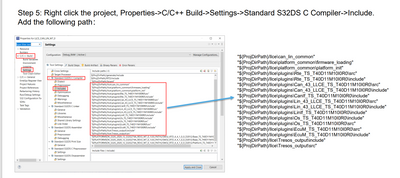
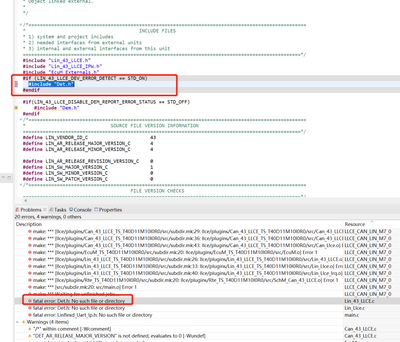
but unable to find (det.h)
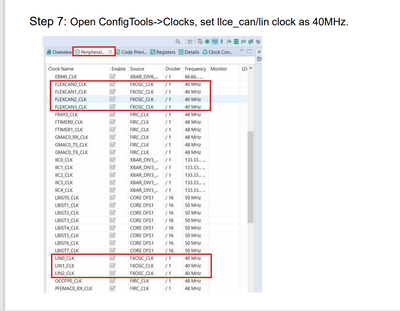
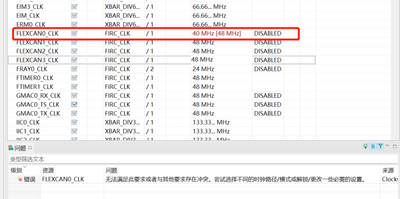
2 .seconde qeuestion: change clock as 40 Mhz ,while unable to change frequency
解決済! 解決策の投稿を見る。
 Daniel-Aguirre
- 新着としてマーク
- ブックマーク
- 購読
- ミュート
- RSS フィードを購読する
- ハイライト
- 印刷
- 不適切なコンテンツを報告
Hi,
Thanks for your feedback.
This option is found inside "Config Tools". You can access it by right clicking on your project inside S32DS and selecting:
"S32 Configuration Tools > Open Peripherals"
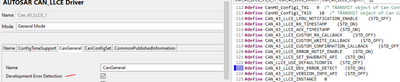
In there you should see different modules or "peripherals". For CAN, select the one that says "Can_43_LLCE". Once selected, a configuration window should open. Inside the "CanGeneral" tab of this configuration window you should see the "Development Error Detection" flag.
For LIN, select the one that says "Lin_43_LLCE". Once selected, a configuration window should open. Inside the "LinGeneral" tab of this configuration window you should see the "Lin Default Error Detection" flag.
Once you set the configuration you want, click the "Update Code" button, for your configuration to take effect under your project.
Please, let us know.
Daniel-Aguirre
- 新着としてマーク
- ブックマーク
- 購読
- ミュート
- RSS フィードを購読する
- ハイライト
- 印刷
- 不適切なコンテンツを報告
Hi,
Which LLCE version are you using? Below will be some comments on regards of your questions:
Q1 >> but unable to find (det.h)
A1 >> det.h is not found due to the flag "Development Error Detection" not being set
Q2 >> change clock as 40 Mhz ,while unable to change frequency
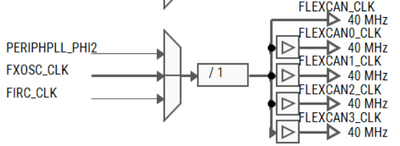
A2 >> FlexCAN clocks all share the same source, which in your case is FIRC_CLK, which is a 48 MHz clock. If you want to change the frequency, you first need to change the source to another. One example is shown below, which uses FXOSC_CLK instead.
Please, let us know.
- 新着としてマーク
- ブックマーク
- 購読
- ミュート
- RSS フィードを購読する
- ハイライト
- 印刷
- 不適切なコンテンツを報告
thanks for your reply
Q1. i am using LLCE 1.0.5 version right now, please give me more information to find this "Development Error Detection" interface
Q2. already solved this question
Daniel-Aguirre
- 新着としてマーク
- ブックマーク
- 購読
- ミュート
- RSS フィードを購読する
- ハイライト
- 印刷
- 不適切なコンテンツを報告
Hi,
Thanks for your feedback.
This option is found inside "Config Tools". You can access it by right clicking on your project inside S32DS and selecting:
"S32 Configuration Tools > Open Peripherals"
In there you should see different modules or "peripherals". For CAN, select the one that says "Can_43_LLCE". Once selected, a configuration window should open. Inside the "CanGeneral" tab of this configuration window you should see the "Development Error Detection" flag.
For LIN, select the one that says "Lin_43_LLCE". Once selected, a configuration window should open. Inside the "LinGeneral" tab of this configuration window you should see the "Lin Default Error Detection" flag.
Once you set the configuration you want, click the "Update Code" button, for your configuration to take effect under your project.
Please, let us know.
- 新着としてマーク
- ブックマーク
- 購読
- ミュート
- RSS フィードを購読する
- ハイライト
- 印刷
- 不適切なコンテンツを報告
wish you have a good day!
