
- Forums
- Product Forums
- General Purpose MicrocontrollersGeneral Purpose Microcontrollers
- i.MX Forumsi.MX Forums
- QorIQ Processing PlatformsQorIQ Processing Platforms
- Identification and SecurityIdentification and Security
- Power ManagementPower Management
- Wireless ConnectivityWireless Connectivity
- RFID / NFCRFID / NFC
- Advanced AnalogAdvanced Analog
- Neural Processing UnitsNeural Processing Units
- MCX Microcontrollers
- S32G
- S32K
- S32V
- MPC5xxx
- Other NXP Products
- S12 / MagniV Microcontrollers
- Powertrain and Electrification Analog Drivers
- Sensors
- Vybrid Processors
- Digital Signal Controllers
- 8-bit Microcontrollers
- ColdFire/68K Microcontrollers and Processors
- PowerQUICC Processors
- OSBDM and TBDML
- S32M
- S32Z/E
-
- Solution Forums
- Software Forums
- MCUXpresso Software and ToolsMCUXpresso Software and Tools
- CodeWarriorCodeWarrior
- MQX Software SolutionsMQX Software Solutions
- Model-Based Design Toolbox (MBDT)Model-Based Design Toolbox (MBDT)
- FreeMASTER
- eIQ Machine Learning Software
- Embedded Software and Tools Clinic
- S32 SDK
- S32 Design Studio
- GUI Guider
- Zephyr Project
- Voice Technology
- Application Software Packs
- Secure Provisioning SDK (SPSDK)
- Processor Expert Software
- Generative AI & LLMs
-
- Topics
- Mobile Robotics - Drones and RoversMobile Robotics - Drones and Rovers
- NXP Training ContentNXP Training Content
- University ProgramsUniversity Programs
- Rapid IoT
- NXP Designs
- SafeAssure-Community
- OSS Security & Maintenance
- Using Our Community
-
- Cloud Lab Forums
-
- Knowledge Bases
- ARM Microcontrollers
- i.MX Processors
- Identification and Security
- Model-Based Design Toolbox (MBDT)
- QorIQ Processing Platforms
- S32 Automotive Processing Platform
- Wireless Connectivity
- CodeWarrior
- MCUXpresso Suite of Software and Tools
- MQX Software Solutions
- RFID / NFC
- Advanced Analog
- Neural Processing Units
-
- NXP Tech Blogs
- Home
- :
- ソフトウェア・フォーラム
- :
- S32 デザインスタジオ
- :
- Re: Can't Build with Link-time Optimizer Enabled
Can't Build with Link-time Optimizer Enabled
- RSS フィードを購読する
- トピックを新着としてマーク
- トピックを既読としてマーク
- このトピックを現在のユーザーにフロートします
- ブックマーク
- 購読
- ミュート
- 印刷用ページ

- 新着としてマーク
- ブックマーク
- 購読
- ミュート
- RSS フィードを購読する
- ハイライト
- 印刷
- 不適切なコンテンツを報告
Enabling the link-time optimizer (-flto) option in the build settings causes my builds to fail in the following way:
Invoking: Standard S32DS C++ Linker
powerpc-eabivle-g++ -o "link_opt_Z7_0.elf" "@link_opt_Z7_0.args"
powerpc-eabivle-g++.exe: error: nosys.specs: No such file or directory
lto-wrapper: c:\NXP\S32DS_Power_v1.2\Cross_Tools\powerpc-eabivle-4_9\bin\powerpc-eabivle-g++.exe returned 1 exit status
c:/nxp/s32ds_power_v1.2/cross_tools/powerpc-eabivle-4_9/bin/../lib/gcc/powerpc-eabivle/4.9.4/../../../../powerpc-eabivle/bin/real-ld.exe: error: lto-wrapper failed
collect2.exe: error: ld returned 1 exit status
make: *** [link_opt_Z7_0.elf] Error 1It appears that the linker cannot find the nosys.specs file when this option is enabled. It doesn't have a problem when it is disabled.
If I am missing any other set-up I should also be doing in conjunction with enabling this option, does anyone have any tips or pointers for me?
This can be reproduced with a new S32DS project (I am using S32DS for PowerPC V1.2)
- Start a new project
- I selected the MPC5777C core (it probably doesn't matter)
- C++ for the language
- NewLib for the library
- In the build settings of S32DS , enable the link-time optimizer (-flto) option. I did this for both C and C++ settings
- Compile
解決済! 解決策の投稿を見る。

 alexanderfedoto
- 新着としてマーク
- ブックマーク
- 購読
- ミュート
- RSS フィードを購読する
- ハイライト
- 印刷
- 不適切なコンテンツを報告
This issue is common for ARM and Power GCC toolchain.
Regarding to Newlib libraries workaround is to move libraries from powerpc-eabivle\newlib\lib to powerpc-eabivle\lib
mv powerpc-eabivle\newlib\lib powerpc-eabivle\lib
alexanderfedoto
- 新着としてマーク
- ブックマーク
- 購読
- ミュート
- RSS フィードを購読する
- ハイライト
- 印刷
- 不適切なコンテンツを報告
This issue is common for ARM and Power GCC toolchain.
Regarding to Newlib libraries workaround is to move libraries from powerpc-eabivle\newlib\lib to powerpc-eabivle\lib
mv powerpc-eabivle\newlib\lib powerpc-eabivle\lib
- 新着としてマーク
- ブックマーク
- 購読
- ミュート
- RSS フィードを購読する
- ハイライト
- 印刷
- 不適切なコンテンツを報告
Hello, I have the same issue with S32DS for ARM 1.3, with ewl_c library and -flto option.
This is my build log:
Building target: dummy_project.elf
Executing target #5 dummy_project.elf
Invoking: Standard S32DS C Linker
arm-none-eabi-gcc -o "dummy_project.elf" "@dummy_project.args"
arm-none-eabi-gcc.exe: error: ewl_c9x_noio.specs: No such file or directory
lto-wrapper: c:\NXP\S32DS_ARM_v1.3\Cross_Tools\gcc-arm-none-eabi-4_9\bin\arm-none-eabi-gcc.exe returned 1 exit status
c:/nxp/s32ds_arm_v1.3/cross_tools/gcc-arm-none-eabi-4_9/bin/../lib/gcc/arm-none-eabi/4.9.3/../../../../arm-none-eabi/bin/ld.exe: lto-wrapper failed
collect2.exe: error: ld returned 1 exit status
make: *** [dummy_project.elf] Error 1
Is there a solution like the one for newlib?
Thanks,
Riccardo
alexanderfedoto
- 新着としてマーク
- ブックマーク
- 購読
- ミュート
- RSS フィードを購読する
- ハイライト
- 印刷
- 不適切なコンテンツを報告
Workaround should be the same:
mv S32DS\arm_ewl2\lib Cross_Tools\gcc-arm-none-eabi-4_9\arm-none-eabi\lib- 新着としてマーク
- ブックマーク
- 購読
- ミュート
- RSS フィードを購読する
- ハイライト
- 印刷
- 不適切なコンテンツを報告
It worked, thank you.
 stanish
- 新着としてマーク
- ブックマーク
- 購読
- ミュート
- RSS フィードを購読する
- ハイライト
- 印刷
- 不適切なコンテンツを報告
Hi Peter,
Thanks for this report. I'm able to reproduce it easily.
I've logged this issue into our defect tracking system.
Our compiler experts are going to analyze this particular issue.
At the moment the only workaround is not to use -flno switch
Regards,
Stan
- 新着としてマーク
- ブックマーク
- 購読
- ミュート
- RSS フィードを購読する
- ハイライト
- 印刷
- 不適切なコンテンツを報告
Hi Sliva:
I use the method from "Alexander Fedotov " (mv powerpc-eabivle\newlib\lib powerpc-eabivle\lib)and still didn't work. I search the folder "Cross_Tools" and find no file named "ewl_c9x_noio.specs". Is there any way that i can enable the link-time optimizer (-flto) option
Thank you very much!
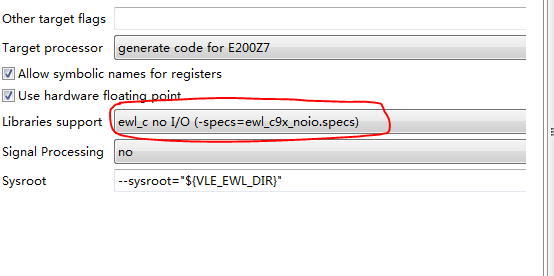
The build infomation list below:
Building target: SMS_PRJ_Z7_0.elf
Executing target #112 SMS_PRJ_Z7_0.elf
Invoking: Standard S32DS C Linker
powerpc-eabivle-gcc -o "SMS_PRJ_Z7_0.elf" "@SMS_PRJ_Z7_0.args"
powerpc-eabivle-gcc.exe: error: ewl_c9x_noio.specs: No such file or directory
lto-wrapper: c:\Freescale\S32_Power_v1.2\Cross_Tools\powerpc-eabivle-4_9\bin\powerpc-eabivle-gcc.exe returned 1 exit status
c:/freescale/s32_power_v1.2/cross_tools/powerpc-eabivle-4_9/bin/../lib/gcc/powerpc-eabivle/4.9.4/../../../../powerpc-eabivle/bin/real-ld.exe: error: lto-wrapper failed
collect2.exe: error: ld returned 1 exit status
make: *** [SMS_PRJ_Z7_0.elf] Error 1
alexanderfedoto
- 新着としてマーク
- ブックマーク
- 購読
- ミュート
- RSS フィードを購読する
- ハイライト
- 印刷
- 不適切なコンテンツを報告
You are using EWL2 specs and EWL2 libs respectively. so in this case you need to move/copy lib folder from EWL2.
See my answer below for ARM.
For Power the trick almost the same:
mv S32DS\e200_ewl2\lib Cross_Tools\powerpv-eabivle-4_9\powerpc-eabivle\lib
