
- Forums
- Product Forums
- General Purpose MicrocontrollersGeneral Purpose Microcontrollers
- i.MX Forumsi.MX Forums
- QorIQ Processing PlatformsQorIQ Processing Platforms
- Identification and SecurityIdentification and Security
- Power ManagementPower Management
- Wireless ConnectivityWireless Connectivity
- RFID / NFCRFID / NFC
- Advanced AnalogAdvanced Analog
- Neural Processing UnitsNeural Processing Units
- MCX Microcontrollers
- S32G
- S32K
- S32V
- MPC5xxx
- Other NXP Products
- S12 / MagniV Microcontrollers
- Powertrain and Electrification Analog Drivers
- Sensors
- Vybrid Processors
- Digital Signal Controllers
- 8-bit Microcontrollers
- ColdFire/68K Microcontrollers and Processors
- PowerQUICC Processors
- OSBDM and TBDML
- S32M
- S32Z/E
-
- Solution Forums
- Software Forums
- MCUXpresso Software and ToolsMCUXpresso Software and Tools
- CodeWarriorCodeWarrior
- MQX Software SolutionsMQX Software Solutions
- Model-Based Design Toolbox (MBDT)Model-Based Design Toolbox (MBDT)
- FreeMASTER
- eIQ Machine Learning Software
- Embedded Software and Tools Clinic
- S32 SDK
- S32 Design Studio
- GUI Guider
- Zephyr Project
- Voice Technology
- Application Software Packs
- Secure Provisioning SDK (SPSDK)
- Processor Expert Software
- Generative AI & LLMs
-
- Topics
- Mobile Robotics - Drones and RoversMobile Robotics - Drones and Rovers
- NXP Training ContentNXP Training Content
- University ProgramsUniversity Programs
- Rapid IoT
- NXP Designs
- SafeAssure-Community
- OSS Security & Maintenance
- Using Our Community
-
- Cloud Lab Forums
-
- Knowledge Bases
- ARM Microcontrollers
- i.MX Processors
- Identification and Security
- Model-Based Design Toolbox (MBDT)
- QorIQ Processing Platforms
- S32 Automotive Processing Platform
- Wireless Connectivity
- CodeWarrior
- MCUXpresso Suite of Software and Tools
- MQX Software Solutions
- RFID / NFC
- Advanced Analog
- Neural Processing Units
-
- NXP Tech Blogs
- Home
- :
- Power Management
- :
- Power Management
- :
- SBC FS65 - Cannot use the LDT Timer twice in a row
SBC FS65 - Cannot use the LDT Timer twice in a row
Turn on suggestions
Auto-suggest helps you quickly narrow down your search results by suggesting possible matches as you type.
Options
- Subscribe to RSS Feed
- Mark Topic as New
- Mark Topic as Read
- Float this Topic for Current User
- Bookmark
- Subscribe
- Mute
- Printer Friendly Page
SBC FS65 - Cannot use the LDT Timer twice in a row
02-08-2023
12:08 PM
1,629 Views

gabriel-fz
Contributor II
- Mark as New
- Bookmark
- Subscribe
- Mute
- Subscribe to RSS Feed
- Permalink
- Report Inappropriate Content
Hi,
I'm trying to use the LDT timer to make my system sleep for a specific amount of time.
The following function configures my LDT:
    // The counter must be disabled (~ENABLE) before reading its value and enabled again.
    bool const counter_should_be_running = false;
    status = FS65_LDT_RunCounter(counter_should_be_running);
    if (status != fs65StatusOk) return -1;

    // Long Duration Timer
    // The timer is configurable by the SPI and can operate in normal mode and low-power mode
    // The LDT as multiple functions
    // Function 4: In low-power mode, count until the counter reaches the wake-up value and wakes up.
    //
    // NXP FS6500, Product data sheet rev7.0, 12.8.3 Timer operation
    fs65_ldt_function_t const timer_is_our_alarm_clock = fs65LdtFunc4;
    status = FS65_LDT_SetTimerOperation(timer_is_our_alarm_clock);
    if (status != fs65StatusOk) return -1;

    // When function 4 is selected and the counter reaches the wake-up value (EOT), the device wakes up and the counter
    // is stopped.
    //
    // NXP FS6500, Product data sheet rev7.0, 12.8.3 Timer operation
    uint32_t const wakeup_value = sleep_time_sec; //< The timer is configured at 1 Hz
    status = FS65_LDT_SetWakeUpValue(wakeup_value);
    if (status != fs65StatusOk) return -2;

    bool const start_running = true;
    status = FS65_LDT_RunCounter(start_running);
    if (status != fs65StatusOk) return -3;
The first time I call this function it works great.
The problem occurs when I call this function a second time: the LDT timer refuses to be disabled.
More specifically, the FS65_LDT_RunCounter(false) function fails because LDT_ENABLE is still set to 1.
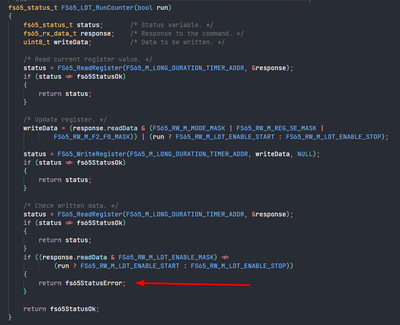
The proof of the LDT_ENABLE is still set.
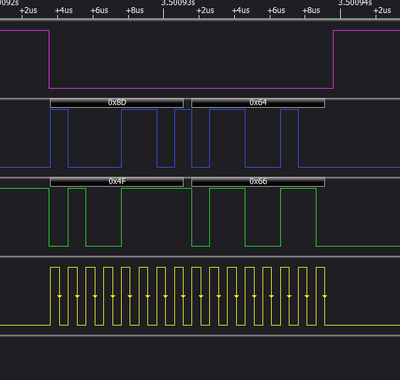
What is the proper way to configure the timer so it can be used twice in a row?
Regards,
Gabriel
1 Reply
02-08-2023
06:48 PM
1,616 Views
 guoweisun
NXP TechSupport
- Mark as New
- Bookmark
- Subscribe
- Mute
- Subscribe to RSS Feed
- Permalink
- Report Inappropriate Content
what do you mean twice in a row?
First time use the LDT wakeup SBC from LPOFF mode, now the SBC is waken up,what about the second time LDT?
