
- Forums
- Product Forums
- General Purpose MicrocontrollersGeneral Purpose Microcontrollers
- i.MX Forumsi.MX Forums
- QorIQ Processing PlatformsQorIQ Processing Platforms
- Identification and SecurityIdentification and Security
- Power ManagementPower Management
- Wireless ConnectivityWireless Connectivity
- RFID / NFCRFID / NFC
- Advanced AnalogAdvanced Analog
- Neural Processing UnitsNeural Processing Units
- MCX Microcontrollers
- S32G
- S32K
- S32V
- MPC5xxx
- Other NXP Products
- S12 / MagniV Microcontrollers
- Powertrain and Electrification Analog Drivers
- Sensors
- Vybrid Processors
- Digital Signal Controllers
- 8-bit Microcontrollers
- ColdFire/68K Microcontrollers and Processors
- PowerQUICC Processors
- OSBDM and TBDML
- S32M
- S32Z/E
-
- Solution Forums
- Software Forums
- MCUXpresso Software and ToolsMCUXpresso Software and Tools
- CodeWarriorCodeWarrior
- MQX Software SolutionsMQX Software Solutions
- Model-Based Design Toolbox (MBDT)Model-Based Design Toolbox (MBDT)
- FreeMASTER
- eIQ Machine Learning Software
- Embedded Software and Tools Clinic
- S32 SDK
- S32 Design Studio
- GUI Guider
- Zephyr Project
- Voice Technology
- Application Software Packs
- Secure Provisioning SDK (SPSDK)
- Processor Expert Software
- Generative AI & LLMs
-
- Topics
- Mobile Robotics - Drones and RoversMobile Robotics - Drones and Rovers
- NXP Training ContentNXP Training Content
- University ProgramsUniversity Programs
- Rapid IoT
- NXP Designs
- SafeAssure-Community
- OSS Security & Maintenance
- Using Our Community
-
- Cloud Lab Forums
-
- Knowledge Bases
- ARM Microcontrollers
- i.MX Processors
- Identification and Security
- Model-Based Design Toolbox (MBDT)
- QorIQ Processing Platforms
- S32 Automotive Processing Platform
- Wireless Connectivity
- CodeWarrior
- MCUXpresso Suite of Software and Tools
- MQX Software Solutions
- RFID / NFC
- Advanced Analog
- Neural Processing Units
-
- NXP Tech Blogs
- Home
- :
- QorIQプロセッシングプラットフォーム
- :
- Pシリーズ
- :
- Re: Freescale P1010 with Xilinx Virtex-6 communicating over PCIe.
Freescale P1010 with Xilinx Virtex-6 communicating over PCIe.
- RSS フィードを購読する
- トピックを新着としてマーク
- トピックを既読としてマーク
- このトピックを現在のユーザーにフロートします
- ブックマーク
- 購読
- ミュート
- 印刷用ページ

- 新着としてマーク
- ブックマーク
- 購読
- ミュート
- RSS フィードを購読する
- ハイライト
- 印刷
- 不適切なコンテンツを報告
I am using a P1010 system with a Xilinx Virtex-6 FPGA. The connection between the P1010 and the Virtex-6 is via the PCIe bus. I am DMA'ing data from the Virtex-6 to the P1010 DDR memory. The P1010 is root complex and the Virtex-6 is an endpoint. There is nothing else on the PCIe bus. The Virtex-6 appears to be throttled by the P1010.
I measure the speed of this PCIe link at 75MB/sec by timing large data transfers from the Virtex-6 to the P1010 on the P1010.
I would expect this PCIe link to transfer data faster. I have a few general questions in regards to trying to improve this data transfer speed from 75MB/sec.
1) What is an achievable speed with PCIe and the P1010? Am I at the limit for the P1010?
2) Do I need special techniques on the P1010 (e.g. L2 cache/stashing) to get higher data rates? I am using a max payload size of 128 bytes.
3) Are there special kernel configurations that I may be missing that are selectable and can improve the speed? I am using QorIQ-SDK-V1.2-20120614-yocto.
4) Are there special configuration settings in the P1010RDB.h config file (u-boot or kernel) that need to be changed?
解決済! 解決策の投稿を見る。

 lunminliang
- 新着としてマーク
- ブックマーク
- 購読
- ミュート
- RSS フィードを購読する
- ハイライト
- 印刷
- 不適切なコンテンツを報告
We'd advice to follow the steps shown below before running PCIe transaction tests.
The steps below assumes you are using PCIe controller 2. If you are using PCIe controller 1, replace "0x9" with "0xa"
a) Write 0x0000_0000 to PEX2 config space offset 0x4D0 as shown below:
a.i) Write "0x840000d0" at "0xCCSRBAR + 0x9000".
a.ii) Write "0x0" at "0xCCSRBAR + 0x9004"
b) Read-Modify-Write to set the upper 16-bits of the little endian hidden register at PEX2 config space offset 0x4CC to 0x0110 (little endian), which is 0x1001 (big endian)
b.i) Write "0x840000cc" at "0xCCSRBAR + 0x9000"
b.ii) Read "0xCCSRBAR + 0x9004". Let's say the data read is "0x02010000"
b.iii) Write "02011001" at "0xCCSRBAR + 0x9004"
c) Read back from PEX2 config space offset 0x4CC. The new value of this register should be 0x0000_0011 (little endian) = 0x1100_0000 (big endian)
c.i) Write "0x840000cc" at "0xCCSRBAR + 0x9000".
a.ii) Read "0xCCSRBAR + 0x9004". It should be 0x11000000
d) Perform your PCIe performance tests.
yipingwang
- 新着としてマーク
- ブックマーク
- 購読
- ミュート
- RSS フィードを購読する
- ハイライト
- 印刷
- 不適切なコンテンツを報告
Hello Franka,
Please check whether the following would be helpful for your original queries.
1. Please refer to the statement from P1010RM.
The physical layer of the PCI Express interface operates at a transmission rate of 2.5 Gbaud (data rate of 2.0 Gbps) per lane. The theoretical unidirectional peak bandwidth is 2 Gbps per lane. Receive and transmit ports operate independently, resulting in an aggregate theoretical bandwidth of 4 Gbps per lane.
2. Using DMA controller is the most effective way to transfer data to and from PCI Express, please note that MR[BWC] value should be set greater or equal to payload size, this makes the maximum supported payload size to be used.
3. The default Kernel configuration is OK.
4. Please pay attention to LAW and TLB(board/freescale/p1010rdb/tlb.c) configuration in u-boot to make them suitable for your target.
If your problem remains, please provide more information to us to do more investigation, for example registers memory map or the output of "lspci --vv".
Have a great day,
Yiping
-----------------------------------------------------------------------------------------------------------------------
Note: If this post answers your question, please click the Correct Answer button. Thank you!
-----------------------------------------------------------------------------------------------------------------------
- 新着としてマーク
- ブックマーク
- 購読
- ミュート
- RSS フィードを購読する
- ハイライト
- 印刷
- 不適切なコンテンツを報告
Hi Yiping,
Thank you for your response.
1) I understand that the data link should perform faster than my current performance according to the reference manual. Thank you for any ideas that may help me improve the performance.
2) I am confused by this statement. Currently, I am not using the DMA controller. My understanding was that I could not use the DMA controller on PCIe inbound transactions on the P1010. Am I incorrect? I can investigate using the DMA controller if possible on inbound PCIe transactions. My understanding is that any DMA controller register setting would not matter if I am not using the DMA controller.
3) Yes, I have default kernel configuration. Ok.
4) I will investigate LAW and TLB further and verify they are setup correctly. I am using the default u-boot settings. By the way, I tried to turn cache on for the PCIe memory window in tlb.c and that was not a good thing to do!
5) I attached an image of the lspci -vv command response. The other PCIe channel is not connected.
6) I have discovered another piece of information in my testing. Using chipscope I can now see that approximately 3136 data bytes are sent fast to the P1010. After this amount of data bytes are sent, the data transfer slows down to what appears to be 1 packet every 1.64uSec. (which corresponds to the overall data transfer rate of approximately 75MB/sec).
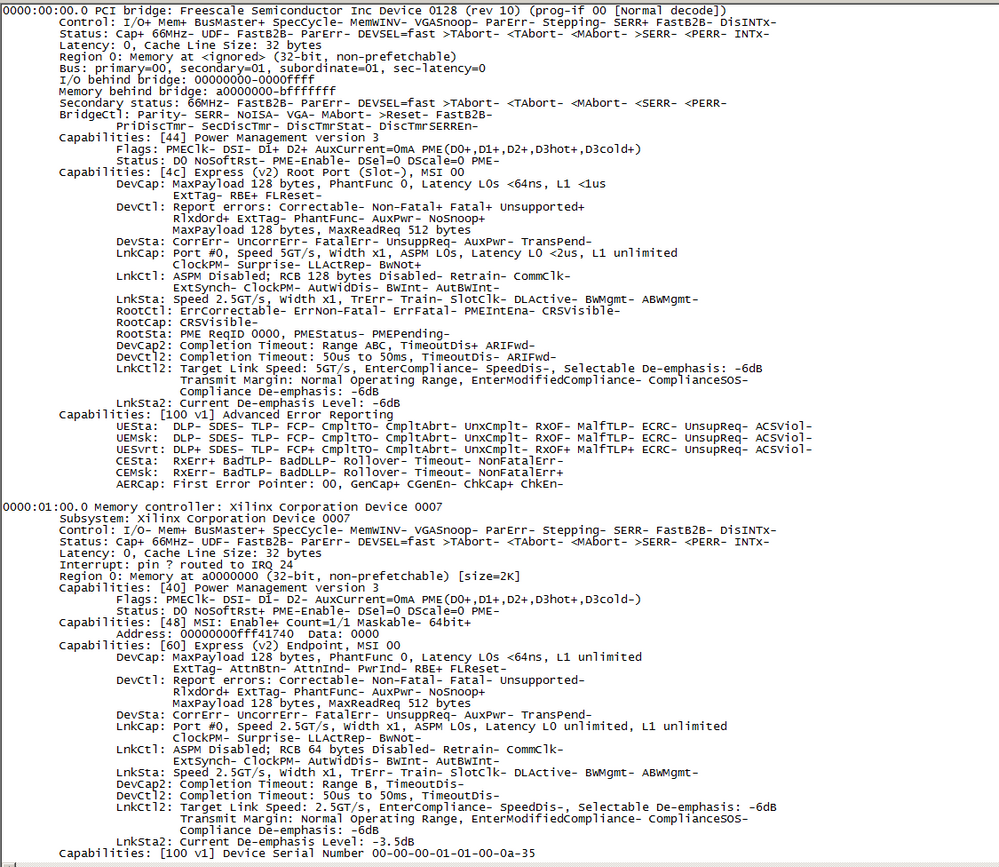
Thanks,
Frank
yipingwang
- 新着としてマーク
- ブックマーク
- 購読
- ミュート
- RSS フィードを購読する
- ハイライト
- 印刷
- 不適切なコンテンツを報告
Hello Frank,
You could use the FPGA DMA and this is what most of the endpoint bus master do.
Please try whether this would be helpful to enhance the throughput.
Please configure PCI Express Inbound ATMU as prefetchable, plese configure PEXx_PEXIWARn[PF] as 1, for details please refer to PCI Express inbound window attributes register in P1010RM. According to the log, the it is configured as non-prefetchable mode.
I think LAW, TLB and ATMU configurations should be OK, otherwise PCI Express transaction cannot be set up at all.
If the above doesn't help, please feel free to let me know.
Have a great day,
Yiping
-----------------------------------------------------------------------------------------------------------------------
Note: If this post answers your question, please click the Correct Answer button. Thank you!
-----------------------------------------------------------------------------------------------------------------------
- 新着としてマーク
- ブックマーク
- 購読
- ミュート
- RSS フィードを購読する
- ハイライト
- 印刷
- 不適切なコンテンツを報告
Hi Yiping,
Thank you for your reply. You have given me some things to try. I will work on them over the next week and report back my progress next week.
Thanks,
Frank
lunminliang
- 新着としてマーク
- ブックマーク
- 購読
- ミュート
- RSS フィードを購読する
- ハイライト
- 印刷
- 不適切なコンテンツを報告
Few queries to understand your system better.
Q5) You mentioned you are using DMA. Where is this DMA placed? In P1010 or FPGA? Effectively is this a inbound memory write or an outbound memory read for P1010?
Q6) Can you share any PCIe analyzer trace while data transactions are going on?
Q7) You mentioned you got 75MB/sec (=600 Mbps). We believe this is raw throughput. Please confirm.
Q8) What devices are connected on IFC? Are all the devices on IFC being used while you measure PCIe performance?
Q9) Is any other interface active while the test?
- 新着としてマーク
- ブックマーク
- 購読
- ミュート
- RSS フィードを購読する
- ハイライト
- 印刷
- 不適切なコンテンツを報告
Hi lunminliang,
Thank you for your reply.
Q5) The virtex-6 is "dma'ing" into the P1010 DDR memory. The P1010 is setup as root complex and the virtex-6 is endpoint. From the P1010 perspective, the pcie transaction is an inbound transaction from the virtex-6. I found somewhere in the P1010 reference manual that stated dma cannot be done on inbound pcie transactions so the actual process of the virtex-6 placing the data into the P1010 ddr memory must be using the internal p1010 bus somehow. I took the comment in the reference manual to mean that I could not setup a specific dma controller action for a pcie inbound transaction. That is to say, an inbound transaction must use the standard internal bus mechanism in the p1010. The p1010rdb ddr memory is clocked at 300mhz, so the ddr memory writes from pcie on the p1010 would ultimately be limited by this ddr clock speed.
Q6) I don't have a pcie analyzer or traces. I briefly looked for a pcie protocol analyzer but they were expensive. I have looked at some signals in the virtex-6 using chipscope and can say that it looks like a not ready type of signal is coming back over pcie from somewhere causing the virtex-6 to throttle the data transfers. But I can't pinpoint the source of the not ready signal. I don't know how to probe anything in the p1010 at this time because it appears everything runs outside of normal code accesses (i.e. I haven't studied how to use the performance monitor feature in the p1010 yet). I'm interested to know if the pcie can run faster because I don't want to spend a lot of time trying to figure out why it's so slow if ultimately I am already at the data transfer speed maximum of the pcie inbound transactions for p1010.
Q7) I have made the virtex-6 supply two interrupts to the p1010. I supply an interrupt to the p1010 when the data transfer is started by the virtex-6 and I have an interrupt at the p1010 when the virtex-6 has transferred all the data. I can make an arbitrary length of data transferred by the virtex-6. I can then time the data transfer on the p1010 in a small Linux application. For example, when I send a 2.3MB data transfer, the time measured on the p1010 is 31 mSec. So, I am measuring the complete data transfer time including all the packet overhead. It appears the transfer time I measure is consistent at 75MB/sec independent of the data size.
Q8) It's a stock P1010RDB system with only a ML605 card added. I have a small kernel driver on the P1010 that sets up the pcie bus. Then there is a small Linux app that commands the virtex-6 to start data transfer and the p1010 processes the pcie interrupts. As far as I know at this time, there is nothing else running on the P1010. The Linux app is running out of ddr and I-cache so that may limit some ddr bandwidth but other than that, there shouldn't be anything else running on the p1010. I can verify that I receive all the data correctly in the 1010 from the virtex-6. When the Linux app is waiting for the pcie interrupt, it is sitting in a little tight code loop just waiting.
Q9) As far as I know there is no other interface running when performing the test. I do have the serial port connected to the p1010 and there is a standard Ethernet connection but nothing is actively communicating with the p1010 over the Ethernet when the app is running on the p1010.
lunminliang
- 新着としてマーク
- ブックマーク
- 購読
- ミュート
- RSS フィードを購読する
- ハイライト
- 印刷
- 不適切なコンテンツを報告
We'd advice to follow the steps shown below before running PCIe transaction tests.
The steps below assumes you are using PCIe controller 2. If you are using PCIe controller 1, replace "0x9" with "0xa"
a) Write 0x0000_0000 to PEX2 config space offset 0x4D0 as shown below:
a.i) Write "0x840000d0" at "0xCCSRBAR + 0x9000".
a.ii) Write "0x0" at "0xCCSRBAR + 0x9004"
b) Read-Modify-Write to set the upper 16-bits of the little endian hidden register at PEX2 config space offset 0x4CC to 0x0110 (little endian), which is 0x1001 (big endian)
b.i) Write "0x840000cc" at "0xCCSRBAR + 0x9000"
b.ii) Read "0xCCSRBAR + 0x9004". Let's say the data read is "0x02010000"
b.iii) Write "02011001" at "0xCCSRBAR + 0x9004"
c) Read back from PEX2 config space offset 0x4CC. The new value of this register should be 0x0000_0011 (little endian) = 0x1100_0000 (big endian)
c.i) Write "0x840000cc" at "0xCCSRBAR + 0x9000".
a.ii) Read "0xCCSRBAR + 0x9004". It should be 0x11000000
d) Perform your PCIe performance tests.
- 新着としてマーク
- ブックマーク
- 購読
- ミュート
- RSS フィードを購読する
- ハイライト
- 印刷
- 不適切なコンテンツを報告
Hi Lunminliang,
I am working with Frank now on this PCIe performance issue.
Would you kindly tell me what exactly the following steps do:
a) Write 0x0000_0000 to PEX2 config space offset 0x4D0 as shown below:
a.i) Write "0x840000d0" at "0xCCSRBAR + 0x9000".
a.ii) Write "0x0" at "0xCCSRBAR + 0x9004"
b) Read-Modify-Write to set the upper 16-bits of the little endian hidden register at PEX2 config space offset 0x4CC to 0x0110 (little endian), which is 0x1001 (big endian)
b.i) Write "0x840000cc" at "0xCCSRBAR + 0x9000"
b.ii) Read "0xCCSRBAR + 0x9004". Let's say the data read is "0x02010000"
b.iii) Write "02011001" at "0xCCSRBAR + 0x9004"
c) Read back from PEX2 config space offset 0x4CC. The new value of this register should be 0x0000_0011 (little endian) = 0x1100_0000 (big endian)
c.i) Write "0x840000cc" at "0xCCSRBAR + 0x9000".
a.ii) Read "0xCCSRBAR + 0x9004". It should be 0x11000000
I see that it changes the PCIe configuration space at offset 0x4d0, but would you tell me what capablity this is?
Thanks,
Nick
lunminliang
- 新着としてマーク
- ブックマーク
- 購読
- ミュート
- RSS フィードを購読する
- ハイライト
- 印刷
- 不適切なコンテンツを報告
those registers increased the frequency of UpdateFCs. Faster credit exchanges resulted in improved performance.
- 新着としてマーク
- ブックマーク
- 購読
- ミュート
- RSS フィードを購読する
- ハイライト
- 印刷
- 不適切なコンテンツを報告
Hi,
Thanks for the information. So I understand that in the PCIe configuration space, registers starting at offset 0x400 are not part of the configuration space but are internal CSR's. Can you provide us with the documentation of these registers since I am unable to find it.
Also, there are several registers with differences before and after we make your changes as can be seen in the Diff image below. It would be helpful to have the register documentation so that we can understand these.
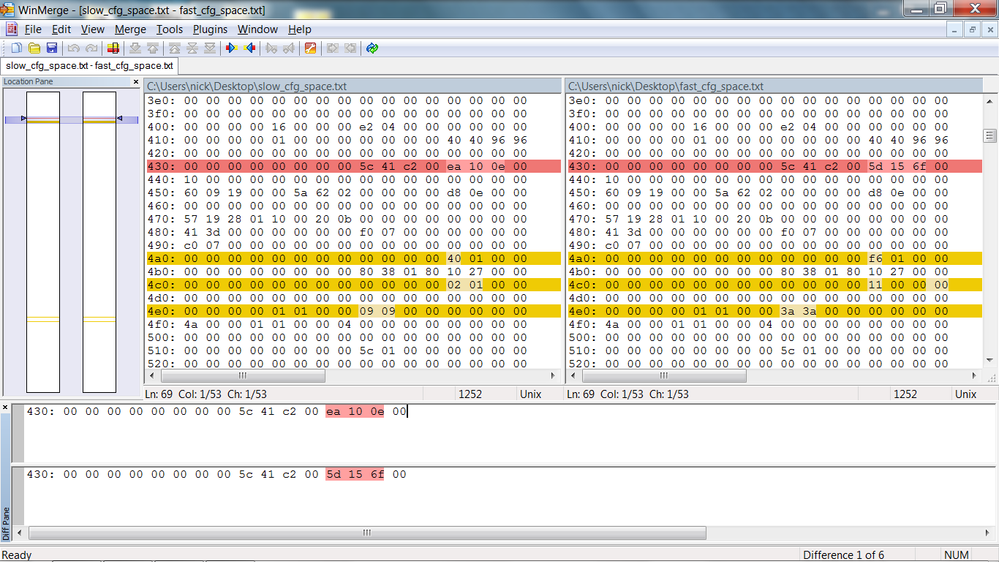
Thanks,
Nick
- 新着としてマーク
- ブックマーク
- 購読
- ミュート
- RSS フィードを購読する
- ハイライト
- 印刷
- 不適切なコンテンツを報告
Hi lunminliang,
Please let us know if you can share with us the documentation of your PCIe controller internal registers at address 0x400 - 0x4ff.
The reason we want this documentation is because we may want to improve our PCIe performance further and so we require to know how to program these registers to achieve that.
Thanks,
Nick
- 新着としてマーク
- ブックマーク
- 購読
- ミュート
- RSS フィードを購読する
- ハイライト
- 印刷
- 不適切なコンテンツを報告
Hi lunminliang,
Thank you for your reply. I tried the steps above and the data transfer rate increased from 75MB/sec to 125MB/sec.
I am trying to work through all the various suggestions at this time to see if I can make it go any faster. Thank you for your suggestion.
Frank
lunminliang
- 新着としてマーク
- ブックマーク
- 購読
- ミュート
- RSS フィードを購読する
- ハイライト
- 印刷
- 不適切なコンテンツを報告
From your figures it's 67% improvement, hope the latest figure has been taken with bigger file (>1MB).
See more comment from app:
I think platform and SDRAM are not bottlenecks in your case. P1010 PCIe controller has smaller MAX_PAYLOAD_SIZE and lesser credits.
I do not have any theoretical or practical max performance numbers for P1010.
- 新着としてマーク
- ブックマーク
- 購読
- ミュート
- RSS フィードを購読する
- ハイライト
- 印刷
- 不適切なコンテンツを報告
Hi Lunminliang,
I am using a 2.5MB buffer. Yes, it is a big improvement. It may be sufficient for what I need - I just thought I could find out if I could get a little more performance a different way. What I am trying to do now is switch from using inbound transactions on the P1010 to using outbound transactions so that I can use the DMA controller on the P1010. By using the DMA controller, the transfers may go faster (that is what I want to find out). It is taking me much longer to get the PCI, DMA, FPGA all working together in this new method. I have many changes to figure out. Section 13.4.2 in the P1010 reference manual indicates that this may work and using the DMA controller may make the transfers faster (or at least I think so). I think I need several more days to figure this out...
Frank
lunminliang
- 新着としてマーク
- ブックマーク
- 購読
- ミュート
- RSS フィードを購読する
- ハイライト
- 印刷
- 不適切なコンテンツを報告
If you aim to move data from FPGA -> P1010, you'd better use FPGA's DMA as before unless you suspect FPGA's DMA as a bottleneck. WRITEs are posted and hence would perform better than non-posted READs.
- 新着としてマーク
- ブックマーク
- 購読
- ミュート
- RSS フィードを購読する
- ハイライト
- 印刷
- 不適切なコンテンツを報告
Hi lunminliang,
Thank you for your reply.
Yes, currently I am moving data FPGA -> P1010 using FPGA DMA. I had not considered that using the P1010 DMA would be a non-posted read transaction. I still plan on attempting to use the P1010 DMA for this transfer and measure bandwidth but have not made any progress yet. This is going to take me a lot longer than I had anticipated.
I am marking the bandwidth improvement suggestion as the correct answer at this time. I will update this thread as I make progress over time...
