
- Forums
- Product Forums
- General Purpose MicrocontrollersGeneral Purpose Microcontrollers
- i.MX Forumsi.MX Forums
- QorIQ Processing PlatformsQorIQ Processing Platforms
- Identification and SecurityIdentification and Security
- Power ManagementPower Management
- Wireless ConnectivityWireless Connectivity
- RFID / NFCRFID / NFC
- Advanced AnalogAdvanced Analog
- Neural Processing UnitsNeural Processing Units
- MCX Microcontrollers
- S32G
- S32K
- S32V
- MPC5xxx
- Other NXP Products
- S12 / MagniV Microcontrollers
- Powertrain and Electrification Analog Drivers
- Sensors
- Vybrid Processors
- Digital Signal Controllers
- 8-bit Microcontrollers
- ColdFire/68K Microcontrollers and Processors
- PowerQUICC Processors
- OSBDM and TBDML
- S32M
- S32Z/E
-
- Solution Forums
- Software Forums
- MCUXpresso Software and ToolsMCUXpresso Software and Tools
- CodeWarriorCodeWarrior
- MQX Software SolutionsMQX Software Solutions
- Model-Based Design Toolbox (MBDT)Model-Based Design Toolbox (MBDT)
- FreeMASTER
- eIQ Machine Learning Software
- Embedded Software and Tools Clinic
- S32 SDK
- S32 Design Studio
- GUI Guider
- Zephyr Project
- Voice Technology
- Application Software Packs
- Secure Provisioning SDK (SPSDK)
- Processor Expert Software
- Generative AI & LLMs
-
- Topics
- Mobile Robotics - Drones and RoversMobile Robotics - Drones and Rovers
- NXP Training ContentNXP Training Content
- University ProgramsUniversity Programs
- Rapid IoT
- NXP Designs
- SafeAssure-Community
- OSS Security & Maintenance
- Using Our Community
-
- Cloud Lab Forums
-
- Knowledge Bases
- ARM Microcontrollers
- i.MX Processors
- Identification and Security
- Model-Based Design Toolbox (MBDT)
- QorIQ Processing Platforms
- S32 Automotive Processing Platform
- Wireless Connectivity
- CodeWarrior
- MCUXpresso Suite of Software and Tools
- MQX Software Solutions
- RFID / NFC
- Advanced Analog
- Neural Processing Units
-
- NXP Tech Blogs
- Home
- :
- Product Forums
- :
- Other NXP Products
- :
- Re: Problems regarding MXRT1061 board flashing
Problems regarding MXRT1061 board flashing
- Subscribe to RSS Feed
- Mark Topic as New
- Mark Topic as Read
- Float this Topic for Current User
- Bookmark
- Subscribe
- Mute
- Printer Friendly Page

- Mark as New
- Bookmark
- Subscribe
- Mute
- Subscribe to RSS Feed
- Permalink
- Report Inappropriate Content
Hello sir
Now I am working with iris detection project using MXRT1061 board.The project setup was
Controller only purchased and board printing and further process done here.
I following settings in the program part.The debugging time it perfectly works from RAM but it couldn't possible from FLASH memory.
I have following configurations
1.Add hyper flash configuration
2.Select flash memory settings
3.select the memory range
4. .file selection
5.set external flash=1
Hardware setup:
Controller:MXRT1061(board printing by company),link2
But now it couldn't flash.....
what is the reason behind this problem.Please check and let me know.any further changes and modifications for this project
Thanks&Regards
Solved! Go to Solution.

 kerryzhou
- Mark as New
- Bookmark
- Subscribe
- Mute
- Subscribe to RSS Feed
- Permalink
- Report Inappropriate Content
Hi @PragalfSIL ,
This morning, I also find one SLN-VIZN-IOT to test it again, still works.
I have a question for you, do you connect both two USB port to your PC?
This is my test result:
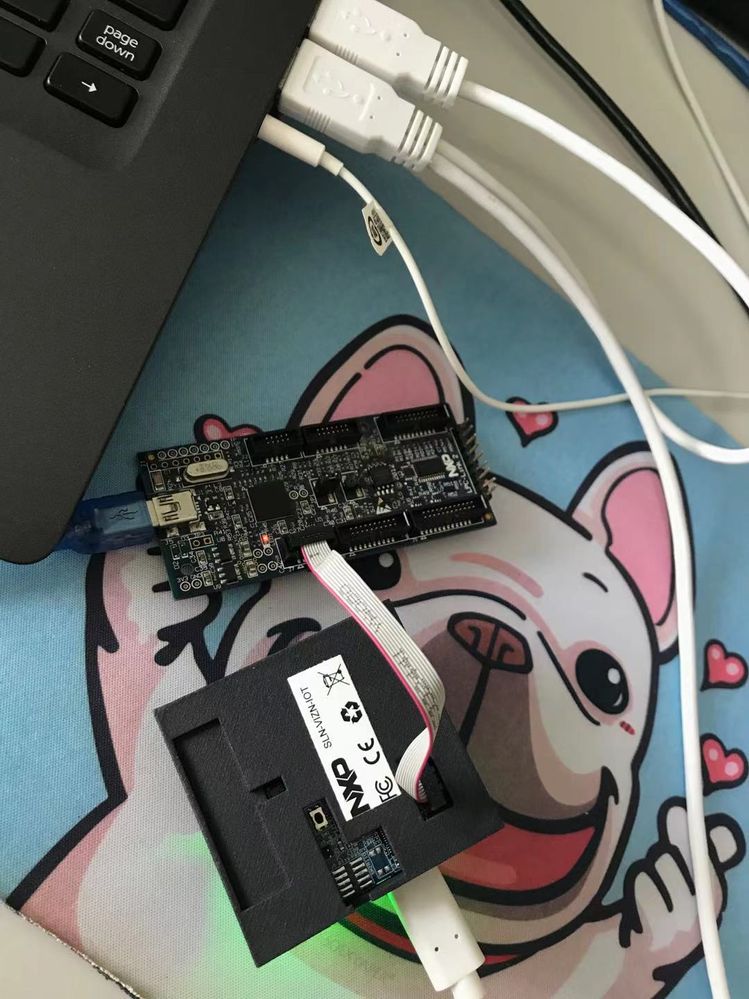
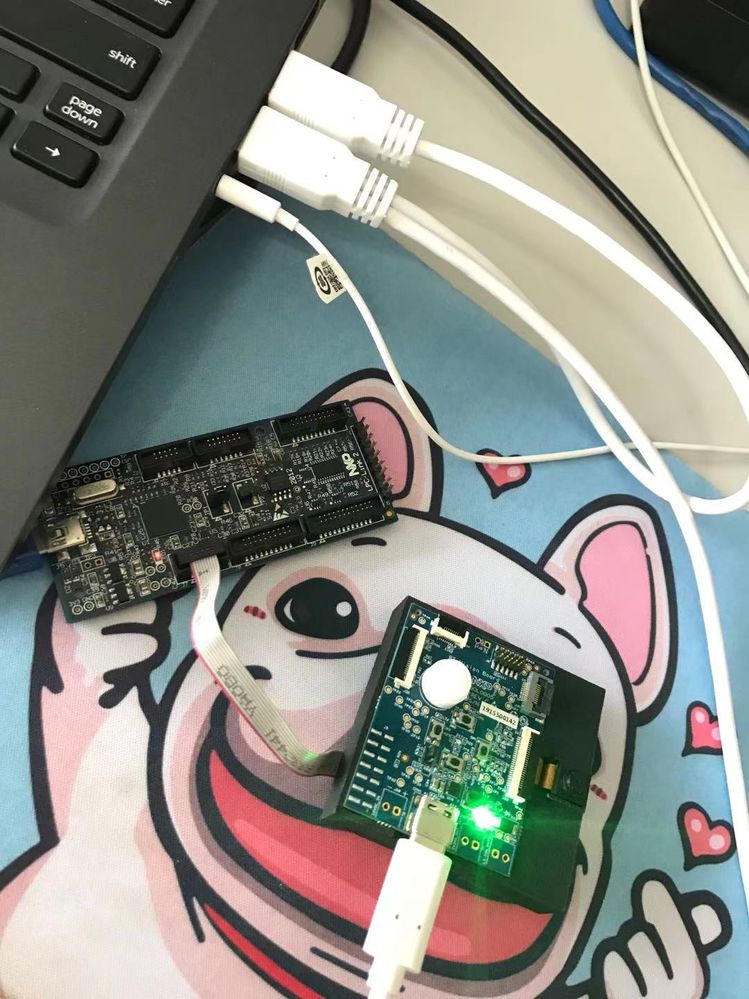
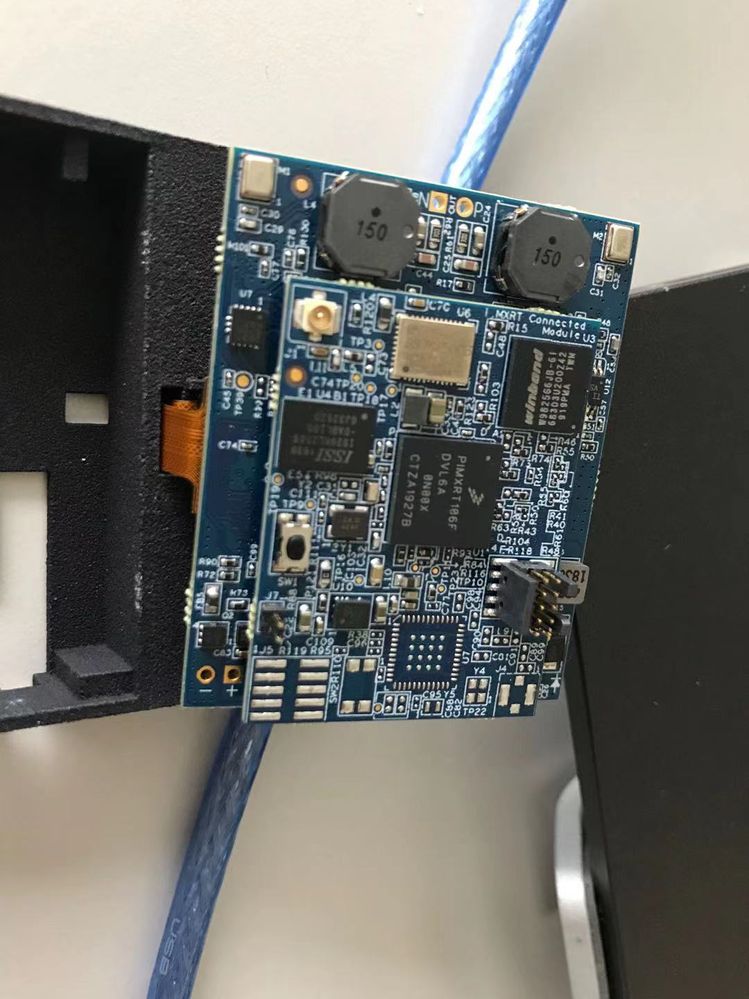
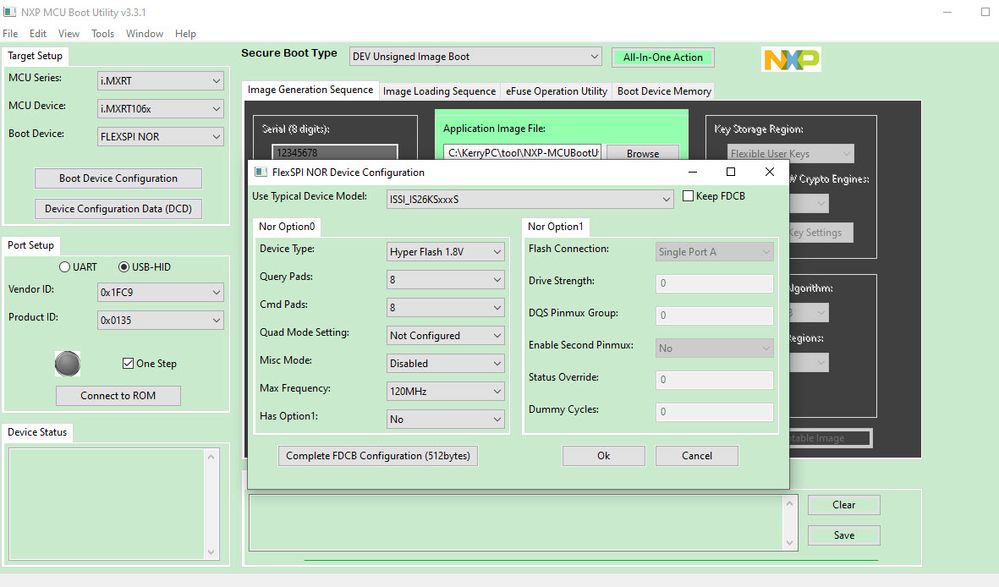
You can see, I am connecting both two USB, from your side, please double check it.
BTW, please check your board like my picture 3, make sure 2 boards connection is stable, as sometimes, I find I can't find the USB port in the MCUBootUtility tool, because two board connection is not OK, I connect it again, then board works again.
Wish it helps you!
If you still have questions about it, please kindly let me know.
Best Regards,
kerry
kerryzhou
- Mark as New
- Bookmark
- Subscribe
- Mute
- Subscribe to RSS Feed
- Permalink
- Report Inappropriate Content
To the USB cable, even you just one port to the PC, it also works on my side.
So, I also suggest you try another PC USB port, whether your PC USB port power is not strong enough.
Just try more, even you can try another PC with win10.
Wish it helps you!
Best Regards,
kerry
kerryzhou
- Mark as New
- Bookmark
- Subscribe
- Mute
- Subscribe to RSS Feed
- Permalink
- Report Inappropriate Content
Hi @PragalfSIL
Do you use the customer board? and work for your company project? if yes, next time, please use your company email to create the question instead of the gmail account.
Now, answer your questions.
When you use the RT1060+ hyperflash, what's the IDE and debugger you are using, these items you need to note:
1. Flash algo need to be hyperflash, instead of the QSPI, as the SDK code and the IDE default is using the QSPI flash, our official EVK is using QSPI flash.
2. About the APP FCB area, you need to use the flexSPI for hyerflash, you can refer to the RT1050 sdk about it:
SDK_2_10_0_EVKB-IMXRT1050\boards\evkbimxrt1050\xip
evkbimxrt1050_flexspi_nor_config.c
evkbimxrt1050_flexspi_nor_config.h
3. if you are working for the customer board, please use this code run in internal RAM to check your external hyperflash operation:
SDK_2_10_0_EVK-MIMXRT1060\boards\evkmimxrt1060\driver_examples\flexspi\hyper_flash
Please check it at first.
If you still have questions about it, please kindly let me know.
Best Regards,
Kerry
- Mark as New
- Bookmark
- Subscribe
- Mute
- Subscribe to RSS Feed
- Permalink
- Report Inappropriate Content
Hello Sir,
Now I am not start the company project and only test simple programs for flashing purpose.am the fresher in this area.So I don't know how to start flashing with this board
1. I am using our printed pcb and not nxp board (only purchased controller(MXRT1061) and further pcb done here)
2.MCUXpresso IDE(SDK_2.8.5_EVK-IMXRT1060) and Jlink is LPC link2 used for testing
3.MCU settings and hyperflash=1 is set from properties option
4 Using file is evkmimxrt1060_flexspi_nor_config.c and 1060_flexspi_nor_config.h.In .c file change with hyper flash configuration program from hyper flash test project.
But these modifications are enough for flashing?Please let me know.
Thanks & Regards
kerryzhou
- Mark as New
- Bookmark
- Subscribe
- Mute
- Subscribe to RSS Feed
- Permalink
- Report Inappropriate Content
Hi @PragalfSIL
Thanks for your updated information.
Do you run my suggest code:
SDK_2_10_0_EVK-MIMXRT1060\boards\evkmimxrt1060\driver_examples\flexspi\hyper_flash
Test it from RAM, whether you can do your external hyper flash operation or not?
This will help you to check your external flash is working or not, please test it at first.
BTW, please download the newest SDK, your SDK2.8.x is old.
Any test result, just kindly let me know.
Best Regards,
Kerry
- Mark as New
- Bookmark
- Subscribe
- Mute
- Subscribe to RSS Feed
- Permalink
- Report Inappropriate Content
Hello Sir,
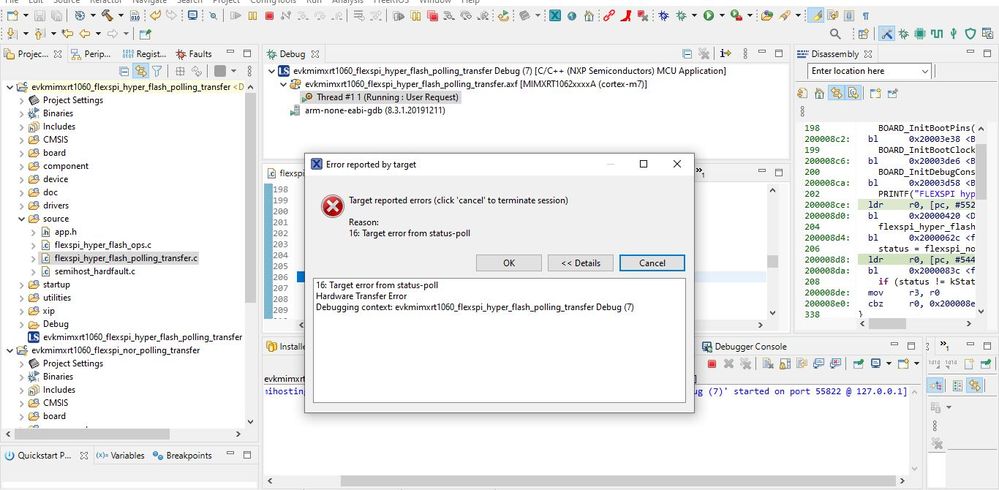
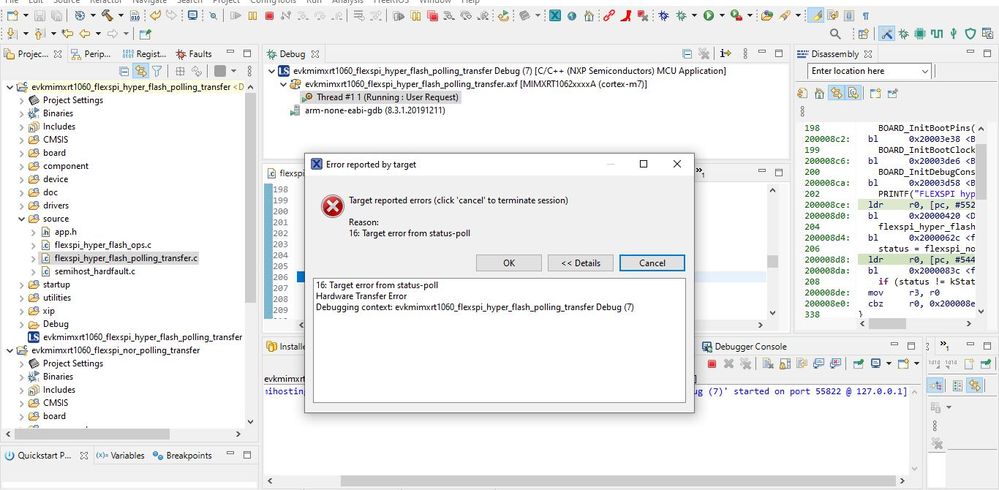
Now I tried running hyper flash driver example program with sdk 2.10.0 but nothing is displayed on console.when I checked with help of break point,the cursor pass through all lines but does not print anything on console.then finally one error is displayed "16:Target error from status poll"(hardware transfer error)
Thanks
 kerryzhou
- Mark as New
- Bookmark
- Subscribe
- Mute
- Subscribe to RSS Feed
- Permalink
- Report Inappropriate Content
Hi @PragalfSIL
1. Project download to internal RAM
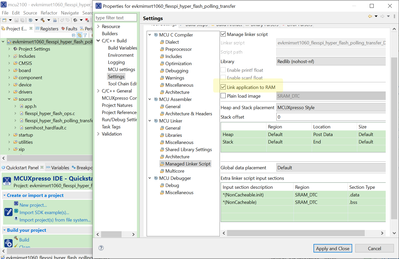
2. about the printf, please use semihost console.
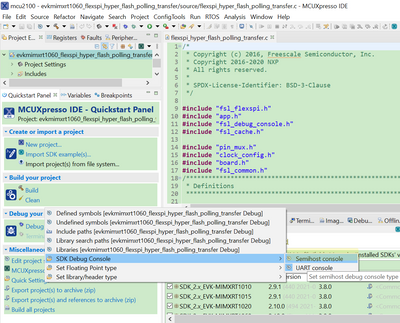
Then test it again, if you still meet debug issues, seems your hardware have problems.
You can let your chip enter the serial download mode, then use the MCUBootUtility tool to connect you chip. Whether you can detect your chip or not?
https://github.com/JayHeng/NXP-MCUBootUtility/archive/refs/tags/v3.3.1.zip
the related user manual is:
https://github.com/JayHeng/NXP-MCUBootUtility
- Mark as New
- Bookmark
- Subscribe
- Mute
- Subscribe to RSS Feed
- Permalink
- Report Inappropriate Content
Hai Kerry,
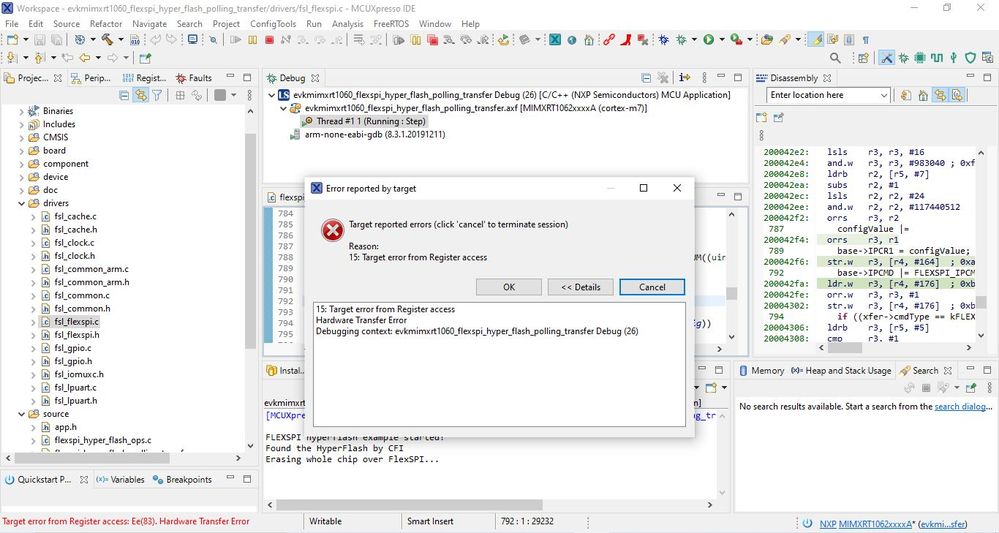
We have tried as you said and the program started running. Now the printf works and hyper flash is detected. In the function to erase hyper flash, erasing started but error occurred before completing the erase. When we step in through the program we found error occurred in this command,
"base->IPCMD |= FLEXSPI_IPCMD_TRG_MASK;"
Error message is attached below.
Also we are using vision board from SLN-VIZNAS-IOT kit with MXRT1061 IC, not MIMXRT1060EVK. So if it causes any hardware issues please inform as. Since we don't have serial port available in the board we cant use apps like MCUbootutility.
Thanks
 kerryzhou
- Mark as New
- Bookmark
- Subscribe
- Mute
- Subscribe to RSS Feed
- Permalink
- Report Inappropriate Content
Hi @PragalfSIL
Do you use SLN-VIZNAS-IOT kit? This board is the MIMXRT106F chip with external hyper Flash.
Seems your MIMXRT1061 is the customer board, can you share the schematic of your board? As you can enter the debugger mode, but the external flash operation failed, so seems your hyperflash connect to the RT chip has issues in the hardware. Whether it is the same as the MIMXRT1060-EVK schematic? What about the solder?
Please also test the led_blinky SDK code in the RAM, can you run it without issues?
Any updated information, just kindly let me know.
Best Regards,
Kerry
- Mark as New
- Bookmark
- Subscribe
- Mute
- Subscribe to RSS Feed
- Permalink
- Report Inappropriate Content
Hello Kerry,
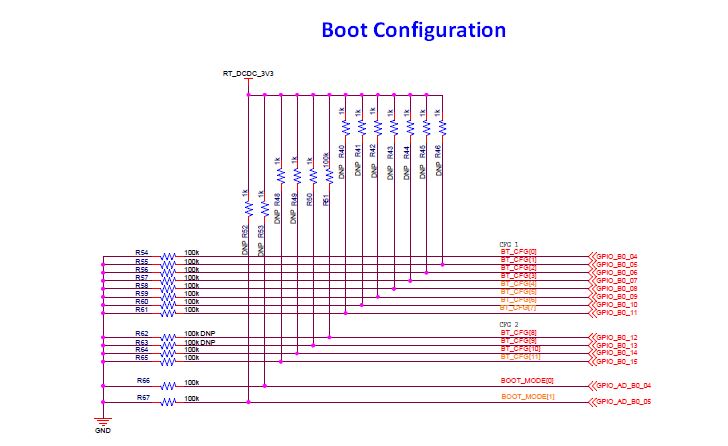
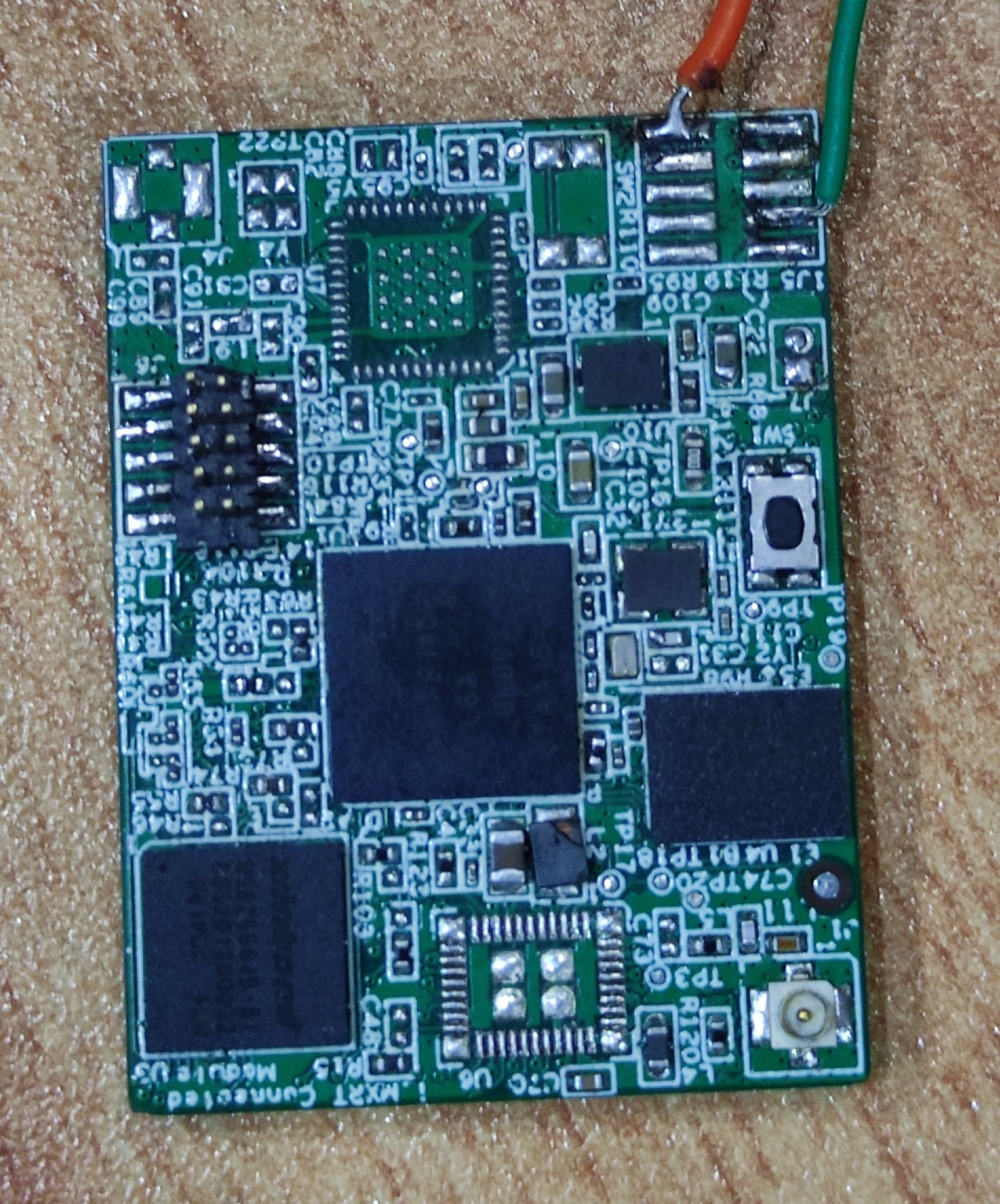
We are using a custom board based on the Gerber file of SLN-VIZNAS-IOT kit. Since we are developing an application other than face recognition, we changed MIMXRT106F with MIMXRT1061. No other changes were made on PCB deign. Schematic of SLN-VIZNAS-IOT kit PCB is attached below.
1. In hyper flash section, boot mode selected is 10 (R52 is connected R67 is not connected). Does this cause any errors in hyper flash selection?
2. MIMXRT1060-EVK uses SW7 to select hyper flash. But SLN-VIZNAS-IOT board doesn't have any switches. Do we need to do anything particular to select hyper flash in our board?
We checked led_blinky SDK code in the RAM, it works fine without led connected to the pins. Output is verified with multimeter. But when we connect led to pins, hardware transfer error occurred and led stays high. Error message is attached below.
kerryzhou
- Mark as New
- Bookmark
- Subscribe
- Mute
- Subscribe to RSS Feed
- Permalink
- Report Inappropriate Content
Hi @PragalfSIL
Thanks for your updated information, understand it now.
1. In hyper flash section, boot mode selected is 10 (R52 is connected R67 is not connected). Does this cause any errors in hyper flash selection?
--> boot mode 10, means it is the internal boot mode, it will boot from the external flash.
2. MIMXRT1060-EVK uses SW7 to select hyper flash. But SLN-VIZNAS-IOT board doesn't have any switches. Do we need to do anything particular to select hyper flash in our board?
-->BT_CFG[9] should be 1, but your picture turns you already connect it to 1.
Your hyper flash is 3V3 not 1V8, right? If 3V3, BT_CFG[8] should be 1.
We checked led_blinky SDK code in the RAM, it works fine without led connected to the pins. Output is verified with multimeter. But when we connect led to pins, hardware transfer error occurred and led stays high. Error message is attached below.
->Seems your debug is lost when you connect led to pins, when you verified with multimeter, the pin is toggle, right? If yes, it's OK, your error should be caused by your hardware side when you connect led to the board.
What's the debugger you are using now? As the debugger will determine the different flash algorithm you need to use.
Do you test my another method: MCUbootUtility?
I already share the tool link, please modify your board, R52 connect, R53 removed, just enter the serial download mode, then use the MCUBootutility download code through the UART or USB/HID, whether your hyperflash connection works or not?
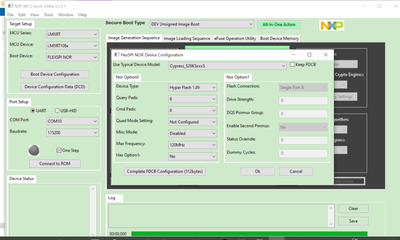
Please also tell me which detail hyperflash you are using? the same as EVK?
Best Regards,
Kerry
- Mark as New
- Bookmark
- Subscribe
- Mute
- Subscribe to RSS Feed
- Permalink
- Report Inappropriate Content
Hai Kerry,
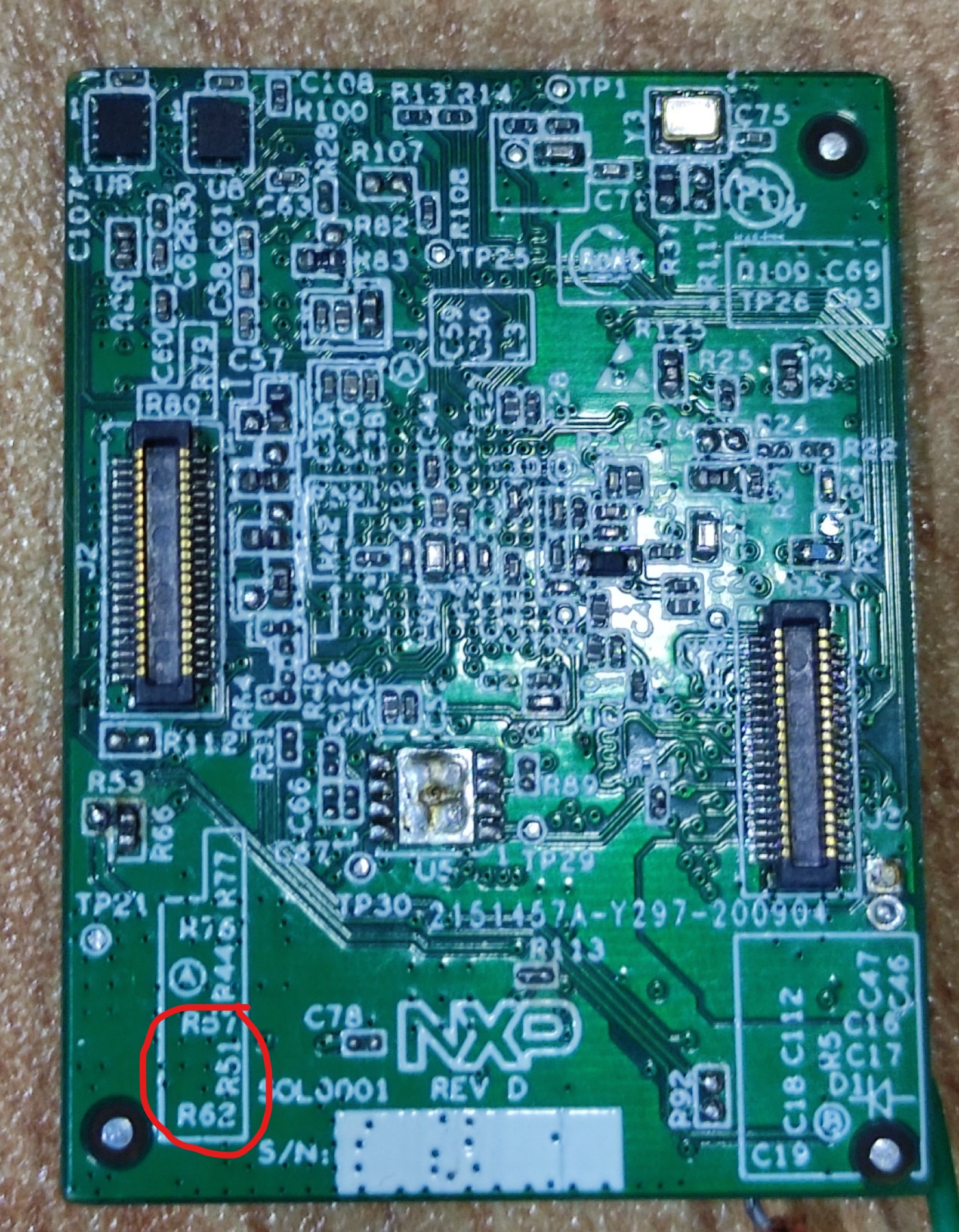
Could you please explain difference between 1V8 hyperflash and 3V3 hyperflash. We couldn't find any connections to BT_CFG[8], (R62 and R51 are kept out from the circuit). So we think it is iV8 by default.
Led_blinky example works, toggling checked using multimeter.
We are using LPC Link2 for debugging.
Since SLN-VIZNAS-IOT board doesn't have any serial pins we were not able to use MCUBootUtility. If anyway we can use it please let us know.
We are using IS26KL256S as flash memory and MIMXRT1050-EVK_S26KS512S.cfx driver file. Do we need to change driver files?
Thank You
kerryzhou
- Mark as New
- Bookmark
- Subscribe
- Mute
- Subscribe to RSS Feed
- Permalink
- Report Inappropriate Content
Hi @PragalfSIL
About 1V8 hyperflash and 3V3 hyperflash, please check your used hypeflash datasheet, is it 3V3 or 1V8?
From your schematic:
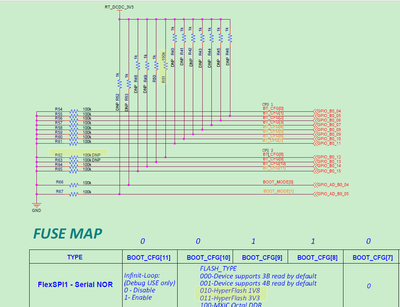
If you want to use 1V8, you need to connect R62, then R51 disconnect it, just let BT_CFG[8]=0.
Please try it on your side, then test the hyperflash operation again.
About SLN-VIZNAS-IOT, as I know, the USB port will simulate the port for the USB HID or UART connection.
Best Regard,
Kerry
- Mark as New
- Bookmark
- Subscribe
- Mute
- Subscribe to RSS Feed
- Permalink
- Report Inappropriate Content
Hai Kerry,
We checked datasheet of flash and it is 3V3 hyperflash. Hardware connection is also set for 3V3 hyperflash. Also we used MCUBootUtility, it worked for the first time and when we tried to confirm the results it wont detect our board. After that our LPC Link 2 also not detected in MCUXpresso. The link is shown in device manager of system also it is detected when updating driver using command prompt, but not in MCUXpresso. (LPC link driver version is 2.1.2_57)
Thanks
- Mark as New
- Bookmark
- Subscribe
- Mute
- Subscribe to RSS Feed
- Permalink
- Report Inappropriate Content
Hai Kerry,
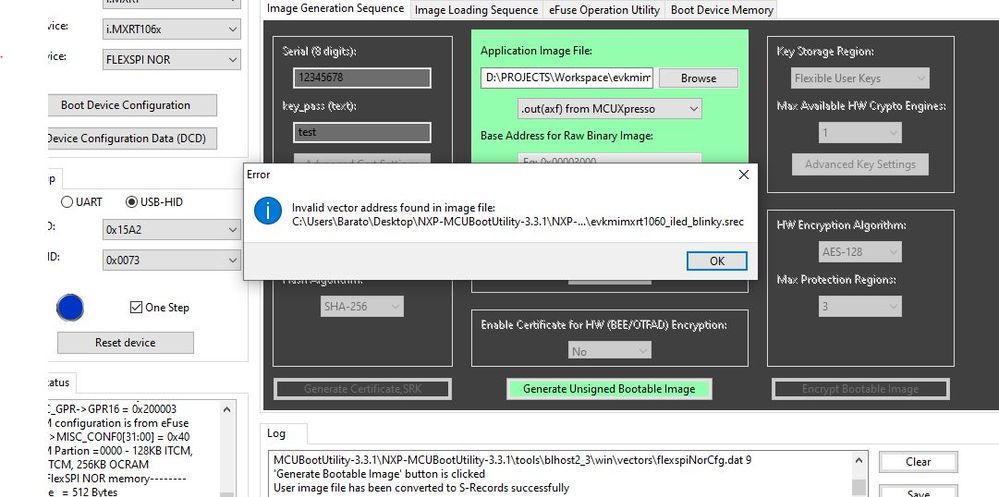
We figured the problem about detecting the device. It was a hardware issue and board is detected. But when we use MCUBootUtility to serial program an error occurs while flashing the program.
"Invalid vector address found in image file"
Error message and memory map configuration given below. We are using IS26KL256S hyperflash and MIMXRT1050-EVK_S26KS512S.cfx driver file. Do we need change anything?
Thanks
kerryzhou
- Mark as New
- Bookmark
- Subscribe
- Mute
- Subscribe to RSS Feed
- Permalink
- Report Inappropriate Content
Hi @PragalfSIL
Seems it is your app issues, please test the MCUbootUtility tool attached app:
NXP-MCUBootUtility-3.3.1\apps\NXP_MIMXRT1060-EVK_Rev.A1led_blinky_0x60002000.srec
Whether this can be downloaded or not.
BTW, if you are working for your company project, it's better to use the company email to create the case instead of the 3rd part email, then it will have higher priority.
Best Regards,
Kerry
- Mark as New
- Bookmark
- Subscribe
- Mute
- Subscribe to RSS Feed
- Permalink
- Report Inappropriate Content
Hai Kerry,
1. We tried running the sample program from MCUBootUtility and it worked. Error was due to linker to the RAM. It is checked and app is working. But when we run the program (both sample code and our code), the output remains low, it isn't toggling.
2. It is only possible to burn one time to flash memory. Then the app wont detect the device. Then we need to connect the device to MCUXpresso and debug the program in RAM in order to make it right. This need to be done several times because it shows hardware transfer error at first.
3. Is there any way to make sure that the program is burned to the flash?
4. How can we check that the program is up and running? is there any particular steps to make the program run?
(We will create official mail id soon and update it)
Thanks
kerryzhou
- Mark as New
- Bookmark
- Subscribe
- Mute
- Subscribe to RSS Feed
- Permalink
- Report Inappropriate Content
Hi @PragalfSIL
Answer your questions:
1. We tried running the sample program from MCUBootUtility and it worked. Error was due to linker to the RAM. It is checked and app is working. But when we run the program (both sample code and our code), the output remains low, it isn't toggling.
Answer: MCUbootUtility tool, download, then exit, change to internal boot mode, all works OK, right?
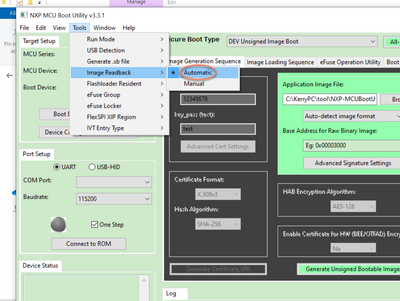
Please select the readback, after you download the code, you also can the tool readback the image data. Whether the read are all works OK?
About the RAM, code, what about the led_blinky SDK project run in RAM, when you debug it, whether it works OK?
2. It is only possible to burn one time to flash memory. Then the app wont detect the device. Then we need to connect the device to MCUXpresso and debug the program in RAM in order to make it right. This need to be done several times because it shows hardware transfer error at first.
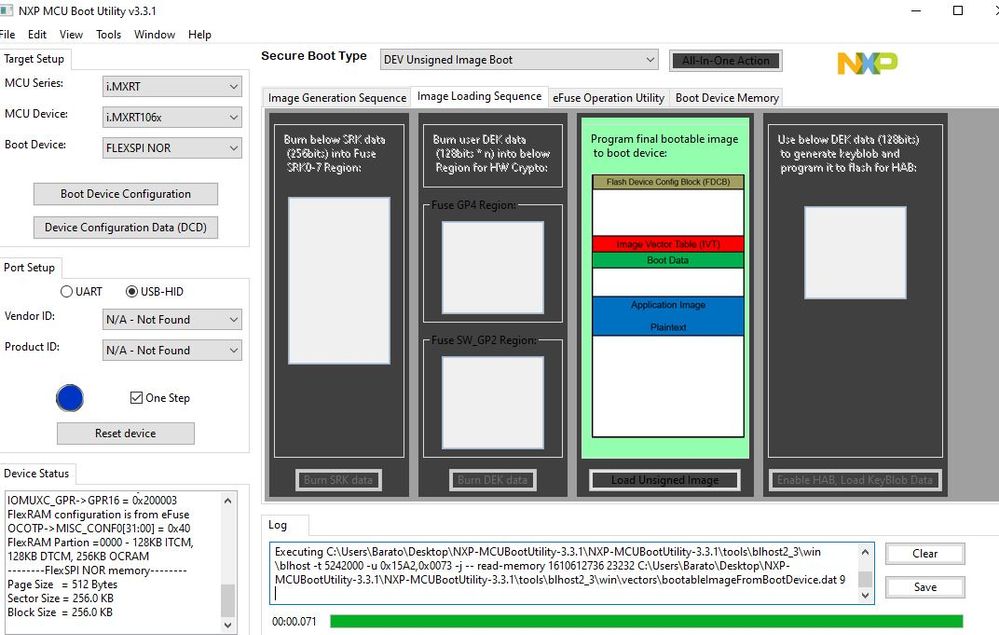
Answer: After you download to the flash, please use my above picture, readout it, whether the flash image is OK, if the data is correct, then switch the boot mode to boot internally. Whether the boot works or not? internal boot mode: BOOT_MOD[1:0]:10
The app won't detect device, do you mean, the MCUbootUtility can't detect it?
If yes, just power off and power on and test it again in serial download mode when you want to connect to the MCUbootUtility.
3. Is there any way to make sure that the program is burned to the flash?
Answer: MY above post picture, you can see the flash image data, it will be the same as the source app which is burned.
4. How can we check that the program is up and running? is there any particular steps to make the program run?
Answer: After download app successfully, switch the boot mode to internal boot, power off and power on the board, the app will run.
Best Regards,
Kerry
- Mark as New
- Bookmark
- Subscribe
- Mute
- Subscribe to RSS Feed
- Permalink
- Report Inappropriate Content
Hai Kerry,
First of all thanks for your support.
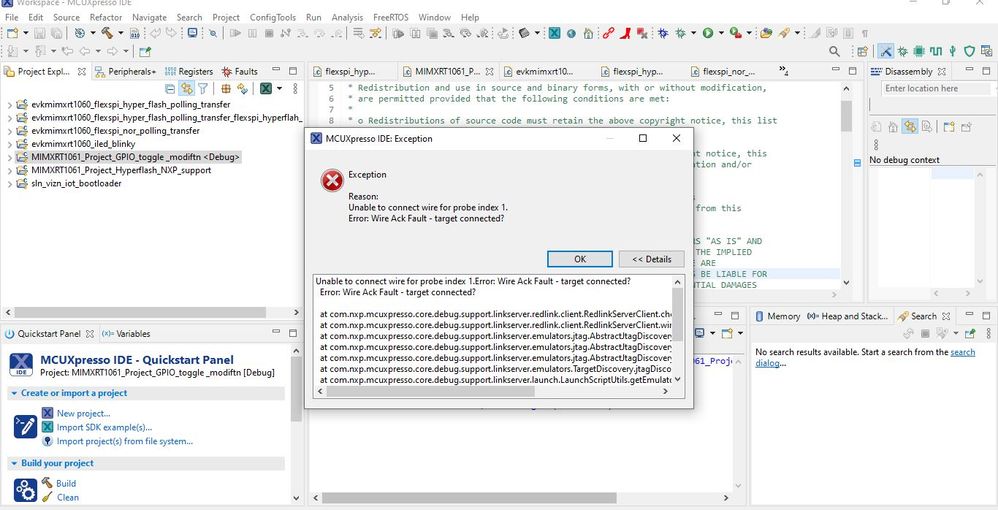
1. We have tried running the program by changing boot mode. It worked. The pins toggled and output verified. It worked in debugging also. But the problem of device detection in MCUBootUtility is still there. And right now debugging shows "Unable to connect wire for probe index 1". Error message and log details are given below. (LPC Link detected in debugger and device manager. LPC Scrypt is up to date )
Log details:
MCUXpresso IDE RedlinkMulti Driver v11.3 (Jan 11 2021 16:41:13 - crt_emu_cm_redlink build 9)
Found chip XML file in D:/PROJECTS/Workspace/MIMXRT1061_Project_GPIO_toggle _modiftn/Debug\MIMXRT1061xxxxA.xml
Reconnected to existing LinkServer process.
Connecting to probe 1 core 0 (using server started externally) reports:
'Ee(42). Could not connect to core.'
Retrying...
Reconnected to existing LinkServer process.
Server OK but no connection to probe 1 core 0 (after 3 attempts) - Ee(42). Could not connect to core.
============= SCRIPT: RT1060_connect.scp =============
RT1060 Connect Script
Error: Wire Ack Fault - target connected?
Error: Wire not connected
Error: Wire not connected
Disabling MPU
Error: Wire not connected
Error: Wire not connected
Configure FlexRAM for 768KB OC RAM, 128KB I-TCM, 128KB D-TCM
Error: Wire not connected
Error: Wire not connected
Error: Wire not connected
Finished
============= END SCRIPT =============================
Failed on connect: Ee(42). Could not connect to core.
No connection to chip's debug port
2. Could you give a detailed explanation on how to use image read back in MCUBootUtility to check the program?
3. We wanted to write the program to hyperflash IS26KL256 chip on our board not internal flash in the MXRT1061. The base address of written program shows 0X60000000. Is it internal flash or not? Do we need to change anything to write to hyperflash on board? (Memory map in data sheet shows 0X60000000 is FlexSPI)
kerryzhou
- Mark as New
- Bookmark
- Subscribe
- Mute
- Subscribe to RSS Feed
- Permalink
- Report Inappropriate Content
Hi @PragalfSIL
Thanks for your updated information.
1. But the problem of device detection in MCUBootUtility is still there
Answer: I am not very clear about your questions, as you mentioned you already can download the code and boot it, wh you still have device detection? MCUbootUtility need to use the serial download mode, boot need to use internal boot mode, you need to change the BOOT_MODE.
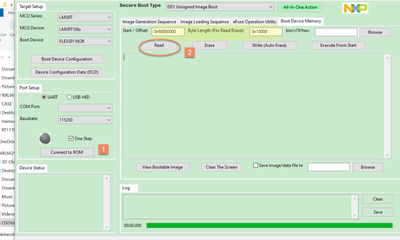
About MCUbootutility read.
After connection, then select the address and length, click read button, you can read it, then you can check the image, FCB, IVT, BD, DCD, APP area
2. About your debug issues
Seems you are using CMSIS DAP.
Then, you need to select the hyper flash program driver, as the SDK in default use the QSPI flash.
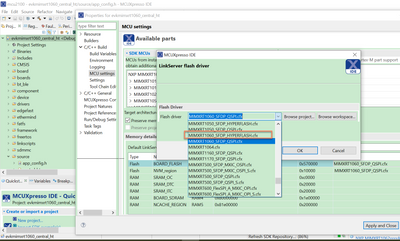


BTW, you need to check your IS26KL256, what's the difference with the IS26KSXXXS?
Wish it helps you!
Best Regards,
Kerry
- Mark as New
- Bookmark
- Subscribe
- Mute
- Subscribe to RSS Feed
- Permalink
- Report Inappropriate Content
Hai Kerry,
We think device detection problem was due to a hardware issue. We are trying to solve the issue right now. We will get back to you soon as the problem resolved.
Last time when we checked the flashed program, the base address shown in log was 0X60000000. Memory map suggest it is address of FlexSPI. If not related to external hyperflash on board, how can we change it to external flash?
In the case of hyper flash, according to cypress's data sheet KL series is 3V and KS series is 1.8V. Image is given below. If need to change driver file let us know.
Thank You
