
- Forums
- Product Forums
- General Purpose MicrocontrollersGeneral Purpose Microcontrollers
- i.MX Forumsi.MX Forums
- QorIQ Processing PlatformsQorIQ Processing Platforms
- Identification and SecurityIdentification and Security
- Power ManagementPower Management
- Wireless ConnectivityWireless Connectivity
- RFID / NFCRFID / NFC
- Advanced AnalogAdvanced Analog
- Neural Processing UnitsNeural Processing Units
- MCX Microcontrollers
- S32G
- S32K
- S32V
- MPC5xxx
- Other NXP Products
- S12 / MagniV Microcontrollers
- Powertrain and Electrification Analog Drivers
- Sensors
- Vybrid Processors
- Digital Signal Controllers
- 8-bit Microcontrollers
- ColdFire/68K Microcontrollers and Processors
- PowerQUICC Processors
- OSBDM and TBDML
- S32M
- S32Z/E
-
- Solution Forums
- Software Forums
- MCUXpresso Software and ToolsMCUXpresso Software and Tools
- CodeWarriorCodeWarrior
- MQX Software SolutionsMQX Software Solutions
- Model-Based Design Toolbox (MBDT)Model-Based Design Toolbox (MBDT)
- FreeMASTER
- eIQ Machine Learning Software
- Embedded Software and Tools Clinic
- S32 SDK
- S32 Design Studio
- GUI Guider
- Zephyr Project
- Voice Technology
- Application Software Packs
- Secure Provisioning SDK (SPSDK)
- Processor Expert Software
- Generative AI & LLMs
-
- Topics
- Mobile Robotics - Drones and RoversMobile Robotics - Drones and Rovers
- NXP Training ContentNXP Training Content
- University ProgramsUniversity Programs
- Rapid IoT
- NXP Designs
- SafeAssure-Community
- OSS Security & Maintenance
- Using Our Community
-
- Cloud Lab Forums
-
- Knowledge Bases
- ARM Microcontrollers
- i.MX Processors
- Identification and Security
- Model-Based Design Toolbox (MBDT)
- QorIQ Processing Platforms
- S32 Automotive Processing Platform
- Wireless Connectivity
- CodeWarrior
- MCUXpresso Suite of Software and Tools
- MQX Software Solutions
- RFID / NFC
- Advanced Analog
- Neural Processing Units
-
- NXP Tech Blogs
- Home
- :
- Product Forums
- :
- Other NXP Products
- :
- Re: LS1028ARDB sd boot Failed to start File System
LS1028ARDB sd boot Failed to start File System
- Subscribe to RSS Feed
- Mark Topic as New
- Mark Topic as Read
- Float this Topic for Current User
- Bookmark
- Subscribe
- Mute
- Printer Friendly Page
LS1028ARDB sd boot Failed to start File System

- Mark as New
- Bookmark
- Subscribe
- Mute
- Subscribe to RSS Feed
- Permalink
- Report Inappropriate Content
Hello,
I am tying to get LS1028A BSP to work b following this https://www.nxp.com/docs/en/user-guide/LS1028ABSPUG.pdf documentation. I am using VirtualBox on Ubuntu 18.04 to write the sd card.
--- 3.1.3Download and assemble LS1028A BSP images
tar xvzf flexbuild_<version>.tgz
cd flexbuild
source setup.env
wget https://www.nxp.com/lgfiles/sdk/ls1028a_bsp_03/app_components_LS_arm64.tgz
wget https://www.nxp.com/lgfiles/sdk/ls1028a_bsp_03/bootpartition_LS_arm64_lts_4.14.tgz
wget https://www.nxp.com/lgfiles/sdk/ls1028a_bsp_03/lib_modules_LS_arm64_4.14.47.tgz
wget https://www.nxp.com/lgfiles/sdk/ls1028a_bsp_03/firmware_ls1028ardb_uboot_sdboot.img
flex-builder -i mkrfs -a arm64
tar xvzf app_components_LS_arm64.tgz -C build/apps
sudo tar xvzf lib_modules_LS_arm64_<kernel_version>.tgz -C build/rfs/rootfs_ubuntu_bionic_LS_arm64/lib/modules
flex-builder -c linux -a arm64 #Adviced here: https://community.nxp.com/thread/504787 for error "libOpenVG.so is not a symbolic link"
flex-builder -i merge-component -a arm64
flex-builder -i compressrfs -a arm64
--- 3.1.4.2Option 1 - Deploy LS1028A BSP images using removable storage device
Note: sdb is the sd card here.
sudo fdisk /dev/sdb
Welcome to fdisk (util-linux 2.31.1).
Changes will remain in memory only, until you decide to write them.
Be careful before using the write command.
The old ext2 signature will be removed by a write command.
Device does not contain a recognized partition table.
Created a new DOS disklabel with disk identifier 0xad3eeef6.
Command (m for help): n
Partition type
p primary (0 primary, 0 extended, 4 free)
e extended (container for logical partitions)
Select (default p):
Using default response p.
Partition number (1-4, default 1):
First sector (2048-30375935, default 2048):
Last sector, +sectors or +size{K,M,G,T,P} (2048-30375935, default 30375935):
Created a new partition 1 of type 'Linux' and of size 14,5 GiB.
Command (m for help): w
The partition table has been altered.
Calling ioctl() to re-read partition table.
Syncing disks.
sudo fdisk -l /dev/sdb
Disk /dev/sdb: 14,5 GiB, 15552479232 bytes, 30375936 sectors
Units: sectors of 1 * 512 = 512 bytes
Sector size (logical/physical): 512 bytes / 512 bytes
I/O size (minimum/optimal): 512 bytes / 512 bytes
Disklabel type: dos
Disk identifier: 0xad3eeef6
Device Boot Start End Sectors Size Id Type
/dev/sdb1 2048 30375935 30373888 14,5G 83 Linux
sudo mkfs.ext2 /dev/sdb
flex-installer -b bootpartition_LS_arm64_lts_4.14.tgz -r build/images/rootfs_ubuntu_bionic_LS_arm64_201908211259.tgz -f firmware_ls1028ardb_uboot_sdboot.img -d /dev/sdb
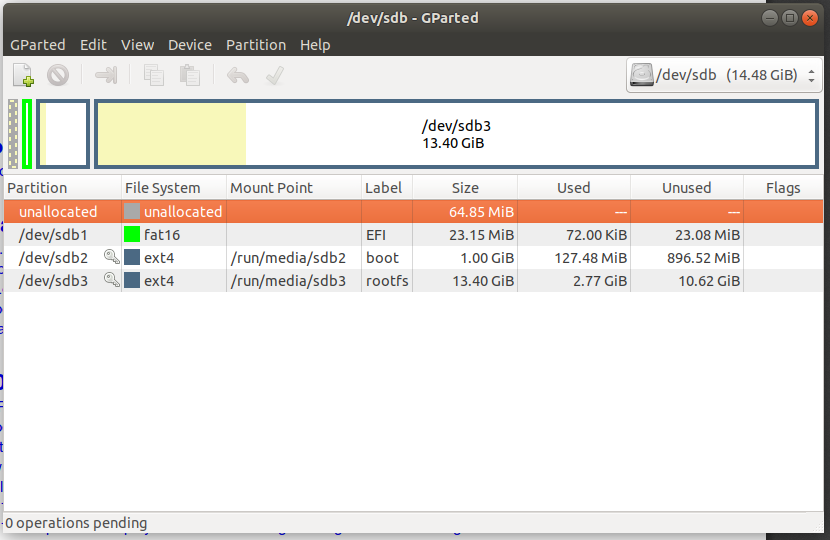
# Boot didn't start if I didn't write the firmware also. There is GParted image of sd card partitions.
--- LS1028ARDB boot
When booting the board from SD card I start to get errors (whole boot sequence in attachment):
[FAILED] Failed to start File System Check on Root Device.
[FAILED] Failed to start Remount Root and Kernel File Systems.
[FAILED] Failed to start File System Check o…74cb4-486e-4869-a643-e283b08aec35.
...
---
This is how the sd card looks in GParted:

 Pavel
Pavel
- Mark as New
- Bookmark
- Subscribe
- Mute
- Subscribe to RSS Feed
- Permalink
- Report Inappropriate Content
Try to write .img file to SD card on your Linux PC usinf the following command.
sudo dd if=firmware_ls1028ardb_uboot_sdboot.img of=/dev/sdb bs=512 seek=8
Test the LS1028ardb board using this SD card.
Have a great day,
Pavel Chubakov
- Mark as New
- Bookmark
- Subscribe
- Mute
- Subscribe to RSS Feed
- Permalink
- Report Inappropriate Content
Hi, Pavel
for your suggestions, i do below operation. then, instert the sd card into ls1028ardb, the dip switch(sw2) set as 10001000, then using the tera term(set as manual) try to communicated with ls1028ardb, nothing shows on tera term.
would have some other suggestions, thanks a lot.
 Pavel
Pavel
- Mark as New
- Bookmark
- Subscribe
- Mute
- Subscribe to RSS Feed
- Permalink
- Report Inappropriate Content
Your log contains information about error message -84 on your mmcblk0.
Test your SD card using "mmc read" command under u-boot.
Have a great day,
Pavel Chubakov
-----------------------------------------------------------------------------------------------------------------------
Note: If this post answers your question, please click the Correct Answer button. Thank you!
-----------------------------------------------------------------------------------------------------------------------
- Mark as New
- Bookmark
- Subscribe
- Mute
- Subscribe to RSS Feed
- Permalink
- Report Inappropriate Content
Sorry I am quite noob to U-boot, what address should I read? In env there is:
sd_hdploadcmd=echo Trying load HDP firmware from SD..;mmcinfo;mmc read $load_addr 0x4800 0x200 && hdp load $load_addr 0x2000
and
load_addr=0xa0000000
So I tried:
=> mmc read 0xa0000000 0x4800 0x200
MMC read: dev # 0, block # 18432, count 512 ... 0 blocks read: ERROR
