
- Forums
- Product Forums
- General Purpose MicrocontrollersGeneral Purpose Microcontrollers
- i.MX Forumsi.MX Forums
- QorIQ Processing PlatformsQorIQ Processing Platforms
- Identification and SecurityIdentification and Security
- Power ManagementPower Management
- Wireless ConnectivityWireless Connectivity
- RFID / NFCRFID / NFC
- Advanced AnalogAdvanced Analog
- Neural Processing UnitsNeural Processing Units
- MCX Microcontrollers
- S32G
- S32K
- S32V
- MPC5xxx
- Other NXP Products
- S12 / MagniV Microcontrollers
- Powertrain and Electrification Analog Drivers
- Sensors
- Vybrid Processors
- Digital Signal Controllers
- 8-bit Microcontrollers
- ColdFire/68K Microcontrollers and Processors
- PowerQUICC Processors
- OSBDM and TBDML
- S32M
- S32Z/E
-
- Solution Forums
- Software Forums
- MCUXpresso Software and ToolsMCUXpresso Software and Tools
- CodeWarriorCodeWarrior
- MQX Software SolutionsMQX Software Solutions
- Model-Based Design Toolbox (MBDT)Model-Based Design Toolbox (MBDT)
- FreeMASTER
- eIQ Machine Learning Software
- Embedded Software and Tools Clinic
- S32 SDK
- S32 Design Studio
- GUI Guider
- Zephyr Project
- Voice Technology
- Application Software Packs
- Secure Provisioning SDK (SPSDK)
- Processor Expert Software
- Generative AI & LLMs
-
- Topics
- Mobile Robotics - Drones and RoversMobile Robotics - Drones and Rovers
- NXP Training ContentNXP Training Content
- University ProgramsUniversity Programs
- Rapid IoT
- NXP Designs
- SafeAssure-Community
- OSS Security & Maintenance
- Using Our Community
-
- Cloud Lab Forums
-
- Knowledge Bases
- ARM Microcontrollers
- i.MX Processors
- Identification and Security
- Model-Based Design Toolbox (MBDT)
- QorIQ Processing Platforms
- S32 Automotive Processing Platform
- Wireless Connectivity
- CodeWarrior
- MCUXpresso Suite of Software and Tools
- MQX Software Solutions
- RFID / NFC
- Advanced Analog
- Neural Processing Units
-
- NXP Tech Blogs
How to import NTAG I2C plus middleware into MCUXpresso project

Article "BLE pairing with the NTAG I2C plus kit for Arduino pinout" at
https://community.nxp.com/docs/DOC-335241
This article provides details for how to take a standard SDK demo for the Freedom KW41Z board, and convert it to a demo of BLE pairing using NFC (a second board, NTAG I2C plus kit for Arduino, is also required). The article provides detailed instructions down to "Importing NTAG I2C plus middelware" (sic). At this point it just says "The NTAG I2C plus middleware can be easily imported as a new folder in the project tree using the MCUXpresso File / Import menu.", but does not specify exactly where this middleware is to be found and imported from. Likewise, the 35 minute video at the bottom of the article also skims over this important detail. I'm new to MCUXpresso and have no idea where to find this middleware. Could someone please tell me where to find it ?
Thank you


Hi John,
Hope you are doing well. When you download the SDK in the SDK Builder, there are some middleware options to download. Please make sure you add the NTAG I2C Middleware.
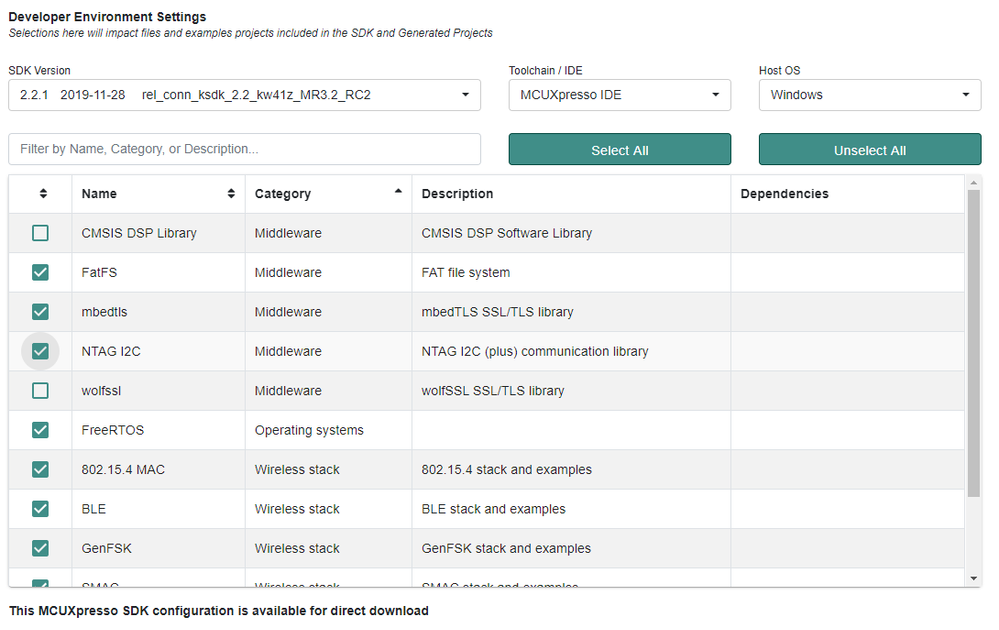
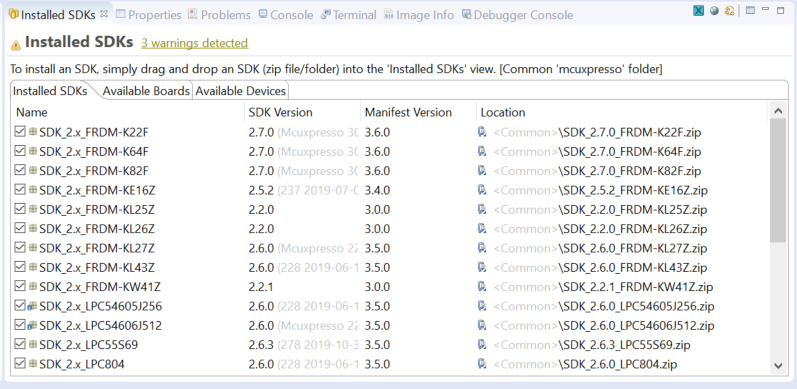
After you downloaded the SDK, please import the it in the MCUXpresso, in the following tab. Just drag and drop the SDK zip.
With the SDK you are able to import some examples from the QuickStart Panel, for example the bluetooth_hid_device_freertos and the ntag_i2c_plus_explorer_demo.
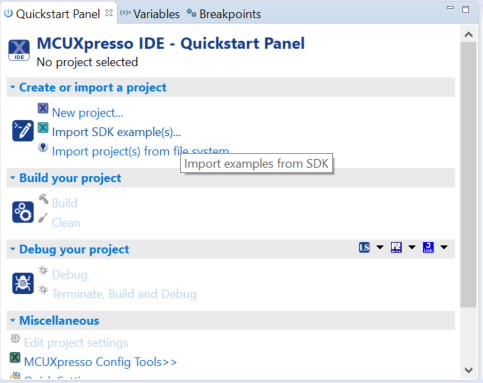
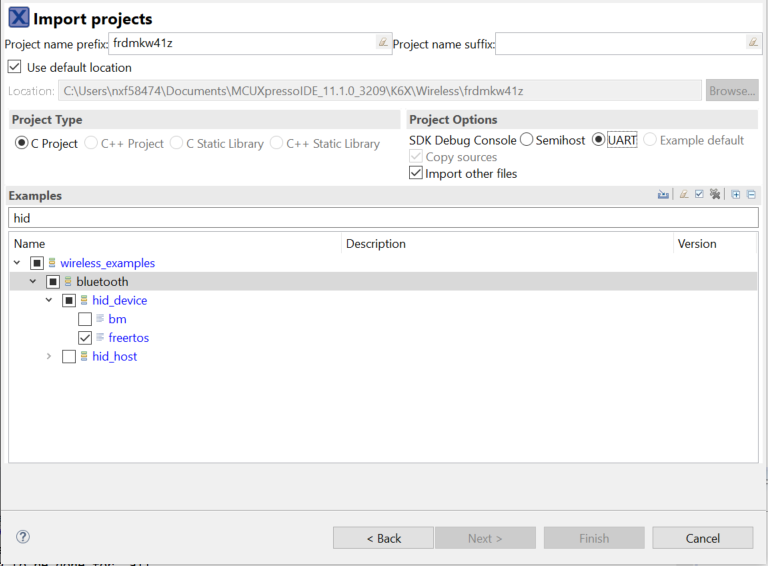
When you have both SDK examples, just copy the folder from the NTAG project, to the Bluetooth project.
You will need to add the path of the added folder. Please select the Bluetooth project and go to Properties.
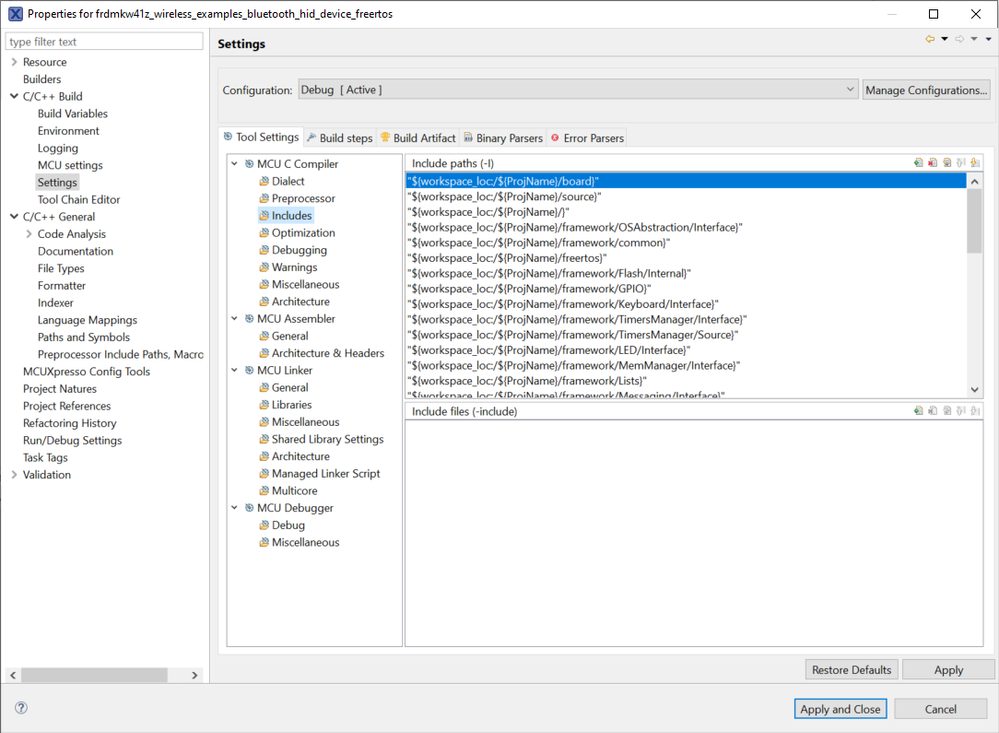
You will need to include the folder. Please click on the Add button, and select the folder from the Workspace.
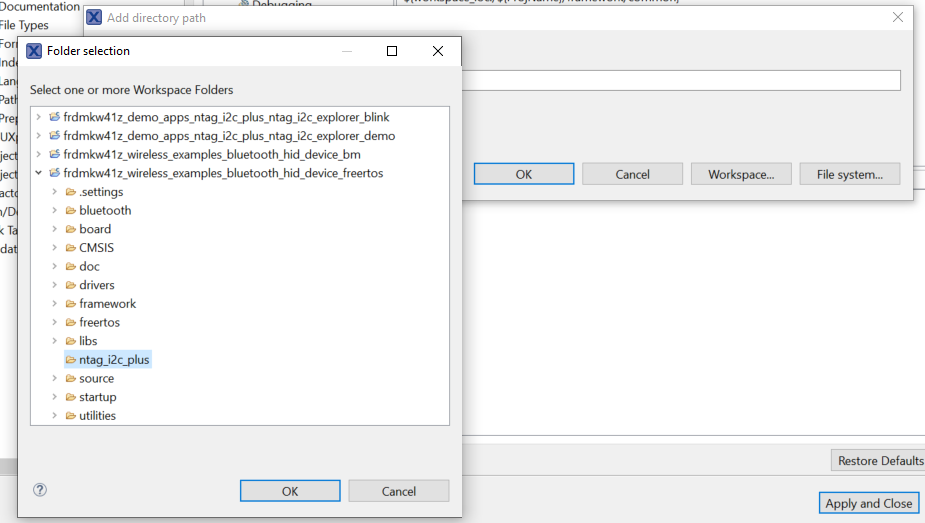
With this actions, you won't have issues.
If you have any questions please don't hesitate to ask.
Best Regards,
Ricardo
