
- Forums
- Product Forums
- General Purpose MicrocontrollersGeneral Purpose Microcontrollers
- i.MX Forumsi.MX Forums
- QorIQ Processing PlatformsQorIQ Processing Platforms
- Identification and SecurityIdentification and Security
- Power ManagementPower Management
- Wireless ConnectivityWireless Connectivity
- RFID / NFCRFID / NFC
- Advanced AnalogAdvanced Analog
- Neural Processing UnitsNeural Processing Units
- MCX Microcontrollers
- S32G
- S32K
- S32V
- MPC5xxx
- Other NXP Products
- S12 / MagniV Microcontrollers
- Powertrain and Electrification Analog Drivers
- Sensors
- Vybrid Processors
- Digital Signal Controllers
- 8-bit Microcontrollers
- ColdFire/68K Microcontrollers and Processors
- PowerQUICC Processors
- OSBDM and TBDML
- S32M
- S32Z/E
-
- Solution Forums
- Software Forums
- MCUXpresso Software and ToolsMCUXpresso Software and Tools
- CodeWarriorCodeWarrior
- MQX Software SolutionsMQX Software Solutions
- Model-Based Design Toolbox (MBDT)Model-Based Design Toolbox (MBDT)
- FreeMASTER
- eIQ Machine Learning Software
- Embedded Software and Tools Clinic
- S32 SDK
- S32 Design Studio
- GUI Guider
- Zephyr Project
- Voice Technology
- Application Software Packs
- Secure Provisioning SDK (SPSDK)
- Processor Expert Software
- Generative AI & LLMs
-
- Topics
- Mobile Robotics - Drones and RoversMobile Robotics - Drones and Rovers
- NXP Training ContentNXP Training Content
- University ProgramsUniversity Programs
- Rapid IoT
- NXP Designs
- SafeAssure-Community
- OSS Security & Maintenance
- Using Our Community
-
- Cloud Lab Forums
-
- Knowledge Bases
- ARM Microcontrollers
- i.MX Processors
- Identification and Security
- Model-Based Design Toolbox (MBDT)
- QorIQ Processing Platforms
- S32 Automotive Processing Platform
- Wireless Connectivity
- CodeWarrior
- MCUXpresso Suite of Software and Tools
- MQX Software Solutions
- RFID / NFC
- Advanced Analog
- Neural Processing Units
-
- NXP Tech Blogs
- Home
- :
- Topics
- :
- NXP Designs Knowledge Base
- :
- SeeControl Smart Cloud and Sensor Demo
SeeControl Smart Cloud and Sensor Demo
- Subscribe to RSS Feed
- Mark as New
- Mark as Read
- Bookmark
- Subscribe
- Printer Friendly Page
- Report Inappropriate Content
SeeControl Smart Cloud and Sensor Demo
SeeControl Smart Cloud and Sensor Demo
Smart Sensor Demo Kit
Highlighted Features
- Multi-protocol bi-directional data stream support from/to any IP-enabled remote system
- Data parsing and abstraction mapping layer for normalizing data from heterogeneous devices
- Drag-and-drop business and analytics processing logic (akin to using Visio and Excel fused together)
- Report and web page builder that assembles
- Table reports (including data for exposure to the secure API)
- Time-series graphs
- Pie, line, spark and other chart types
- Uploaded visuals such as photos, CAD/CAM drawings, diagrams, schematics, etc.
- Full location-based services incorporating Google Maps, NOKIA here, CloudMade and Open Street Maps
- Business Forms assembly system so you can deploy workflow for
- Firmware push
- Remote command and control (on/off, settings, reboot, etc.)
- Device inventory tracking and control
- Asset management
- Financial transactions from machines
- Many other possibilities
Description
The SeeControl Cloud Service allows embedded systems engineers to quickly assemble scalable 3-tier web applications that collect, analyze and display systems data.
The service is drag and drop so you don't have to script or code to create a web app.
The Service natively supports the following IoT/M2M communication protocols:
- UDP
- TCP
- MQTT
- HTTP
- MODBUS
- CoAP
There is additional support for vendor-specific communication stacks such as GE, CalAmp, Sierra Wireless, etc. Customers can also create their own device adapter using protocol and language of choice.
You can stream data to these data adapters at http://com2.seecontrol.com. We will give you a specific port range for each protocol/device type.
You can also send your data through a device API. Guidance is here.
Once the data has been received by our system. You will use a data abstraction tool to define fields that are in the packets you are sending. For example, if you send a variable field called tmp_123 from a temperature sensor you will tell the SeeControl service that tmp_123 is a a number and specifically a unit of measure called "Temperature" and then select whether Celsius or Fahrenheit. Once that is done, you can use the rest of the system to build a scalable web app, typically in 1-2 days depending on how complex our solution needs to be.
To see the full range of interfaces available for visualizaing IoT data and managing devices/process, you can log in to:
http://cloudx.seecontrol.com
user: fslcommunity1
password: fslcomms1
This account only shows the visualization output, not the tools used to collect and process data.
To try out the whole toolset, please acquire a full demo kit. The demo kit includes a cloud account that you can connect to the sample connectivity and sensor items listed below (or any hardware/system you would like to try out).
Full Bill of Materials
See bottom of this page for BOM Table
Basic Data (To be filled out by FSL)
Demo Number:
Current Version:
Current Demo Reproducibility:
Intended to be Modified By:
Current Demo Operation:
BOM: See bottom of this page
Demo Video
System Block Diagram
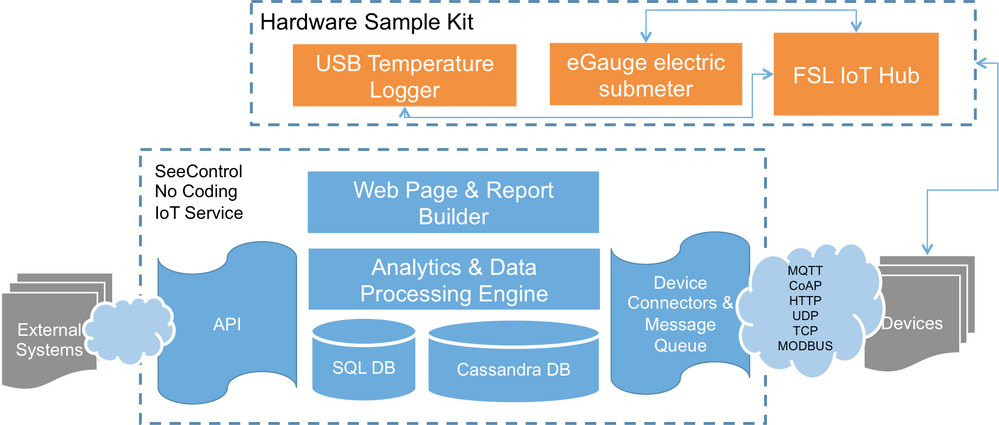
Hardware Kit & Data Flow Diagram
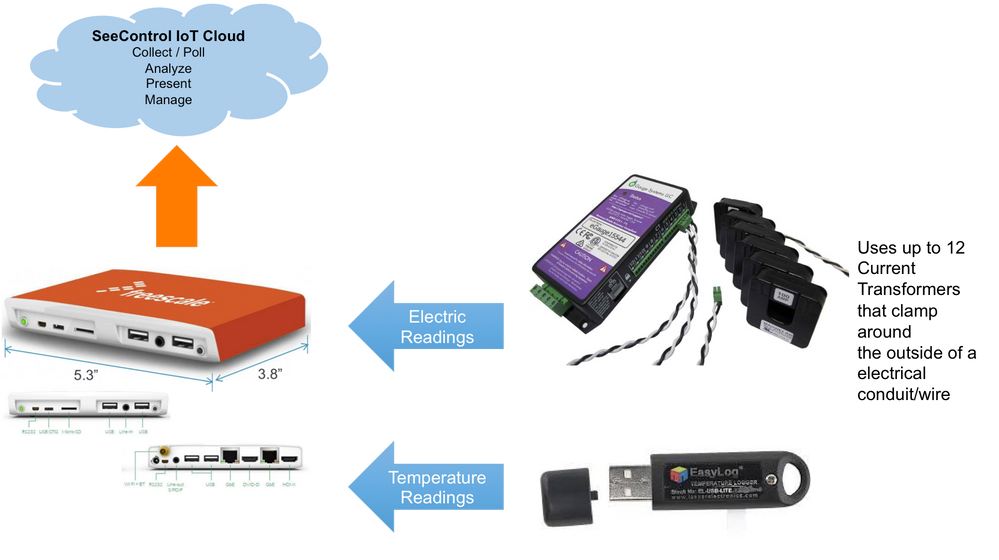
IoT Physical Components
Gateways
- SOC's: i.MX6 Dual
- Boards/Modules: Utilite Standard Box
- Software:
Connectivity
- Software:
- USB
- Local TCP/IP over Ethernet
- HTTP to Cloud
Sensors
- End User Products: Commercial Temperature and Electric Current Sensors (See below for list)
Cloud Infrastructure/Services
IoT System Capabilities
Device Management
- Add Device
- Remove Device
- Device Inventory Management
- Check Online/Offline Status
- View real time and historical messages
Communications/Interworking
- HTTP (other protocols such as CoAP, MQTT, etc. optional)
Security
- HTTPs (secured HTTP)
Middleware / Analytics / Data
- SeeControl Cloud Communications & Data Mapping Tool
- SeeControl No Coding Analytic Engine
- SeeControl No Coding Visualizer
Note: For additional Products/Components used in this demo see bottom of this page.
| IoT Product Type | Product/Component | Vendor | Research or Procure This Product/Component |
|---|---|---|---|
| Gateway | NXP Utilite Standard Box | NXP | Contact NXP IoT Center |
| Temperature Sensor | Lascar USB Temperature Logger | MicroDAQ | Visit MicroDAQ Website |
| Electrical Meter | eGauge eg3000 Electric Meter | eGauge | In online or phone order, please ask for SeeControl Turnkey Part Number |
| Current Transformer(s) | eGauge Current Transformers | eGauge | Visit eGauge Website |
| Connectivity / Messaging Middleware | SeeControl No Coding IoT Cloud Service | SeeControl | Get a live demo |
| Analytics | SeeControl No Coding IoT Cloud Service | SeeControl | Get a live demo |
| Data Visualization | SeeControl No Coding IoT Cloud Service | SeeControl | Get a live demo |
